Sharp MultiSync E274FL 27" Black 2024

VAパネルで、暗い部屋でも深いコントラスト 11月29日に確認済み
50/100 総合スコア 5.0 オーナー評価1件の平均
これまで1日分の価格しか確認しておらず、通常価格を判断するには足りません。
- Screen
- 27"
- Resolution
- 1920 x 1080
- Panel
- VA
- Refresh
- 60 Hz
- Response time
- 6 ms
- HDR
- HDR10
1店舗の価格を比較
安い順。新品・整備済み品・バンドルのオファーは分けて表示するので、同じ条件どうしで比較できます。
| 店舗 | 販売元 | カラーと状態 | 価格 | 最安との差 | 最終確認 | リンク |
|---|---|---|---|---|---|---|
| 新品1件の価格単品 | ||||||
| Amazon | 不明 | 記載なし | ¥88,669 | 最安値 | 3 日前 | 店舗へ |
 出典: PriceZen, 2026年11月26日に確認
過去7日以内に確認した価格を「現在の価格」としています。 「マーケットプレイス出品者」とは、その店舗自身ではなく、店舗上の第三者の出品者を指します。











概要
The 30-Second Version
The Sharp MultiSync E274FL is a business monitor that spends its budget on a top-tier ergonomic stand, USB-C docking with 60W charging and an RJ45 jack rather than on pixels. The catch is 1080p across 27 inches, which works out to a coarse 82 ppi, plus 60Hz and 250 nits. Pricing is the deciding factor: we've tracked it from USD 180 at Newegg to USD 500 at B&H Photo, and only the cheap end makes sense. Great value office workhorse at the low price, easy pass at the high one.
Pros & Cons
長所
- Ergonomics rank in the top tier: height, tilt, swivel, pivot plus 100x100 VESA 91st
- USB-C carries video, data and up to 60W of charging over one cable 81st
- RJ45 jack and two USB-A 3.2 Gen 1 ports make it a genuine desk dock 70th
- 4000:1 static contrast gives real blacks, unusual for an office panel 70th
- 95.5% sRGB coverage and 20W power draw suit all-day business use
短所
- 82 ppi at 27 inches means visibly soft text if you sit close
- 60Hz and 6ms GtG put performance in the bottom tier of our rankings
- 250 nits is dim for bright rooms, and HDR10 has no headroom to work with
- 75.3% Adobe RGB rules out serious wide-gamut photo or print work
- Only one review on record, so there's almost no owner feedback to lean on
実証データ
Performance
Let's talk about what 60Hz and a 6ms GtG response time actually mean at your desk. For static content, nothing. Scrolling a long document or dragging a window will show more smear than a faster panel, and VA panels in particular tend to lag on dark-to-bright transitions, so expect some trailing in dark-mode apps. Our performance ranking puts this near the bottom of the category, and that's not a knock on build quality, it's just what a 60Hz business panel scores when you stack it against everything else on the market. The 4000:1 static contrast is the genuinely good number here: blacks look properly black rather than grey, which makes dark themes and text-on-dark interfaces easier on the eyes than they'd be on a typical low-contrast office panel.
Color is a mixed bag but a fair one for the job. 95.5% sRGB coverage means web content, office documents and standard video look correct, and 8-bit color with support for 16.7 million colors is exactly what that work needs. But 75.3% Adobe RGB and 71.1% NTSC mean wide-gamut photo and print work is off the table, and our color ranking lands it dead center of the pack. HDR10 support is listed, though 250 nits of peak brightness gives HDR nowhere to go, so treat that as a compatibility checkbox rather than a feature you'll enjoy. The 178° horizontal and vertical viewing angles are the practical win: a colleague leaning over your shoulder sees the same image you do. Power draw is 20W, which matters when you're multiplying it across a floor of desks.
Specifications
Full Specifications
Display
| Size | 27" |
| Resolution | 1920x1080 (Full HD) |
| Panel Type | VA |
| Aspect Ratio | 16:9 |
| Curved | No |
| Screen Finish | matte |
Performance
| Refresh Rate | 60 Hz |
| Response Time | 6 |
Color & HDR
| Brightness | 250 nits |
| Color Gamut | 75.3% Adobe RGB, 71.1% NTSC, 95.5% sRGB |
| Color Depth | 8-bit |
| HDR | HDR10 |
Connectivity
| HDMI Ports | 1 |
| DisplayPort | 1 |
| USB-C | 1 |
| Speakers | Yes |
| Headphone Jack | Yes |
Ergonomics
| Height Adjustable | Yes |
| Tilt | Yes |
| Swivel | Yes |
| Pivot | Yes |
| VESA Mount | 100x100 |
Features
| Webcam | No |
| Touchscreen | No |
| PIP/PBP | No |
| Power | 20 |
| Weight | 6.6 kg / 14.6 lbs |
vs Competition
Against the MSI MAG 271QPX QD-OLED E2 27" and the ASUS ROG Strix XG27AQDMG 26.5", this monitor isn't competing, it's playing a different sport. Both of those are gaming-first panels, and our rankings make the gap plain: the E274FL's performance score sits in the bottom tier while its ergonomics rank near the top. If you game at all after hours, cross-shop those two and don't look back, because 60Hz and 6ms GtG will feel sluggish the moment something moves quickly. The LG UltraGear 27G810A-B 27" belongs in that same conversation for the same reason.
The closer fight is with the Dell S2725QC 27" and the Samsung ViewFinity LS34C650UANXGO 34", both of which are aimed at people who work rather than play. Here the E274FL's argument is its connectivity ranking, which lands well above average thanks to the RJ45 jack, the USB-A hub and 60W USB-C charging, plus a stand that ranks among the best we track. Its counterargument is resolution: 82 ppi is the weak link, and if sharper text is your priority, that's the axis to compare on. The Samsung's ultrawide format is also worth a look if you live in side-by-side windows, since a single 16:9 1080p canvas gets cramped fast.
| Spec | Sharp MultiSync E274FL 27" | LG UltraGear 39" | BenQ PD3220U 32" | Samsung Odyssey Ark 2nd Gen 55" | Gigabyte M Series M32U 31.5" | Dell UltraSharp U4320Q 27" |
|---|---|---|---|---|---|---|
| Screen Size | 27 | 39 | 32 | 55 | 31.5 | 27 |
| Resolution | 1920 x 1080 | 3440 x 1440 | 3840 x 2160 | 3840 x 2160 | 3840 x 2160 | 3840 x 2160 |
| Panel Type | VA | OLED | IPS | Mini-LED | IPS | IPS |
| Refresh Rate | 60 | 240 | 60 | 165 | 144 | 60 |
| Response Time Ms | 6 | 0.03 | 5 | 1 | 1 | 5 |
| Adaptive Sync | - | FreeSync Premium Pro | - | FreeSync Premium Pro | FreeSync Premium Pro | - |
| Hdr | HDR10 | DisplayHDR True Black 400 | HDR10 | HDR10+ | HDR400 | HDR400 |
| Compare | Compare | Compare | Compare | Compare |
| 製品 | Color | 携帯性 | Display | Feature | Ergonomic | Performance | Connectivity | ユーザー評価 |
|---|---|---|---|---|---|---|---|---|
| Sharp MultiSync E274FL 27" | 49.9 | 81.3 | 43.5 | 70.1 | 90.7 | 10.5 | 70.1 | 27.2 |
| LG UltraGear 39" Compare | 63.3 | 49.3 | 84 | 96.3 | 66.8 | 97.9 | 81 | 0 |
| BenQ PD3220U 32" Compare | 88.5 | 81.3 | 95.1 | 85 | 90.7 | 22.3 | 96.9 | 0 |
| Samsung Odyssey Ark 2nd Gen 55" Compare | 98.4 | 20.7 | 91.5 | 96.3 | 29.9 | 77 | 81 | 75.1 |
| Gigabyte M Series M32U 31.5" Compare | 89.9 | 62.8 | 87 | 85 | 73.4 | 72.6 | 87.4 | 0 |
| Dell UltraSharp U4320Q 27" Compare | 91 | 82.7 | 87 | 85 | 90.7 | 22.3 | 96.9 | 0 |
価格
Value & Pricing
Here's where things get interesting, because the price spread on this thing is wild. We track USD listings from USD 180 all the way to USD 500, a USD 320 gap for the identical monitor. Newegg is the cheapest right now at USD 180, while B&H Photo sits at USD 500. At USD 180 this is a strong buy for an office desk: you're getting a full ergonomic stand, USB-C docking with 60W charging and an ethernet jack, which is a lot of hardware for that money. At USD 500 the math falls apart, because you're paying premium-monitor money for 1080p at 60Hz. Same product, two completely different verdicts depending on which cart you click.
Canadian listings run CAD 500 to CAD 716, a CAD 216 spread, and at those numbers the value argument gets thinner. Our advice is simple: check the price before you check anything else on this page. If you can land it near the bottom of the range, the docking features and stand justify it easily. If you're staring at the top of the range, keep shopping.
2026年11月29日からこの製品の価格を追跡しています。データが増えるとチャートが表示されます。
詳細情報
Overview
The Sharp MultiSync E274FL is a 27-inch office monitor wearing an NEC badge, and it makes no attempt to hide what it's for. You get a VA panel running 1920 x 1080 at 60Hz, a 4000:1 static contrast ratio, 250 nits of brightness and a port selection that reads like an IT department's wish list: HDMI, DisplayPort 1.2, USB-C with DisplayPort Alt mode and up to 60W of charging, two USB-A ports, an RJ45 network jack, dual 1W speakers and a headphone output. This is the monitor you buy for a desk where someone opens spreadsheets at nine and closes them at five.
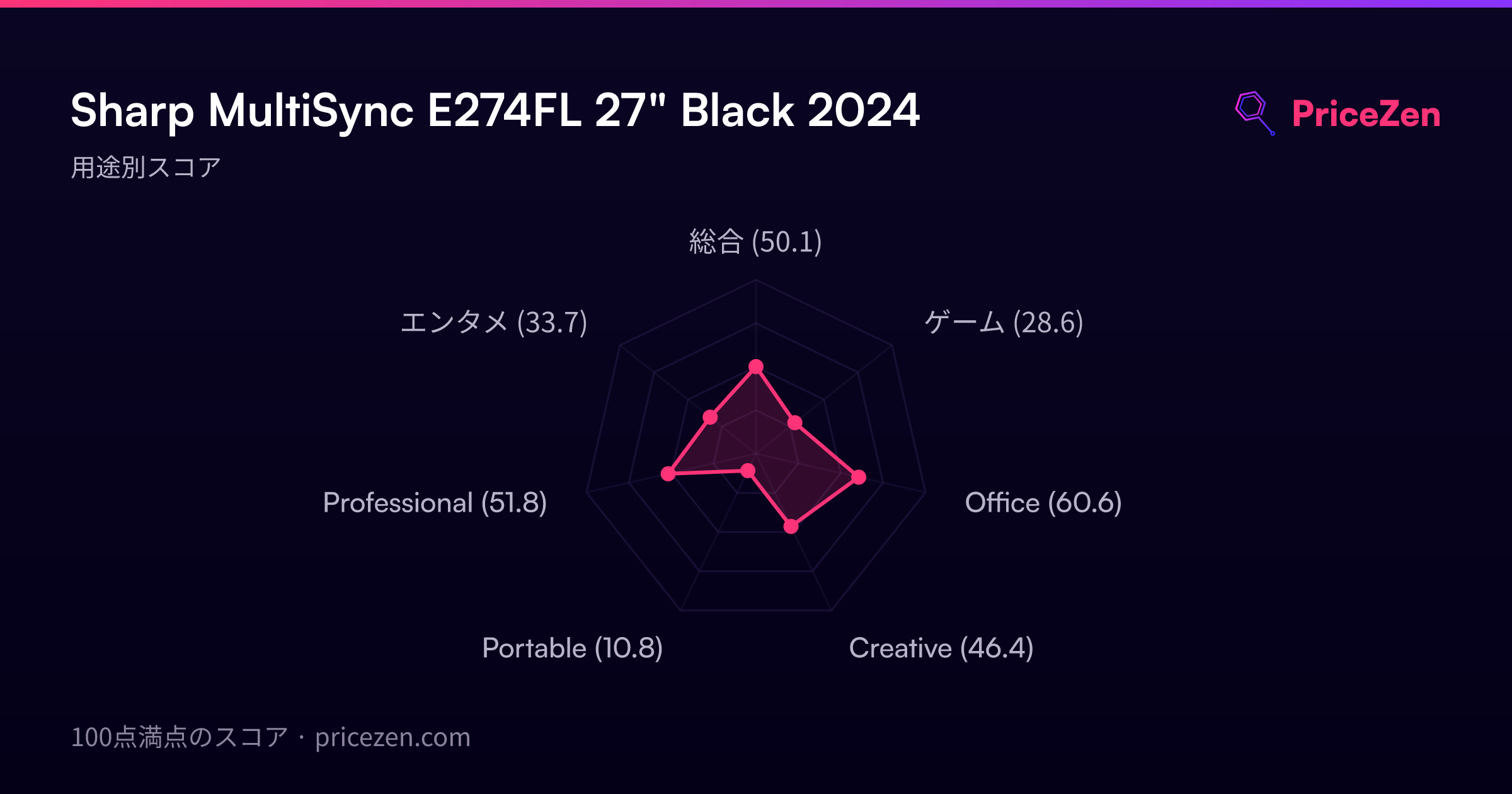
Our scoring model puts it at 61.1/100 for office work, which is its best category by a wide margin, against 52/100 for professional use and 50.6/100 overall. That spread tells the story better than any spec sheet. The ergonomics ranking is one of the best on the market at the 91st percentile, with height adjust, tilt, swivel, pivot and a 100x100 VESA mount. Connectivity and features both land well above the middle of the pack. So the money here went into the stand, the dock and the panel's contrast, not into pixels or refresh rate.
And that's the trade-off you need to sit with before buying. At 27 inches, 1080p works out to 82 ppi, which is coarse enough that text edges look soft if you sit close. Our display ranking has it slightly below average and performance sits in the bottom tier of monitors we track. If your day is email, documents, dashboards and video calls, none of that will bother you much. If your day involves reading fine type for hours or anything that moves fast on screen, it will.
Common Questions
Q: Is 1080p really usable on a 27-inch screen?
It's usable, but it's the biggest compromise here. At 27 inches, 1920 x 1080 gives you 82 ppi, which is low enough that individual pixels are visible on text if you sit at a normal desk distance. Our display ranking puts it slightly below the category average largely because of this. If you mostly view documents from arm's length or further it's tolerable, but if you're picky about font rendering, a higher-resolution 27-inch panel is the better spend.
Q: Can it charge my laptop over USB-C?
Yes, the USB-C 3.2 Gen 1 port supports DisplayPort Alt mode for video, data, audio and up to 60W of power delivery. That's enough for most thin-and-light business laptops, so one cable can handle your display, peripherals and charging. Power-hungry workstation laptops may still want their own brick, since 60W is the ceiling here.
Q: Is the HDR10 support worth anything?
Not really. HDR10 is listed as supported, but with 250 nits of peak brightness and an 8-bit panel there's no meaningful highlight headroom, so HDR content won't look dramatically better than SDR. Treat it as a signal-compatibility feature rather than a picture-quality upgrade. The 4000:1 static contrast ratio is the spec that actually improves how images look day to day.
Q: Why is the price so different between stores?
We track USD listings ranging from USD 180 to USD 500 for the same model, with Newegg currently the cheapest at USD 180 and B&H Photo at USD 500. Canadian listings span CAD 500 to CAD 716. Nothing about the hardware changes between them, so this is purely a pricing question, and it flips the recommendation entirely: strong value at the bottom of the range, poor value at the top.
Who Should Skip This
Gamers should stop reading here. A 60Hz refresh rate and 6ms GtG response put this in the bottom tier of our performance rankings, and the MSI MAG 271QPX QD-OLED E2 27", ASUS ROG Strix XG27AQDMG 26.5" and LG UltraGear 27G810A-B 27" are all built for exactly the thing this monitor is worst at. Photo and print folks should skip too: 75.3% Adobe RGB and 71.1% NTSC coverage mean you can't trust wide-gamut color, and 250 nits with 8-bit color gives you nothing to grade with.
The other group is anyone who reads dense text all day and cares about sharpness. 82 ppi is the number to remember, and no amount of stand adjustment fixes it. If that's you, compare against the Dell S2725QC 27" on resolution first, or look at the Samsung ViewFinity LS34C650UANXGO 34" if you want more horizontal room for side-by-side windows instead. And anyone quoted the top of the price range should skip on principle.
Verdict
If you're outfitting a home office or a small business floor and your work is documents, email, browser tabs and calls, this is a sensible pick at the low end of its price range. The stand adjusts every which way including pivot for portrait coding or reading, the USB-C cable handles video and laptop charging together, and the ethernet jack solves a problem most monitors ignore. The 4000:1 contrast makes long reading sessions more comfortable than you'd expect from a budget business panel. Buy it at USD 180 and you'll feel smart about it.
If you're a photographer, a designer working in wide gamut, a gamer, or someone who simply wants crisp text at 27 inches, skip it. The 75.3% Adobe RGB coverage, 250 nits and 82 ppi are all hard limits you can't settings-menu your way around. And if you're being quoted anything near USD 500 or CAD 716, walk away regardless of use case, because the panel doesn't earn that number. This is a good cheap dock-with-a-screen, not a good expensive monitor.
Usage Scores
- 総合50.1
- ゲーム28.6
- Office60.6
- Creative46.4
- Portable10.8
- Professional51.8
- エンタメ33.7