Samsung CRG5 LC24RG50FZNXZA 24" Black 2021
The 1800R curved panel wraps around your field of view, and the 144Hz refresh rate with AMD Radeon FreeSync keeps fast action tear-free and smooth. A 3000:1 contrast ratio reveals enemies in dark scenes, while Game Mode and Low Input Lag Mode tailor the experience for competitive play. This monitor suits budget-conscious gamers who want a curved, high-refresh display for fast-paced shooters and immersive titles without breaking the bank.

現在、販売店の最新価格はありません











概要
The 30-Second Version
The Samsung CRG5 is a 24-inch curved 1080p gaming monitor with a 144Hz refresh rate and FreeSync. It's a solid budget pick for casual and competitive gamers who want the curve and deep contrast, but the 4ms response time, weak colors, and basic stand hold it back. At around $200, it's a fair deal, not a steal.
Pros & Cons
長所
- 144Hz refresh rate at a budget price 92nd
- 3000:1 contrast ratio delivers deep blacks
- FreeSync support reduces screen tearing
- Curved 1800R panel adds immersion
- Eye Saver Mode and Flicker Free help during long sessions
短所
- 4ms response time trails faster 1ms panels
- Stand offers no height or swivel adjustment
- Limited connectivity options
- Color accuracy is weak, even for a VA panel
- 1080p on 24 inches is fine, but text can look soft
オーナーの声
The Word on the Street
購入者の評価が時間とともにどう変化したか
独自顧客が実際にレビューを書いた時期に基づいています。発売当初の高評価が続いたかどうかがわかります。
書かれたレビュー 10件、2022/09~2025/06:満足 10件
ストア評価全911件:4.6★。 多くの購入者はレビューを書かずに評価だけを付けています。 グラフは書かれたレビュー10件を数えています。
各点は書かれたレビュー1件で、書かれた月に置いています。満足 = 4〜5★、普通 = 3★、不満 = 1〜2★。
実証データ
Performance
The 144Hz refresh rate is the star here. In our database, the CRG5's performance lands in the 62nd percentile, which is solid but not spectacular. The 4ms response time is fine for casual and competitive gaming, though it's not as snappy as the 1ms panels you'll find on pricier TN or fast IPS monitors. FreeSync does its job, keeping screen tearing at bay when paired with an AMD GPU.
Input lag is kept low thanks to Samsung's Low Input Lag Mode, and the Game Mode presets tweak black levels and contrast per genre. The 3000:1 contrast ratio is a genuine highlight, giving deeper blacks than typical IPS panels in this price range. That's a VA panel advantage, and it makes dark scenes in horror games or night maps in shooters look better than you'd expect for the money.
Specifications
Full Specifications
Display
| Size | 24" |
| Resolution | 1920x1080 (Full HD) |
| Aspect Ratio | 16:9 |
| Curved | Yes |
| Curvature | 1800 |
| Screen Finish | glossy |
Performance
| Refresh Rate | 144 Hz |
| Response Time | 4 |
| Adaptive Sync | FreeSync |
Connectivity
| HDMI Ports | 0 |
| DisplayPort | 0 |
| USB-C | 0 |
Features
| Weight | 3.3 kg / 7.2 lbs |
vs Competition
Stacked against the ASUS ROG Strix XG27AQDMG or the MSI MAG 271QPX QD-OLED E2, the CRG5 looks like a toy. Those are 1440p OLED panels with vastly better color, contrast, and response times, but they also cost several times more. That's not a fair fight. A more realistic comparison is against other budget 1080p gaming monitors, where the CRG5's curve and contrast ratio help it stand out, but its weak ergonomics and limited ports hold it back.
The LG UltraGear 32GX850A-B and BenQ MA270U are also in a different class, aimed at creators and high-end gamers. If you're cross-shopping those, the CRG5 isn't really your monitor. For pure esports on a budget, a flat 24-inch TN or fast IPS panel with 1ms response time might serve you better. The CRG5 is for people who want the curve and the contrast, not the fastest pixel response.
| Spec | Samsung CRG5 LC24RG50FZNXZA 24" | BenQ MOBIUZ EX381U 37.5" | Gigabyte M Series M32U 31.5" | Dell UltraSharp U4320Q 27" | Acer CB342CU UM.CB2AA.004 34" | MSI MAG 273QP QD-OLED X24 26.5" |
|---|---|---|---|---|---|---|
| Screen Size | 24 | 37.5 | 31.5 | 27 | 34 | 26.5 |
| Resolution | 1920 x 1080 | 3840 x 2160 | 3840 x 2160 | 3840 x 2160 | 3440 x 1440 | 2560 x 1440 |
| Panel Type | - | IPS | IPS | IPS | IPS | QD-OLED |
| Refresh Rate | 144 | 144 | 144 | 60 | 75 | 240 |
| Response Time Ms | 4 | 1 | 1 | 5 | 1 | 0.029999999329447746 |
| Adaptive Sync | FreeSync | FreeSync Premium Pro | FreeSync Premium Pro | - | FreeSync | Adaptive-Sync |
| Hdr | - | HDR10 | HDR400 | HDR400 | HDR400 | DisplayHDR True Black 400 |
| Compare | Compare | Compare | Compare | Compare |
| 製品 | Color | 携帯性 | Display | Feature | Ergonomic | Performance | Connectivity | ユーザー評価 |
|---|---|---|---|---|---|---|---|---|
| Samsung CRG5 LC24RG50FZNXZA 24" | 15.5 | 27.8 | 31.2 | 47.6 | 9.5 | 62.3 | 6.6 | 92 |
| BenQ MOBIUZ EX381U 37.5" Compare | 93.6 | 68 | 95.1 | 70.2 | 73.5 | 72.6 | 99.8 | 0 |
| Gigabyte M Series M32U 31.5" Compare | 90 | 62.9 | 87 | 85.1 | 73.5 | 72.6 | 87.5 | 0 |
| Dell UltraSharp U4320Q 27" Compare | 91.1 | 82.7 | 87 | 85.1 | 90.8 | 22.4 | 97 | 0 |
| Acer CB342CU UM.CB2AA.004 34" Compare | 79 | 62.9 | 78.8 | 70.2 | 78.6 | 65.7 | 70.3 | 74.8 |
| MSI MAG 273QP QD-OLED X24 26.5" Compare | 74.4 | 12.7 | 72.6 | 70.2 | 90.8 | 97.9 | 53.2 | 0 |
価格
Value & Pricing
At $200 USD, the CRG5 is a decent deal if you specifically want a curved 144Hz monitor. But the value proposition gets murkier when you look at flat 24-inch 144Hz IPS monitors in the same price bracket, many of which offer better colors and faster response times. The curve is the differentiator here, and whether that's worth the trade-offs depends on your setup. If you're on a tight budget and want that curved immersion, it's a reasonable buy. If you don't care about the curve, there are better all-around panels for similar money.
価格履歴
詳細情報
Overview
The Samsung CRG5 LC24RG50FZNXZA is a 24-inch 1080p curved gaming monitor aimed at budget-conscious players who want high refresh rates without spending a fortune. It's a 144Hz panel with a 4ms response time and AMD FreeSync, which puts it squarely in the entry-level esports category. At around $200 USD in the US, it's one of the cheaper ways to get a curved screen with this kind of refresh rate.
People searching for a budget 144Hz monitor will find the CRG5 hits the basics. The 1800R curve is subtle enough for daily use but adds a bit of immersion in racing games and shooters. It's also a popular pick for folks pairing it with older GPUs, like a GTX 1050 Ti laptop, since 1080p at 144Hz is a realistic target for that hardware.
But this is a no-frills panel. The stand is basic, connectivity is limited, and color performance is nothing to write home about. If you want a curved gaming monitor that just works and don't care about extras, it's worth a look. If you want accurate colors or a height-adjustable stand, keep scrolling.
Common Questions
Q: Is the Samsung CRG5 good for gaming?
Yes, the CRG5 is a solid budget gaming monitor with a 144Hz refresh rate, FreeSync support, and a 3000:1 contrast ratio that makes dark scenes look great. The 4ms response time is fine for most games, though hardcore esports players may want something faster.
Q: Does the Samsung CRG5 have built-in speakers?
No, the CRG5 does not include built-in speakers. You'll need external speakers or a headset for audio.
Q: Can the Samsung CRG5 be wall mounted?
Yes, the CRG5 supports VESA mounting, which is a good thing because the included stand offers no height or swivel adjustment.
Q: Is the Samsung CRG5 compatible with Nvidia GPUs?
The CRG5 officially supports AMD FreeSync, but it will still work with Nvidia GPUs at 144Hz. You just won't get adaptive sync unless your Nvidia card supports FreeSync over HDMI, which some newer models do.
Who Should Skip This
Skip the CRG5 if you need accurate colors for photo or video editing, since its color performance ranks in the 16th percentile of our database. Competitive esports players who want the absolute fastest response times should look at 1ms TN or fast IPS panels instead. And if you need a monitor for a multi-device setup, the limited connectivity will be a headache. For those use cases, a flat IPS monitor like the BenQ MA270U or a faster TN panel would serve you better.
Verdict
Should you buy the Samsung CRG5? If you want a curved 144Hz gaming monitor for under $250 and don't mind the basic stand and mediocre colors, yes. It's a solid entry point into high-refresh gaming, especially for older GPUs or as a second monitor. The contrast ratio is genuinely good, and the curve is a nice touch at this price.
But if you're serious about competitive shooters, the 4ms response time and lack of ergonomic adjustments will frustrate you. And if you do any photo or video work, the color accuracy will drive you nuts. This is a gaming monitor, full stop. For that job, it's fine. For everything else, look elsewhere.
Usage Scores
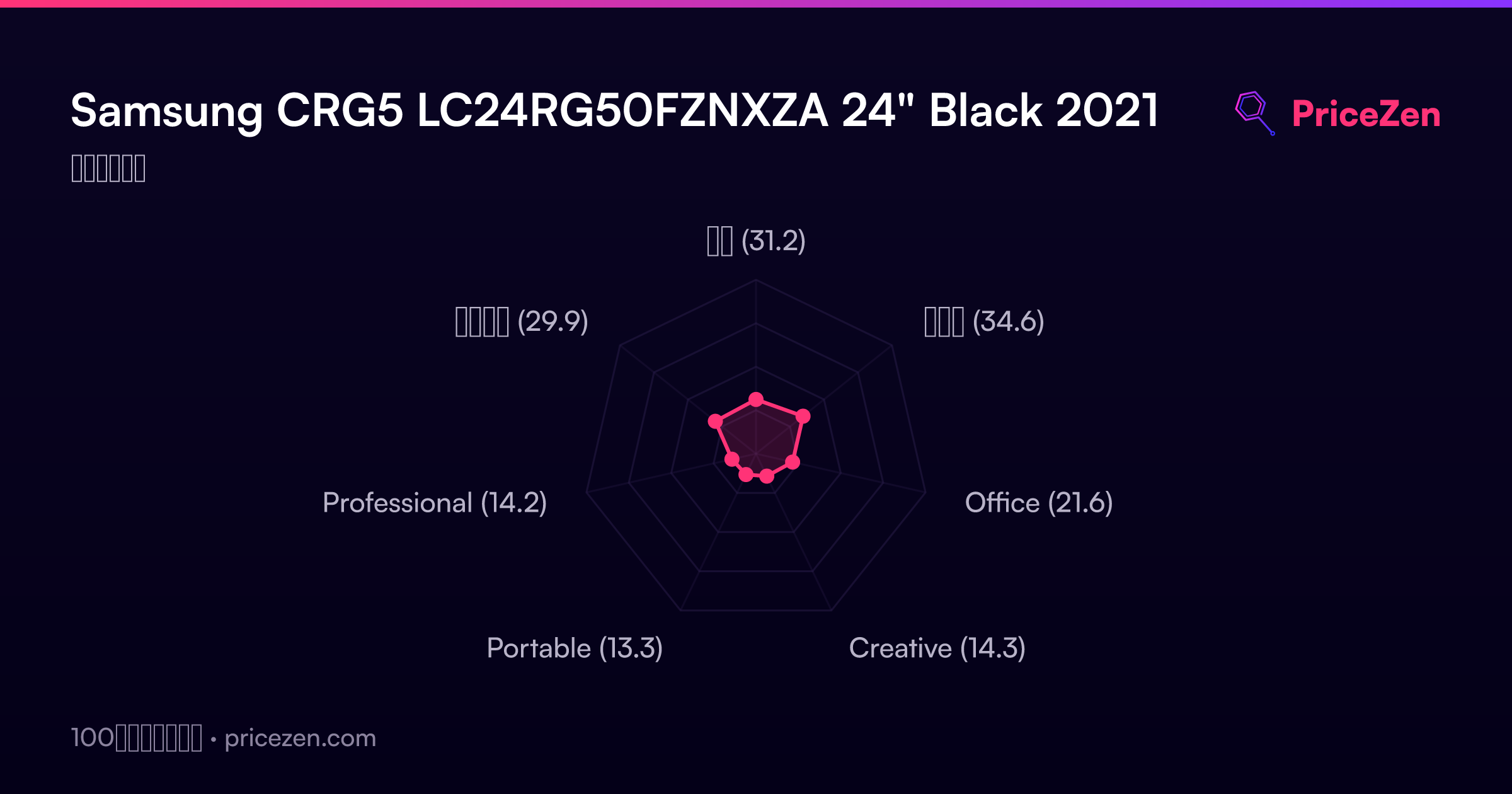
- 総合31.2
- ゲーム34.6
- Office21.6
- Creative14.3
- Portable13.3
- Professional14.2
- エンタメ29.9