HP Series 5 527sw 27" White 2024
The 100Hz refresh rate and 99% sRGB IPS panel provide smoother motion and accurate color for a budget display. Its ultra-thin borderless design and integrated dual 2W speakers create a clean, cable-free desk setup with the bundled Docztorm dock for easy connectivity. This monitor is best for home office workers and students who want a flicker-free, eye-comfortable screen for productivity and casual content consumption.

現在、販売店の最新価格はありません


概要
The 30-Second Version
The HP Series 5 27" offers a 100Hz refresh rate and 99% sRGB coverage at a budget price, but the 82 PPI pixel density at 1080p on a 27-inch panel is a real compromise. It scores 45.3 out of 100 overall, with ergonomics as its strongest suit at the 67th percentile. Shop the low end of the USD 170 to USD 430 price range or skip it.
Pros & Cons
長所
- 100Hz refresh rate beats most office monitors at this price 92nd
- 99% sRGB coverage with a solid 1500:1 contrast ratio 67th
- 100mm height adjustment and tilt for decent ergonomics
- 300 nits brightness works for typical office lighting
- Dual 2W speakers and a bundled Docztorm dock add value
短所
- 82 PPI at 27 inches makes text look soft up close
- No VESA mount support limits setup flexibility
- Connectivity is weak with only HDMI 1.4 and VGA
- Feature set lands at the 21st percentile, bare bones
- 5ms response time is mediocre for fast-paced content
オーナーの声
購入者の評価が時間とともにどう変化したか
独自顧客が実際にレビューを書いた時期に基づいています。発売当初の高評価が続いたかどうかがわかります。
満足した購入者:最近100%、2023/04~2025/03は100%
レビューが少なく、変化とは言えません。
ストア評価全618件:4.6★。 多くの購入者はレビューを書かずに評価だけを付けています。 グラフは星と投稿日のある書かれたレビュー33件を数えています。
数値を表示
| 期間 | レビュー | 満足 | 普通 | 不満 | 満足の割合 |
|---|---|---|---|---|---|
| 2023/04~2025/03 | 10 | 10 | 0 | 0 | 100% |
| 2025/04~2026/02 | 23 | 23 | 0 | 0 | 100% |
- 2026/01~2026/037件中7件が満足
Buyers praised the monitors for work, design, color accuracy, and value, but one had a green-tint defect and minor missing features.
- Excellent picture quality and resolution for work and marketing.
- Sleek, lightweight design with no flickering and tilt adjustment.
- One unit intermittently turns green, raising reliability concerns.
- Lacks second HDMI port and VESA mount, contrary to expectations.
- 2025/10~2025/129件中9件が満足
All reviews in Q4 2025 are 5-star, praising picture quality, ease of setup, lightweight design, and HP reliability. One user notes a desire for built-in speakers.
- Excellent picture quality and visual colors praised in multiple reviews.
- Easy setup and lightweight, compact design appreciated by buyers.
- Brand reputation for reliability and consistency noted across several reviews.
- One buyer suggests adding built-in speakers for improved functionality.
- 2025/07~2025/095件中5件が満足
Buyers highly recommend these monitors for dual budget setups and document work, praising easy installation, size, and vibrant display. Some note fragility and suggest insurance.
- Great for dual budget remote work setups
- Perfect size for document work with easy install
- Good value, vibrant display for the price
- Screen fragile if dropped or hit; insurance advised
- 2025/01~2025/033件中3件が満足
Buyers praised the monitor's ease of setup, image quality, Eye Ease blue light reduction, and sleek design. One noted a 100 Hz refresh rate warning but overall satisfaction.
- Easy setup and intuitive assembly without instructions.
- Eye Ease blue light reduction is a strong selling point, desired as standard.
- Monitor throws a warning preferring 60 Hz over 100 Hz, though MacBooks default to 100.
- Sleek design matches HP office monitors, good value for price.
各列は、星と投稿日のあるレビューが10件以上になるまで四半期をまとめています。満足 = 4〜5★、普通 = 3★、不満 = 1〜2★。 期間ごとの要約は英語です。
実証データ
Performance
The 100Hz refresh rate is the headline act here. It's not going to blow anyone away, but it makes scrolling and window dragging feel noticeably smoother than a standard 60Hz office monitor. The 5ms GtG response time with overdrive is about average for an IPS panel in this class. You won't see much ghosting in everyday use, but this isn't a gaming monitor by any stretch. The performance score lands at the 48th percentile, which is about what you'd expect from a budget-friendly productivity display.
The 1500:1 contrast ratio is actually a bit better than the typical 1000:1 you see on many IPS panels, so blacks look a touch deeper. The 300 nits brightness is adequate for a well-lit office but will struggle near a bright window. The 82 PPI pixel density is the compromise here. Text is readable, but if you're used to a 1440p or 4K panel, you'll notice the difference immediately. It's fine for spreadsheets and email, less ideal for photo editing or long reading sessions.
Specifications
Full Specifications
Display
| Size | 27" |
| Resolution | 1920x1080 (Full HD) |
| Panel Type | IPS |
| Aspect Ratio | 16:9 |
| Curved | No |
| Screen Finish | matte |
Performance
| Refresh Rate | 100 Hz |
| Response Time | 5 |
Color & HDR
| Brightness | 300 nits |
| Color Gamut | 99% sRGB |
| Color Depth | 8-bit |
Connectivity
| HDMI Ports | 2 |
| DisplayPort | 0 |
| USB-C | 0 |
| Thunderbolt | N/A |
| Speakers | No |
| Headphone Jack | No |
Ergonomics
| Height Adjustable | No |
| Tilt | Yes |
| Swivel | No |
| Pivot | No |
| VESA Mount | Not Compatible |
Features
| Webcam | No |
| Touchscreen | No |
| PIP/PBP | No |
| Power | 19 |
| Weight | 3.2 kg / 7.1 lbs |
vs Competition
Against the competition in our database, the HP Series 5 27" is a budget workhorse, not a performance contender. The MSI MAG 271QPX QD-OLED E2 and the ASUS ROG Strix XG27AQDMGR are in a completely different league with OLED panels and much higher refresh rates, but they also cost several times more. The LG UltraGear 27G810A-B offers a better balance of speed and resolution if you can stretch your budget. The BenQ MA270U targets a similar office audience but with a higher resolution panel that makes text much sharper. The Alienware AW2725D splits the difference with a higher refresh rate and better response times. Where the HP wins is price, assuming you find it at the low end of that USD 170 to USD 430 range. It's a sensible pick for a dual-monitor office setup where you want smooth scrolling without spending much.
| Spec | HP Series 5 527sw 27" | LG UltraGear 45GX950A-B 45" | ASUS ROG Strix XG27UCDMG 27" | MSI MAG 271QPX QD-OLED E2 27" | Alienware AW-Series AW3425DW 34" | Gigabyte AORUS FO32U2 32" |
|---|---|---|---|---|---|---|
| Screen Size | 27 | 45 | 27 | 27 | 34 | 32 |
| Resolution | 1920 x 1080 | 5120 x 2160 | 3840 x 2160 | 2560 x 1440 | 3440 x 1440 | 3840 x 2160 |
| Panel Type | IPS | OLED | OLED | QD-OLED | QD-OLED | OLED |
| Refresh Rate | 100 | 330 | 240 | 240 | 240 | 240 |
| Response Time Ms | 5 | 0.029999999329447746 | 0.029999999329447746 | 0.029999999329447746 | 0.029999999329447746 | 0.029999999329447746 |
| Adaptive Sync | - | FreeSync Premium Pro | FreeSync Premium Pro | FreeSync Premium Pro | FreeSync Premium Pro | FreeSync Premium Pro |
| Hdr | - | DisplayHDR True Black 400 | DisplayHDR True Black 400 | DisplayHDR True Black 400 | DisplayHDR 400 True Black | DisplayHDR True Black 400 |
| Compare | Compare | Compare | Compare | Compare |
| 製品 | Color | 携帯性 | Display | Feature | Ergonomic | Performance | Connectivity | ユーザー評価 |
|---|---|---|---|---|---|---|---|---|
| HP Series 5 527sw 27" | 53.7 | 57.5 | 52.4 | 19.2 | 47.6 | 48 | 67.3 | 92.1 |
| LG UltraGear 45GX950A-B 45" Compare | 99.4 | 76.5 | 99.7 | 95.7 | 90.8 | 99.4 | 97 | 92.1 |
| ASUS ROG Strix XG27UCDMG 27" Compare | 96.1 | 57.5 | 97.9 | 83.7 | 90.8 | 97.9 | 81.3 | 98.9 |
| MSI MAG 271QPX QD-OLED E2 27" Compare | 99.1 | 57.5 | 77.3 | 83.7 | 90.8 | 97.9 | 81.3 | 98.9 |
| Alienware AW-Series AW3425DW 34" Compare | 99 | 73.9 | 85.7 | 89.7 | 90.8 | 97.9 | 95.5 | 96.9 |
| Gigabyte AORUS FO32U2 32" Compare | 79.4 | 63 | 99.1 | 83.7 | 90.8 | 97.9 | 87.6 | 92.1 |
価格
Value & Pricing
Pricing is all over the place on this one. US listings range from USD 170 to USD 430, which is a massive USD 260 spread across 11 listings. At the low end, you're getting a 100Hz IPS panel with height adjustment for under USD 200, which is genuinely good value. At the high end, you're paying way too much for what this monitor offers. The bundled Docztorm dock and speakers add some perceived value, but they don't justify the top-end price. If you're shopping this model, hunt for the listings closer to USD 170. Anything above USD 250 and you should start looking at 1440p options instead.
価格履歴
詳細情報
Overview
The HP Series 5 27" is a 1080p IPS panel that lands at 45.3 out of 100 in our database, which puts it in the middle of the pack overall. The standout number here is the 100Hz refresh rate, a nice step up from the 60Hz panels that dominate this price range. But the 82 pixels per inch tells the real story. At 27 inches, 1920 x 1080 starts to look a little soft if you sit close, and that's the trade-off you're making for the smoother motion.
Color coverage is decent at 99% sRGB with a 1500:1 contrast ratio, and the 300 nits brightness is fine for a typical office. The ergonomic score sits at the 67th percentile, which is solid, mostly thanks to the 100mm height adjustment. But the connectivity score is a weak spot at the 32nd percentile, and the feature set lands at the 21st percentile. You get two HDMI 1.4 ports and a VGA port, which feels a bit dated in 2026.
Common Questions
Q: Is this monitor good for gaming?
Not really. The 100Hz refresh rate is a step up from 60Hz, but the 5ms GtG response time and lack of adaptive sync features put it behind dedicated gaming monitors. It's fine for casual games, but competitive players should look elsewhere.
Q: Can I mount this monitor on a monitor arm?
No. This model does not support VESA mounting, so you're stuck with the included stand. The stand does offer 100mm of height adjustment and tilt, which helps, but wall mounting or arm mounting is not an option.
Q: How sharp is the text on this display?
At 27 inches with a 1920 x 1080 resolution, the pixel density is 82 PPI. That's on the lower end for a monitor this size. Text is readable but noticeably softer than a 1440p or 4K panel. If you do a lot of reading or detailed work, you may find it fatiguing over long sessions.
Who Should Skip This
Skip this one if you care about text sharpness or plan to sit close to the screen. The 82 PPI pixel density at 27 inches is a real drawback for anyone doing design work, photo editing, or heavy reading. The connectivity score at the 32nd percentile means you're limited to HDMI 1.4 and VGA, which rules out high refresh rate over DisplayPort and feels outdated. And if you need VESA mounting for a multi-monitor arm setup, this monitor simply won't work. The feature set at the 21st percentile means no USB hub, no KVM, no fancy extras beyond the bundled dock. If any of that matters to you, spend a bit more on a 1440p panel.
Verdict
The HP Series 5 27" is a reasonable budget office monitor with one nice trick: a 100Hz refresh rate at a price that often dips under USD 200. The 99% sRGB coverage and 1500:1 contrast ratio are respectable, and the height-adjustable stand is a genuine plus. But the 1080p resolution stretched across 27 inches means an 82 PPI pixel density that looks dated next to modern 1440p panels. The lack of VESA support and the weak connectivity hold it back further. If you find it near USD 170 and you just need a smooth, basic display for office work, it's a decent buy. If you're paying more than USD 250, you're overpaying.
Usage Scores
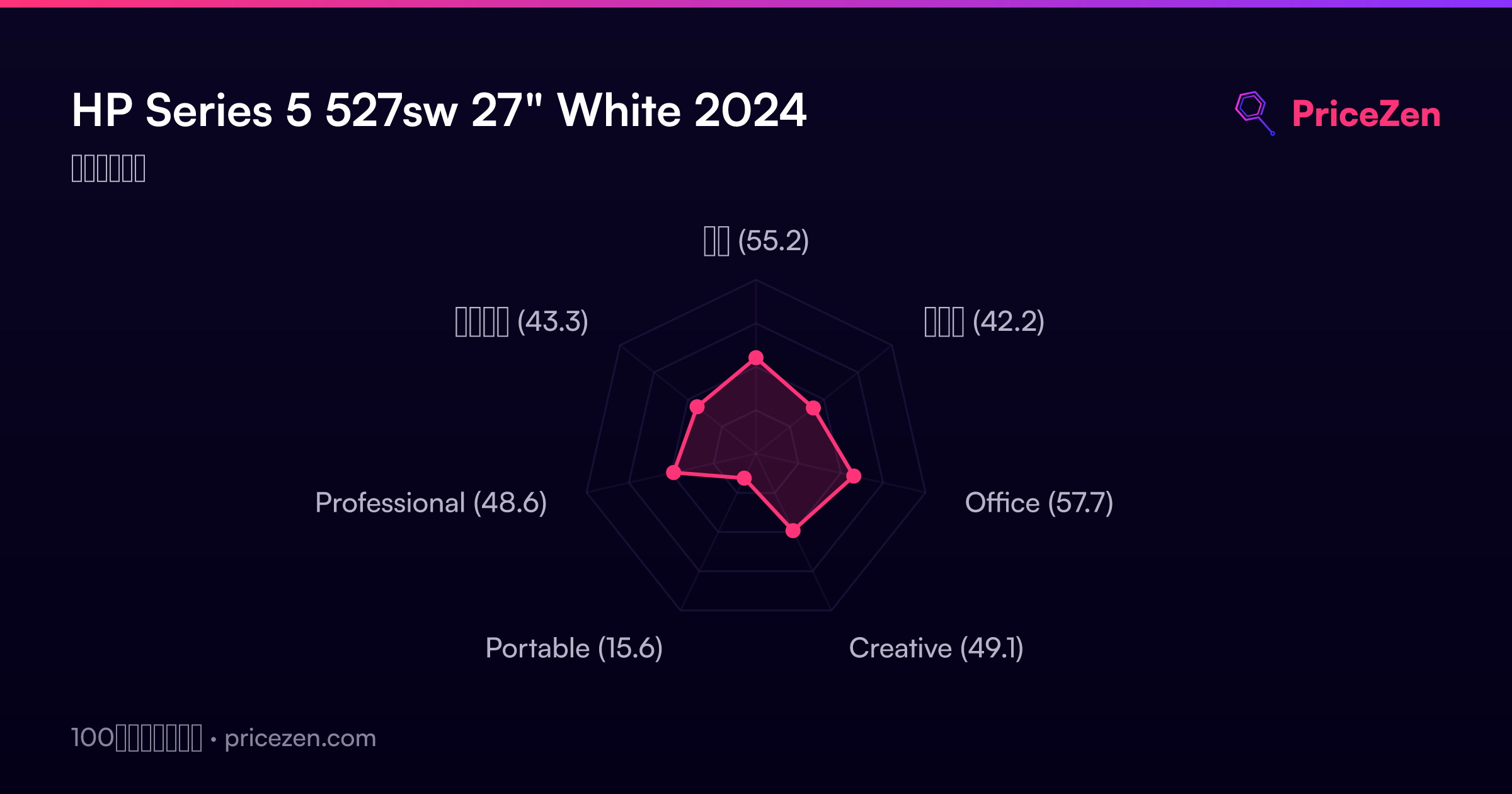
- 総合55.2
- ゲーム42.2
- Office57.7
- Creative49.1
- Portable15.6
- Professional48.6
- エンタメ43.3