MSI PRO MP242PMG 23.8" Matte Black 2025

画面にWebカメラを内蔵、ビデオ通話に 11月29日に確認済み
60/100 総合スコア
- Screen
- 23.8"
- Resolution
- 1920 x 1080
- Panel
- IPS
- Refresh
- 120 Hz
- Response time
- 1 ms
- Adaptive sync
- Adaptive-Sync
- HDR
- HDR


概要
The 30-Second Version
The MSI PRO MP242PMG is a 24-inch 1080p office monitor with a 120Hz refresh rate and a built-in webcam. Its feature set ranks in the 94th percentile for this category, but display quality is only average. At the low end of its price range, it's a great value for productivity-focused buyers.
Pros & Cons
長所
- 120Hz refresh rate makes everyday use feel much smoother 94th
- Built-in 2MP webcam and speakers reduce desk clutter 91st
- Full ergonomic stand with height, tilt, swivel, and pivot 70th
- Strong feature set for the office category
短所
- Display quality is below average for this class
- Only 6-bit+FRC color, not true 8-bit
- HDR10 support is mostly marketing at 300 nits
- Connectivity is limited with just HDMI, DisplayPort, and VGA
実証データ
Performance
The 120Hz refresh rate is the star here. Our database puts this panel's feature set in the 94th percentile for monitors of this type, and the smoothness is immediately noticeable next to a 60Hz office display. The 1ms response time is MPRT, not true gray-to-gray, so don't expect esports-level motion clarity. Brightness sits at 300 nits, which is fine for indoor use but nothing special. Color coverage hits 89% DCI-P3 with 6-bit+FRC, so it's decent but not a colorist's dream. Performance overall lands in the 70th percentile, which is solid for a business monitor but not a standout.
Specifications
Full Specifications
Display
| Size | 23.8" |
| Resolution | 1920x1080 (Full HD) |
| Panel Type | IPS |
| Aspect Ratio | 16:9 |
| Curved | No |
| Screen Finish | matte |
Performance
| Refresh Rate | 120 Hz |
| Response Time | 1 |
| Adaptive Sync | Adaptive-Sync |
Color & HDR
| Brightness | 300 nits |
| Color Gamut | DCI-P3 89% |
| Color Depth | 6-bit+FRC |
| HDR | ✓ |
| HDR Support | HDR |
Connectivity
| HDMI Ports | 1 |
| DisplayPort | 1 |
| USB-C | 0 |
| Speakers | Yes |
| Headphone Jack | Yes |
Ergonomics
| Height Adjustable | Yes |
| Tilt | Yes |
| Swivel | Yes |
| Pivot | Yes |
| VESA Mount | 100x100 |
Features
| Webcam | Yes |
| Touchscreen | No |
| PIP/PBP | No |
| Weight | 5.5 kg / 12.1 lbs |
vs Competition
Against the LG UltraGear 27G810A-B or ASUS TUF Gaming VG34VQL1B, the MSI loses on raw gaming performance and screen real estate. Those are bigger, faster panels aimed at gamers. The BenQ MA Series MA270U and Dell S2725QC S2725QC offer better color accuracy and higher resolution for creative work. But none of those have a built-in webcam, and most cost more. The MSI's niche is the office worker who wants a smooth panel and a clean desk without buying a separate webcam.
| Spec | MSI PRO MP242PMG 23.8" | ASUS ROG Strix XG27UCDMG 27" | LG UltraGear 45GX950A-B 45" | Dell UltraSharp U4025QW 39.7" | Alienware AW-Series AW3425DW 34" | Samsung Odyssey G60SD 27" |
|---|---|---|---|---|---|---|
| Screen Size | 23.8 | 27 | 45 | 39.7 | 34 | 27 |
| Resolution | 1920 x 1080 | 3840 x 2160 | 5120 x 2160 | 5120 x 2160 | 3440 x 1440 | 2560 x 1440 |
| Panel Type | IPS | QD-OLED | OLED | IPS | QD-OLED | OLED |
| Refresh Rate | 120 | 240 | 330 | 120 | 240 | 360 |
| Response Time Ms | 1 | 0.03 | 0.03 | 5 | 0.03 | 0.03 |
| Adaptive Sync | Adaptive-Sync | FreeSync Premium Pro | FreeSync Premium Pro | Adaptive-Sync | FreeSync Premium Pro | FreeSync Premium Pro |
| Hdr | HDR | DisplayHDR True Black 400 | DisplayHDR True Black 400 | HDR600 | HDR400 | HDR10+ |
| Compare | Compare | Compare | Compare | Compare |
| 製品 | Color | 携帯性 | Display | Feature | Performance | Connectivity |
|---|---|---|---|---|---|---|
| MSI PRO MP242PMG 23.8" | 52 | 43.3 | 21.4 | 94.4 | 69.9 | 42.9 |
| ASUS ROG Strix XG27UCDMG 27" Compare | 96.5 | 57.3 | 97.7 | 85 | 97.9 | 81 |
| LG UltraGear 45GX950A-B 45" Compare | 99.4 | 76.5 | 99.7 | 96.3 | 99.4 | 96.9 |
| Dell UltraSharp U4025QW 39.7" Compare | 97.9 | 76.5 | 98.6 | 96.3 | 56 | 99.3 |
| Alienware AW-Series AW3425DW 34" Compare | 98.9 | 73.9 | 84 | 96.3 | 97.9 | 95.3 |
| Samsung Odyssey G60SD 27" Compare | 90.6 | 39.3 | 73.3 | 70 | 99.5 | 87.4 |
価格
Value & Pricing
Pricing is all over the place. In the US, we're seeing listings from USD 150 to USD 233 across three vendors, and Newegg has the best deal at the low end. In Canada, the spread is CAD 205 to CAD 315. At the lower end of that range, this monitor is a genuinely good value for an office setup with a webcam and full ergonomics. At the top end, you're paying too much for what you get. Shop around before you buy.
詳細情報
Overview
The MSI PRO MP242PMG is a 24-inch 1080p IPS monitor aimed at office workers who want a bit more smoothness than the usual 60Hz panel. The headline feature is the 120Hz refresh rate, which makes scrolling and window dragging feel noticeably nicer. It also packs a built-in 2MP webcam, speakers, and a full ergonomic stand, so it's trying to be a one-stop workstation upgrade.
It's not a gaming monitor despite the 1ms MPRT claim, and it's not a color-critical display either. But for coding, spreadsheets, and video calls, it covers the bases well. The feature set is genuinely strong for the office category, even if the display itself is pretty standard.
Common Questions
Q: Is the built-in webcam good enough for video calls?
The 2MP webcam is fine for Zoom and Teams calls in decent lighting. It won't match a dedicated 1080p webcam, but it's perfectly serviceable and keeps your desk clean.
Q: Can I use this monitor for gaming?
You can, and the 120Hz refresh rate helps, but the 1ms response time is MPRT, not true gray-to-gray. It's fine for casual gaming but not ideal for competitive shooters.
Q: Does the stand support portrait mode?
Yes, the stand supports height adjustment, tilt, swivel, and pivot, so you can rotate it into portrait mode for coding or reading long documents.
Who Should Skip This
Skip this if you need accurate color for photo or video work. The 6-bit+FRC panel and 89% DCI-P3 coverage won't cut it for color-critical tasks. Gamers should also look elsewhere, since the MPRT response time and lack of true high-refresh gaming features make it a poor fit for fast-paced titles.
Verdict
The MSI PRO MP242PMG is a smart buy for office workers, programmers, and anyone who spends all day in front of a screen and wants a smoother experience plus a built-in webcam. It's not for gamers or color professionals, but it nails the productivity use case. If you can find it near the low end of the price range, it's an easy recommendation.
Usage Scores
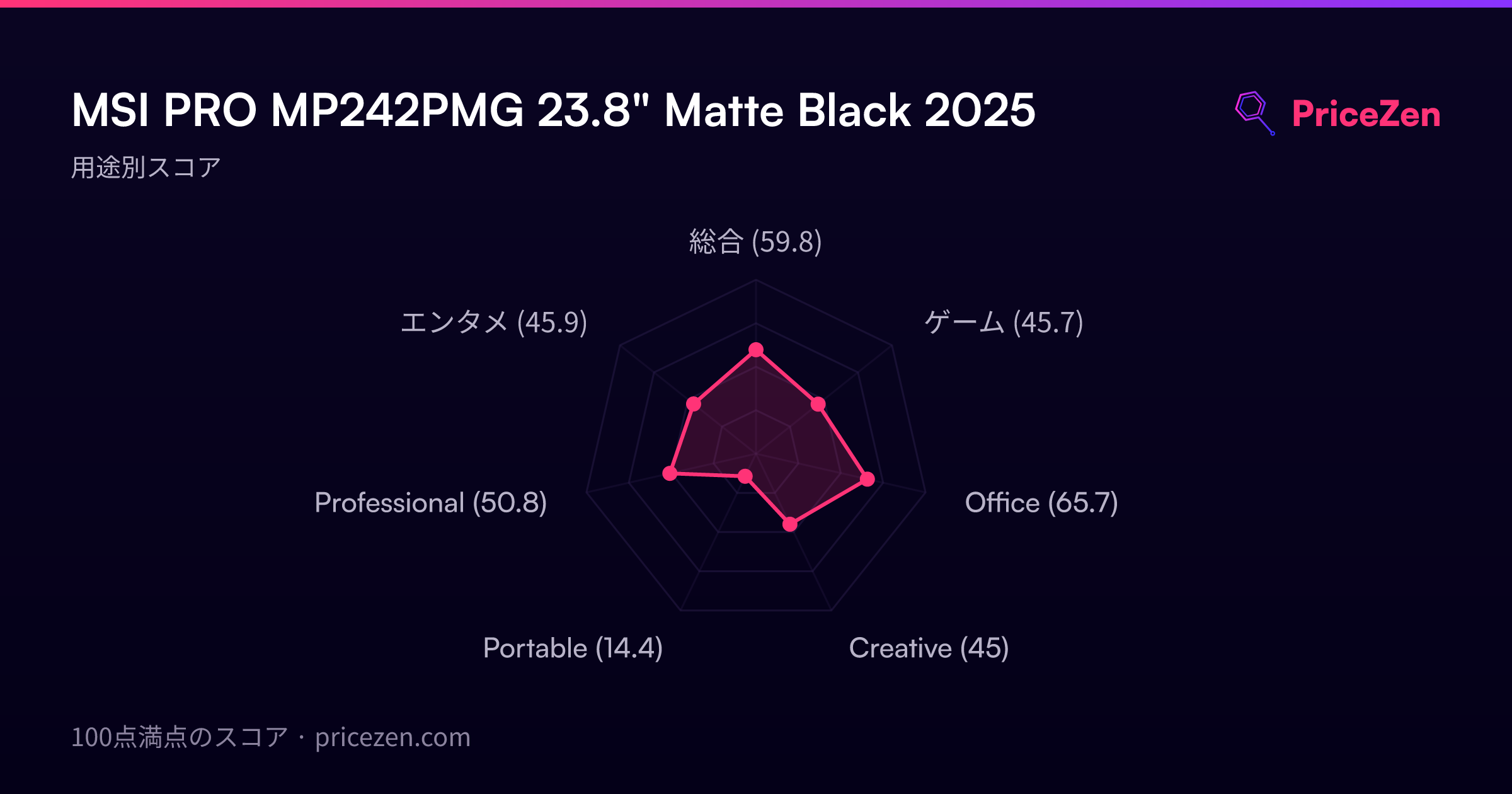
- 総合59.8
- ゲーム45.7
- Office65.7
- Creative45
- Portable14.4
- Professional50.8
- エンタメ45.9