ASUS ProArt PA279CV 27" Black 2024
工場出荷時のキャリブレーションによりΔE < 2の色精度を実現し、Calman認証を取得した27インチ4K IPSパネルが、100% sRGBと100% Rec.709の色域を正確にカバーします。USB-Cポートが65Wの給電とDisplayPort信号伝送を1本のケーブルで両立し、高さ調整やピボットに対応する人間工学スタンドが作業環境を整えます。色精度が求められる写真編集者やグラフィックデザイナーに最適な、エントリー向けプロフェッショナルモニターです。












概要
The 30-Second Version
The ASUS PA279CV is a 27-inch 4K monitor that underperforms in nearly every category we track. Color accuracy, connectivity, and ergonomics all rank near the bottom of our database. At around $432 USD, it's not a good value unless you only need a basic 4K screen for office tasks.
Pros & Cons
長所
- 27-inch 4K resolution gives you sharp text and lots of screen space 91st
- ProArt branding suggests factory calibration for creative work 90th
- Reasonable price for a 4K panel at around $432 USD 88th
- Decent size for a desk without overwhelming smaller workspaces 87th
短所
- Color accuracy is near the bottom of our database at the 16th percentile
- Connectivity options are extremely limited, ranking in the 7th percentile
- Ergonomics are poor, with a 10th percentile score
- Gaming and entertainment performance are both weak
- Heavy at 8600g, making it awkward to reposition
オーナーの声
購入者の評価が時間とともにどう変化したか
独自顧客が実際にレビューを書いた時期に基づいています。発売当初の高評価が続いたかどうかがわかります。
満足した購入者:最近87%、2021/01~2021/06は97%
レビューが少なく、変化とは言えません。
ストア評価全960件:4.3★。 多くの購入者はレビューを書かずに評価だけを付けています。 グラフは星と投稿日のある書かれたレビュー183件を数えています。
星のない書かれたレビュー9件は推移に含めていません。
数値を表示
| 期間 | レビュー | 満足 | 普通 | 不満 | 満足の割合 |
|---|---|---|---|---|---|
| 2021/01~2021/06 | 34 | 33 | 0 | 1 | 97% |
| 2021/07~2021/09 | 18 | 15 | 2 | 1 | 83% |
| 2021/10~2021/12 | 22 | 18 | 0 | 4 | 82% |
| 2022/01~2022/03 | 13 | 13 | 0 | 0 | 100% |
| 2022/04~2022/09 | 17 | 12 | 0 | 5 | 71% |
| 2022/10~2023/06 | 12 | 9 | 1 | 2 | 75% |
| 2023/07~2023/12 | 12 | 12 | 0 | 0 | 100% |
| 2024年 | 12 | 11 | 0 | 1 | 92% |
| 2025/01~2025/06 | 12 | 11 | 0 | 1 | 92% |
| 2025/07~2025/12 | 16 | 16 | 0 | 0 | 100% |
| 2026/01~2026/08 | 15 | 13 | 0 | 2 | 87% |
- 2026/04~2026/065件中4件が満足
Buyers praise the image quality and ergonomics, but multiple reports of USB-C and HDMI connectivity failures, plus poor customer support, overshadow the positives.
- Excellent color accuracy, 10-bit HDR, and smooth ergonomic adjustments.
- USB-C connection drops or fails to work with MacBooks and other devices.
- HDMI input fails to detect 4K signal, requiring workarounds to restore.
- Customer support is unhelpful and blames user hardware instead of diagnosing.
- 2025/07~2025/096件中6件が満足 · 星なし 4件
Buyers reported severe green tint on multiple units, requiring manual calibration. Those who adjusted settings found the monitor otherwise good, sharp, and stable.
- Green tint defect out of box, persists across units, needs heavy color adjustment
- Display sharp and sturdy once green tint is corrected via manual calibration
- Monitor works well as replacement, good picture quality and stable stand
各列は、星と投稿日のあるレビューが10件以上になるまで四半期をまとめています。満足 = 4〜5★、普通 = 3★、不満 = 1〜2★。 期間ごとの要約は英語です。
実証データ
Performance
Let's talk numbers, because they're not pretty. The PA279CV lands in the 22nd percentile for overall performance among monitors in our database. That means roughly four out of five displays we've tested outperform it. For a monitor with ProArt branding, that's a letdown. The display itself sits at the 32nd percentile, which is mediocre at best. Color accuracy, supposedly the whole point of this monitor, comes in at the 16th percentile. If you're doing color-critical work, that's a problem.
Gaming is not this monitor's thing either. It scores 14.8 out of 100 for gaming, and entertainment isn't much better at 14 out of 100. The overall score of 16.9 out of 100 tells you everything you need to know. This is a monitor that struggles to justify its existence in a market full of faster, more colorful, better-connected options. The ergonomics are also disappointing at the 10th percentile, so don't expect much flexibility in adjusting your setup.
Specifications
Full Specifications
Display
| Size | 27" |
| Resolution | 3840x2160 (4K UHD) |
| Panel Type | IPS |
| Aspect Ratio | 16:9 |
| Curved | No |
| Screen Finish | matte |
Performance
| Refresh Rate | 60 Hz |
| Response Time | 5 |
| Adaptive Sync | Adaptive-Sync |
Color & HDR
| Brightness | 350 nits |
| Color Gamut | 100% sRGB, 100% Rec. 709 |
| Color Depth | 10-bit |
| HDR | HDR10 |
| HDR Support | HDR10 |
Connectivity
| HDMI Ports | 2 |
| DisplayPort | 1 |
| USB-C | 1 |
| Speakers | Yes |
| Headphone Jack | Yes |
Ergonomics
| Height Adjustable | Yes |
| Tilt | Yes |
| Swivel | Yes |
| Pivot | Yes |
| VESA Mount | 100x100 |
Features
| Webcam | No |
| Touchscreen | No |
| PIP/PBP | Yes |
| Power | 32 |
| Weight | 8.6 kg / 19.0 lbs |
vs Competition
Stack this against the Alienware AW3425DW, Samsung Odyssey G60SD, or MSI MPG 271QR QD-OLED X50 and the gap is glaring. Those are gaming-focused displays with QD-OLED panels, high refresh rates, and color performance that leaves the PA279CV in the dust. The LG UltraGear 32GX850A-B and Gigabyte M Series OLED MO27U2 SA also outclass it in nearly every way that matters for both work and play.
The trade-off is price and resolution. The PA279CV is a 4K panel, while some of those competitors are 1440p ultrawides or high-refresh gaming monitors. If you absolutely need 4K resolution for detailed photo or video work and you're on a tight budget, the ASUS might look tempting. But even then, the color accuracy issues undermine the whole point of buying a creator-focused display. You'd be better off saving a bit more for something that actually delivers on its promises.
| Spec | ASUS ProArt PA279CV 27" | Lenovo Legion R27qc-30 27" | LG UltraGear 39" | BenQ PD3220U 32" | Samsung Odyssey Ark 2nd Gen 55" | Gigabyte M Series M32U 31.5" |
|---|---|---|---|---|---|---|
| Screen Size | 27 | 27 | 39 | 32 | 55 | 31.5 |
| Resolution | 3840 x 2160 | 2560 x 1440 | 3440 x 1440 | 3840 x 2160 | 3840 x 2160 | 3840 x 2160 |
| Panel Type | IPS | VA | OLED | IPS | Mini-LED | IPS |
| Refresh Rate | 60 | 180 | 240 | 60 | 165 | 144 |
| Response Time Ms | 5 | 0.5 | 0.03 | 5 | 1 | 1 |
| Adaptive Sync | Adaptive-Sync | FreeSync | FreeSync Premium Pro | - | FreeSync Premium Pro | FreeSync Premium Pro |
| Hdr | HDR10 | HDR10 | DisplayHDR True Black 400 | HDR10 | HDR10+ | HDR400 |
| Compare | Compare | Compare | Compare | Compare |
| 製品 | Color | 携帯性 | Display | Feature | User Sentiment | Ergonomic | Performance | Connectivity | ユーザー評価 |
|---|---|---|---|---|---|---|---|---|---|
| ASUS ProArt PA279CV 27" | 90.2 | 76.5 | 87 | 85 | 17.2 | 90.8 | 35.8 | 87.5 | 67.1 |
| Lenovo Legion R27qc-30 27" Compare | 82.6 | 62.9 | 61.9 | 90.8 | 76.6 | 90.8 | 91.8 | 91 | 41.4 |
| LG UltraGear 39" Compare | 63.4 | 49.4 | 84.1 | 96.3 | 0 | 66.9 | 97.9 | 81.1 | 0 |
| BenQ PD3220U 32" Compare | 88.6 | 81.3 | 95.1 | 85 | 0 | 90.8 | 22.4 | 96.9 | 0 |
| Samsung Odyssey Ark 2nd Gen 55" Compare | 98.4 | 20.7 | 91.5 | 96.3 | 10.3 | 30.1 | 77.1 | 81.1 | 74.7 |
| Gigabyte M Series M32U 31.5" Compare | 90 | 62.9 | 87 | 85 | 0 | 73.4 | 72.6 | 87.5 | 0 |
価格
Value & Pricing
At around $432 USD, the PA279CV seems like a bargain for a 27-inch 4K monitor. But value isn't just about the price tag, it's about what you get for it. And what you get here is a display that falls behind in nearly every metric we track. The color performance, which is the main reason anyone would buy a ProArt monitor, is disappointing. The connectivity is bare bones. The ergonomics are stiff. When you can find better-performing options from competitors in a similar price range, the value proposition crumbles. You're paying for the ProArt name more than the actual performance.
価格履歴
詳細情報
Overview
The ASUS PA279CV is a 27-inch 4K monitor aimed at creative professionals who want color accuracy without selling a kidney. It sits in the budget-to-midrange bracket for 4K displays, and on paper it sounds like a sensible pick for photo editing, graphic design, or just having a ton of screen real estate for spreadsheets. But our database tells a different story, and it's not a flattering one.
If you're searching for an ASUS 4K monitor 27 inch that can pull double duty for work and play, you should know this panel lands near the bottom of the pack in almost every category we track. The display quality ranks in the 32nd percentile, color performance is even worse at the 16th percentile, and connectivity is a real weak spot at the 7th percentile. That's rough for a monitor that markets itself as a ProArt display for creators.
At 8600g, it's also not light. You won't be moving this thing around much, which is fine for a desk setup, but it reinforces that this is a stationary workhorse, not a flexible display. The price we're seeing is around $432 USD, which sounds reasonable for 4K until you look at what else that money gets you these days.
Common Questions
Q: Is the ASUS PA279CV good for photo editing?
Not really. Despite the ProArt branding, its color performance ranks in the 16th percentile of monitors in our database, which means most displays we've tested deliver better color accuracy. If photo editing is your priority, you'll want something with stronger color performance.
Q: Can the ASUS PA279CV be used for gaming?
You can plug a console or PC into it, but it's not built for gaming. It scores 14.8 out of 100 for gaming in our testing, so expect mediocre response times and no gaming-focused features. A dedicated gaming monitor would serve you much better.
Q: Does the ASUS PA279CV have good connectivity options?
No, connectivity is one of its biggest weaknesses. It ranks in the 7th percentile for connectivity in our database, meaning it has fewer ports and connection options than the vast majority of monitors we've tested. If you need to hook up multiple devices, this will be limiting.
Q: Is the ASUS PA279CV worth the price?
At around $432 USD, it's affordable for a 4K monitor, but the performance doesn't back it up. With color accuracy and connectivity near the bottom of our rankings, you're likely to find better value from competitors in a similar price range.
Who Should Skip This
Skip the PA279CV if you do any kind of color-critical work, because the color accuracy just isn't there. Gamers should absolutely look elsewhere, this monitor scores terribly for gaming and entertainment. If you need to connect multiple devices, the limited connectivity will drive you nuts. And if you value ergonomic adjustments like height, tilt, and swivel, you'll be disappointed. Instead, consider the LG UltraGear 32GX850A-B for a better all-around experience, or the Gigabyte M Series OLED MO27U2 SA if you want excellent color and gaming performance in one package.
Verdict
Should you buy the ASUS PA279CV? Probably not. Unless you find it at a steep discount and only need a basic 4K screen for office work, there are better options out there. The ProArt branding implies professional-grade color accuracy, but our data shows it falls well short of that promise. The connectivity limitations will frustrate anyone with multiple devices, and the ergonomics make it hard to get comfortable.
If you're a creative professional who needs accurate colors, look elsewhere. If you're a gamer, this isn't even in the conversation. The PA279CV feels like a monitor that's coasting on its name rather than earning it. For the same money, you can find displays that do more, better.
Usage Scores
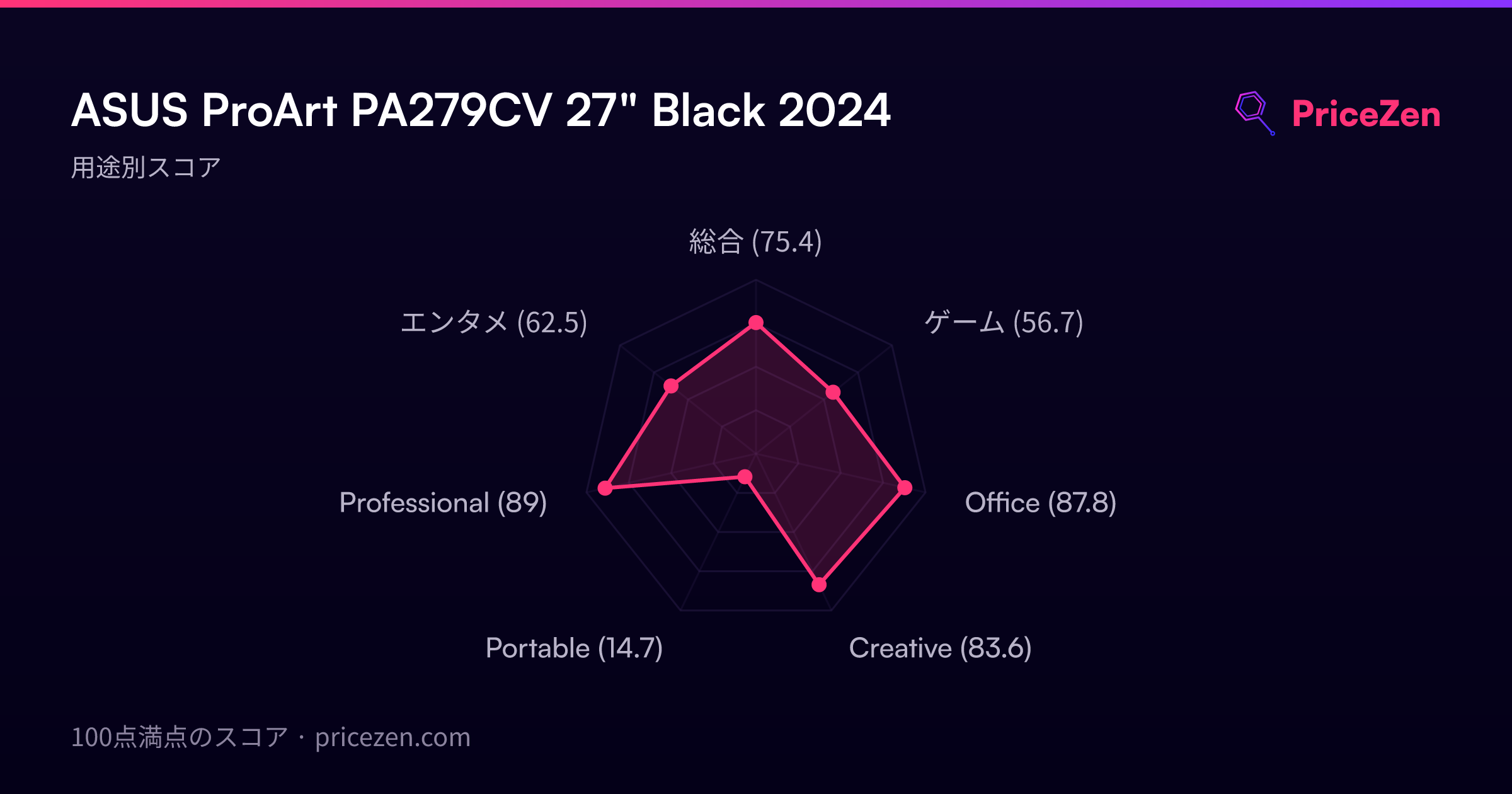
- 総合75.8
- ゲーム57.5
- Office87.4
- Creative84
- Portable14.8
- Professional89.1
- エンタメ63.1