MSI Pro MP341CQ 34" Matte Black 2023

21:9ウルトラワイドで、ゲームの視界が広がる 11月29日に確認済み
66/100 総合スコア 4.4 オーナー評価55件の平均
- Screen
- 34"
- Resolution
- 3440 x 1440
- Panel
- VA
- Refresh
- 100 Hz
- Response time
- 1 ms
- Adaptive sync
- FreeSync
- HDR
- HDR
1店舗の価格を比較
安い順。新品・整備済み品・バンドルのオファーは分けて表示するので、同じ条件どうしで比較できます。
| 店舗 | 販売元 | カラーと状態 | 価格 | 最安との差 | 最終確認 | リンク |
|---|---|---|---|---|---|---|
| 新品1件の価格単品 | ||||||
| 過去7日間は確認していないため、これらの価格は変わっている可能性があります | ||||||
| Amazon | マーケットプレイス出品者 | 記載なし | ¥65,906 | 11月3日 | 店舗へ | |
 出典: PriceZen, 2026年11月3日に確認
過去7日以内に確認した価格を「現在の価格」としています。 「マーケットプレイス出品者」とは、その店舗自身ではなく、店舗上の第三者の出品者を指します。
価格履歴
その日に確認その日は未確認、オファーは継続中
出典: PriceZen, checked 2026年11月3日











概要
The 30-Second Version
The MSI Pro MP341CQ is a 34-inch ultrawide with a 100Hz refresh rate and a VA panel. It's great for office work and casual gaming, but the 250 nits brightness is dim and the ergonomics are basic. If you can find it for under USD 300, it's worth it.
Pros & Cons
長所
- Big 34-inch ultrawide screen for a reasonable price 91st
- 100Hz refresh rate is a nice upgrade from 60Hz 76th
- FreeSync support for smooth casual gaming 68th
- Good contrast ratio for a VA panel
短所
- 250 nits brightness is dim for bright rooms
- Only tilt adjustment, no height or swivel
- Built-in speakers are weak at 2W each
- Heavy at over 9kg, not easy to move
オーナーの声
The Word on the Street
- Several owners mention the monitor is easy on the wallet and delivers good graphics for the price.
- A few buyers report receiving units with half the screen dim out of the box, leading to returns.
- Some users note the 100Hz refresh rate feels smooth enough that they can't tell the difference from higher refresh rates.
購入者の評価が時間とともにどう変化したか
独自顧客が実際にレビューを書いた時期に基づいています。発売当初の高評価が続いたかどうかがわかります。
書かれたレビュー 32件、2023/05~2026/05:満足 24件、不満 4件、星なし 4件
ストア評価全55件:4.4★。 グラフは書かれたレビュー32件を数えています。
各点は書かれたレビュー1件で、書かれた月に置いています。満足 = 4〜5★、普通 = 3★、不満 = 1〜2★。
実証データ
Performance
The 100Hz refresh rate and 1ms MPRT response time are the headline numbers here, and they're fine for a business monitor. FreeSync keeps things smooth if you're doing some light gaming on the side. The VA panel gives you a 3000:1 static contrast ratio, which means blacks look decent, but the 250 nits brightness is a bit dim for a bright room. The 116.2% sRGB coverage is solid for office work, but the 8-bit+FRC color depth means it's not a true 10-bit panel. In our database, the display quality ranks in the 80th percentile, which is good, but the overall performance sits at 68th, so it's not a speed demon.
Specifications
Full Specifications
Display
| Size | 34" |
| Resolution | 3440x1440 |
| Panel Type | VA |
| Aspect Ratio | 21:9 |
| Curved | Yes |
| Curvature | 1500 |
| Screen Finish | matte |
Performance
| Refresh Rate | 100 Hz |
| Response Time | 1 |
| Adaptive Sync | FreeSync |
Color & HDR
| Brightness | 250 nits |
| Color Gamut | 116.2% sRGB |
| Color Depth | 10-bit (8-bit + FRC) |
| HDR | ✓ |
| HDR Support | HDR |
Connectivity
| HDMI Ports | 2 |
| DisplayPort | 1 |
| USB-C | 0 |
| Speakers | Yes |
| Headphone Jack | Yes |
Ergonomics
| Height Adjustable | No |
| Tilt | Yes |
| Swivel | No |
| Pivot | No |
| VESA Mount | 100x100 |
Features
| Webcam | No |
| Touchscreen | No |
| PIP/PBP | No |
| Power | 60 |
| Weight | 7.7 kg / 17.0 lbs |
vs Competition
Compared to the Samsung Odyssey G60SD or the ASUS ROG Strix XG27AQDMG, the MSI is not in the same league for gaming. Those are OLED panels with much higher refresh rates and better HDR. But they also cost a lot more. The LG UltraGear 32GX850A-B is a closer competitor in terms of size and resolution, but it's also more expensive. The BenQ MA Series MA270U is a 27-inch 4K monitor, so it's sharper but smaller. If you want an ultrawide for work and don't need blazing speed, the MSI is a solid budget pick.
| Spec | MSI Pro MP341CQ 34" | LG UltraGear 39" | BenQ PD3220U 32" | Samsung Odyssey Ark 2nd Gen 55" | Gigabyte M Series M32U 31.5" | Dell UltraSharp U4320Q 27" |
|---|---|---|---|---|---|---|
| Screen Size | 34 | 39 | 32 | 55 | 31.5 | 27 |
| Resolution | 3440 x 1440 | 3440 x 1440 | 3840 x 2160 | 3840 x 2160 | 3840 x 2160 | 3840 x 2160 |
| Panel Type | VA | OLED | IPS | Mini-LED | IPS | IPS |
| Refresh Rate | 100 | 240 | 60 | 165 | 144 | 60 |
| Response Time Ms | 1 | 0.03 | 5 | 1 | 1 | 5 |
| Adaptive Sync | FreeSync | FreeSync Premium Pro | - | FreeSync Premium Pro | FreeSync Premium Pro | - |
| Hdr | HDR | DisplayHDR True Black 400 | HDR10 | HDR10+ | HDR400 | HDR400 |
| Compare | Compare | Compare | Compare | Compare |
| 製品 | Color | 携帯性 | Display | Feature | Ergonomic | Performance | Connectivity | ユーザー評価 |
|---|---|---|---|---|---|---|---|---|
| MSI Pro MP341CQ 34" | 63.3 | 20.7 | 76 | 90.8 | 47.1 | 67.8 | 62.1 | 52.1 |
| LG UltraGear 39" Compare | 63.3 | 49.3 | 84 | 96.3 | 66.8 | 97.9 | 81 | 0 |
| BenQ PD3220U 32" Compare | 88.5 | 81.3 | 95.1 | 85 | 90.7 | 22.3 | 96.9 | 0 |
| Samsung Odyssey Ark 2nd Gen 55" Compare | 98.4 | 20.7 | 91.5 | 96.3 | 29.9 | 77 | 81 | 75.1 |
| Gigabyte M Series M32U 31.5" Compare | 89.9 | 62.8 | 87 | 85 | 73.4 | 72.6 | 87.4 | 0 |
| Dell UltraSharp U4320Q 27" Compare | 91 | 82.7 | 87 | 85 | 90.7 | 22.3 | 96.9 | 0 |
価格
Value & Pricing
Pricing is all over the place. In the US, we've seen it listed anywhere from USD 200 to USD 560, which is a massive spread. If you can snag it near the low end, it's a steal. At the high end, you're paying way too much for what you get. The best deal we've seen is from Newegg, which tends to have the lowest US listing. In Canada, prices range from CAD 372 to CAD 566, so the same advice applies: shop around and don't pay full price.
詳細情報
Overview
The MSI Pro MP341CQ is a 34-inch ultrawide that wants to be your office workhorse. It's a VA panel with a 3440 x 1440 resolution and a 100Hz refresh rate, which is a nice step up from the 60Hz panels most people are stuck with. The curve is gentle at 1500R, so it wraps around your desk without feeling like a funhouse mirror.
For the price, you're getting a lot of screen. It's not going to blow anyone away with brightness or color accuracy, but it's a solid, no-nonsense ultrawide for productivity and casual gaming. Just don't expect it to be a portable monitor, because at over 9kg, it's basically a piece of furniture.
Common Questions
Q: Is this monitor good for gaming?
It's fine for casual gaming thanks to the 100Hz refresh rate and FreeSync support, but serious gamers will want something faster with better HDR.
Q: Can I mount this monitor on a monitor arm?
Yes, it has a standard VESA 100x100 mount, so you can attach it to most monitor arms or wall mounts.
Q: Does this monitor have built-in speakers?
Yes, it has dual 2W speakers, but they're pretty weak. You'll want external speakers or headphones for anything beyond basic audio.
Who Should Skip This
Skip this if you need accurate color for professional photo or video editing, because the 8-bit+FRC panel and 250 nits brightness won't cut it. Also skip it if you want a portable monitor, because at over 9kg, it's not going anywhere. And if you need height adjustment or swivel, look elsewhere, because this only tilts.
Verdict
This monitor is for people who want a big, curved ultrawide for office work, spreadsheets, and maybe some light gaming. It's not for serious gamers or anyone who needs accurate color for professional photo or video work. If you can find it for under USD 300, it's a great deal. If you're paying more than that, you should look at other options.
Usage Scores
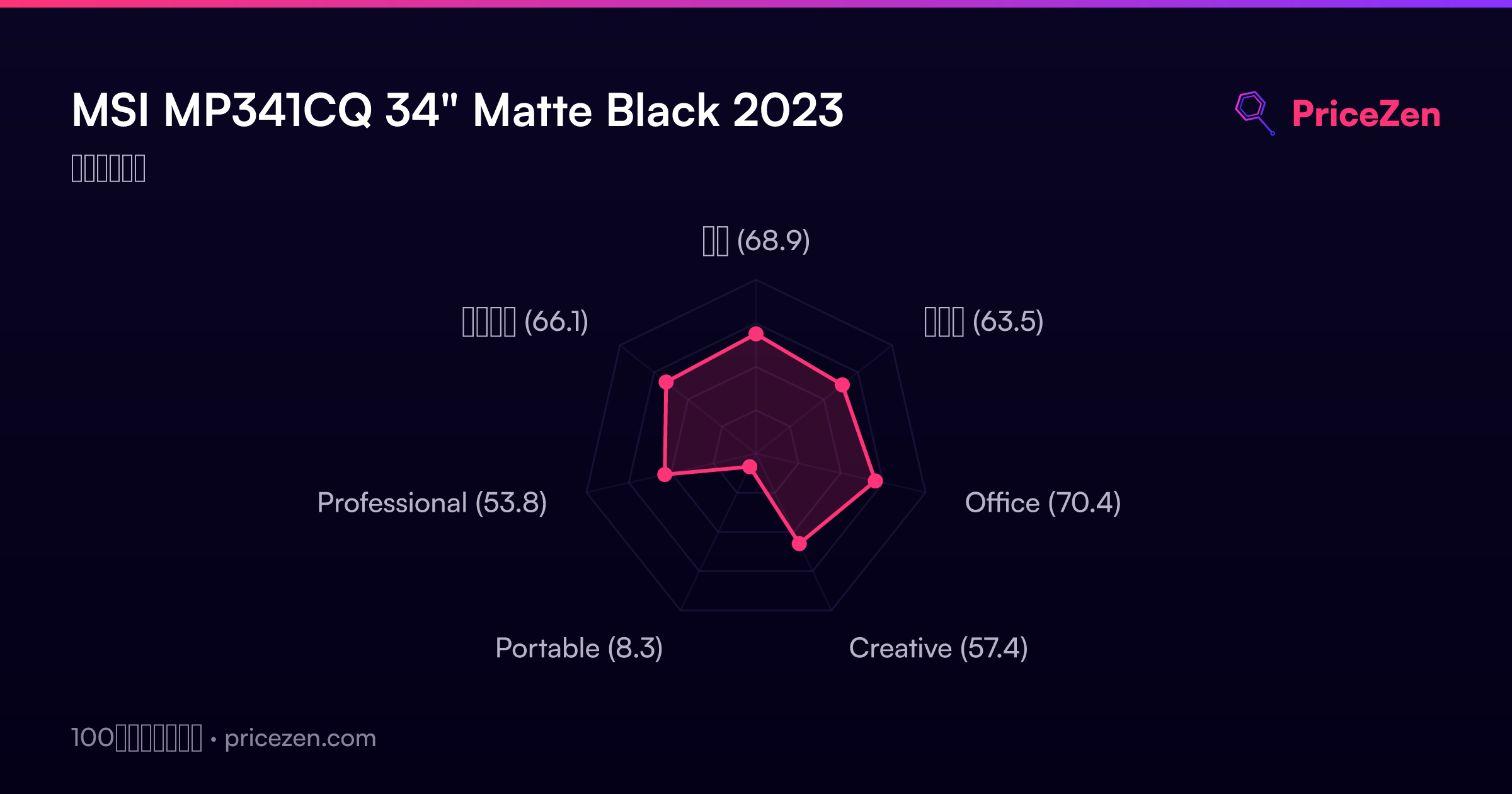
- 総合65.8
- ゲーム62.1
- Office67.2
- Creative56.1
- Portable7.8
- Professional52.1
- エンタメ64.7