Acer SB0 Series SB220Q bi 21.5" Black
The 21.5-inch IPS panel with a 75Hz refresh rate and FreeSync Premium delivers smooth, tear-free visuals in an ultra-thin zero-frame design. Its low price point makes the accurate colors and wide viewing angles of IPS technology accessible for budget-conscious setups. This monitor is best for students or home office users who need a compact, flicker-free display for documents, web browsing, and light media consumption.

現在、販売店の最新価格はありません


概要
The 30-Second Version
The Acer SB220Q bi is a budget 21.5-inch 1080p IPS monitor with 75Hz and FreeSync. It's great for everyday use and has massive social proof, but the display and color scores are weak. Worth it if you need a cheap, reliable screen.
Pros & Cons
長所
- IPS panel with wide 178-degree viewing angles 92nd
- 75Hz refresh rate with FreeSync Premium 80th
- Ultra-thin zero-frame design looks clean
- Huge social proof, buyers love it
短所
- Only 250 nits brightness, struggles in bright rooms
- No VESA mount compatibility despite listing confusion
- Limited to HDMI and VGA, no DisplayPort
- Color accuracy is weak for creative work
オーナーの声
The Word on the Street
購入者の評価が時間とともにどう変化したか
独自顧客が実際にレビューを書いた時期に基づいています。発売当初の高評価が続いたかどうかがわかります。
書かれたレビュー 9件、2019/02~2026/04:満足 9件
ストア評価全42,373件:4.6★。 多くの購入者はレビューを書かずに評価だけを付けています。 グラフは書かれたレビュー9件を数えています。
各点は書かれたレビュー1件で、書かれた月に置いています。満足 = 4〜5★、普通 = 3★、不満 = 1〜2★。
実証データ
Performance
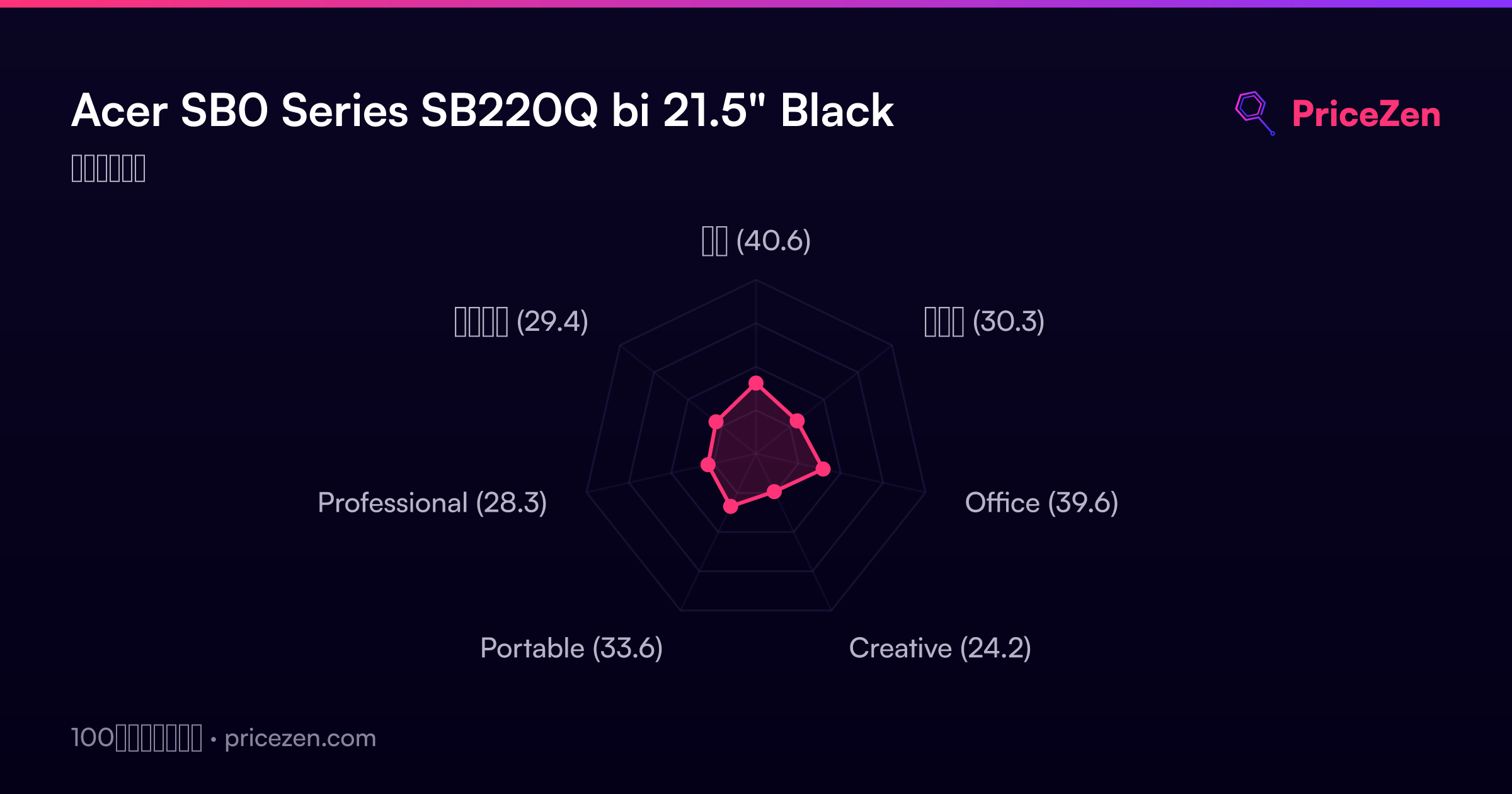
The 75Hz refresh rate and 4ms response time are fine for casual gaming and general use. FreeSync Premium helps keep things smooth if you have an AMD GPU. But the 250-nit brightness and basic color support put it well below average for anything creative. It's a solid office monitor, scoring 41 out of 100 there, but don't expect it to impress in photo or video work.
Specifications
Full Specifications
Display
| Size | 21.5" |
| Resolution | 1920x1080 (Full HD) |
| Panel Type | IPS |
| Aspect Ratio | 16:9 |
| Curved | No |
| Screen Finish | matte |
Performance
| Refresh Rate | 75 Hz |
| Response Time | 4 |
| Adaptive Sync | FreeSync Premium |
Color & HDR
| Brightness | 250 nits |
| Color Depth | 8-bit |
Connectivity
| HDMI Ports | 1 |
| DisplayPort | 0 |
| USB-C | 0 |
| Thunderbolt | N/A |
Ergonomics
| Height Adjustable | No |
| Tilt | Yes |
| Swivel | No |
| Pivot | No |
| VESA Mount | N/A |
Features
| Weight | 2.5 kg / 5.6 lbs |
vs Competition
Stacked against the MSI MAG 271QPX QD-OLED or the LG UltraGear 27G810A-B, the SB220Q bi looks ancient. Those are high-refresh gaming panels with better color and connectivity. But they also cost way more. The Acer is for people who want a basic, reliable screen without spending hundreds. It's not competing with those, it's competing with other budget 1080p monitors, and it holds its own there.
| Spec | Acer SB0 Series SB220Q bi 21.5" | LG UltraGear 45GX950A-B 45" | ASUS ROG Strix XG27UCDMG 27" | Dell UltraSharp U4025QW 39.7" | Alienware AW-Series AW3425DW 34" | MSI MAG 271QPX QD-OLED E2 27" |
|---|---|---|---|---|---|---|
| Screen Size | 21.5 | 45 | 27 | 39.70000076293945 | 34 | 27 |
| Resolution | 1920 x 1080 | 5120 x 2160 | 3840 x 2160 | 5120 x 2160 | 3440 x 1440 | 2560 x 1440 |
| Panel Type | IPS | OLED | OLED | IPS | QD-OLED | QD-OLED |
| Refresh Rate | 75 | 330 | 240 | 120 | 240 | 240 |
| Response Time Ms | 4 | 0.029999999329447746 | 0.029999999329447746 | 5 | 0.029999999329447746 | 0.029999999329447746 |
| Adaptive Sync | FreeSync Premium | FreeSync Premium Pro | FreeSync Premium Pro | Adaptive-Sync | FreeSync Premium Pro | FreeSync Premium Pro |
| Hdr | - | DisplayHDR True Black 400 | DisplayHDR True Black 400 | HDR600 | HDR400 | DisplayHDR True Black 400 |
| Compare | Compare | Compare | Compare | Compare |
| 製品 | Color | 携帯性 | Display | Feature | Ergonomic | Performance | Connectivity | ユーザー評価 |
|---|---|---|---|---|---|---|---|---|
| Acer SB0 Series SB220Q bi 21.5" | 15.5 | 79.5 | 21.4 | 21.2 | 47.2 | 50.3 | 47.6 | 92 |
| LG UltraGear 45GX950A-B 45" Compare | 99.4 | 76.6 | 99.7 | 96.3 | 90.8 | 99.4 | 97 | 92 |
| ASUS ROG Strix XG27UCDMG 27" Compare | 96.5 | 57.4 | 97.7 | 85.1 | 90.8 | 97.9 | 81.1 | 98.9 |
| Dell UltraSharp U4025QW 39.7" Compare | 97.9 | 76.6 | 98.6 | 96.3 | 90.8 | 56.1 | 99.3 | 96.8 |
| Alienware AW-Series AW3425DW 34" Compare | 98.9 | 74 | 84.1 | 96.3 | 90.8 | 97.9 | 95.4 | 96.8 |
| MSI MAG 271QPX QD-OLED E2 27" Compare | 99.2 | 57.4 | 73.5 | 85.1 | 90.8 | 97.9 | 81.1 | 98.9 |
価格
Value & Pricing
At around $170 USD, this monitor is a decent deal for basic office and light gaming use. The CAD listings show a wider range, from 293 to 313, so shop around if you're in Canada. You're not getting premium features, but you're also not paying premium prices. For a second monitor or a first budget screen, it's hard to complain too much.
詳細情報
Overview
The Acer SB220Q bi is a budget 21.5-inch IPS monitor that keeps things simple. You get 1080p, a 75Hz refresh rate, and FreeSync Premium in a slim, zero-frame design. It's not flashy, but it covers the basics for everyday use.
Our database puts its social proof in the 95th percentile, which means buyers really like this thing. But the display and color scores are weak, landing near the bottom. So it's a case of great value for the price, as long as you know what you're getting.
Common Questions
Q: Does this monitor support VESA mounting?
No, the SB220Q bi does not have VESA mount compatibility. You'll need to use the included stand.
Q: Is this monitor good for gaming?
It's okay for casual gaming with 75Hz and FreeSync Premium, but serious gamers will want a higher refresh rate and faster response time.
Q: What ports does it have?
It has one HDMI port and one VGA port. There's no DisplayPort, so keep that in mind for newer GPUs.
Who Should Skip This
Skip this if you need accurate colors for photo or video editing, or if you want a high-refresh gaming experience. The 250-nit brightness and basic color support won't cut it. Also, if VESA mounting is a must, look elsewhere because this one doesn't support it.
Verdict
If you need a cheap, dependable monitor for office work, school, or light gaming, the SB220Q bi is a solid pick. It's not for creators or serious gamers, but it nails the basics. The huge number of positive reviews backs that up.
Usage Scores
- 総合40.6
- ゲーム30.3
- Office39.6
- Creative24.2
- Portable33.6
- Professional28.3
- エンタメ29.4