Samsung Odyssey G80HF 27" Black 2026
The dual-mode panel switches between 5K at 180Hz for sharp detail and QHD at 360Hz for competitive speed, backed by DisplayPort 2.1 and HDMI 2.1 connectivity. Its 27-inch IPS display covers 99% sRGB with 10-bit color and HDR10+ support, making it a versatile single-screen solution for mixed use. This monitor is best for users who split time between color-accurate creative work and high-refresh-rate gaming.

現在、販売店の最新価格はありません
概要
The 30-Second Version
The Samsung Odyssey G80HF is a dual-mode oddball that nails both 5K productivity and 360Hz gaming in one 27-inch screen. Its color accuracy is among the best we've seen, but the dim 350-nit panel kills any real HDR enjoyment. At $950, it's a niche pick for people who refuse to choose between work and play.
Pros & Cons
長所
- The 5K/180Hz to 1440p/360Hz dual mode is genuinely useful, not a gimmick. 100th
- Color accuracy out of the box is top-tier, covering 99% sRGB with 10-bit depth. 93rd
- The stand offers full ergonomic adjustment including pivot for portrait mode. 91st
- DisplayPort 2.1 and HDMI 2.1 give you plenty of bandwidth for high-res, high-refresh gaming. 82nd
短所
- 350 nits peak brightness makes HDR a total afterthought.
- At 27 inches, 5K resolution demands aggressive scaling in Windows, which can be finicky.
- No built-in speakers or USB-C video input, which stings at this price.
- The matte coating is aggressive and can make whites look slightly grainy.
オーナーの声
購入者の評価が時間とともにどう変化したか
独自顧客が実際にレビューを書いた時期に基づいています。発売当初の高評価が続いたかどうかがわかります。
書かれたレビュー 16件、2026/07~2026/11:満足 12件、普通 1件、不満 3件
ストア評価全60件:4.2★。 多くの購入者はレビューを書かずに評価だけを付けています。 グラフは書かれたレビュー16件を数えています。
- 2026/10~2026/128件中7件が満足
Buyers praised the monitor's picture quality, size, and gaming performance, with several noting it works well for productivity. One Mac user reported compatibility issues with 5K over Thunderbolt, and support was unhelpful.
- Crisp, vivid picture quality with deep blacks and vibrant colors, praised for both gaming and productivity.
- Smooth gaming experience with high refresh rate, no lag, and fast response, enhancing gameplay.
- 27-inch screen size is ideal for multitasking, allowing multiple windows side by side for work or school.
- Mac compatibility issue: unable to get 5K resolution with MacBook M3 via Thunderbolt, and support blamed the Mac.
- 2026/07~2026/098件中5件が満足
Buyers praised responsiveness, image quality, and high refresh rates for gaming, but one reported dark screen, flickering, and delivery issues, while others gave vague praise.
- High refresh rate, low latency, and clear HDR image quality praised for gaming.
- One buyer reported screen darker than older monitor, flickering to black in games, and poor delivery experience.
- Several reviews mention good features and quality but lack specifics or are promotional.
- One buyer loves the monitor so much they plan to buy two more.
各点は書かれたレビュー1件で、書かれた月に置いています。満足 = 4〜5★、普通 = 3★、不満 = 1〜2★。 期間ごとの要約は英語です。
実証データ
Performance
The dual-mode party trick is the star. At 5K, you get a crisp 180Hz refresh that makes desktop work and slower-paced games look incredible. Flip the switch to 1440p and you're suddenly at 360Hz with a 1ms response time, which is exactly where you want to be for shooters. Motion clarity is excellent in both modes thanks to that fast IPS panel and FreeSync Premium support. The weak spot is brightness. At 350 nits typical, HDR content feels flat, and the HDR10+ certification is mostly on paper. It's fine in a dim room, but don't expect it to punch like a good OLED or a mini-LED panel.
Specifications
Full Specifications
Display
| Size | 27" |
| Resolution | 5120x2880 |
| Panel Type | IPS |
| Aspect Ratio | 16:9 |
| Curved | No |
| Screen Finish | matte |
Performance
| Refresh Rate | 180 Hz |
| Response Time | 1 |
| Adaptive Sync | FreeSync Premium |
Color & HDR
| Brightness | 350 nits |
| Color Gamut | 99% sRGB |
| Color Depth | 10-bit |
| HDR | HDR10+ |
| HDR Support | HDR10+ |
Connectivity
| HDMI Ports | 2 |
| DisplayPort | 1 |
| USB-C | 1 |
| Speakers | No |
| Headphone Jack | Yes |
Ergonomics
| Height Adjustable | Yes |
| Tilt | Yes |
| Swivel | Yes |
| Pivot | Yes |
| VESA Mount | 100x100 |
Features
| Webcam | No |
| Touchscreen | No |
| PIP/PBP | No |
| Power | 78 |
| Weight | 6.2 kg / 13.7 lbs |
vs Competition
Stacked against the OLED competition like the ASUS ROG Strix XG27UCDMG or the MSI MAG 271QPX QD-OLED E2, the G80HF gets absolutely smoked on contrast and HDR impact. Those panels deliver true blacks and eye-searing highlights this IPS screen can't touch. The LG UltraGear 45GX950A-B is a different shape entirely but offers a more immersive ultrawide experience for similar money. Where the Samsung wins is pure pixel density and that dual-mode flexibility. The LG UltraGear 32GX850A-B is probably its closest spiritual rival with a high-res, high-refresh dual-mode setup, but at a larger 32-inch size. If you want 5K sharpness at 27 inches with a gaming mode, this is basically your only option.
| Spec | Samsung Odyssey G80HF 27" | ASUS ROG Strix XG27UCDMG 27" | LG UltraGear 45GX950A-B 45" | Dell UltraSharp U4025QW 39.7" | Alienware AW-Series AW3425DW 34" | MSI MAG 271QPX QD-OLED E2 27" |
|---|---|---|---|---|---|---|
| Screen Size | 27 | 27 | 45 | 39.70000076293945 | 34 | 27 |
| Resolution | 5120 x 2880 | 3840 x 2160 | 5120 x 2160 | 5120 x 2160 | 3440 x 1440 | 2560 x 1440 |
| Panel Type | IPS | OLED | OLED | IPS | QD-OLED | QD-OLED |
| Refresh Rate | 180 | 240 | 330 | 120 | 240 | 240 |
| Response Time Ms | 1 | 0.029999999329447746 | 0.029999999329447746 | 5 | 0.029999999329447746 | 0.029999999329447746 |
| Adaptive Sync | FreeSync Premium | FreeSync Premium Pro | FreeSync Premium Pro | Adaptive-Sync | FreeSync Premium Pro | FreeSync Premium Pro |
| Hdr | HDR10+ | DisplayHDR True Black 400 | DisplayHDR True Black 400 | HDR600 | HDR400 | DisplayHDR True Black 400 |
| Compare | Compare | Compare | Compare | Compare |
| 製品 | Color | 携帯性 | Display | Feature | Performance | Connectivity | ユーザー評価 |
|---|---|---|---|---|---|---|---|
| Samsung Odyssey G80HF 27" | 92.6 | 57.5 | 99.5 | 70.2 | 81.7 | 81.2 | 51.1 |
| ASUS ROG Strix XG27UCDMG 27" Compare | 96.5 | 57.5 | 97.7 | 85.1 | 97.9 | 81.2 | 98.9 |
| LG UltraGear 45GX950A-B 45" Compare | 99.4 | 76.6 | 99.7 | 96.3 | 99.4 | 96.9 | 92 |
| Dell UltraSharp U4025QW 39.7" Compare | 97.9 | 76.6 | 98.6 | 96.3 | 56.1 | 99.3 | 96.8 |
| Alienware AW-Series AW3425DW 34" Compare | 98.9 | 74 | 84.1 | 96.3 | 97.9 | 95.4 | 96.8 |
| MSI MAG 271QPX QD-OLED E2 27" Compare | 99.2 | 57.5 | 73.5 | 85.1 | 97.9 | 81.2 | 98.9 |
価格
Value & Pricing
Value is the trickiest part of this review. At $950, you're paying a huge premium for the dual-mode panel and that crisp 5K desktop experience. You can get a fantastic 4K 240Hz OLED for less, or a dedicated 1440p 360Hz monitor for half the price. What you're really buying here is the convenience of not needing two separate displays. If that workflow flexibility saves you desk space and hassle, the price starts to make sense. For most people, it's a tough sell.
詳細情報
Overview
Samsung's Odyssey G80HF is a weird, wonderful beast. It's a 27-inch 5K IPS panel that can also drop down to 1440p and crank the refresh rate to a blistering 360Hz. That dual-mode trick is the whole pitch here, giving you a pixel-dense canvas for work and a speed demon for competitive gaming in one box. At $950, it's asking a lot, but it's also doing something nobody else is really doing at this size.
Common Questions
Q: Can I run games at 5K 180Hz with my current GPU?
You'll need a serious modern GPU like an RTX 4080 or RX 7900 XTX to push 5K at high frame rates in demanding games. The DisplayPort 2.1 and HDMI 2.1 ports give you the bandwidth, but your graphics card is going to sweat.
Q: How does the 1440p mode look on a 5K panel?
It looks surprisingly good for gaming, but text and desktop work will appear softer than on a native 1440p screen. The 360Hz refresh and fast response time are the real draw here, not pixel-perfect clarity in the lower mode.
Q: Is this monitor good for photo or video editing?
Yes, the 99% sRGB coverage and 10-bit color make it a strong choice for SDR editing work. Just don't rely on it for critical HDR grading, as the 350-nit brightness and lack of full DCI-P3 coverage hold it back.
Who Should Skip This
If you mostly game in a dark room and care about deep blacks and punchy HDR, skip this and buy an OLED. The G80HF's IPS glow and low peak brightness will leave you disappointed. Console gamers should also look elsewhere, since neither the PS5 nor Xbox Series X support 5K output, and you're paying for resolution you can't use.
Verdict
The Odyssey G80HF is for a very specific person: someone who needs a color-accurate, high-resolution monitor for creative or professional work during the day, and a high-refresh gaming panel at night, all without cluttering their desk with two screens. It executes that dual-life mission better than anything else on the market. Just know you're paying a steep early-adopter tax and sacrificing HDR quality to get it.
Usage Scores
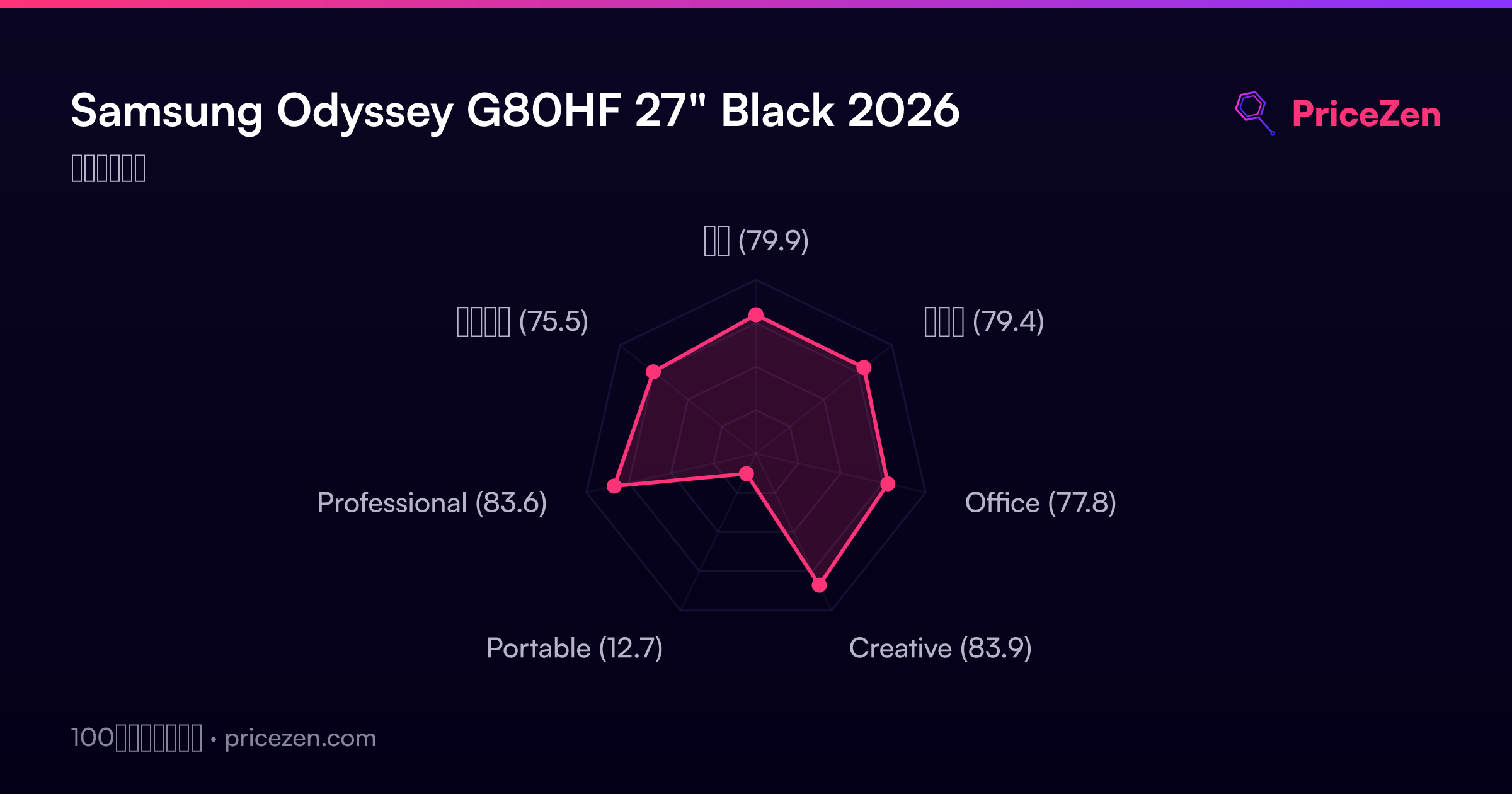
- 総合79.9
- ゲーム79.4
- Office77.8
- Creative83.9
- Portable12.7
- Professional83.6
- エンタメ75.5