Samsung QET Series QE43T 43" Black 2020
The Crystal 4K processor and UHD resolution deliver lifelike images at 300 nits brightness, with an 8ms response time for smooth content playback. Its integrated MagicINFO Lite Player allows easy loading and scheduling of media, while remote management via the MagicINFO server simplifies multi-location control. This display is best for retail or hospitality buyers needing a reliable 16/7 commercial screen with a 3-year onsite warranty.

現在、販売店の最新価格はありません





概要
The 30-Second Version
The Samsung QE43T is a 43-inch 4K commercial display with a genuinely excellent panel and a non-smart design that's perfect for external players like Apple TV. At $466 USD it's a strong value for business signage, backed by a 3-year onsite warranty and 16/7 operation rating. The main risk is quality control, with multiple buyers reporting broken screens on arrival. Buy from a vendor with easy returns and inspect it immediately.
Pros & Cons
長所
- Crisp 4K picture with strong upscaling from the Crystal processor 92nd
- Non-smart design works flawlessly with Apple TV and other external devices
- Built for 16/7 commercial operation with a 3-year onsite warranty
- Integrated MagicINFO Lite player for scheduled content without extra hardware
- Slim bezel and clean design that keeps focus on the content
短所
- 300 nits brightness is weak for bright rooms or window-facing placement
- Quality control issues with units arriving with broken screens or internal defects
- 8ms response time rules out gaming or fast-motion content
- No way to power off via cable remote, which annoys some installers
- Connectivity options are limited compared to other displays in this range
オーナーの声
The Word on the Street
購入者の評価が時間とともにどう変化したか
独自顧客が実際にレビューを書いた時期に基づいています。発売当初の高評価が続いたかどうかがわかります。
書かれたレビュー 12件、2021/09~2026/01:満足 9件、普通 1件、不満 2件
ストア評価全74件:4.1★。 多くの購入者はレビューを書かずに評価だけを付けています。 グラフは書かれたレビュー12件を数えています。
各点は書かれたレビュー1件で、書かれた月に置いています。満足 = 4〜5★、普通 = 3★、不満 = 1〜2★。
実証データ
Performance
The headline spec here is the Crystal 4K processor paired with UHD resolution. That processor handles upscaling, so even 1080p or lower-res content gets cleaned up before it hits the panel. The display itself ranks in the 93rd percentile in our database, which means the panel quality is genuinely one of the best on the market for this category. Colors are accurate and smooth, and the 4K resolution means text, logos, and product shots look crisp from a few feet away.
But the 8ms response time and 300 nits of brightness tell you this is not a speed or HDR machine. The performance ranking sits at the 6th percentile, which sounds brutal, but it's the right trade-off for a signage panel. You don't need 1ms response times to show a menu board or a welcome video. The 300 nits is fine for indoor use in controlled lighting, but it'll struggle near bright windows or in direct sunlight. If you're planning to put this in a sun-drenched storefront, you'll want something brighter.
Specifications
Full Specifications
Display
| Size | 43" |
| Resolution | 3840x2160 (4K UHD) |
| Aspect Ratio | 16:9 |
| Curved | No |
Performance
| Response Time | 8 |
Color & HDR
| Brightness | 300 nits |
Connectivity
| USB-C | 1 |
| Speakers | Yes |
Features
| Weight | 10.8 kg / 23.9 lbs |
vs Competition
The QE43T doesn't really compete with the gaming monitors in our database like the ASUS ROG Strix XG27UCDMG or the Alienware AW2725D. Those are 27-inch QD-OLED panels built for speed and HDR, and they cost significantly more. If you're buying for a desk and you care about refresh rates, response times, or HDR performance, the QE43T is the wrong tool. It's a 43-inch commercial panel with an 8ms response time and no meaningful HDR capability.
Where it does make sense is against other commercial signage options. The Dell UltraSharp U4025QW is a 40-inch ultrawide aimed at productivity, with better connectivity and ergonomics, but it's a different form factor and a different price bracket. The QE43T's real competition is other Samsung commercial displays and budget signage panels from LG and NEC. Against those, the QE43T holds up well on panel quality and warranty, but the quality control complaints and limited connectivity are real differentiators you should weigh carefully.
| Spec | Samsung QET Series QE43T 43" | LG UltraGear 45GX950A-B 45" | ASUS ROG Strix XG27UCDMG 27" | Dell UltraSharp U4025QW 39.7" | Alienware AW-Series AW3425DW 34" | MSI MAG 271QPX QD-OLED E2 27" |
|---|---|---|---|---|---|---|
| Screen Size | 43 | 45 | 27 | 39.70000076293945 | 34 | 27 |
| Resolution | 3840 x 2160 | 5120 x 2160 | 3840 x 2160 | 5120 x 2160 | 3440 x 1440 | 2560 x 1440 |
| Panel Type | - | OLED | OLED | IPS | QD-OLED | QD-OLED |
| Refresh Rate | - | 330 | 240 | 120 | 240 | 240 |
| Response Time Ms | 8 | 0.029999999329447746 | 0.029999999329447746 | 5 | 0.029999999329447746 | 0.029999999329447746 |
| Adaptive Sync | - | FreeSync Premium Pro | FreeSync Premium Pro | Adaptive-Sync | FreeSync Premium Pro | FreeSync Premium Pro |
| Hdr | - | DisplayHDR True Black 400 | DisplayHDR True Black 400 | HDR600 | HDR400 | DisplayHDR True Black 400 |
| Compare | Compare | Compare | Compare | Compare |
| 製品 | Color | 携帯性 | Display | Feature | User Sentiment | Ergonomic | Performance | Connectivity | ユーザー評価 |
|---|---|---|---|---|---|---|---|---|---|
| Samsung QET Series QE43T 43" | 42.1 | 63 | 91.5 | 21.2 | 37.4 | 9.5 | 6.2 | 29.9 | 53.2 |
| LG UltraGear 45GX950A-B 45" Compare | 99.4 | 76.6 | 99.7 | 96.3 | 76.3 | 90.8 | 99.4 | 96.9 | 92 |
| ASUS ROG Strix XG27UCDMG 27" Compare | 96.5 | 57.5 | 97.7 | 85.1 | 99.3 | 90.8 | 97.9 | 81.2 | 98.9 |
| Dell UltraSharp U4025QW 39.7" Compare | 97.9 | 76.6 | 98.6 | 96.3 | 85.5 | 90.8 | 56.1 | 99.3 | 96.8 |
| Alienware AW-Series AW3425DW 34" Compare | 98.9 | 74 | 84.1 | 96.3 | 95.7 | 90.8 | 97.9 | 95.4 | 96.8 |
| MSI MAG 271QPX QD-OLED E2 27" Compare | 99.2 | 57.5 | 73.5 | 85.1 | 95.7 | 90.8 | 97.9 | 81.2 | 98.9 |
価格
Value & Pricing
At $466 USD, the QE43T is priced aggressively for a commercial 4K display. Most signage panels in this size class run higher, and you're getting a 3-year onsite warranty that consumer monitors simply don't include. If you're a small business setting up a lobby display or a tradeshow booth, that warranty alone is worth a chunk of the price.
The catch is the quality control roulette. Multiple buyers report units arriving with broken screens or internal defects, sometimes in undamaged boxes. If you get a good unit, the value is excellent. If you get a bad one, you're dealing with returns and potentially restocking fees. The Canadian pricing at CAD 1,372 is a different story entirely, and at that price you'd want to be very sure about your vendor's return policy before pulling the trigger.
詳細情報
Overview
The Samsung QET Series QE43T is a 43-inch 4K display that's built for a very specific job: sitting in a lobby, conference room, or retail space and showing content all day without complaint. It's not trying to be a gaming monitor or a home theater centerpiece. It's a commercial signage panel with a 16/7 duty rating and a 3-year onsite warranty, which tells you Samsung expects this thing to run for years in a business environment.
What makes it interesting is the non-smart design. A lot of buyers are actively looking for a dumb panel they can plug an Apple TV, a PC, or a media player into without dealing with built-in ads, app stores, or sluggish smart TV interfaces. The QE43T delivers exactly that, and the integrated MagicINFO Lite player means you can also push scheduled content to it without any external device at all. That flexibility is the whole pitch.
At around $466 USD on the street, it's priced like a decent mid-range monitor but built like a commercial display. The 93rd percentile display ranking in our database backs up the fact that the panel itself is a strong point. But the 38th percentile user sentiment score tells a more complicated story, and we'll get into why below.
Common Questions
Q: Is this a smart TV or a monitor?
It's a commercial monitor, not a smart TV. There's no built-in app store or streaming platform interface. You connect external devices like an Apple TV, PC, or media player via HDMI, or you use the integrated MagicINFO Lite player to push scheduled content to the display over your network. This is actually a selling point for many buyers who want a clean panel without smart TV bloat.
Q: Can this display run 24/7?
Samsung rates the QET Series for 16 hours a day, 7 days a week operation, not 24/7. For most business use cases like lobbies, conference rooms, and retail spaces, 16/7 is more than enough. If you need true 24/7 operation, you'll want to look at Samsung's higher-tier commercial displays or panels from NEC and LG that are specifically rated for continuous use.
Q: How bright is the screen, and will it work near windows?
The panel is rated at 300 nits, which is fine for indoor use in controlled lighting conditions. It'll look good in a lobby, conference room, or retail space without direct sunlight hitting the screen. If you're placing it near large windows or in a bright storefront, 300 nits will likely wash out and you should consider a high-brightness signage panel rated at 700 nits or higher.
Q: What's the warranty situation?
Samsung includes a 3-year onsite commercial warranty with the QET Series. That means if something goes wrong, a technician comes to your location rather than you shipping the unit back. This is a significant advantage over consumer monitors, which typically only carry 1-year warranties. Just make sure you buy from an authorized Samsung commercial reseller to ensure the warranty is valid.
Who Should Skip This
Skip this if you're a gamer or a home user looking for a big desktop monitor. The 8ms response time and 60Hz panel will feel sluggish for fast-paced games, and the 300 nits brightness won't do HDR content any favors. You'd be much happier with something like the ASUS ROG Strix XG27UCDMG or the Alienware AW2725D if gaming is the priority, even though they're smaller and pricier.
Also skip it if you need to mount this in a bright environment or outdoors. The 300 nits rating is simply not enough for direct sunlight or even strong ambient light. Look for a high-brightness commercial panel rated at 700 nits or above for those scenarios. And if you're in Canada looking at the CAD 1,372 price, that's a tough sell given the quality control complaints. At that price you have better options with more reliable out-of-box experiences.
Verdict
If you're running a small business and need a reliable 4K display for a lobby, conference room, or retail space, the QE43T is a solid pick at the US price. The panel quality is genuinely good, the non-smart design is a feature for anyone using external players, and the 3-year onsite warranty gives you real peace of mind. Just buy from a vendor with a good return policy and inspect the unit immediately on arrival.
If you're a home user looking for a big monitor for your desk or a TV replacement for your living room, this probably isn't it. The 300 nits brightness and 8ms response time will feel limiting, and the limited connectivity means you'll be juggling adapters. You'd be better served by a proper consumer monitor or TV in this price range, especially if you want HDR or faster response for any kind of gaming or video editing.
Usage Scores
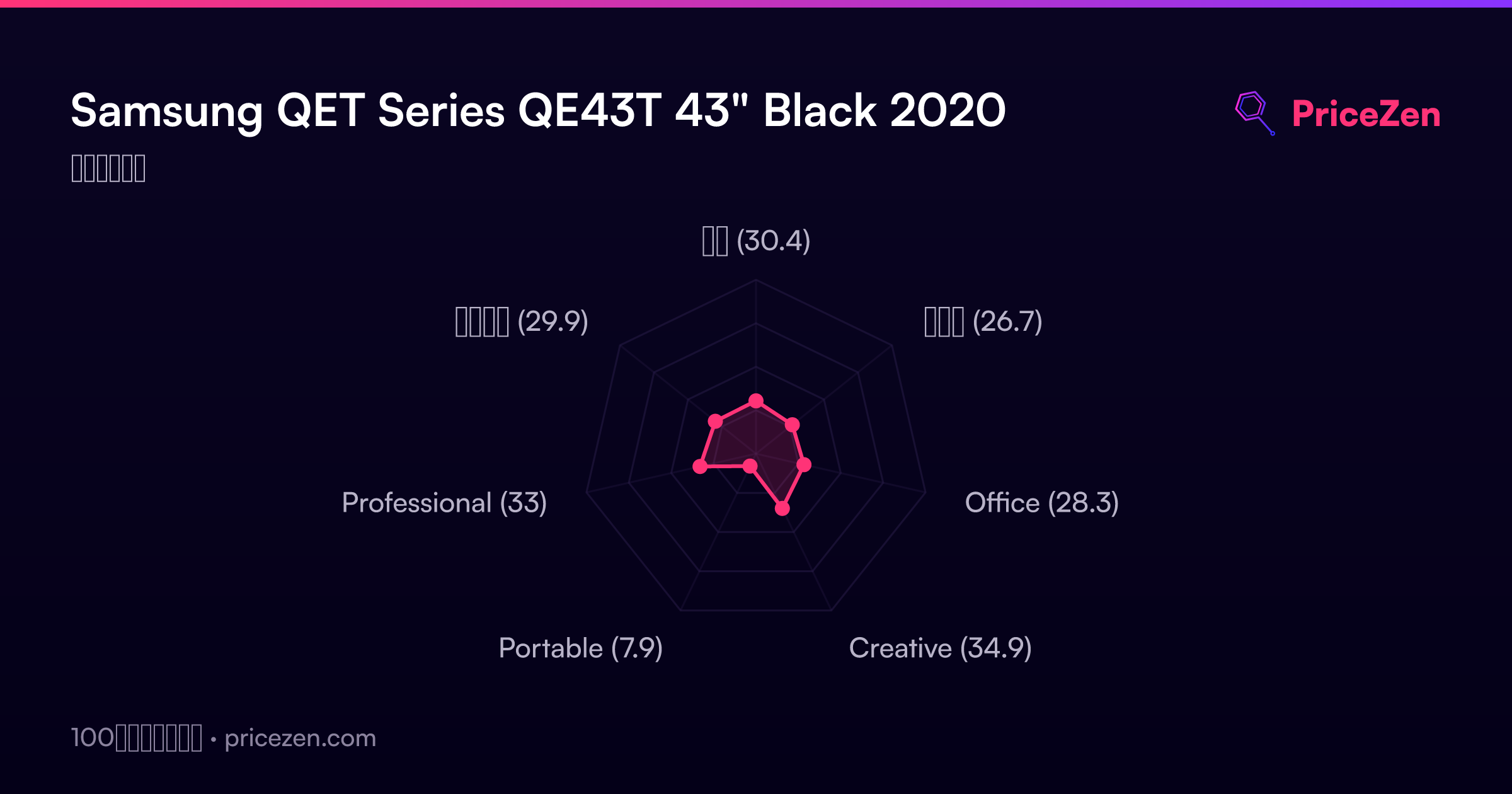
- 総合30.4
- ゲーム26.7
- Office28.3
- Creative34.9
- Portable7.9
- Professional33
- エンタメ29.9