Acer PM1 Series PM161QT bmiuuux 15.6" Black 2024
The 15.6-inch IPS touchscreen with 10-point multi-touch and 1920x1080 resolution at 60Hz makes this a practical second display for on-the-go work, while Adaptive-Sync and FreeSync reduce screen tearing during video playback. Its 1238g weight and dual USB-C 3.2 Gen 1 ports with 15W power delivery simplify connection to laptops and phones without extra adapters. Best for mobile professionals and students who need a touch-enabled portable monitor for presentations, note-taking, or extending a laptop workspace in meetings or classrooms.










概要
The 30-Second Version
The Acer PM161QT is a portable 15.6 inch touchscreen that nails portability and connectivity but falls flat on display quality. 200 nits brightness and weak color put it near the bottom of our rankings. It's worth considering at the low end of its price range, around USD 96, but skip it if you care about visuals.
Pros & Cons
長所
- Touchscreen works great for presentations and quick navigation 98th
- Single USB-C cable handles video, touch, and power 77th
- Lightweight and compact, easy to toss in a bag
- Dual USB-C ports give you flexibility on which side to plug in
短所
- 200 nits brightness is rough in any well-lit room
- Color accuracy is near the bottom of our database
- Gaming performance is basically a no-go
- Speakers are tiny 1W drivers, expect laptop-level audio at best
オーナーの声
購入者の評価が時間とともにどう変化したか
独自顧客が実際にレビューを書いた時期に基づいています。発売当初の高評価が続いたかどうかがわかります。
書かれたレビュー 1件、2025年9月:星なし 1件
ストア評価全50件:4.1★。 多くの購入者はレビューを書かずに評価だけを付けています。 グラフは書かれたレビュー1件を数えています。
各点は書かれたレビュー1件で、書かれた月に置いています。満足 = 4〜5★、普通 = 3★、不満 = 1〜2★。
実証データ
Performance
This thing is not built for speed. The 60Hz refresh rate and 6ms response time land it in the bottom quarter of our performance database, and the gaming score of 24 out of 100 tells you everything. FreeSync is here, which is nice, but it's more of a checkbox than a feature on a panel this dim. The 200 nits brightness is the real problem. In a bright room or near a window, you'll be squinting. Color coverage is basic 8-bit with 16.7 million colors, which sounds fine until you see it next to almost any modern laptop screen. For office work and touch input, it's responsive enough. For anything else, it struggles.
Specifications
Full Specifications
Display
| Size | 15.6" |
| Resolution | 1920x1080 (Full HD) |
| Panel Type | IPS |
| Aspect Ratio | 16:9 |
| Curved | No |
| Screen Finish | matte |
Performance
| Refresh Rate | 60 Hz |
| Response Time | 6 |
| Adaptive Sync | FreeSync |
Color & HDR
| Brightness | 200 nits |
| Color Depth | 8-bit |
Connectivity
| HDMI Ports | 1 |
| DisplayPort | 0 |
| USB-C | 2 |
| Speakers | Yes |
| Headphone Jack | Yes |
Ergonomics
| Height Adjustable | No |
| Tilt | Yes |
| VESA Mount | 75x75 |
Features
| Webcam | No |
| Touchscreen | Yes |
| Power | 15 |
| Weight | 1.2 kg / 2.7 lbs |
vs Competition
Stacked against the competition, the PM161QT is a niche pick. The ASUS TUF Gaming VG34VQL1B and LG UltraGear 27GS75Q-B are in a completely different league for gaming and color, but they're also big, heavy, and not touchscreens. The Dell S2725QC and HP OMEN 27qs G2 are better all-around displays if you're staying at a desk. What the Acer offers that none of those do is a 15.6 inch touchscreen you can power from a laptop USB-C port. If portability and touch are your top two priorities, this wins by default. If you want a monitor that looks good, any of those competitors will embarrass it.
| Spec | Acer PM1 Series PM161QT bmiuuux 15.6" | Gigabyte AORUS FO32U2 32" | LG UltraGear 39" | BenQ PD3220U 32" | MSI MAG 274URFW 27" | ASUS ProArt Display PA32KCX 32" |
|---|---|---|---|---|---|---|
| Screen Size | 15.6 | 32 | 39 | 32 | 27 | 32 |
| Resolution | 1920 x 1080 | 3840 x 2160 | 3440 x 1440 | 3840 x 2160 | 3840 x 2160 | 7680 x 4320 |
| Panel Type | IPS | OLED | OLED | IPS | IPS | Mini-LED |
| Refresh Rate | 60 | 240 | 240 | 60 | 160 | 60 |
| Response Time Ms | 6 | 0.03 | 0.03 | 5 | 0.5 | 5 |
| Adaptive Sync | FreeSync | FreeSync Premium Pro | FreeSync Premium Pro | - | FreeSync Premium | Adaptive-Sync |
| Hdr | - | DisplayHDR True Black 400 | DisplayHDR True Black 400 | HDR10 | HDR | Dolby Vision |
| Compare | Compare | Compare | Compare | Compare |
| 製品 | Color | 携帯性 | Display | Feature | Ergonomic | Performance | Connectivity | ユーザー評価 |
|---|---|---|---|---|---|---|---|---|
| Acer PM1 Series PM161QT bmiuuux 15.6" | 0.8 | 98 | 21.4 | 55.4 | 47.2 | 22.4 | 77.2 | 46.9 |
| Gigabyte AORUS FO32U2 32" Compare | 80 | 62.8 | 99 | 85 | 90.8 | 97.9 | 87.5 | 92 |
| LG UltraGear 39" Compare | 63.4 | 49.4 | 84.1 | 96.3 | 66.9 | 97.9 | 81.1 | 0 |
| BenQ PD3220U 32" Compare | 88.6 | 81.3 | 95.1 | 85 | 90.8 | 22.4 | 96.9 | 0 |
| MSI MAG 274URFW 27" Compare | 91.8 | 57.4 | 87 | 85 | 90.8 | 90.8 | 81.1 | 51.2 |
| ASUS ProArt Display PA32KCX 32" Compare | 99.8 | 76.5 | 100 | 85 | 90.8 | 35.7 | 96.9 | 6.8 |
価格
Value & Pricing
Pricing is all over the place. In the US, we're seeing listings from USD 96 to USD 318, which is a massive spread for the same panel. At the low end, around USD 96, this is a reasonable buy if you need a portable touchscreen and don't care about color. At USD 318, you're getting into territory where better portable monitors with brighter panels exist. The CAD spread is tighter, CAD 188 to CAD 220, and the lower end of that range feels about right. Shop around before you commit, the deal you get depends heavily on which store you land on.
価格履歴
詳細情報
Overview
The Acer PM161QT is a 15.6 inch 1080p IPS touchscreen built for travel. It weighs 1238g, runs off a single USB-C cable, and folds into a bag without much fuss. The feature set is genuinely impressive for the size, with 10-point touch, FreeSync, and dual USB-C ports.
But the display itself is where corners got cut. 200 nits of brightness and an 800:1 contrast ratio put it near the bottom of our color rankings. It's fine for spreadsheets and Slack, but don't expect it to make anything look pretty.
Common Questions
Q: Can I power this monitor and get video from a single cable?
Yes, one USB-C cable can handle video, touch input, and up to 15W of power, as long as your laptop's USB-C port supports DisplayPort Alt Mode.
Q: Does the touchscreen work with Macs?
The touchscreen works over USB-C with macOS, but macOS itself has limited touch support, so expect basic tap and drag rather than full multi-touch gestures.
Q: Is this bright enough to use outside?
No. At 200 nits, it's too dim for outdoor use or bright rooms. You'll want a shaded or indoor environment to see it clearly.
Who Should Skip This
Skip this if you need a monitor for gaming, photo editing, or anything color-critical. The 24 out of 100 gaming score and bottom-tier color performance make it a poor fit. Also skip it if you work near windows or in bright offices, 200 nits will have you craning your neck all day. And if you don't need touch, there are brighter, better-looking portable monitors for similar money.
Verdict
Buy this if you need a portable second screen with touch and you'll mostly use it indoors in controlled lighting. It's a solid travel companion for productivity, note-taking, or running a quick demo. Just know that the display quality is the trade-off. If you're a designer, gamer, or anyone who cares about how colors look, this is not your monitor.
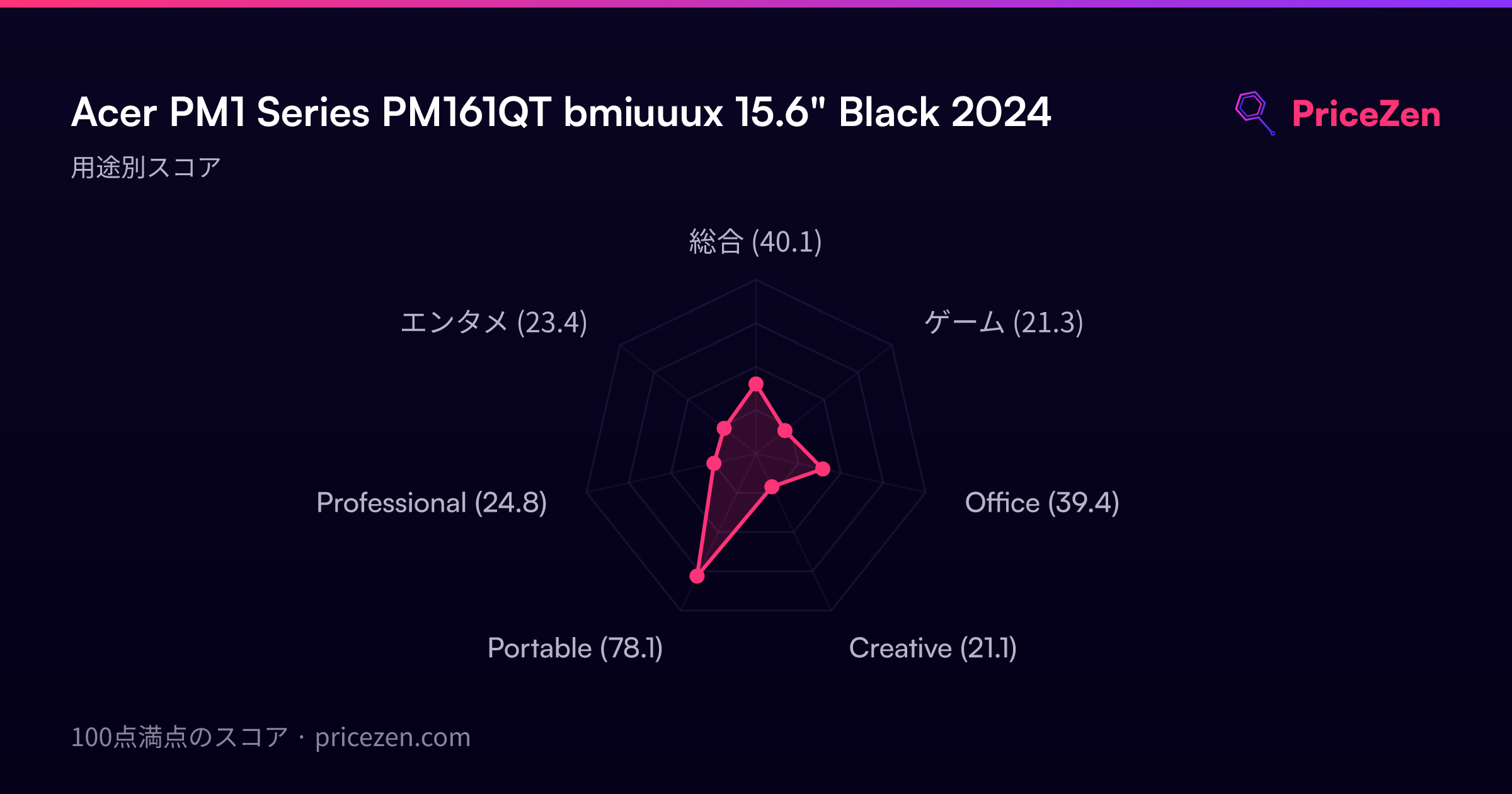
Usage Scores
- 総合40.1
- ゲーム21.3
- Office39.4
- Creative21.1
- Portable78.1
- Professional24.8
- エンタメ23.4