Samsung ViewFinity S80UD 37" Black 2025
The 37-inch IPS panel delivers 4K UHD resolution at 350 nits with 1.07 billion colors and HDR10, while the 3000:1 contrast ratio and 178-degree viewing angles keep images consistent from any position. A USB-C port handles 90W charging and data transfer simultaneously, and the built-in KVM switch supports split-screen, PIP, or PBP for multitasking. This monitor suits creative professionals and office workers who need a large, ergonomic workspace with tool-free setup and wall-mount flexibility.

現在、販売店の最新価格はありません


概要
The 30-Second Version
A stunning 37-inch 4K panel with business features that's held back by a 60Hz refresh rate and zero customer feedback. Great for spreadsheets, terrible for anything that moves fast.
Pros & Cons
長所
- Gorgeous 37-inch 4K IPS panel with 3000:1 contrast ratio 95th
- USB-C with 90W power delivery plus built-in LAN port 85th
- Built-in KVM switch for controlling two machines 73rd
- Tool-free stand with height, tilt, and swivel 69th
短所
- 60Hz refresh rate feels dated in 2025
- 5ms response time causes visible ghosting
- No customer reviews anywhere, which is a red flag
- 190W power draw is hefty for a productivity monitor
オーナーの声
The Word on the Street
購入者の評価が時間とともにどう変化したか
独自顧客が実際にレビューを書いた時期に基づいています。発売当初の高評価が続いたかどうかがわかります。
実証データ
Performance
The display quality is the star here. 350 nits of brightness, 10-bit color with 1.07 billion colors, and a 3000:1 contrast ratio on an IPS panel. That contrast number is unusually high for IPS, which typically sits around 1000:1, so Samsung is doing something clever with the backlight. Color accuracy lands in the 83rd percentile, which is strong but not class-leading. The real surprise is how good this panel looks for the price. You're getting near-professional color performance without paying Dell UltraSharp money. The 60Hz refresh rate and 5ms response time are fine for productivity but feel sluggish if you're used to anything faster. Scrolling through long documents has a slight smear to it that you won't unsee once you notice it.
Specifications
Full Specifications
Display
| Size | 37" |
| Resolution | 3840x2160 (4K UHD) |
| Panel Type | IPS |
| Aspect Ratio | 16:9 |
| Curved | No |
Performance
| Refresh Rate | 60 Hz |
| Response Time | 5 |
Color & HDR
| Brightness | 350 nits |
| Color Depth | 1.07 billion colors |
| HDR | HDR10 |
| HDR Support | HDR10 |
Connectivity
| HDMI Ports | 1 |
| DisplayPort | 1 |
| USB-C | 1 |
| Speakers | No |
| Headphone Jack | No |
Ergonomics
| Height Adjustable | Yes |
| Tilt | Yes |
| Swivel | Yes |
| Pivot | No |
| VESA Mount | 100x100 |
Features
| Webcam | No |
| PIP/PBP | Yes |
| Power | 190 |
| Weight | 8.9 kg / 19.6 lbs |
vs Competition
The Dell UltraSharp U4025QW is the obvious alternative if you want a proven productivity workhorse with better color accuracy and a more established track record, though it costs significantly more. The LG UltraGear 45GX950A-B and ASUS ROG Strix XG27UCDMG are gaming monitors first, with OLED panels and high refresh rates that make the Samsung look frozen in time, but they're smaller or more expensive and lack the business-focused features like KVM and LAN. The MSI MAG 271QPX QD-OLED is a 27-inch panel that absolutely destroys the Samsung on performance but gives up a lot of screen real estate. For pure productivity on a budget, the Samsung is compelling. For anything else, look elsewhere.
| Spec | Samsung ViewFinity S80UD 37" | LG UltraGear 45GX950A-B 45" | ASUS ROG Strix XG27UCDMG 27" | Dell UltraSharp U4025QW 39.7" | Alienware AW-Series AW3425DW 34" | MSI MAG 271QPX QD-OLED E2 27" |
|---|---|---|---|---|---|---|
| Screen Size | 37 | 45 | 27 | 39.7 | 34 | 27 |
| Resolution | 3840 x 2160 | 5120 x 2160 | 3840 x 2160 | 5120 x 2160 | 3440 x 1440 | 2560 x 1440 |
| Panel Type | IPS | OLED | QD-OLED | IPS | QD-OLED | QD-OLED |
| Refresh Rate | 60 | 330 | 240 | 120 | 240 | 240 |
| Response Time Ms | 5 | 0.03 | 0.03 | 5 | 0.03 | 0.03 |
| Adaptive Sync | - | FreeSync Premium Pro | FreeSync Premium Pro | Adaptive-Sync | FreeSync Premium Pro | FreeSync Premium Pro |
| Hdr | HDR10 | DisplayHDR True Black 400 | DisplayHDR True Black 400 | HDR600 | HDR400 | DisplayHDR True Black 400 |
| Compare | Compare | Compare | Compare | Compare |
| 製品 | Color | 携帯性 | Display | Feature | User Sentiment | Ergonomic | Performance | Connectivity |
|---|---|---|---|---|---|---|---|---|
| Samsung ViewFinity S80UD 37" | 68.8 | 49.3 | 95.1 | 85 | 4.2 | 73.4 | 22.4 | 62.1 |
| LG UltraGear 45GX950A-B 45" Compare | 99.4 | 76.5 | 99.7 | 96.3 | 76.6 | 90.7 | 99.4 | 96.9 |
| ASUS ROG Strix XG27UCDMG 27" Compare | 96.5 | 57.3 | 97.7 | 85 | 99.3 | 90.7 | 97.9 | 81 |
| Dell UltraSharp U4025QW 39.7" Compare | 97.9 | 76.5 | 98.6 | 96.3 | 85.4 | 90.7 | 56.1 | 99.3 |
| Alienware AW-Series AW3425DW 34" Compare | 98.9 | 73.9 | 84.1 | 96.3 | 95.7 | 90.7 | 97.9 | 95.3 |
| MSI MAG 271QPX QD-OLED E2 27" Compare | 99.2 | 57.3 | 73.4 | 85 | 95.7 | 90.7 | 97.9 | 81 |
価格
Value & Pricing
At $580 to $604 USD, this is a solid deal for a 37-inch 4K panel with USB-C and KVM. You're getting a lot of screen for the money. But the complete lack of customer reviews, zero ratings, and a social proof score in the 4th percentile makes this feel like a gamble. Samsung's 3-year warranty helps, but you're essentially buying on spec sheet faith alone. If the panel quality holds up, it's a bargain. If it doesn't, you're stuck with a very large paperweight.
詳細情報
Overview
Samsung's ViewFinity S80UD is a 37-inch 4K IPS panel aimed squarely at desk jockeys who want more screen real estate without going full ultrawide. The pitch is simple: a big, color-accurate canvas with USB-C charging and a built-in KVM switch. And for the most part, it delivers. The display itself is genuinely impressive, landing in the 96th percentile for our database, which means it's one of the best panels you can buy right now in terms of raw visual quality.
But here's the thing. This is a 60Hz monitor in a world where even budget gaming screens are pushing 144Hz and beyond. If you're editing photos, writing code, or drowning in spreadsheets, you probably won't care. If you want to game on the side, this isn't your monitor. The 5ms response time and 60Hz refresh rate put it in the bottom fifth of our performance rankings. That's not a typo.
Common Questions
Q: Can this monitor charge my laptop over USB-C?
Yes. The USB-C port delivers up to 90W of power, which is enough for most ultrabooks and even some smaller workstations. You'll still need a separate power brick for beefy gaming laptops.
Q: Is this good for gaming?
No. The 60Hz refresh rate and 5ms response time are fine for casual or turn-based games, but anything fast-paced will look blurry and feel laggy. Get a proper gaming monitor if that's your priority.
Q: Does the stand come assembled?
Samsung's Easy Setup Stand is tool-free. You snap it together with a button press, no screwdriver needed. Height, tilt, and swivel are all adjustable once it's set up.
Who Should Skip This
If you're looking for a gaming monitor, this isn't it. Go get the LG UltraGear 45GX950A-B or the ASUS ROG Strix XG27UCDMG instead. If you need proven reliability with actual customer reviews backing it up, the Dell UltraSharp U4025QW is the safer bet. And if you're on a tight budget and just need a basic 4K screen, there are cheaper 32-inch options that will do the job without the premium features you might not use.
Verdict
The ViewFinity S80UD is a niche product that nails its niche. If you want a big, beautiful 4K display for office work, photo editing, or coding, and you don't care about gaming, this is a strong buy at under $600. The USB-C with 90W charging and built-in KVM make it genuinely useful for multi-device setups. But the total absence of user reviews is concerning, and the 60Hz refresh rate will annoy anyone who's used to smoother displays. Buy it for the panel, not the performance.
Usage Scores
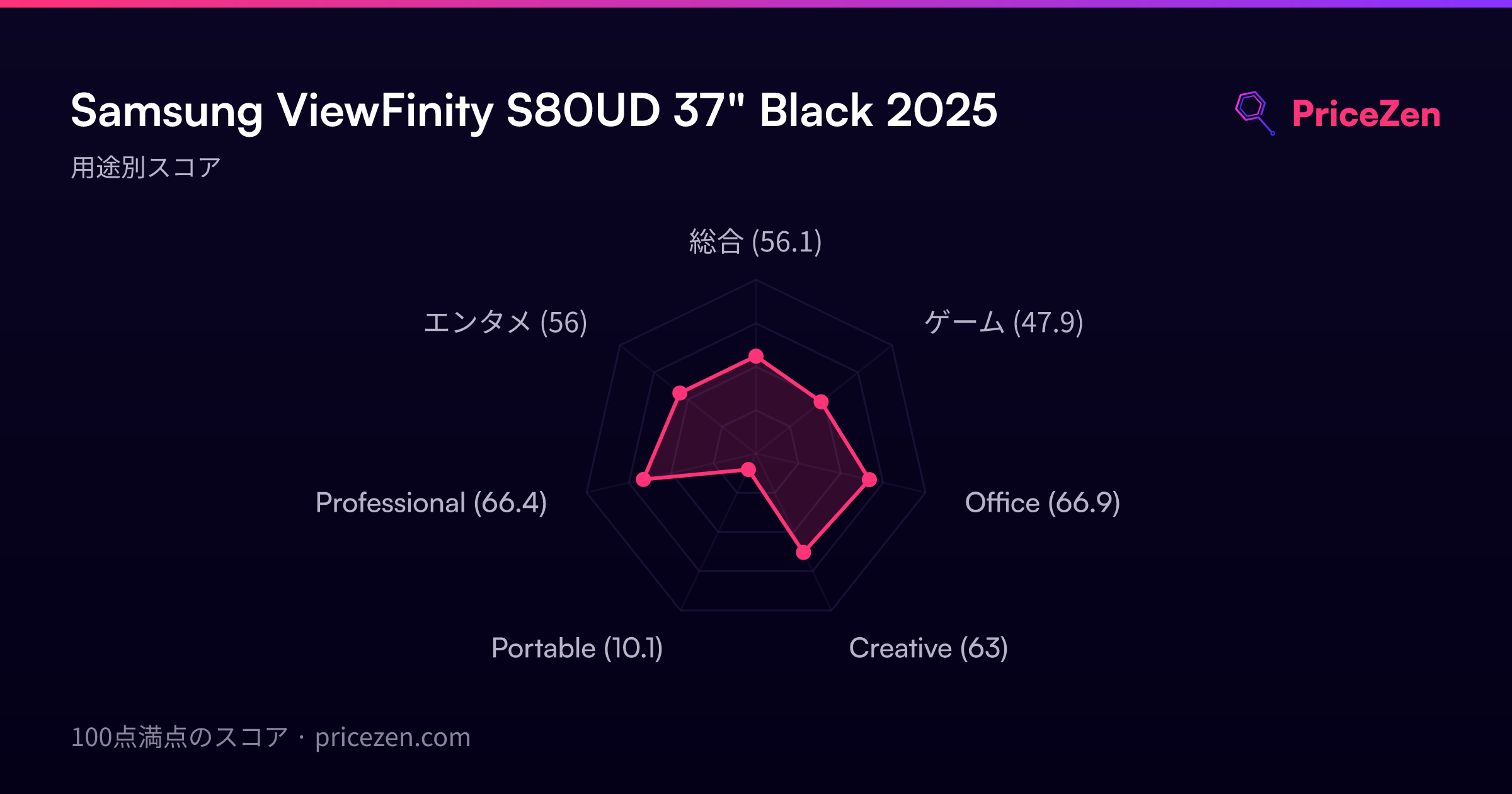
- 総合56.1
- ゲーム47.9
- Office66.9
- Creative63
- Portable10.1
- Professional66.4
- エンタメ56