Acer V206HQL Cbmp 19.5" Black

VAパネルで、暗い部屋でも深いコントラスト 11月29日に確認済み
28/100 総合スコア
- Screen
- 19.5"
- Resolution
- 1920 x 1080
- Panel
- VA
- Refresh
- 60 Hz
- Response time
- 5 ms
1店舗の価格を比較
安い順。新品・整備済み品・バンドルのオファーは分けて表示するので、同じ条件どうしで比較できます。
| 店舗 | 販売元 | カラーと状態 | 価格 | 最安との差 | 最終確認 | リンク |
|---|---|---|---|---|---|---|
| 新品1件の価格単品 | ||||||
| 過去7日間は確認していないため、これらの価格は変わっている可能性があります | ||||||
| Amazon | マーケットプレイス出品者 | 記載なし | ¥88,802 | 11月3日 | 店舗へ | |
 出典: PriceZen, 2026年11月3日に確認
過去7日以内に確認した価格を「現在の価格」としています。 「マーケットプレイス出品者」とは、その店舗自身ではなく、店舗上の第三者の出品者を指します。
価格履歴
その日に確認その日は未確認、オファーは継続中
出典: PriceZen, checked 2026年11月3日









概要
The 30-Second Version
The Acer V206HQL Cbmp is a compact 19.5 inch 1080p VA monitor built for basic office work and tight spaces. It ranks in the 84th percentile for compactness but just 22nd for performance, with a 60Hz refresh rate and 250 nits of brightness. US pricing ranges from USD 140 to USD 280, and it's only worth considering at the low end. Buy it as a cheap second screen, not as a primary display.
Pros & Cons
長所
- Compact 19.5 inch size fits tight desks and ranks in the 84th percentile for compactness 84th
- Full HD 1920 x 1080 resolution on a small panel means sharp text for office work
- VA panel with 100,000,000:1 dynamic contrast ratio gives decent dark scene depth
- VESA 100x100 mount support makes it easy to wall mount or use a monitor arm
- DisplayPort and VGA inputs cover both modern and legacy devices
短所
- 60Hz refresh rate and 5ms response time put it in the 22nd percentile for performance
- 250 nits brightness is dim and lands in the 16th percentile for color
- Built-in speakers are low wattage and sound tinny based on the Q&A data
- Connectivity is limited, sitting in the 30th percentile with no HDMI port
- Entertainment score of 11.7 out of 100 makes it a poor choice for movies and games
実証データ
Performance
The performance story here is pretty simple. You get a 60Hz refresh rate and a 5ms response time, which puts this panel in the 22nd percentile for performance overall. That's not a typo. This is a slow monitor by modern standards, but for office work and web browsing, it's perfectly fine. You won't notice the response time when you're reading a PDF or moving a window around. You will notice it if you try to play a fast-paced shooter, but that's not what this thing is for.
The VA panel gives you a 100,000,000:1 dynamic contrast ratio, which sounds impressive until you realize it's a marketing number. What it means in practice is that dark scenes in movies will look deeper than they would on a cheap TN panel. The 250 nits of brightness is on the dim side, landing in the 16th percentile for color. In a bright room with lots of windows, you'll be cranking the brightness to max and wishing for more. In a dim office or a basement setup, it's fine.
Specifications
Full Specifications
Display
| Size | 19.5" |
| Resolution | 1920x1080 (Full HD) |
| Panel Type | VA |
| Aspect Ratio | 16:9 |
| Curved | No |
Performance
| Refresh Rate | 60 Hz |
| Response Time | 5 |
Color & HDR
| Brightness | 250 nits |
| Color Depth | 16.7 Million |
Connectivity
| HDMI Ports | 0 |
| DisplayPort | 1 |
| USB-C | 0 |
| Speakers | Yes |
Ergonomics
| Height Adjustable | No |
| Tilt | Yes |
| Swivel | No |
| Pivot | No |
| VESA Mount | 100x100 |
Features
| Webcam | No |
| Touchscreen | No |
| Power | 19 |
| Weight | 3.0 kg / 6.5 lbs |
vs Competition
Stacked against the competition in our database, this Acer is playing a different game entirely. The LG UltraGear 27G810A-B and MSI MAG 272QPW QD-OLED are gaming monitors with high refresh rates and much larger panels. They're also significantly more expensive. The Dell S2725QC is a 27 inch 4K display aimed at productivity, and it's going to beat this Acer on color accuracy and screen real estate without breaking a sweat. The HP OMEN 27qs G2 is another gaming-focused option that leaves the V206HQL in the dust on performance.
But here's the thing: none of those monitors fit on a tiny desk the way this 19.5 inch panel does. If you're comparing based on raw specs, the Acer loses every time. If you're comparing based on footprint and price, it's a different conversation. The ASUS TUF Gaming VG34VQL1B is a 34 inch ultrawide that's basically the opposite of this product. The Acer's only real advantage is that it's small, cheap, and simple. For a lot of office setups, that's enough.
| Spec | Acer V206HQL Cbmp 19.5" | LG UltraGear 39" | BenQ PD3220U 32" | Samsung Odyssey Ark 2nd Gen 55" | Gigabyte M Series M32U 31.5" | Dell UltraSharp U4320Q 27" |
|---|---|---|---|---|---|---|
| Screen Size | 19.5 | 39 | 32 | 55 | 31.5 | 27 |
| Resolution | 1920 x 1080 | 3440 x 1440 | 3840 x 2160 | 3840 x 2160 | 3840 x 2160 | 3840 x 2160 |
| Panel Type | VA | OLED | IPS | Mini-LED | IPS | IPS |
| Refresh Rate | 60 | 240 | 60 | 165 | 144 | 60 |
| Response Time Ms | 5 | 0.03 | 5 | 1 | 1 | 5 |
| Adaptive Sync | - | FreeSync Premium Pro | - | FreeSync Premium Pro | FreeSync Premium Pro | - |
| Hdr | - | DisplayHDR True Black 400 | HDR10 | HDR10+ | HDR400 | HDR400 |
| Compare | Compare | Compare | Compare | Compare |
| 製品 | Color | 携帯性 | Display | Feature | Ergonomic | Performance | Connectivity |
|---|---|---|---|---|---|---|---|
| Acer V206HQL Cbmp 19.5" | 15.4 | 83.9 | 11.7 | 21.1 | 47.1 | 22.3 | 28.6 |
| LG UltraGear 39" Compare | 63.3 | 49.3 | 84 | 96.3 | 66.8 | 97.9 | 81 |
| BenQ PD3220U 32" Compare | 88.5 | 81.3 | 95.1 | 85 | 90.7 | 22.3 | 96.9 |
| Samsung Odyssey Ark 2nd Gen 55" Compare | 98.4 | 20.7 | 91.5 | 96.3 | 29.9 | 77 | 81 |
| Gigabyte M Series M32U 31.5" Compare | 89.9 | 62.8 | 87 | 85 | 73.4 | 72.6 | 87.4 |
| Dell UltraSharp U4320Q 27" Compare | 91 | 82.7 | 87 | 85 | 90.7 | 22.3 | 96.9 |
価格
Value & Pricing
Pricing on this monitor is all over the place depending on where you look. In the US, we're seeing listings from USD 140 to USD 280, which is a pretty wide spread for what is essentially a budget office display. The lower end of that range feels about right. At USD 140, you're getting a compact 1080p VA panel with a VESA mount and dual inputs. That's a fair deal for a second monitor or a basic workstation screen.
At USD 280, you're getting into territory where you can find 24 inch or even 27 inch IPS panels with better color and brightness. The Newegg listing for a used, like-new unit is where the value proposition gets interesting, since you're likely to land closer to the bottom of that price range. If you can snag one for under USD 150, it's a reasonable buy. Anything more than that and you should probably look at what else is out there.
詳細情報
Overview
The Acer V206HQL Cbmp is a 19.5 inch VA panel that feels like it was designed for a very specific job: being a cheap, dependable second screen in an office or a compact setup at home. It's not chasing gaming glory or color-critical work. It's chasing a price point and a small footprint, and on that front it mostly delivers. The 1920 x 1080 resolution on a panel this size means text is actually pretty crisp, which is a nice bonus for spreadsheets and email.
We pulled this one from our database because it's a good example of a monitor that knows what it isn't. The specs are modest. 60Hz, 5ms response time, 250 nits of brightness. Nothing here is going to blow your hair back. But the compact size lands it in the 84th percentile for that category, which means it's genuinely good at being small. If you're tight on desk space, that matters more than a flashy spec sheet.
Acer is selling this as a no-nonsense display with VGA and DisplayPort inputs, built-in speakers, and a VESA mount. The tilt range is decent at -5 to 25 degrees. It's a monitor for people who need a screen, not an experience. And honestly, there's a real market for that.
Common Questions
Q: How good are the built-in speakers?
The built-in speakers are a weak point. The monitor draws 19W total, which doesn't leave much power for audio, and the Q&A data suggests the sound is thin and tinny. If you care about audio quality at all, plan on using external speakers or headphones. The speakers are fine for system sounds and the occasional video call, but that's about it.
Q: Does this monitor have HDMI?
No, it doesn't. The V206HQL Cbmp comes with VGA and DisplayPort inputs only. That's a bit of a limitation in 2024, since HDMI is the most common connection on laptops and streaming devices. If your device only has HDMI out, you'll need an adapter or a different monitor. The connectivity score sits in the 30th percentile for this reason.
Q: Is this monitor good for gaming?
Not really. The 60Hz refresh rate and 5ms response time put it in the 22nd percentile for performance in our database. Casual or turn-based games will be playable, but fast-paced shooters or competitive titles will feel sluggish and blurry. If gaming is a priority, look for something with a higher refresh rate, like the LG UltraGear or HP OMEN models in our comparison data.
Q: Can I mount this monitor on a wall or monitor arm?
Yes. The V206HQL Cbmp has a VESA 100x100 mount pattern, which is the most common standard. You can easily attach it to a wall mount or a monitor arm to free up desk space. The built-in stand also tilts from -5 to 25 degrees, which is a decent range for adjusting your viewing angle.
Who Should Skip This
Skip this monitor if you're a gamer, a content creator, or anyone who cares about color accuracy and brightness. The 60Hz refresh rate and 5ms response time will frustrate anyone used to a modern gaming display, and the 250 nits of brightness means it'll struggle in bright rooms. The entertainment score of 11.7 out of 100 is one of the lowest we've seen for that category.
If you need a primary display for photo editing, video work, or even just watching Netflix in a well-lit room, look at something like the Dell S2725QC instead. It's a 27 inch 4K panel with much better color and brightness. You'll pay more, but you'll get a monitor that can actually handle those tasks. The Acer is a utility screen, not a daily driver for media consumption.
Verdict
If you need a compact second monitor for email, documents, or a point-of-sale setup, the Acer V206HQL Cbmp is a perfectly serviceable choice. The 1080p resolution on a 19.5 inch panel means text is sharp, and the VESA mount gives you flexibility. Just make sure you're paying closer to USD 140 than USD 280. At the lower price, it's a sensible buy for a basic workstation.
If you're looking for a primary display for gaming, photo editing, or watching movies, this is not the monitor for you. The 60Hz refresh rate, dim panel, and weak speakers make it a poor fit for entertainment. The entertainment score of 11.7 out of 100 in our database tells the story. This is a utility monitor, not a lifestyle monitor. Buy it for what it is, not what you wish it were.
Usage Scores
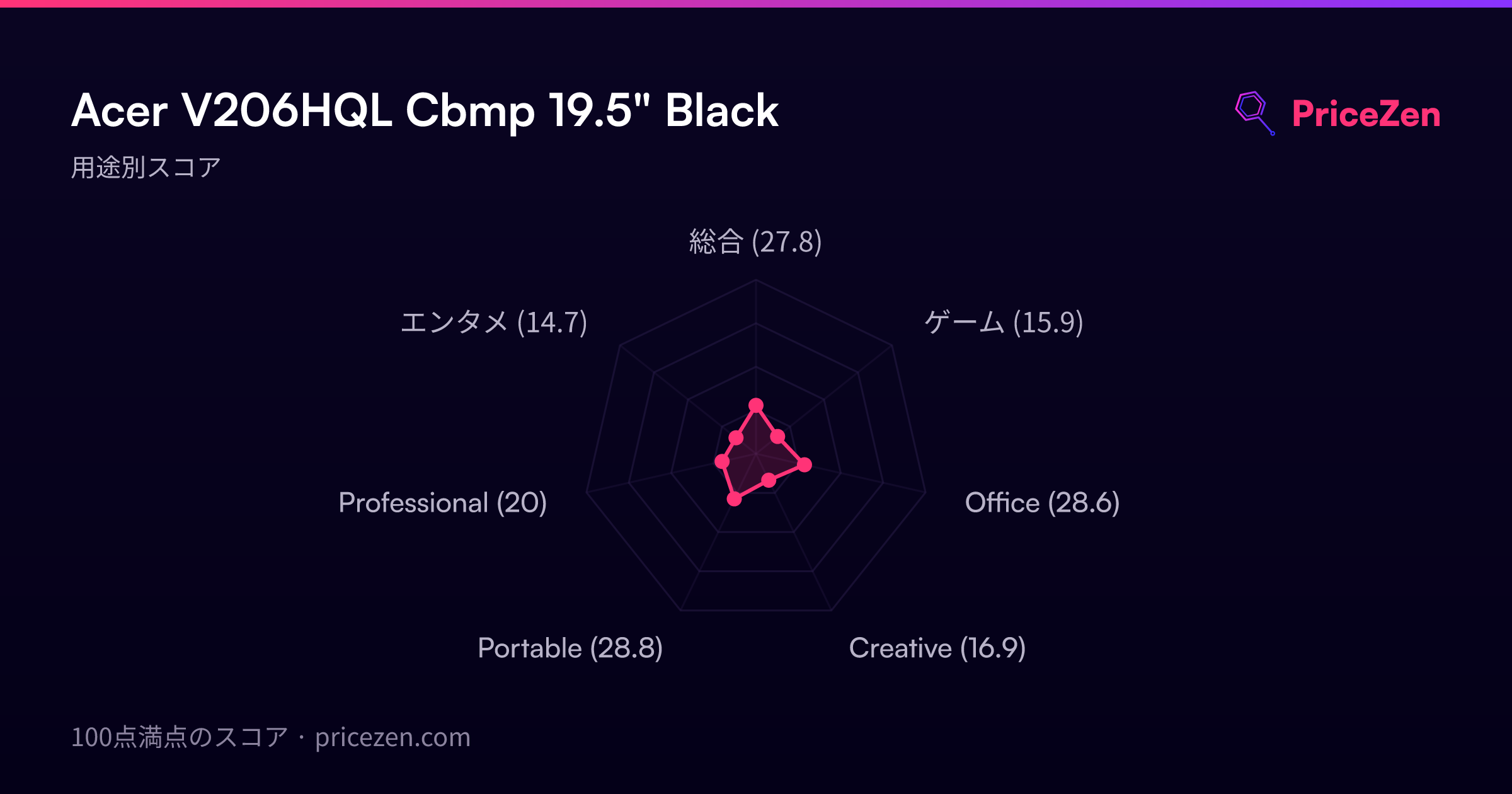
- 総合27.8
- ゲーム15.9
- Office28.6
- Creative16.9
- Portable28.8
- Professional20
- エンタメ14.7