Acer KB272 UM.HK2AA.E02 27" Black 2023
The 100Hz refresh rate and 1ms VRB response time on its 27-inch IPS panel provide smooth, tear-free visuals through AMD FreeSync, making motion far clearer than standard 60Hz office displays. Its zero-frame design and VESA mount compatibility allow for a clean, space-saving multi-monitor setup, while the inclusion of a legacy VGA port adds flexibility for older systems. This monitor is best for home office users and casual gamers who want a fluid, flicker-free experience on a budget without needing high brightness or wide color gamut.










概要
The 30-Second Version
The Acer KB272 is a budget 27-inch 1080p monitor with a smooth 100Hz IPS panel and FreeSync, but the plastic build and missing ports remind you it's cheap. Buy it for the panel, not the stand.
Pros & Cons
長所
- 100Hz IPS panel at a budget price 92nd
- FreeSync support actually works 68th
- Easy setup, basically plug and play 68th
- Great image clarity for the money
短所
- Plastic build feels like a toy
- No DisplayPort, no USB hub, no speakers
- 250 nits is dim in bright rooms
- Only one HDMI port, and it's HDMI 1.4
オーナーの声
The Word on the Street
購入者の評価が時間とともにどう変化したか
独自顧客が実際にレビューを書いた時期に基づいています。発売当初の高評価が続いたかどうかがわかります。
書かれたレビュー 13件、2024/06~2026/02:満足 13件
ストア評価全3,642件:4.6★。 多くの購入者はレビューを書かずに評価だけを付けています。 グラフは書かれたレビュー13件を数えています。
各点は書かれたレビュー1件で、書かれた月に置いています。満足 = 4〜5★、普通 = 3★、不満 = 1〜2★。
実証データ
Performance
The 100Hz refresh rate is the headline here, and it's genuinely smooth for a budget panel. Our database puts overall performance at the 68th percentile, which is solid but not spectacular. The 1ms VRB response time is marketing math, you'll see some ghosting if you push it hard, but for casual gaming and productivity it's fine. The real surprise is how many owners report getting 120Hz out of this thing on some models, which would make it an even better deal than the spec sheet suggests. Just don't expect miracles from a 250-nit panel in a bright room.
Specifications
Full Specifications
Display
| Size | 27" |
| Resolution | 1920x1080 (Full HD) |
| Panel Type | IPS |
| Aspect Ratio | 16:9 |
| Curved | No |
| Screen Finish | matte |
Performance
| Refresh Rate | 100 Hz |
| Response Time | 1 |
| Adaptive Sync | FreeSync |
Color & HDR
| Brightness | 250 nits |
Connectivity
| HDMI Ports | 1 |
| Speakers | No |
Ergonomics
| Tilt | Yes |
| VESA Mount | 100x100 |
Features
| Weight | 5.4 kg / 11.9 lbs |
vs Competition
The LG UltraGear 27G810A-B is the obvious step up if you want better build quality and more connectivity, but you'll pay for it. The Dell S2725QC gives you 4K and USB-C, which is a completely different use case, and the MSI MAG 271QPX QD-OLED is in another universe entirely. For pure budget gaming, the KB272 holds its own against anything in its price bracket. The ASUS TUF Gaming VG34VQL1B is ultrawide and curved, so it's not really a direct competitor, but if you want immersion, that's where you'd go.
| Spec | Acer KB272 UM.HK2AA.E02 27" | Lenovo Legion R27qc-30 27" | LG UltraGear 39" | BenQ PD3220U 32" | MSI MAG 274URFW 27" | Samsung Odyssey Ark 2nd Gen 55" |
|---|---|---|---|---|---|---|
| Screen Size | 27 | 27 | 39 | 32 | 27 | 55 |
| Resolution | 1920 x 1080 | 2560 x 1440 | 3440 x 1440 | 3840 x 2160 | 3840 x 2160 | 3840 x 2160 |
| Panel Type | IPS | VA | OLED | IPS | IPS | Mini-LED |
| Refresh Rate | 100 | 180 | 240 | 60 | 160 | 165 |
| Response Time Ms | 1 | 0.5 | 0.03 | 5 | 0.5 | 1 |
| Adaptive Sync | FreeSync | FreeSync | FreeSync Premium Pro | - | FreeSync Premium | FreeSync Premium Pro |
| Hdr | - | HDR10 | DisplayHDR True Black 400 | HDR10 | HDR | HDR10+ |
| Compare | Compare | Compare | Compare | Compare |
| 製品 | Color | 携帯性 | Display | Feature | User Sentiment | Ergonomic | Performance | Connectivity | ユーザー評価 |
|---|---|---|---|---|---|---|---|---|---|
| Acer KB272 UM.HK2AA.E02 27" | 15.4 | 12.7 | 50.6 | 21.1 | 68.2 | 47.2 | 67.8 | 20.4 | 92 |
| Lenovo Legion R27qc-30 27" Compare | 82.6 | 62.8 | 61.9 | 90.8 | 76.7 | 90.8 | 91.8 | 91 | 41.5 |
| LG UltraGear 39" Compare | 63.4 | 49.3 | 84.1 | 96.3 | 0 | 66.9 | 97.9 | 81.1 | 0 |
| BenQ PD3220U 32" Compare | 88.6 | 81.3 | 95.1 | 85 | 0 | 90.8 | 22.4 | 96.9 | 0 |
| MSI MAG 274URFW 27" Compare | 91.8 | 57.3 | 87 | 85 | 0 | 90.8 | 90.8 | 81.1 | 51.3 |
| Samsung Odyssey Ark 2nd Gen 55" Compare | 98.4 | 20.7 | 91.5 | 96.3 | 10.3 | 30.1 | 77.1 | 81.1 | 74.8 |
価格
Value & Pricing
At $133 USD, this is a no-brainer for a secondary display or a first gaming monitor. At the European prices we're seeing, around 400 EUR, it's a much harder sell. You're paying for the panel, not the build quality, and that's fine if the price is right. Just don't overpay for what is fundamentally a budget monitor with a decent screen.
価格履歴
詳細情報
Overview
The Acer KB272 is a budget 27-inch 1080p monitor that punches above its weight where it counts. You get a 100Hz IPS panel with FreeSync and a claimed 1ms response time, which is honestly more than most people need for everyday gaming and office work. The catch? Acer cut every corner that doesn't show up on a spec sheet. The stand is flimsy plastic, there's no DisplayPort, no USB hub, no speakers, and no audio passthrough. If you can live with that, this thing is a steal at the right price.
Common Questions
Q: Does the Acer KB272 have built-in speakers?
No, and there's no audio output either. You'll need external speakers or headphones connected to your PC, not the monitor.
Q: Can I mount this monitor on a wall or monitor arm?
Yes, it has VESA 100x100 mounting holes. Given how flimsy the included stand is, a monitor arm is actually a smart upgrade.
Q: Is 100Hz enough for gaming?
For most people, absolutely. It's a big step up from 60Hz and FreeSync keeps things smooth. Hardcore competitive players will want 144Hz or higher, but casual gamers will be happy.
Who Should Skip This
If you need built-in speakers, a USB hub, or DisplayPort, this isn't your monitor. Go grab a Dell S2725QC or an LG UltraGear instead. And if you're doing color-critical work, the 250-nit brightness and 54th percentile display score won't cut it. This is a budget gaming and office panel, not a content creation tool.
Verdict
The Acer KB272 is a budget monitor that knows exactly what it is. It's not trying to be a premium display, and it doesn't pretend to be one. You get a smooth 100Hz IPS panel with FreeSync, decent colors, and a price tag that makes sense for what you're getting. The build quality is cheap, the connectivity is barebones, and the brightness is mediocre. But if you need a solid 27-inch 1080p monitor for gaming or office work and you don't want to spend a fortune, this is one of the best options out there. Just make sure you're paying the right price for it.
Usage Scores
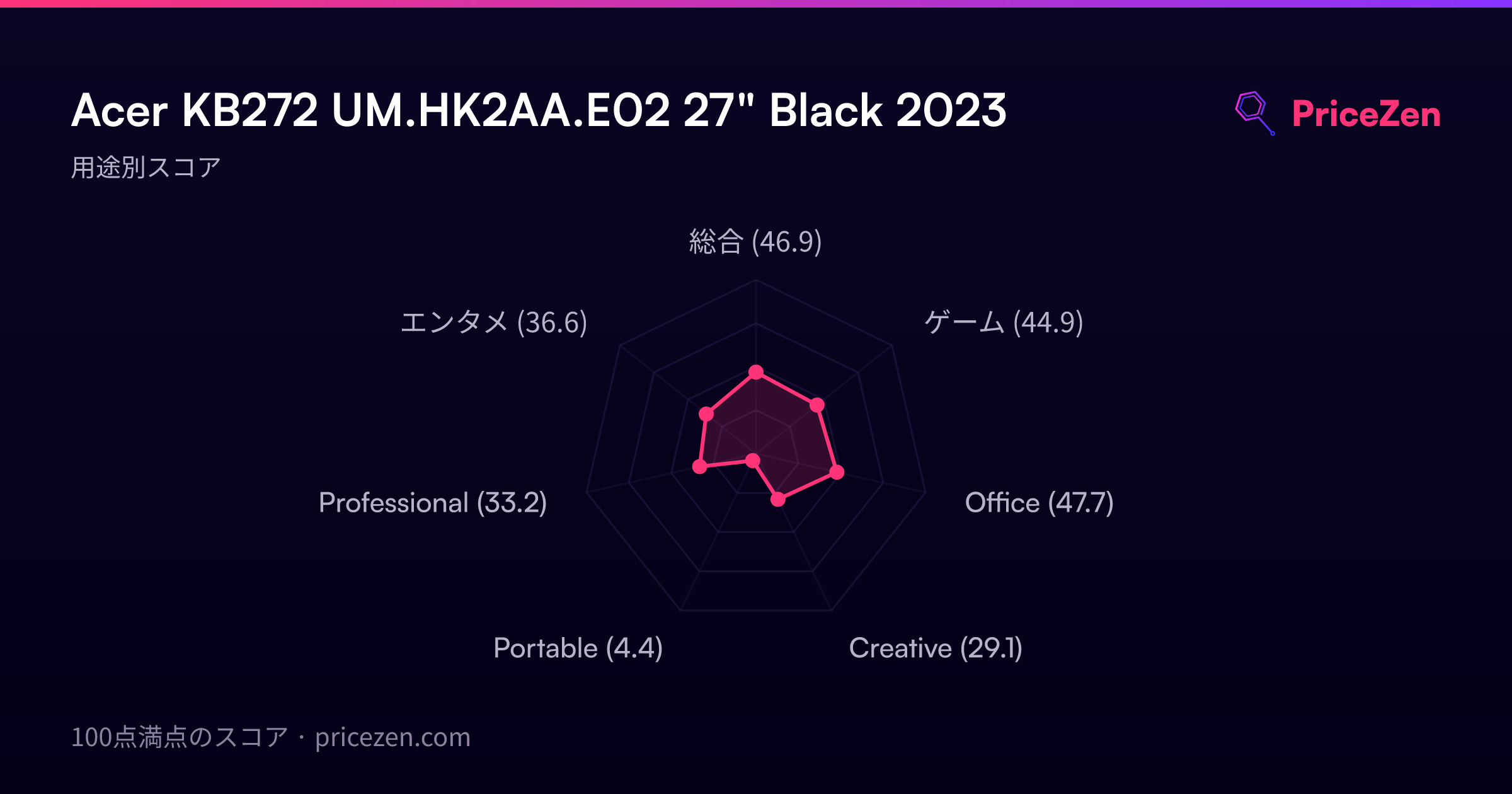
- 総合46.9
- ゲーム44.9
- Office47.7
- Creative29.1
- Portable4.4
- Professional33.2
- エンタメ36.6