MSI PRO MP341CQW E12 PRO MP341CQ 34" Black 2026

21:9ウルトラワイドで、横並びの作業もゆったり 11月29日に確認済み
70/100 総合スコア 4.3 オーナー評価56件の平均
- Screen
- 34"
- Resolution
- 3440 x 1440
- Panel
- VA
- Refresh
- 120 Hz
- Response time
- 1 ms
- Adaptive sync
- Adaptive-Sync
- HDR
- HDR
1店舗の価格を比較
安い順。新品・整備済み品・バンドルのオファーは分けて表示するので、同じ条件どうしで比較できます。
| 店舗 | 販売元 | カラーと状態 | 価格 | 最安との差 | 最終確認 | リンク |
|---|---|---|---|---|---|---|
| 新品2件の価格単品 | ||||||
| 過去7日間は確認していないため、これらの価格は変わっている可能性があります | ||||||
| Amazon | マーケットプレイス出品者 | 記載なし | ¥49,530 | 11月3日 | 店舗へ | |
| Amazon | マーケットプレイス出品者 | 記載なし | ¥51,345 | 11月3日 | 店舗へ | |
 出典: PriceZen, 2026年11月3日に確認
過去7日以内に確認した価格を「現在の価格」としています。 「マーケットプレイス出品者」とは、その店舗自身ではなく、店舗上の第三者の出品者を指します。
価格履歴
その日に確認その日は未確認、オファーは継続中
出典: PriceZen, checked 2026年11月3日











概要
The 30-Second Version
The MSI PRO MP341CQ E12 is a 34-inch ultrawide with 3440 x 1440 resolution, 120Hz refresh rate, and solid color coverage at a surprisingly affordable price. It's best for productivity and casual gaming, with the 1500R curve adding immersion. The built-in speakers are weak and HDR is more marketing than substance, but at USD 190 to USD 230, it's hard to complain. If you want a big, curved, ultrawide monitor without spending a fortune, this is one of the best options out there.
Pros & Cons
長所
- 34-inch ultrawide with 3440 x 1440 resolution gives you serious screen real estate 96th
- 120Hz refresh rate is a big step up from standard 60Hz office monitors 84th
- Color coverage is well above average, with 91% DCI-P3 and 114% sRGB 76th
- 1500R curve makes the ultrawide format feel more immersive 70th
- Built-in speakers and headphone jack reduce desk clutter
- VESA mount support means you can ditch the included stand
短所
- VA panel can show ghosting in fast-paced games despite the 1ms claim
- HDR Ready is mostly marketing, with only 300 nits of brightness
- Built-in speakers are mediocre at best
- Ergonomics are limited to tilt only, no height adjustment
- Heavy at 7099g, so make sure your desk or mount can handle it
- Portability is basically nonexistent, which is expected but worth noting
オーナーの声
The Word on the Street
- Owners consistently praise the overall feature set, with several mentioning they've bought multiple units and remain happy with the purchase.
- The eye care features, including anti-flicker and less blue light technologies, come up as a genuine selling point for people who spend long hours in front of the screen.
- The included digital video cable is a small but appreciated touch that buyers mention, saving them a trip to the store.
- The built-in speakers are a recurring disappointment, with owners describing them as merely adequate and suggesting external audio for anything beyond basic use.
- At least one owner reports a faint high-frequency whine from the monitor, which could be a dealbreaker for people sensitive to electronic noise.
購入者の評価が時間とともにどう変化したか
独自顧客が実際にレビューを書いた時期に基づいています。発売当初の高評価が続いたかどうかがわかります。
書かれたレビュー 14件、2023/06~2026/08:満足 11件、普通 1件、不満 2件
ストア評価全56件:4.3★。 多くの購入者はレビューを書かずに評価だけを付けています。 グラフは書かれたレビュー14件を数えています。
各点は書かれたレビュー1件で、書かれた月に置いています。満足 = 4〜5★、普通 = 3★、不満 = 1〜2★。
実証データ
Performance
The 120Hz refresh rate is the headline number here, and it's a meaningful upgrade over the 60Hz panels most people are used to. Scrolling through long documents feels smoother, and games that can push past 60fps actually show it. The 1ms response time is a bit of marketing math, since VA panels typically use MPRT (moving picture response time) to hit that number, and real-world pixel transitions are slower. You might see some ghosting in fast-paced games, but for a panel at this price, it's acceptable.
The color story is solid for the money. MSI claims 89% Adobe RGB, 91% DCI-P3, and 114% sRGB coverage. In our database, that puts the color performance well above average for this category. The 10-bit color (8-bit + FRC) helps with gradients, so you won't see as much banding in skies or dark scenes. The 300 nits brightness is fine for indoor use, but the HDR Ready label is more of a checkbox than a feature. Without local dimming or meaningful peak brightness, HDR content won't look dramatically different from SDR. Think of it as HDR compatibility, not HDR performance.
Specifications
Full Specifications
Display
| Size | 34" |
| Resolution | 3440x1440 |
| Panel Type | VA |
| Aspect Ratio | 21:9 |
| Curved | Yes |
| Curvature | 1500 |
| Screen Finish | matte |
Performance
| Refresh Rate | 120 Hz |
| Response Time | 1 |
| Adaptive Sync | Adaptive-Sync |
Color & HDR
| Brightness | 300 nits |
| Color Gamut | Adobe RGB 89% / DCI-P3 91% / sRGB 114% |
| Color Depth | 10-bit (8-bit + FRC) |
| HDR | ✓ |
| HDR Support | HDR |
Connectivity
| HDMI Ports | 2 |
| DisplayPort | 1 |
| Speakers | Yes |
| Headphone Jack | Yes |
Ergonomics
| Height Adjustable | No |
| Tilt | Yes |
| Swivel | No |
| Pivot | No |
| VESA Mount | 100x100 |
Features
| Webcam | No |
| Touchscreen | No |
| PIP/PBP | Yes |
| Weight | 7.1 kg / 15.7 lbs |
vs Competition
The MSI PRO MP341CQ E12 sits in an awkward middle ground between budget office monitors and premium gaming displays. Compared to something like the LG UltraGear 27GX790A-B, the MSI gives you a bigger screen and ultrawide format, but the LG likely has better response times and gaming-focused features. The ASUS ROG Strix XG27AQDMG and Gigabyte M Series OLED MO27Q28G are OLED panels, which means they'll absolutely destroy the MSI in contrast and HDR performance, but they're also smaller and significantly more expensive.
The BenQ MA Series MA270U is probably the closest philosophical competitor. Both are aimed at productivity users who want good color and a comfortable viewing experience. The BenQ likely has better ergonomics and color accuracy out of the box, but the MSI counters with a larger ultrawide panel and higher refresh rate. The Dell Alienware AW2724DM is another 27-inch option that focuses on gaming performance, but again, you're giving up the ultrawide format. If you want the 34-inch curved experience specifically, the MSI is one of the more affordable ways to get it.
| Spec | MSI PRO MP341CQW E12 PRO MP341CQ 34" | LG UltraGear 39" | BenQ PD3220U 32" | Samsung Odyssey Ark 2nd Gen 55" | Gigabyte M Series M32U 31.5" | Dell UltraSharp U4320Q 27" |
|---|---|---|---|---|---|---|
| Screen Size | 34 | 39 | 32 | 55 | 31.5 | 27 |
| Resolution | 3440 x 1440 | 3440 x 1440 | 3840 x 2160 | 3840 x 2160 | 3840 x 2160 | 3840 x 2160 |
| Panel Type | VA | OLED | IPS | Mini-LED | IPS | IPS |
| Refresh Rate | 120 | 240 | 60 | 165 | 144 | 60 |
| Response Time Ms | 1 | 0.03 | 5 | 1 | 1 | 5 |
| Adaptive Sync | Adaptive-Sync | FreeSync Premium Pro | - | FreeSync Premium Pro | FreeSync Premium Pro | - |
| Hdr | HDR | DisplayHDR True Black 400 | HDR10 | HDR10+ | HDR400 | HDR400 |
| Compare | Compare | Compare | Compare | Compare |
| 製品 | Color | 携帯性 | Display | Feature | User Sentiment | Ergonomic | Performance | Connectivity | ユーザー評価 |
|---|---|---|---|---|---|---|---|---|---|
| MSI PRO MP341CQW E12 PRO MP341CQ 34" | 83.6 | 20.7 | 76 | 96.3 | 48.2 | 47.1 | 69.9 | 62.1 | 51.2 |
| LG UltraGear 39" Compare | 63.3 | 49.3 | 84 | 96.3 | 0 | 66.8 | 97.9 | 81 | 0 |
| BenQ PD3220U 32" Compare | 88.5 | 81.3 | 95.1 | 85 | 0 | 90.7 | 22.3 | 96.9 | 0 |
| Samsung Odyssey Ark 2nd Gen 55" Compare | 98.4 | 20.7 | 91.5 | 96.3 | 10.3 | 29.9 | 77 | 81 | 75.1 |
| Gigabyte M Series M32U 31.5" Compare | 89.9 | 62.8 | 87 | 85 | 0 | 73.4 | 72.6 | 87.4 | 0 |
| Dell UltraSharp U4320Q 27" Compare | 91 | 82.7 | 87 | 85 | 0 | 90.7 | 22.3 | 96.9 | 0 |
価格
Value & Pricing
Pricing on this monitor is all over the place depending on where you shop. In the US, you'll find it ranging from USD 190 to USD 230 across 8 listings. That's a USD 40 spread, which is significant when you're talking about a budget ultrawide. Best Buy tends to have the most consistent pricing with their price match guarantee, but Newegg occasionally undercuts them. If you're in Canada, the spread is CAD 312 to CAD 355, with Memory Express often landing on the lower end of that range.
For what you're getting, even the higher end of that US price range feels reasonable. A 34-inch ultrawide with 120Hz and solid color coverage at under USD 230 is a genuinely good deal. The value proposition gets shakier in the UK, where prices sit around GBP 519 to GBP 521, which is a much harder sell when you consider what else that money could buy. If you're in North America, this is an easy recommendation on price alone.
詳細情報
Overview
The MSI PRO MP341CQ E12 is a 34-inch ultrawide that tries to do a little bit of everything without asking you to sell a kidney. It's a VA panel with a 3440 x 1440 resolution, 120Hz refresh rate, and a 1500R curve that wraps around your desk like a friendly hug. MSI markets this as a business monitor, but the spec sheet reads more like a budget gaming display that happens to look professional. And honestly, that's kind of the appeal.
Who is this for? If you're someone who works from home, edits spreadsheets, watches movies, and occasionally fires up a game after hours, this monitor checks a lot of boxes. The 21:9 aspect ratio gives you room to have two or three windows side by side without a second monitor. The 120Hz refresh rate keeps things smooth when you're scrolling or gaming. And the built-in speakers mean you don't need to clutter your desk with external audio gear, though we'll get to why you might want to anyway.
What makes this interesting is the price-to-size ratio. A 34-inch ultrawide with these specs usually costs a lot more. MSI has positioned this as an accessible entry point into the ultrawide world, and for the most part, it delivers. It's not going to blow away a color-critical designer or a competitive esports player, but it's not trying to. It's a practical, do-everything panel that gets the fundamentals right.
Common Questions
Q: Is this monitor good for gaming?
For casual gaming, yes. The 120Hz refresh rate and Adaptive-Sync support make games feel smooth, and the 34-inch ultrawide format is genuinely immersive. However, the VA panel can show ghosting in fast-paced competitive games, and the 1ms response time is measured using MPRT, not the more demanding gray-to-gray standard. If you're a serious esports player, you'd be better off with a smaller IPS or OLED panel with faster real-world response times.
Q: Can I mount this monitor on a monitor arm?
Yes, it has a standard VESA 100x100 mount pattern. The monitor weighs about 7099g (roughly 15.6 pounds), so make sure your monitor arm is rated for that weight. The included stand only offers tilt adjustment, so a monitor arm is a good upgrade if you want height adjustment or more desk space.
Q: How does the HDR look on this monitor?
The HDR Ready label is more about compatibility than performance. With 300 nits of peak brightness and no local dimming, HDR content won't look dramatically different from SDR. You'll get some benefit from the 10-bit color (8-bit + FRC) in terms of smoother gradients, but don't expect the eye-searing highlights you'd get from a proper HDR display with 600+ nits and local dimming.
Q: Is the 1500R curve too aggressive for office work?
The 1500R curvature is on the more pronounced side, but most people find it comfortable for both work and entertainment. It helps reduce eye strain by keeping the edges of the screen at a more consistent distance from your eyes. If you do a lot of precise design work where straight lines matter, the curve might take some getting used to, but for general productivity it's a non-issue.
Who Should Skip This
If you're a competitive gamer who plays fast-paced shooters or fighting games, this monitor probably isn't for you. The VA panel's ghosting will frustrate you, and the 120Hz refresh rate, while nice, isn't enough to compensate for the slower real-world pixel response. You'd be better off with a 240Hz IPS or OLED panel, even if it means giving up the ultrawide format.
Color-critical professionals should also look elsewhere. The 89% Adobe RGB coverage is decent, but if you're doing print work or professional photo editing, you'll want something with factory calibration and higher Adobe RGB coverage. The BenQ MA Series MA270U or a dedicated color-accurate display would serve you better. And if you're tight on desk space, this thing is big and heavy. A 27-inch monitor with better ergonomics might be the smarter choice.
Verdict
For office work and general productivity, this monitor is a strong pick. The ultrawide format genuinely changes how you work, letting you keep reference material, chat windows, and your main document all visible at once. The 120Hz refresh rate makes everything feel more responsive, even if you're just scrolling through emails. And the color coverage means photos and videos look good without any calibration fuss.
For gaming, it's more of a mixed bag. Casual gamers and people who play slower-paced titles will love the immersion of the 1500R curve and the smooth 120Hz refresh rate. But if you're into competitive shooters or fast-paced action games, the VA panel's ghosting might bother you. And if you're a content creator who needs accurate color for print work, the 89% Adobe RGB coverage is good but not great. This is a monitor that does a lot of things well, but nothing perfectly. For most people, that's exactly what they need.
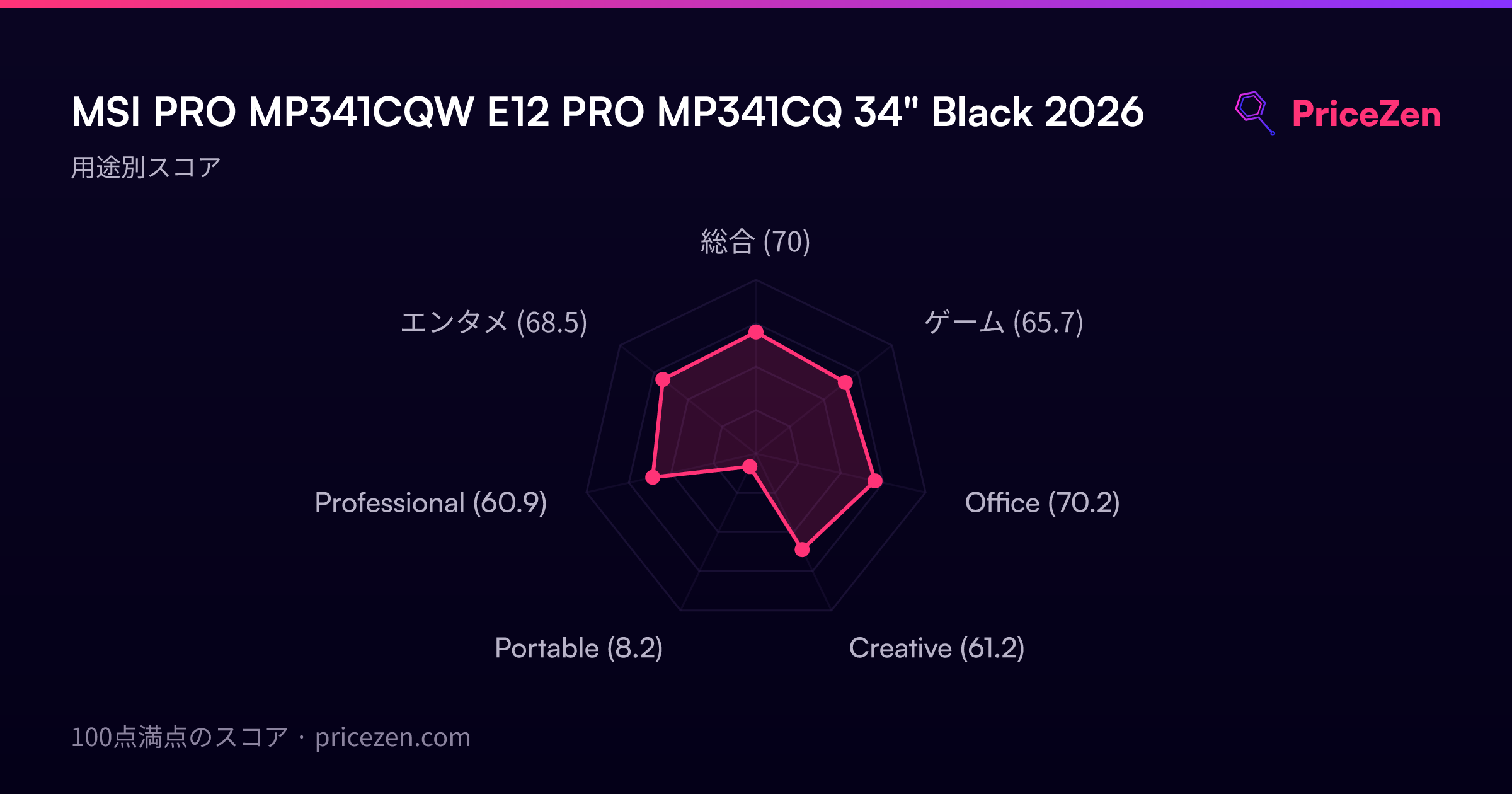
Usage Scores
- 総合70
- ゲーム65.7
- Office70.2
- Creative61.2
- Portable8.2
- Professional60.9
- エンタメ68.5