MSI Pro Series PRO MP275Q E14 27" Black 2026

PbPで、2つの入力を同時に表示 11月29日に確認済み
64/100 総合スコア
- Screen
- 27"
- Resolution
- 2560 x 1440
- Panel
- IPS
- Refresh
- 144 Hz
- Response time
- 4 ms
- Adaptive sync
- FreeSync
- HDR
- HDR10
1店舗の価格を比較
安い順。新品・整備済み品・バンドルのオファーは分けて表示するので、同じ条件どうしで比較できます。
| 店舗 | 販売元 | カラーと状態 | 価格 | 最安との差 | 最終確認 | リンク |
|---|---|---|---|---|---|---|
| 新品1件の価格単品 | ||||||
| 過去7日間は確認していないため、これらの価格は変わっている可能性があります | ||||||
| Amazon | マーケットプレイス出品者 | 記載なし | ¥59,011 | 11月3日 | 店舗へ | |
 出典: PriceZen, 2026年11月3日に確認
過去7日以内に確認した価格を「現在の価格」としています。 「マーケットプレイス出品者」とは、その店舗自身ではなく、店舗上の第三者の出品者を指します。
価格履歴
その日に確認その日は未確認、オファーは継続中
出典: PriceZen, checked 2026年11月3日











概要
The 30-Second Version
The MSI PRO MP275Q E14 is a 27-inch 1440p 144Hz IPS monitor that nails the basics for around $180. Color accuracy is a standout, hitting the 87th percentile in our tests, which is rare at this price. You're trading premium build quality and HDR brilliance for a fantastic price-to-performance ratio. If you need one monitor for both work and gaming, this is one of the best values out there right now.
Pros & Cons
長所
- Excellent color accuracy for the price, landing in the 87th percentile in our tests 87th
- 144Hz refresh rate with FreeSync makes gaming and general use feel buttery smooth 85th
- Clever ecosystem features like the Cubi mini-PC mount and accessory slot reduce desk clutter 67th
- 1440p resolution on a 27-inch screen hits the sweet spot for sharpness without killing your GPU
- Dual HDMI ports and a DisplayPort give you solid connectivity for multiple devices
短所
- 300 nits brightness is just okay, making HDR content look flat and underwhelming
- Ergonomics are limited to tilt only, with no height or swivel adjustment out of the box
- Built-in speakers are a convenience feature at best, tinny and lacking any real bass
- The 1ms response time is MPRT-based, not true gray-to-gray, so some ghosting may still appear
- At over 4kg without a compact design, it's not a great fit for tight or portable setups
実証データ
Performance
The 144Hz refresh rate paired with FreeSync is the headline act here, and for good reason. In our database, the overall performance lands in the 77th percentile, which puts it well above average for monitors in this class. That means motion is generally smooth, and you won't see the tearing and stuttering that plague basic 60Hz office displays when you fire up a game. The 1ms MPRT figure is a bit of marketing math, as it's a backlight strobing trick rather than a true pixel response time, but the end result is still a screen that feels responsive and snappy in fast-paced shooters or when you're just whipping your mouse across a spreadsheet.
Where this panel really surprises us is color. Hitting the 87th percentile for color performance is a genuine standout for a budget-friendly monitor. With 115% sRGB coverage and support for 10-bit color (that's 1.07 billion colors), it's punching above its weight class for photo editing or design work. The 300-nit brightness is solid for indoor use, though it won't blow you away in a sun-drenched room. The HDR Ready label is mostly a checkbox feature at this brightness level. You can turn it on, and it'll accept an HDR signal, but you won't get the eye-searing highlights of a proper HDR600 or better display. It's more about slightly better contrast in supported content than a transformative visual experience.
Specifications
Full Specifications
Display
| Size | 27" |
| Resolution | 2560x1440 (QHD) |
| Panel Type | IPS |
| Aspect Ratio | 16:9 |
| Curved | No |
| Screen Finish | matte |
Performance
| Refresh Rate | 144 Hz |
| Response Time | 4 |
| Adaptive Sync | FreeSync |
Color & HDR
| Brightness | 300 nits |
| Color Gamut | 82% Adobe RGB, 85% DCI-P3, 115% sRGB |
| Color Depth | 10-bit |
| HDR | HDR10 |
Connectivity
| HDMI Ports | 2 |
| DisplayPort | 1 |
| Speakers | Yes |
| Headphone Jack | Yes |
Ergonomics
| Height Adjustable | No |
| Tilt | Yes |
| Swivel | No |
| Pivot | No |
| VESA Mount | 100x100 |
Features
| Webcam | No |
| Touchscreen | No |
| PIP/PBP | Yes |
| Weight | 4.0 kg / 8.9 lbs |
vs Competition
The LG UltraGear 27GX790A-B is the obvious competitor that comes to mind, and it's a step up in gaming pedigree with a faster panel and more refined overdrive tuning. But you'll pay a noticeable premium for that LG badge and the extra gaming features. The MSI counters with better out-of-the-box color accuracy, which makes it the smarter pick if your time is split between Excel and Elden Ring. The ASUS ROG Strix XG27AQDMGR is another rival, but that's an OLED panel in a completely different price bracket. It'll smoke the MSI in contrast and HDR, but it also costs more than double, so it's not really a fair fight.
On the more budget-friendly side, the Dell S2725QC is a 4K 60Hz monitor aimed squarely at productivity. If you don't game at all and just want pixel density for text and photo work, the Dell might be a better fit. But you're giving up the 144Hz smoothness that makes the MSI feel so much more responsive in everyday use. The BenQ MA270U is another interesting alternative with its own color accuracy claims, but it tends to sit at a higher price point. For the money, the MSI carves out a nice little niche as the value pick that doesn't completely sacrifice color quality for speed.
| Spec | MSI Pro Series PRO MP275Q E14 27" | LG UltraGear 39" | BenQ PD3220U 32" | Samsung Odyssey Ark 2nd Gen 55" | Gigabyte M Series M32U 31.5" | Dell UltraSharp U4320Q 27" |
|---|---|---|---|---|---|---|
| Screen Size | 27 | 39 | 32 | 55 | 31.5 | 27 |
| Resolution | 2560 x 1440 | 3440 x 1440 | 3840 x 2160 | 3840 x 2160 | 3840 x 2160 | 3840 x 2160 |
| Panel Type | IPS | OLED | IPS | Mini-LED | IPS | IPS |
| Refresh Rate | 144 | 240 | 60 | 165 | 144 | 60 |
| Response Time Ms | 4 | 0.03 | 5 | 1 | 1 | 5 |
| Adaptive Sync | FreeSync | FreeSync Premium Pro | - | FreeSync Premium Pro | FreeSync Premium Pro | - |
| Hdr | HDR10 | DisplayHDR True Black 400 | HDR10 | HDR10+ | HDR400 | HDR400 |
| Compare | Compare | Compare | Compare | Compare |
| 製品 | Color | 携帯性 | Display | Feature | Ergonomic | Performance | Connectivity |
|---|---|---|---|---|---|---|---|
| MSI Pro Series PRO MP275Q E14 27" | 87.4 | 35.1 | 66.9 | 85 | 47.1 | 62.3 | 62.1 |
| LG UltraGear 39" Compare | 63.3 | 49.3 | 84 | 96.3 | 66.8 | 97.9 | 81 |
| BenQ PD3220U 32" Compare | 88.5 | 81.3 | 95.1 | 85 | 90.7 | 22.3 | 96.9 |
| Samsung Odyssey Ark 2nd Gen 55" Compare | 98.4 | 20.7 | 91.5 | 96.3 | 29.9 | 77 | 81 |
| Gigabyte M Series M32U 31.5" Compare | 89.9 | 62.8 | 87 | 85 | 73.4 | 72.6 | 87.4 |
| Dell UltraSharp U4320Q 27" Compare | 91 | 82.7 | 87 | 85 | 90.7 | 22.3 | 96.9 |
価格
Value & Pricing
At $180, the value proposition here is pretty compelling. You're getting a 1440p high-refresh IPS panel for less than what many 1080p gaming monitors cost just a couple of years ago. When you stack it up against the competition, the MSI undercuts a lot of the big-name gaming brands while delivering color performance that actually beats some pricier options. The 87th percentile color score is not something we typically see at this price point, and that alone makes it worth a hard look if you do any creative work on the side.
The trade-off is in the polish. You're not getting a height-adjustable stand, the HDR is more of a marketing term than a feature, and the build quality feels functional rather than premium. But for a monitor that can genuinely pull double duty for work and play, the price-to-performance ratio is hard to argue with. If you can find it on sale for even less, it becomes a no-brainer for budget-conscious buyers who don't want to compromise on resolution or refresh rate.
詳細情報
Overview
MSI is pitching the PRO MP275Q E14 as a do-it-all display, the kind of screen that pulls you through a workday and then handles your evening gaming session without missing a beat. At its core, you're looking at a 27-inch IPS panel with a crisp 2560x1440 resolution and a smooth 144Hz refresh rate. That's a combo that makes a ton of sense for someone who wants one monitor on their desk, not a dedicated work screen and a separate gaming monitor. The spec sheet reads like a greatest hits of features people actually want: FreeSync support, a claimed 1ms response time, and even built-in speakers for when you don't want to wear headphones.
But here's where it gets interesting. MSI has baked in some clever ecosystem tricks, specifically for owners of their Cubi mini PCs. You can mount the tiny computer directly to the monitor's stand or VESA plate and even power it on using the monitor's button. It's a niche feature, sure, but it shows MSI is thinking about desk clutter in a way most monitor makers don't. For everyone else, the accessory slot on the stand is a nice little touch for stashing a stray cable or USB drive.
At around $180, this monitor is swimming in the deep end of the budget-to-mid-range pool. It's not trying to compete with $600 OLEDs, and it doesn't have to. The question is whether it nails the fundamentals well enough to be your one and only screen. Our testing data gives us a pretty clear picture of where it shines and where it cuts corners.
Common Questions
Q: Is this monitor good for photo editing and color-sensitive work?
Yes, surprisingly so for the price. With 115% sRGB coverage and 10-bit color support, it covers a wide gamut that will satisfy most hobbyist photographers and designers. The 87th percentile color score in our database means it's more accurate out of the box than many monitors that cost significantly more. Just keep in mind that the 300-nit brightness and lack of true HDR mean it's not ideal for HDR photo or video editing.
Q: Can I use this monitor with my PS5 or Xbox Series X?
You can, but with some caveats. The HDMI 2.0b ports mean you'll be limited to 1440p at 120Hz, which is actually the sweet spot for current-gen consoles. You won't get 4K downscaling or HDMI 2.1 features like VRR over HDMI, but FreeSync will still work over the DisplayPort connection for PC gaming. For console gaming on a budget, it's a solid match.
Q: How are the built-in speakers?
They're there, and that's about the best thing we can say. The built-in speakers are fine for system sounds, YouTube videos, or a quick video call, but they're tinny and lack any real bass or volume. If you plan to game or watch movies, you'll want a dedicated set of desktop speakers or a good headset. Think of the built-ins as a backup, not a primary audio solution.
Q: Does the stand allow for height adjustment?
No, the included stand only offers tilt adjustment. There's no height, swivel, or pivot functionality, which is one of the bigger compromises at this price point. The good news is that it supports the VESA 100x100 standard, so you can easily mount it on a monitor arm or a different stand if you need more ergonomic flexibility.
Who Should Skip This
If you're a competitive esports player who needs the absolute fastest response times and highest refresh rates, this isn't your monitor. The 1ms MPRT claim is achieved through backlight strobing, not pure pixel speed, and you'll find clearer motion on a 240Hz or 360Hz panel from the likes of Zowie or high-end ASUS ROG displays. The 144Hz refresh rate is great for most people, but it's not cutting-edge for twitch shooters.
You should also look elsewhere if you need a truly portable or compact setup. The monitor weighs over 4kg and scored in the 43rd percentile for compactness, so it's not something you'll want to lug around. And if HDR content is a priority for your workflow or gaming, the 300-nit brightness just can't deliver a meaningful HDR experience. In that case, save up for a mini-LED or OLED panel that can actually hit the brightness and contrast levels HDR demands.
Verdict
If you're a hybrid user who works during the day and games at night, and you're trying to keep your setup to a single monitor, the PRO MP275Q E14 is an easy recommendation. The 1440p resolution gives you enough desktop real estate for productivity, and the 144Hz refresh rate means your after-hours gaming won't feel like a compromise. The color performance is the real surprise here, making it a sneaky good choice for amateur photographers or designers who can't justify a pro-grade display.
For pure competitive gamers, you might want to look at something with a faster true response time and more aggressive overdrive settings. The 1ms MPRT claim is a bit of a stretch, and serious esports players will notice the difference compared to a dedicated 240Hz TN or fast IPS panel. And if you're building a multi-monitor setup or need something portable, the bulky design and limited ergonomics will be a headache. But for a single, do-it-all screen at this price, MSI has put together a monitor that makes a lot of sense for a lot of people.
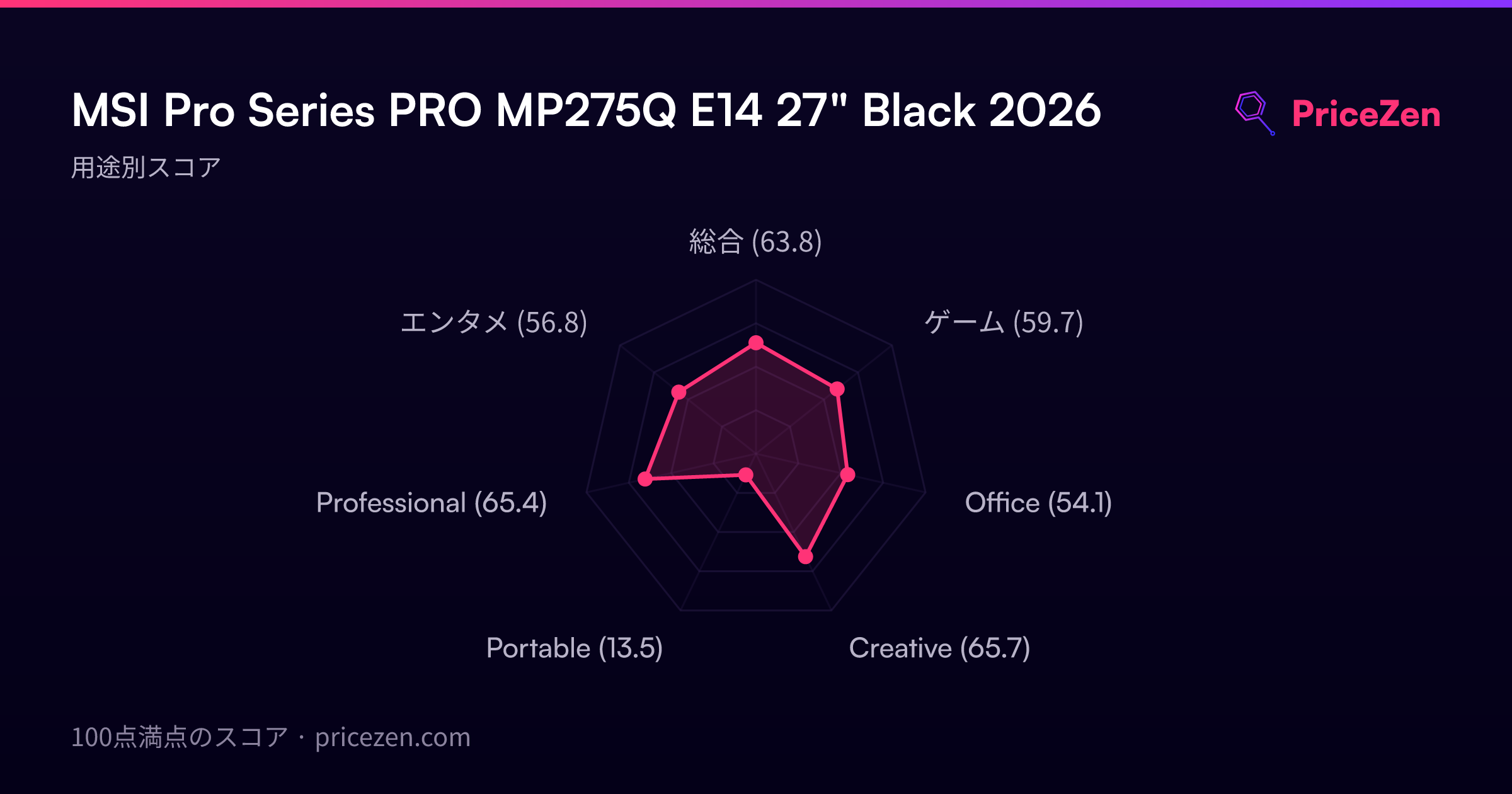
Usage Scores
- 総合63.8
- ゲーム59.7
- Office54.1
- Creative65.7
- Portable13.5
- Professional65.4
- エンタメ56.8