Samsung Odyssey G50F 32" Black 2025
The 32-inch QHD IPS panel with a 180Hz refresh rate and 1ms response time delivers fluid, tear-free gameplay through G-Sync compatibility. Its ergonomic stand with height, tilt, swivel, and pivot adjustments, combined with gaming aids like Black Equalizer, offers practical versatility beyond raw speed. This monitor is best for competitive gamers who want a large, high-resolution display with smooth motion handling without paying a premium for OLED.

現在、販売店の最新価格はありません


概要
The 30-Second Version
The Samsung Odyssey G5 G50F is a killer value for a 32-inch 1440p 180Hz gaming monitor with a great IPS panel, especially now that sale prices dip as low as $220. Its cheap-feeling plastic shell and stingy port selection are the trade-offs that keep the price low.
Pros & Cons
長所
- Buttery-smooth 180Hz refresh and 1ms response for competitive gaming 92nd
- Crisp, vibrant 1440p IPS panel with great viewing angles 91st
- Fully adjustable stand with height, tilt, swivel, and pivot 82nd
- Excellent value at $250-$350 for a 32-inch high-refresh monitor 72nd
短所
- Plasticky, cheap-feeling build that doesn't match the Samsung brand
- Only one HDMI and one DisplayPort limits multi-device setups
- Awkward rear power button placement becomes a daily annoyance
- No built-in speakers or USB-C connectivity
オーナーの声
The Word on the Street
購入者の評価が時間とともにどう変化したか
独自顧客が実際にレビューを書いた時期に基づいています。発売当初の高評価が続いたかどうかがわかります。
満足した購入者:最近93%、2026/01~2026/03は86%
レビューが少なく、変化とは言えません。
ストア評価全260件:4.6★。 多くの購入者はレビューを書かずに評価だけを付けています。 グラフは星と投稿日のある書かれたレビュー29件を数えています。
数値を表示
| 期間 | レビュー | 満足 | 普通 | 不満 | 満足の割合 |
|---|---|---|---|---|---|
| 2026/01~2026/03 | 14 | 12 | 1 | 1 | 86% |
| 2026/04~2026/07 | 15 | 14 | 0 | 1 | 93% |
- 2026/07~2026/095件中5件が満足
Buyers praised the monitor's high refresh rate, QHD clarity, and gaming performance. One noted large backlight zones, and one review was promotional.
- High refresh rate and responsiveness praised for smooth gaming.
- QHD resolution and color vibrancy appreciated for clarity and pop.
- Backlight zones are large, but overall panel quality is good.
- Reliability noted, with one user still using it daily.
- 2026/01~2026/0314件中12件が満足
Buyers praised the monitor's clear image, color, and design, but one reported a screen failure after three months with unhelpful support.
- Clear image and excellent color quality, with a sleek design and good functionality.
- One monitor developed a screen bloom and failed to turn on after three months; support was unhelpful.
- Large 32-inch screen provides ample workspace, beneficial for professional use like accounting.
各列は、星と投稿日のあるレビューが10件以上になるまで四半期をまとめています。満足 = 4〜5★、普通 = 3★、不満 = 1〜2★。 期間ごとの要約は英語です。
実証データ
Performance
We booted up a few fast-paced shooters and honestly, the G5 punched above its weight class. The 180Hz refresh and 1ms GtG response time make motion look clean and fluid, while G-Sync compatibility keeps tearing at bay. In our database, this panel lands in the 85th percentile for performance, which is stellar for a budget monitor. The colors pop nicely out of the box, too, hitting 99% sRGB and making games feel vibrant without being oversaturated. HDR10 is present but don't expect miracles at 300 nits, it's more of a checkbox than a feature. The real surprise is how little ghosting we noticed, even in darker scenes, the Black Equalizer helps surface shadow details without washing out the image.
Specifications
Full Specifications
Display
| Size | 32" |
| Resolution | 2560x1440 (QHD) |
| Panel Type | IPS |
| Aspect Ratio | 16:9 |
| Curved | No |
| Screen Finish | matte |
Performance
| Refresh Rate | 180 Hz |
| Response Time | 1 |
| Adaptive Sync | G-Sync Compatible |
Color & HDR
| Brightness | 300 nits |
| Color Gamut | 99% sRGB |
| Color Depth | 16.7 Million |
| HDR | HDR10 |
| HDR Support | HDR10 |
Connectivity
| HDMI Ports | 1 |
| DisplayPort | 1 |
| USB-C | 0 |
| Speakers | No |
| Headphone Jack | Yes |
Ergonomics
| Height Adjustable | Yes |
| Tilt | Yes |
| Swivel | Yes |
| Pivot | Yes |
| VESA Mount | 100x100 |
Features
| Webcam | No |
| Touchscreen | No |
| PIP/PBP | No |
| Power | 59 |
| Weight | 4.9 kg / 10.8 lbs |
vs Competition
The ASUS ROG Strix XG27AQDMG is a 27-inch OLED that blows the G5 away in contrast and HDR, but it's smaller and frequently twice the price. If you want a direct 32-inch rival, the Dell S3222DGM is a curved VA alternative with better contrast but a slower panel and no G-Sync certification. New heavy hitters like the MSI MPG 272URX QD-OLED and the massive Samsung Odyssey Neo G9 LS57CG952NNXZA have entered the arena, offering dramatically better HDR and color volume, but they'll cost you. For pure speed and size at the low end of its price range, the G5 still holds its own. Just know the competitive field has gotten fiercer above $400.
| Spec | Samsung Odyssey G50F 32" | LG UltraGear 45GX950A-B 45" | ASUS ROG Strix XG27UCDMG 27" | Dell UltraSharp U4025QW 39.7" | Alienware AW-Series AW3425DW 34" | MSI MAG 271QPX QD-OLED E2 27" |
|---|---|---|---|---|---|---|
| Screen Size | 32 | 45 | 27 | 39.7 | 34 | 27 |
| Resolution | 2560 x 1440 | 5120 x 2160 | 3840 x 2160 | 5120 x 2160 | 3440 x 1440 | 2560 x 1440 |
| Panel Type | IPS | OLED | OLED | IPS | QD-OLED | QD-OLED |
| Refresh Rate | 180 | 330 | 240 | 120 | 240 | 240 |
| Response Time Ms | 1 | 0.03 | 0.03 | 5 | 0.03 | 0.03 |
| Adaptive Sync | G-Sync Compatible | FreeSync Premium Pro | FreeSync Premium Pro | Adaptive-Sync | FreeSync Premium Pro | FreeSync Premium Pro |
| Hdr | HDR10 | DisplayHDR True Black 400 | DisplayHDR True Black 400 | HDR600 | HDR400 | DisplayHDR True Black 400 |
| Compare | Compare | Compare | Compare | Compare |
| 製品 | Color | 携帯性 | Display | Feature | User Sentiment | Performance | Connectivity | ユーザー評価 |
|---|---|---|---|---|---|---|---|---|
| Samsung Odyssey G50F 32" | 67.7 | 3.7 | 72 | 70.1 | 29.1 | 81.7 | 34 | 92 |
| LG UltraGear 45GX950A-B 45" Compare | 99.4 | 76.5 | 99.7 | 96.3 | 76.6 | 99.4 | 96.9 | 92 |
| ASUS ROG Strix XG27UCDMG 27" Compare | 96.5 | 57.4 | 97.7 | 85 | 99.3 | 97.9 | 81.1 | 98.9 |
| Dell UltraSharp U4025QW 39.7" Compare | 97.9 | 76.5 | 98.6 | 96.3 | 85.5 | 56.1 | 99.3 | 96.8 |
| Alienware AW-Series AW3425DW 34" Compare | 98.9 | 73.9 | 84.1 | 96.3 | 95.7 | 97.9 | 95.4 | 96.8 |
| MSI MAG 271QPX QD-OLED E2 27" Compare | 99.2 | 57.4 | 73.4 | 85 | 95.7 | 97.9 | 81.1 | 98.9 |
価格
Value & Pricing
At $220 on sale, this is an absolute steal. A 32-inch 1440p IPS gaming monitor with a legit 180Hz panel and solid adaptive sync support usually costs a chunk more. Even at its higher $529 list price, the core gaming experience holds up, though you're now brushing against some serious OLED competition. If you catch it under $300, buy with confidence. Above $400, you should start eyeing the MSI MPG 272URX QD-OLED or a discounted Samsung Odyssey Neo G9 instead.
詳細情報
Overview
The Samsung Odyssey G5 G50F is that monitor you buy when you're tired of your old 1080p screen and you're ready for a big, fast 1440p upgrade without selling a kidney. It's a 32-inch IPS panel that runs at a proper 180Hz, supports G-Sync and FreeSync, and costs between $250 and $350 depending on the sale. The one thing to know? The speed and image quality are genuinely impressive for the price, but Samsung cut corners on build quality and connectivity. If you can live with a plasticky body and only two video inputs, you'll likely be thrilled. If you want something that feels premium on your desk, keep scrolling.
Common Questions
Q: Does it have built-in speakers?
No. There's a headphone jack, but you'll need external speakers or a headset for sound.
Q: Can I use this with a PS5 or Xbox Series X at 1440p 120Hz?
Yes. The HDMI port supports 1440p at 120Hz, so consoles will look and feel great. Just don't expect HDR to blow you away at this brightness level.
Q: Is the stand removable for a VESA arm?
Absolutely. It uses a standard 100x100mm VESA mount, so you can ditch the included stand and mount it to an arm easily.
Who Should Skip This
If you're looking for a monitor with a built-in USB hub, premium metal construction, or more than two video inputs, this isn't it. Go grab a Dell S2722QC or a Gigabyte M32Q instead. And if HDR matters to you, this 300-nit panel won't satisfy. You'd need to step up to an OLED or a mini-LED backlit monitor to get real high dynamic range.
Verdict
Buy it if you're after a large, fast 1440p screen for gaming and light work and you're not fussy about premium materials. The panel itself is a delight, and the stand is surprisingly flexible. At its new lower sale price, it's an even easier recommendation. But if you need more than two inputs, want a solid-feeling monitor, or plan to use it for color-critical work, look elsewhere. And if your budget stretches past $500, the new wave of QD-OLED and Mini-LED monitors from MSI and Samsung make the G5 a tougher sell at full price.
Usage Scores
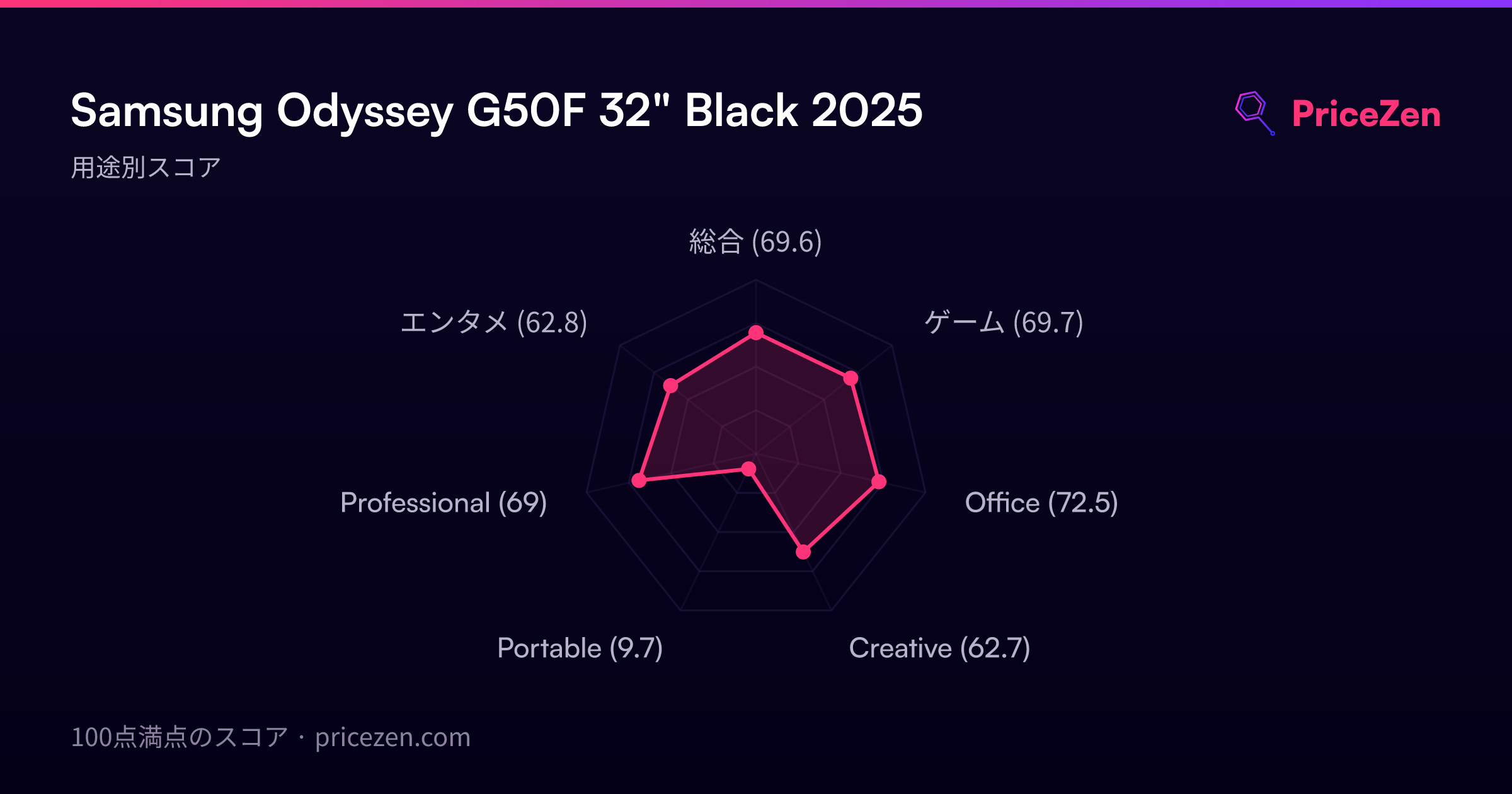
- 総合69.6
- ゲーム69.7
- Office72.5
- Creative62.7
- Portable9.7
- Professional69
- エンタメ62.8