BenQ GW2283 21.5" Black 2020

映り込みを抑えるノングレア画面 11月28日に確認済み
42/100 総合スコア 4.6 オーナー評価320件の平均
- Screen
- 21.5"
- Resolution
- 1920 x 1080
- Panel
- IPS
- Refresh
- 60 Hz
- Response time
- 5 ms
1店舗の価格を比較
安い順。新品・整備済み品・バンドルのオファーは分けて表示するので、同じ条件どうしで比較できます。
| 店舗 | 販売元 | カラーと状態 | 価格 | 最安との差 | 最終確認 | リンク |
|---|---|---|---|---|---|---|
| 新品1件の価格単品 | ||||||
| 過去7日間は確認していないため、これらの価格は変わっている可能性があります | ||||||
| Amazon | マーケットプレイス出品者 | 記載なし | ¥36,265 | 11月3日 | 店舗へ | |
 出典: PriceZen, 2026年11月3日に確認
過去7日以内に確認した価格を「現在の価格」としています。 「マーケットプレイス出品者」とは、その店舗自身ではなく、店舗上の第三者の出品者を指します。
価格履歴
その日に確認その日は未確認、オファーは継続中
出典: PriceZen, checked 2026年11月3日











概要
The 30-Second Version
The BenQ GW2283 is a budget 21.5 inch office monitor with thin bezels and solid eye-care features. It scores well for compactness and social proof, but display and color performance are near the bottom of our database. Worth it if you find it under USD 100 or CAD 100, skip it if you need anything beyond basic office work.
Pros & Cons
長所
- Thin bezels make it great for dual monitor setups 92nd
- Eye-care tech actually helps during long work sessions 71st
- VESA mount support is a nice bonus at this price
- Compact size fits well on smaller desks
短所
- 250 nits brightness is dim for bright rooms
- 72% NTSC color coverage is weak for creative work
- 60Hz refresh rate rules out any serious gaming
- Built-in speakers are barely functional
オーナーの声
The Word on the Street
- Buyers love the thin bezels and how clean dual monitor setups look with this screen
- Many owners mention the VESA mount support and image quality as great value for the price
- A few people note the brightness is fine for indoor office use but struggles in sunlit rooms
購入者の評価が時間とともにどう変化したか
独自顧客が実際にレビューを書いた時期に基づいています。発売当初の高評価が続いたかどうかがわかります。
書かれたレビュー 47件、2017/12~2026/02:満足 38件、不満 1件、星なし 8件
ストア評価全320件:4.6★。 多くの購入者はレビューを書かずに評価だけを付けています。 グラフは書かれたレビュー47件を数えています。
- 2026/01~2026/0324件中23件が満足 · 星なし 1件
Buyers praised the thin bezel, easy setup, and good image quality for home office and light gaming. A few noted color distortion after unplugging.
- Thin bezel and easy multi-monitor setup highly appreciated.
- Good image quality, colors, and brightness for the price.
- Easy setup, works out of the box with no dead pixels.
- Color distortion (pink tint) after unplugging, fixable via settings.
- 2021/10~2021/121件中1件が満足 · 星なし 2件
Mixed reviews: one user finds it a good budget monitor with minor annoyances, while two others report poor speakers and praise eye protection for aging eyes.
- Good budget monitor for basic use, 95% satisfaction with minor irritations.
- Built-in speakers are unusable; volume does not change between 30 and 100.
- Excellent for aging eyes, ideal size (21.5") for older users.
- Overall value is good but speakers are a major flaw, requiring external speakers.
- 2020/10~2020/123件中3件が満足
Buyers praised the monitor as perfect for home office and truck TV use, with great screen quality and value.
- Excellent screen quality and performance for various uses.
- Great value for money, especially as a budget extra monitor.
- Works well with VESA mounts and sound bar for versatile setups.
- Highly recommended for home office and low-budget needs.
- 2020/07~2020/092件中2件が満足 · 星なし 1件
Buyers praised the monitor's value, build quality, and display, with easy setup and attractive stand noted.
- Great value for money and quality at a cheap price.
- Beautiful display, especially in side-by-side setup.
- Easy to set up with a strong, attractive stand.
- One review mentioned good color after tweaking, implying initial calibration needed.
各点は書かれたレビュー1件で、書かれた月に置いています。満足 = 4〜5★、普通 = 3★、不満 = 1〜2★。 期間ごとの要約は英語です。
実証データ
Performance
For everyday office work, this thing is fine. The 1080p resolution on a 21.5 inch panel keeps text sharp, and the IPS screen gives you solid viewing angles. The 60Hz refresh rate and 5ms response time are exactly what you'd expect from a budget office monitor. But the specs tell the real story: 250 nits brightness and 72% NTSC color coverage put it near the bottom of our database for display and color performance. It's not going to win any awards for HDR or vibrant colors. The built-in 1W speakers are there if you need them, but they're more of a backup plan than a primary audio solution.
Specifications
Full Specifications
Display
| Size | 21.5" |
| Resolution | 1920x1080 (Full HD) |
| Panel Type | IPS |
| Aspect Ratio | 16:9 |
| Curved | No |
| Screen Finish | matte |
Performance
| Refresh Rate | 60 Hz |
| Response Time | 5 |
Color & HDR
| Brightness | 250 nits |
| Color Gamut | 72% NTSC |
| Color Depth | 8-bit |
Connectivity
| HDMI Ports | 2 |
| DisplayPort | 0 |
| USB-C | 0 |
| Speakers | Yes |
| Headphone Jack | Yes |
Ergonomics
| Height Adjustable | No |
| Tilt | Yes |
| Swivel | No |
| Pivot | No |
| VESA Mount | 100x100 |
Features
| Webcam | No |
| Touchscreen | No |
| PIP/PBP | No |
| Power | 25 |
| Weight | 3.7 kg / 8.2 lbs |
vs Competition
Stack this against the ASUS TUF Gaming VG27AQL5A or the LG UltraGear 27GS75Q-B and it's not even a fair fight. Those are 27 inch gaming monitors with high refresh rates and better color. But they also cost way more. The BenQ GW2283 is playing a different game entirely. It's a compact, no-frills office monitor. The Samsung Odyssey LS27BG402ENXGO and Acer Nitro XV272U W2bmiiprx are also in a different league for gaming and media. If you need a cheap second screen for work, the BenQ makes sense. If you want to game or edit photos, look at those competitors instead.
| Spec | BenQ GW2283 21.5" | Acer Nitro UM.CX2AA.S01 34" | LG UltraGear 39" | MSI MAG 274URFW 27" | Samsung Odyssey Ark 2nd Gen 55" | Gigabyte M Series M32U 31.5" |
|---|---|---|---|---|---|---|
| Screen Size | 21.5 | 34 | 39 | 27 | 55 | 31.5 |
| Resolution | 1920 x 1080 | 3440 x 1440 | 3440 x 1440 | 3840 x 2160 | 3840 x 2160 | 3840 x 2160 |
| Panel Type | IPS | VA | OLED | IPS | Mini-LED | IPS |
| Refresh Rate | 60 | 165 | 240 | 160 | 165 | 144 |
| Response Time Ms | 5 | 1 | 0.03 | 0.5 | 1 | 1 |
| Adaptive Sync | - | FreeSync Premium | FreeSync Premium Pro | FreeSync Premium | FreeSync Premium Pro | FreeSync Premium Pro |
| Hdr | - | HDR400 | DisplayHDR True Black 400 | HDR | HDR10+ | HDR400 |
| Compare | Compare | Compare | Compare | Compare |
| 製品 | Color | 携帯性 | Display | Feature | Ergonomic | Performance | Connectivity | ユーザー評価 |
|---|---|---|---|---|---|---|---|---|
| BenQ GW2283 21.5" | 15.4 | 71.2 | 21.4 | 21.1 | 47.1 | 22.3 | 38.7 | 91.9 |
| Acer Nitro UM.CX2AA.S01 34" Compare | 84.6 | 20.7 | 76 | 90.8 | 66.9 | 77 | 83.8 | 83.9 |
| LG UltraGear 39" Compare | 63.3 | 49.3 | 84 | 96.3 | 66.9 | 97.9 | 81 | 0 |
| MSI MAG 274URFW 27" Compare | 94.5 | 57.3 | 87 | 85 | 90.8 | 90.8 | 81 | 51.3 |
| Samsung Odyssey Ark 2nd Gen 55" Compare | 98.4 | 20.7 | 91.5 | 96.3 | 30 | 77 | 81 | 74.8 |
| Gigabyte M Series M32U 31.5" Compare | 90 | 62.8 | 87 | 85 | 73.4 | 72.6 | 87.4 | 0 |
価格
Value & Pricing
Pricing is all over the place depending on where you look. In the US, you'll find it between USD 95 and USD 109, which is a pretty tight spread. Newegg has the best deal at the low end of that range. But in Canada, it's a different story. Prices swing from CAD 75 all the way up to CAD 218, which is a massive gap. Memory Express has the best CAD price if you're up north. At the low end, this is a solid budget pick. At the high end, you're getting ripped off. Shop around before you buy.
詳細情報
Overview
The BenQ GW2283 is a 21.5 inch 1080p IPS monitor that knows exactly what it is: a budget-friendly workhorse for your desk. It's not trying to wow you with 4K or a crazy refresh rate. It just wants to show your spreadsheets, documents, and the occasional YouTube video without making your eyes bleed. And honestly, it does that pretty well.
BenQ leans hard into the eye-care angle here, with their Brightness Intelligence tech and low blue light features. The thin bezels and hidden cable management are nice touches that make a dual monitor setup look way cleaner than it should at this price. Just don't expect it to be a gaming beast.
Common Questions
Q: Can I mount this monitor on a monitor arm?
Yes, it has a standard VESA 100x100 mount pattern, so it works with most monitor arms and stands.
Q: Is this monitor good for gaming?
Not really. The 60Hz refresh rate and 5ms response time are fine for casual games, but serious gamers will want something faster.
Q: How are the built-in speakers?
They're 1W speakers, so they're fine for system sounds or a quick video call, but you'll want headphones or external speakers for anything more.
Who Should Skip This
Skip this if you need a monitor for gaming, photo editing, or video work. The 60Hz refresh rate and limited color coverage will frustrate you. Also skip it if you work in a bright room with lots of natural light, because 250 nits just isn't enough to fight glare. And if you're in Canada, don't pay anywhere near CAD 218 for this. That's highway robbery for a budget office monitor.
Verdict
This monitor is for office workers, students, and anyone who needs a reliable second screen without spending a fortune. It's compact, easy on the eyes, and looks clean on a desk. The eye-care features are genuinely useful if you stare at spreadsheets all day. Just don't buy it expecting vibrant colors or smooth gaming. Know what you're getting into and you'll be happy with it.
Usage Scores
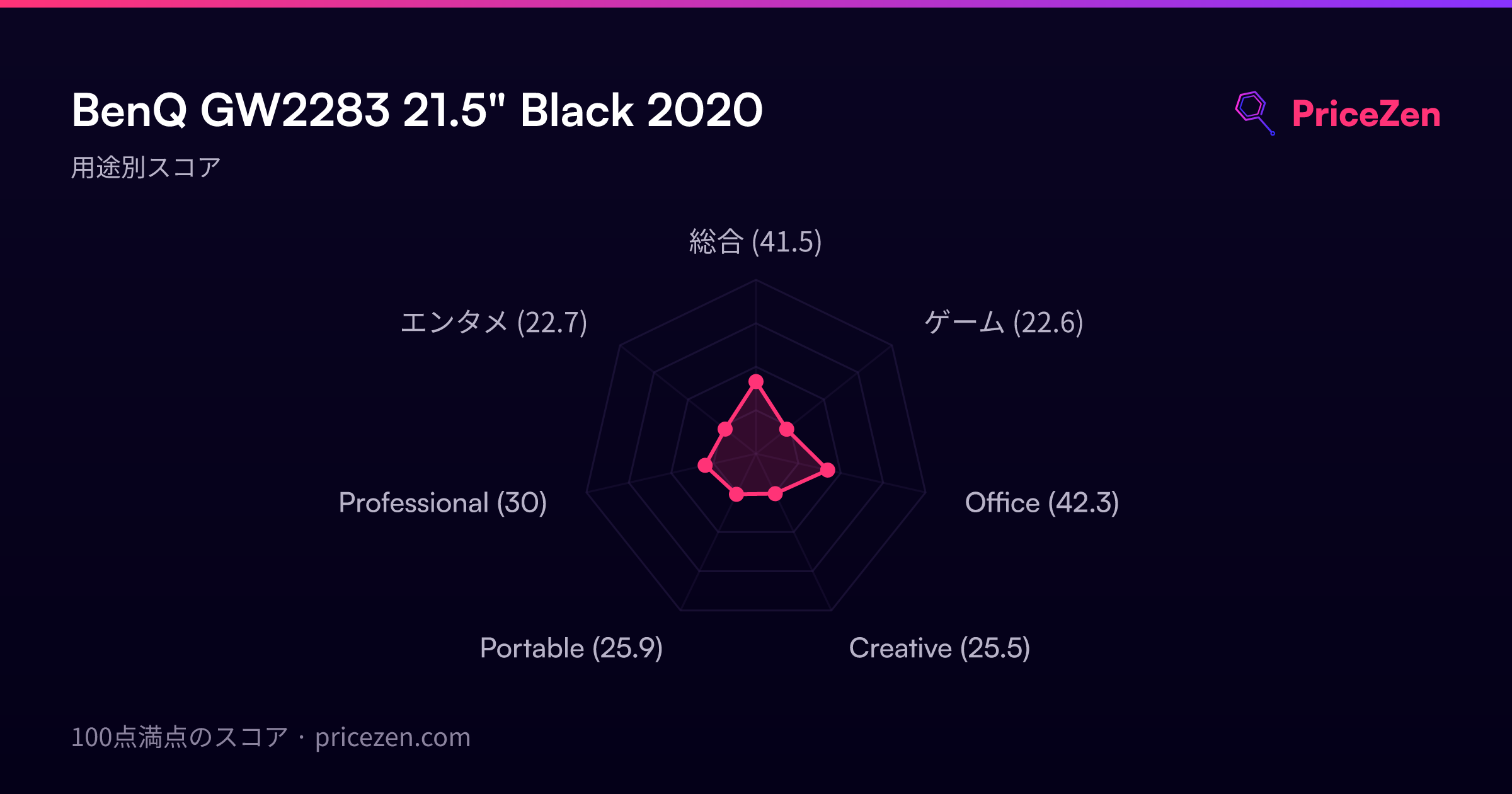
- 総合41.5
- ゲーム22.6
- Office42.3
- Creative25.5
- Portable25.9
- Professional30
- エンタメ22.7