HP E24MV G4 23.8" Black 2024
Its integrated 5MP pop-up webcam with Windows Hello support and built-in speakers make it a purpose-built conferencing solution, eliminating the need for external peripherals. The 23.8-inch IPS panel is backed by 4-way ergonomic adjustability and HP Eye Ease low blue light certification for all-day comfort. This monitor is best for office workers and remote professionals who spend most of their day on video calls and need a clean, single-cable Thunderbolt setup.












概要
The 30-Second Version
The HP E24mv G4 is a 23.8-inch FHD conferencing monitor with a built-in 5MP pop-up webcam, speakers, and mic. It's great for video calls and office work, with best-in-class connectivity and a comfortable ergonomic stand. But the camera mechanism is finicky, the buttons are poorly designed, and the 60Hz panel rules out gaming.
Pros & Cons
長所
- Built-in 5MP pop-up webcam with Windows Hello 100th
- Best-in-class connectivity including Thunderbolt and 4 USB-A ports 91st
- 4-way ergonomic stand with height, tilt, swivel, and pivot 86th
- 99% sRGB coverage for accurate colors
- Integrated speakers and mic for video calls
短所
- Camera spring mechanism is finicky and hard to open
- Bottom buttons are poorly designed and frustrating to use
- 250 nits brightness is mediocre for bright rooms
- 60Hz refresh rate rules out gaming
- Requires both HDMI and video cables for full functionality
オーナーの声
The Word on the Street
購入者の評価が時間とともにどう変化したか
独自顧客が実際にレビューを書いた時期に基づいています。発売当初の高評価が続いたかどうかがわかります。
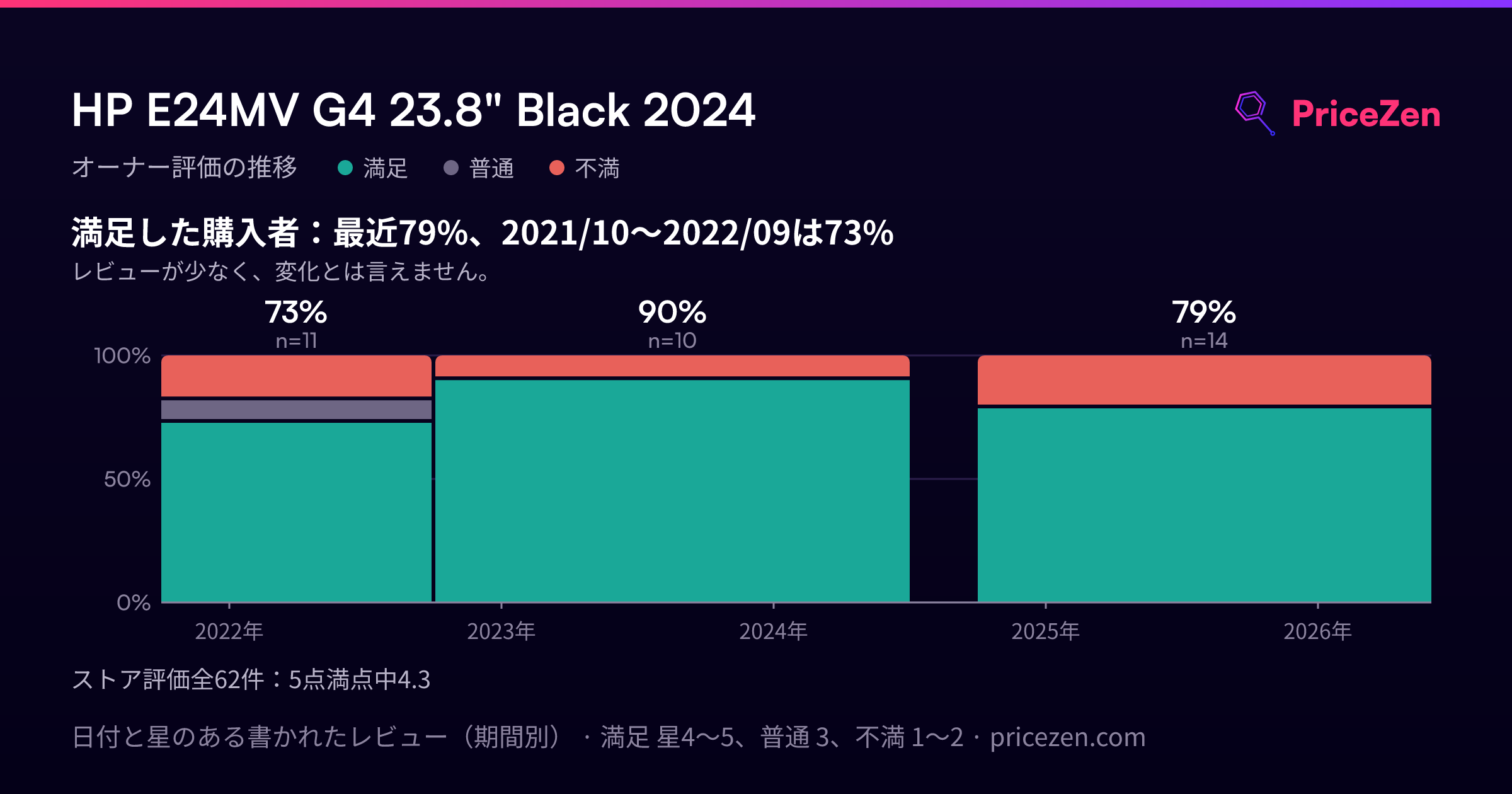
満足した購入者:最近79%、2021/10~2022/09は73%
レビューが少なく、変化とは言えません。
ストア評価全62件:4.3★。 グラフは星と投稿日のある書かれたレビュー35件を数えています。
星のない書かれたレビュー1件は推移に含めていません。
数値を表示
| 期間 | レビュー | 満足 | 普通 | 不満 | 満足の割合 |
|---|---|---|---|---|---|
| 2021/10~2022/09 | 11 | 8 | 1 | 2 | 73% |
| 2022/10~2024/06 | 10 | 9 | 0 | 1 | 90% |
| 2024/10~2026/05 | 14 | 11 | 0 | 3 | 79% |
- 2022/04~2022/063件中3件が満足
Buyers in Q2 2022 found the monitor great for academic work and meetings, praising its integrated camera, speakers, vertical mode, fast refresh rate, and sharp screen. However, one noted the camera quality is poor.
- Integrated camera, speakers, and vertical mode support daily academic and research work.
- Fast refresh rate and sharp screen quality are highlighted as strong points.
- Easy setup and adjustment, plus optional USB ports that free up PC ports.
- Built-in camera quality is poor, not clear, though functional for avoiding extra cables.
- 2022/01~2022/033件中3件が満足
Buyers in this period found the monitor attractive, easy to set up, and compatible with Mac OS. One reviewer missed a printed manual, preferring hard copy over PDF.
- Monitor is nice looking, easy to install and operate, with good viewing.
- Works well with Mac OS (OSX) on Mac-mini.
- No printed user manual included; only PDF, which one buyer disliked.
各列は、星と投稿日のあるレビューが10件以上になるまで四半期をまとめています。満足 = 4〜5★、普通 = 3★、不満 = 1〜2★。 期間ごとの要約は英語です。
実証データ
Performance
Let's be honest about what this monitor is and isn't. The 60Hz refresh rate and 5ms response time put it in the bottom quarter of displays in our database for raw performance. If you're thinking about gaming on this thing, don't. The 29.2 out of 100 gaming score tells you everything you need to know. This is a productivity panel, not a gaming one.
For office work, the story is much better. The IPS panel covers 99% of sRGB, which means colors look accurate enough for everyday tasks, presentations, and video calls. The 250 nits of brightness is fine for indoor office environments, though it'll struggle near bright windows. The 8-bit color depth (6 bit + 2 FRC) is standard for this class of monitor. Where this display really shines is connectivity, sitting at the absolute top of our charts. You get HDMI, DisplayPort, VGA, four USB-A ports, and USB-C with Thunderbolt support. That's more ports than most monitors twice the price.
Specifications
Full Specifications
Display
| Size | 23.8" |
| Resolution | 1920x1080 (Full HD) |
| Panel Type | IPS |
| Aspect Ratio | 16:9 |
| Curved | No |
| Screen Finish | matte |
Performance
| Refresh Rate | 60 Hz |
| Response Time | 5 |
Color & HDR
| Brightness | 250 nits |
| Color Gamut | 99% sRGB |
| Color Depth | 8-bit |
Connectivity
| HDMI Ports | 1 |
| DisplayPort | 1 |
| USB-C | 4 |
| Thunderbolt | N/A |
| Speakers | Yes |
| Headphone Jack | Yes |
Ergonomics
| Height Adjustable | Yes |
| Tilt | Yes |
| Swivel | Yes |
| Pivot | Yes |
| VESA Mount | 100x100 |
Features
| Webcam | Yes |
| Touchscreen | No |
| PIP/PBP | No |
| Power | 28 |
| Weight | 6.5 kg / 14.3 lbs |
vs Competition
The HP E24mv G4 doesn't really compete with gaming monitors like the LG UltraGear 27G810A-B or the ASUS ROG Strix XG27AQDMGR. Those are 144Hz+ panels built for speed, and they'd run circles around this HP in any gaming scenario. But they also don't have webcams, and they cost more. The more relevant comparison is the Dell S2725QC, which gives you a 27-inch 4K panel with USB-C connectivity. The Dell is sharper and bigger, but you'll need to buy a separate webcam if video calls matter to you.
The Acer Nitro XV272U and Samsung G75T are also gaming-focused displays that outclass the HP on refresh rate and response time. But again, none of them have the conferencing features that make the E24mv G4 unique. If you're a hybrid worker who lives on Teams and Zoom, the HP's integrated webcam and mic setup is genuinely useful. If you're a gamer or content creator, look elsewhere. The HP's 54.1 overall score in our database reflects this split personality: great for office use, weak for everything else.
| Spec | HP E24MV G4 23.8" | Lenovo Legion R27qc-30 27" | BenQ PD3220U 32" | Samsung Odyssey Ark 2nd Gen 55" | LG UltraGear 27GN950-B 27" | Gigabyte M Series M32U 31.5" |
|---|---|---|---|---|---|---|
| Screen Size | 23.8 | 27 | 32 | 55 | 27 | 31.5 |
| Resolution | 1920 x 1080 | 2560 x 1440 | 3840 x 2160 | 3840 x 2160 | 3840 x 2160 | 3840 x 2160 |
| Panel Type | IPS | VA | IPS | Mini-LED | Nano-IPS | IPS |
| Refresh Rate | 60 | 180 | 60 | 165 | 144 | 144 |
| Response Time Ms | 5 | 0.5 | 5 | 1 | 1 | 1 |
| Adaptive Sync | - | FreeSync | - | FreeSync Premium Pro | FreeSync Premium Pro | FreeSync Premium Pro |
| Hdr | - | HDR10 | HDR10 | HDR10+ | HDR600 | HDR400 |
| Compare | Compare | Compare | Compare | Compare |
| 製品 | Color | 携帯性 | Display | Feature | User Sentiment | Ergonomic | Performance | Connectivity | ユーザー評価 |
|---|---|---|---|---|---|---|---|---|---|
| HP E24MV G4 23.8" | 35.9 | 85.9 | 21.4 | 51.5 | 29.2 | 90.7 | 22.4 | 99.8 | 52.4 |
| Lenovo Legion R27qc-30 27" Compare | 82.6 | 62.9 | 61.9 | 90.8 | 76.5 | 90.7 | 91.8 | 91 | 41.5 |
| BenQ PD3220U 32" Compare | 88.6 | 81.3 | 95.1 | 85 | 0 | 90.7 | 22.4 | 96.9 | 0 |
| Samsung Odyssey Ark 2nd Gen 55" Compare | 98.4 | 20.8 | 91.5 | 96.3 | 10.2 | 30.1 | 77.1 | 81.1 | 74.8 |
| LG UltraGear 27GN950-B 27" Compare | 93 | 35.2 | 87 | 85 | 0 | 90.7 | 72.6 | 15.2 | 0 |
| Gigabyte M Series M32U 31.5" Compare | 90 | 62.9 | 87 | 85 | 0 | 73.4 | 72.6 | 87.5 | 0 |
価格
Value & Pricing
Value is tricky here because the price swings wildly depending on where you buy. In the US, we're seeing listings from USD 150 all the way up to USD 823. That's a USD 673 spread, which is absurd for a monitor in this class. If you can snag it near the low end, it's a solid deal for a conferencing monitor with a built-in webcam. At the high end, you're getting fleeced. Best Buy has refurbished units that tend to land on the cheaper side, so that's worth checking first. In Canada, the spread is tighter at CAD 370 to CAD 416, which is more reasonable. For comparison, you could grab a Dell S2725QC with a 4K panel for not much more, though you'd lose the integrated webcam.
価格履歴
詳細情報
Overview
The HP E24mv G4 is a 23.8-inch FHD conferencing monitor aimed squarely at people who spend their days on video calls. It's not trying to be a gaming display or a color-critical workhorse. It's a business monitor with a built-in 5MP pop-up webcam, speakers, and a mic, all wrapped in an IPS panel that gets the basics right. Pricing is all over the place depending on where you shop, from USD 150 to USD 823 in the US, so you'll want to hunt for a deal before pulling the trigger.
We've seen this monitor listed across Best Buy, Newegg, Amazon, and a handful of other retailers. The spec sheet reads like a solid office workhorse: 1920 x 1080 resolution, 60Hz refresh rate, 5ms response time, and 250 nits of brightness. Nothing flashy, but for spreadsheets, email, and Zoom calls, it's the kind of monitor that just gets out of your way. The real selling point is that integrated webcam and the 4-way ergonomic stand, which are features you won't find on most budget displays.
Is the HP E24mv G4 good for video conferencing? That's the whole pitch, and for the most part, it delivers. The webcam pops up from the top bezel when you need it and tucks away for privacy when you don't. Windows Hello support is a nice touch too. But there are some rough edges, and we'll get into those below.
Common Questions
Q: Is the HP E24mv G4 good for gaming?
No, the HP E24mv G4 is not good for gaming. Its 60Hz refresh rate and 5ms response time are far below what modern gaming monitors offer, and our database scores it at just 29.2 out of 100 for gaming performance.
Q: Does the HP E24mv G4 have a built-in webcam?
Yes, the HP E24mv G4 has a 5MP pop-up webcam built into the top bezel. It supports Windows Hello and tilts up to 25 degrees for better angles during video calls.
Q: Can the HP E24mv G4 be mounted on a monitor arm?
Yes, the HP E24mv G4 supports VESA 100x100 mounting, so you can attach it to a monitor arm or wall mount if you prefer not to use the included stand.
Q: How bright is the HP E24mv G4 display?
The HP E24mv G4 has a brightness of 250 nits, which is adequate for typical indoor office environments but may struggle in rooms with lots of natural light or direct sunlight.
Who Should Skip This
Skip the HP E24mv G4 if you're a gamer, a video editor, or anyone who needs high refresh rates or wide color gamut coverage. The 60Hz panel and 250 nits brightness won't cut it for fast-paced games or color-critical work. If you need a sharper display for productivity, the Dell S2725QC gives you 4K resolution at a similar price point, though you'll need a separate webcam. And if you're on a tight budget and don't need the integrated camera, there are plenty of basic 24-inch FHD monitors for under USD 100 that'll handle spreadsheets just fine.
Verdict
Should you buy the HP E24mv G4? If you're a remote worker or office professional who spends hours on video calls and wants a clean desk setup without a separate webcam cluttering things up, this monitor makes a lot of sense. The integrated 5MP camera, speakers, and mic are genuinely convenient, and the ergonomic stand is one of the best we've seen in this price range. The connectivity options are also outstanding, with Thunderbolt and four USB-A ports giving you plenty of room to plug in peripherals.
But there are caveats. The camera mechanism has real issues, with multiple owners reporting that it's difficult to open and feels flimsy. The bottom buttons are poorly designed and annoying to use. And the 250 nits brightness means this isn't the monitor for a sun-drenched office. If you can live with those quirks and find it at a good price, it's a solid buy. If you're paying anywhere near the top of that USD 823 range, you're overpaying significantly.
Usage Scores
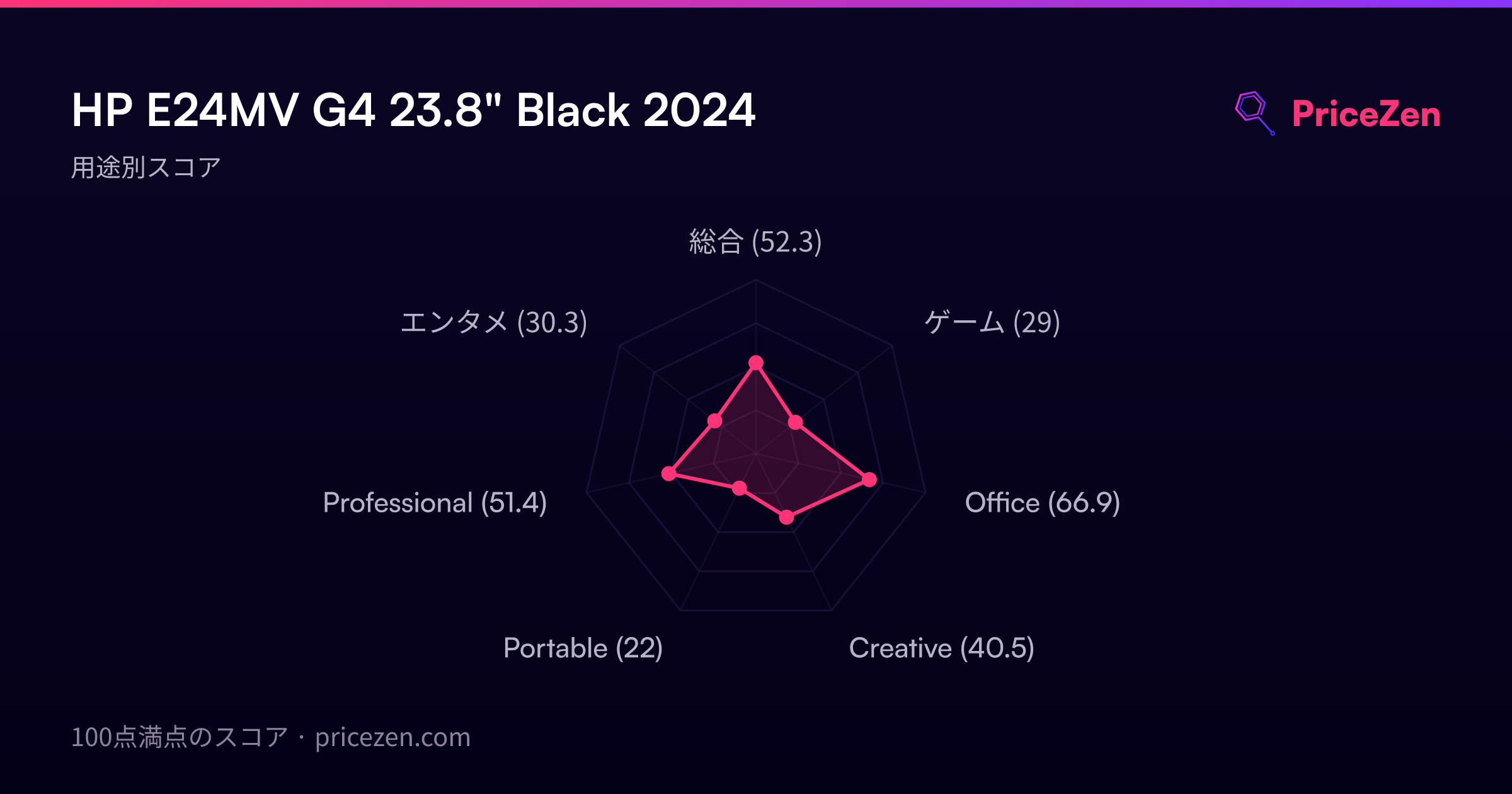
- 総合52.3
- ゲーム29
- Office66.9
- Creative40.5
- Portable22
- Professional51.4
- エンタメ30.3