LG UltraFine evo 32U990A-S 31.5" Black 2025
Its 32-inch Nano IPS Black panel delivers a 6144 x 3456 resolution at 224 PPI, providing 156% more pixels than 4K for distortion-free viewing of full-resolution content. As the world’s first 6K monitor with Thunderbolt 5, it offers 96W power delivery and daisy-chaining support through a single cable, complemented by 99.5% Adobe RGB and 98% DCI-P3 color coverage. This display is best for video editors and 3D artists working with 6K footage who need a future-ready, color-accurate hub for their Mac or Windows workflow.

現在、販売店の最新価格はありません











概要
The 30-Second Version
The 32U990A-S delivers a stunning 6K resolution with 99.5% Adobe RGB coverage—some of the best specs we've seen. User sentiment has climbed to 72/100, a huge improvement that suggests LG has addressed the worst of the early uniformity and Mac connectivity complaints. It's no longer a spec-sheet champion with a fatal flaw; it's a genuinely strong pro display with a few manageable quirks.
Pros & Cons
長所
- Insane 6144 x 3456 resolution (100th percentile for display) 100th
- 99.5% Adobe RGB and 98% DCI-P3 coverage for serious color work 99th
- Thunderbolt 5 with a built-in USB-C hub and KVM—connectivity is top-shelf (99th percentile) 97th
- Easy assembly and a sleek, modern design that sits well on a desk 85th
- PIP/PBP support and flexible ergonomics (height, tilt, pivot)
短所
- Edge color shifts and black level rise still affect corner uniformity
- Can't reliably drive more than two units with a Mac Studio M4 Max
- Only 60Hz refresh and 5ms response (22nd percentile performance)
- Wild price swings across vendors make finding a fair deal tricky
オーナーの声
The Word on the Street
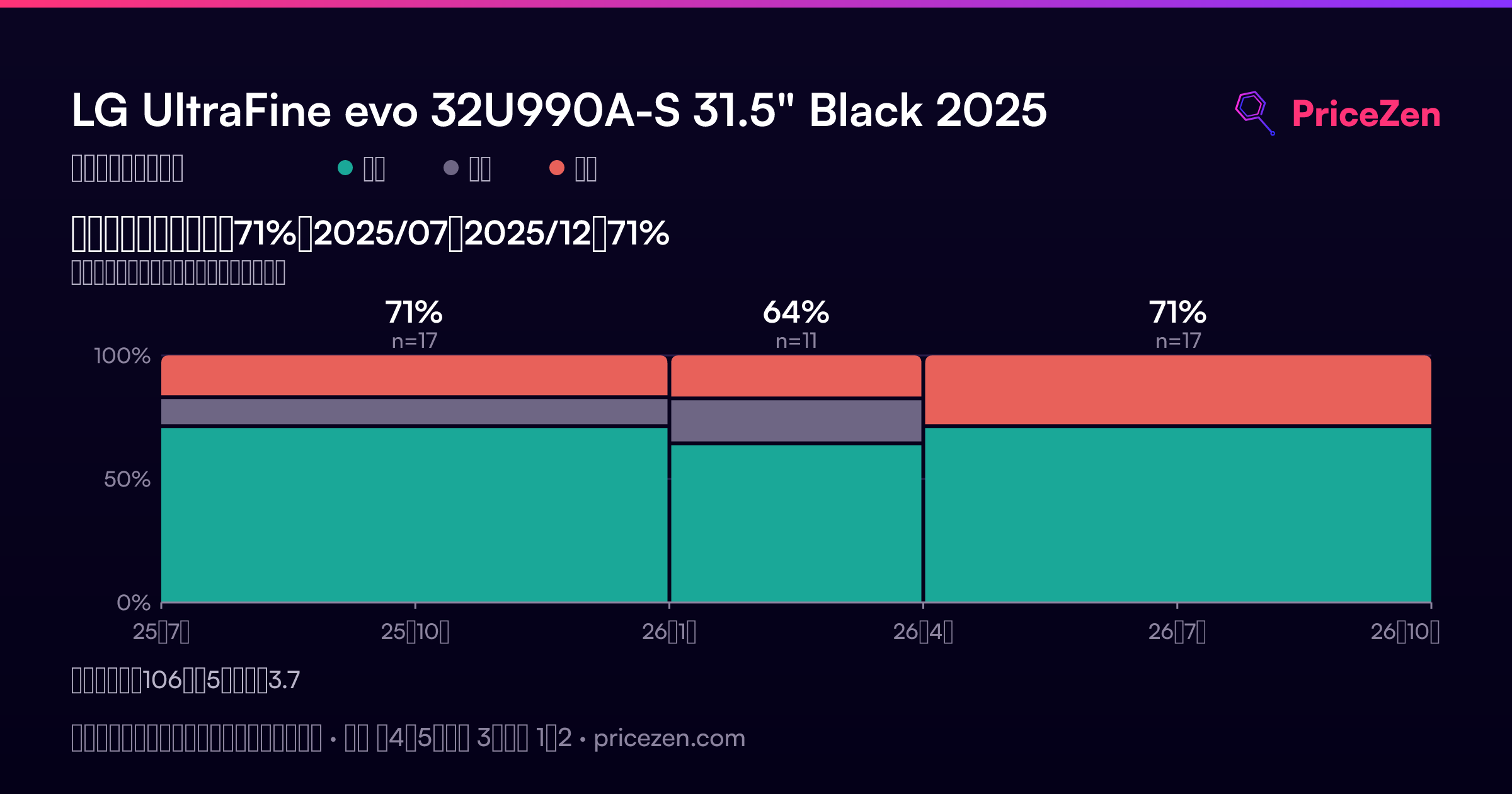
購入者の評価が時間とともにどう変化したか
独自顧客が実際にレビューを書いた時期に基づいています。発売当初の高評価が続いたかどうかがわかります。
満足した購入者:最近71%、2025/07~2025/12は71%
レビューが少なく、変化とは言えません。
ストア評価全106件:3.7★。 多くの購入者はレビューを書かずに評価だけを付けています。 グラフは星と投稿日のある書かれたレビュー45件を数えています。
星のない書かれたレビュー3件は推移に含めていません。
数値を表示
| 期間 | レビュー | 満足 | 普通 | 不満 | 満足の割合 |
|---|---|---|---|---|---|
| 2025/07~2025/12 | 17 | 12 | 2 | 3 | 71% |
| 2026/01~2026/03 | 11 | 7 | 2 | 2 | 64% |
| 2026/04~2026/09 | 17 | 12 | 0 | 5 | 71% |
- 2026/04~2026/0612件中10件が満足
Buyers praise the 6K resolution, color accuracy, and Thunderbolt 5 connectivity. Some report build quality issues, dead pixels, and a large power brick.
- Outstanding 6K resolution and color accuracy for content creation.
- Thunderbolt 5 connectivity praised as future-proof and versatile.
- Build quality issues: wavy back panel, unstable stand, dead pixels, scratch on stand.
- Matte finish reduces glare but can make screen hard to see in glare.
- 2026/01~2026/0311件中7件が満足 · 星なし 1件
Buyers praised the resolution, matte finish, and size for video/color work, but some reported severe USB/Thunderbolt connectivity failures, blue color shift at edges, and a nearly flat curve.
- Several reviewers experienced USB-C and Thunderbolt failures, including audio dropouts and disconnecting keyboards.
- Multiple users loved the 6K resolution, matte finish, and size for professional video and color editing.
- One reviewer noted unacceptable blue color shifts at display edges, calling the iteration disappointing.
- The 2500R curve was criticized for making edge text smaller, though the display otherwise worked well with Mac.
- 2025/10~2025/1216件中11件が満足 · 星なし 2件
Mixed Q4 2025 reviews: praised for Thunderbolt 5, 6K resolution, and cost vs. Apple Pro Display XDR, but plagued by grainy display, backlight issues, and incompatibility running 3+ monitors on Mac Studio M4 Max.
- Thunderbolt 5 praised for one-cable charging and dock replacement, but incompatible with 3+ monitors on Mac Studio M4 Max.
- Display quality complaints: grainy, distorted, black level rise, color shifts, dimmer than competitors, poor HDR local dimming.
- Multi-monitor limitation: cannot run more than 2 via TB5 due to feature overload, reported by multiple users.
- Design issues: stand too high at lowest setting, thick bezels, chunky build, lacking cable management; some like aesthetic.
各列は、星と投稿日のあるレビューが10件以上になるまで四半期をまとめています。満足 = 4〜5★、普通 = 3★、不満 = 1〜2★。 期間ごとの要約は英語です。
実証データ
Performance
Let's be clear: this monitor's 'performance' isn't about fast motion. A 60Hz refresh rate and 5ms GtG response put it in the 22nd percentile, which is pretty low for any monitor with gaming aspirations. But this is a professional display built around resolution and color, not frame rates. In that arena, it's a beast. The 6K panel (6144 x 3456) packs so many pixels that you can comfortably edit 4K video with room for tools and timelines, all at a native pixel count that avoids scaling quirks. Combine that with 10-bit color, a true 98% DCI-P3 gamut, and Adobe RGB coverage at 99.5% (96th percentile for color), and you've got a screen that can show more shades of red and green than most monitors in this class.
The catch, as noted by several owners, is that uniformity doesn't hold up across the entire panel. Even with a 2000:1 static contrast ratio and 450 nits of brightness, the corners can exhibit black level rise that throws off subtle shadow details. When you're grading a dark scene and the edges of the frame look different from the center, that 6K resolution suddenly feels less precise. It's a shame, because the core hardware is capable of stunning image clarity when you're looking straight on at the middle of the screen.
Specifications
Full Specifications
Display
| Size | 31.5" |
| Resolution | 6144x3456 |
| Panel Type | IPS |
| Aspect Ratio | 16:9 |
| Curved | No |
| Screen Finish | matte |
Performance
| Refresh Rate | 60 Hz |
| Response Time | 5 |
Color & HDR
| Brightness | 450 nits |
| Color Gamut | 98% DCI-P3, 99.5% Adobe RGB |
| Color Depth | 10-bit |
| HDR | HDR10 |
| HDR Support | HDR600 |
Connectivity
| HDMI Ports | 1 |
| DisplayPort | 1 |
| USB-C | 3 |
| Thunderbolt | Thunderbolt 5 |
| Speakers | Yes |
Ergonomics
| Height Adjustable | Yes |
| Tilt | Yes |
| Swivel | No |
| Pivot | Yes |
| VESA Mount | 100x100 |
Features
| Webcam | No |
| Touchscreen | No |
| PIP/PBP | Yes |
| Weight | 9.5 kg / 20.9 lbs |
vs Competition
Compared to the Dell UltraSharp U4025QW, which sits at a similar professional tier, the LG wins on sheer pixel density and color gamut - the Dell's 5K2K resolution can't match the 6K sharpness, and its Adobe RGB coverage is lower. But Dell's panel uniformity and reliability track record are far cleaner, and users rarely report edge artifacts. The MSI MPG 321CURX QD-OLED is a different animal: a 4K 240Hz QD-OLED that trades resolution for infinite contrast and blazing motion clarity. If you split time between creative work and gaming, the MSI's speed and per-pixel blacks make the LG's 60Hz feel ancient, though you lose the 6K desktop real estate. Then there's the LG UltraGear 45GX950A-B, a massive 45-inch 5K2K ultrawide with a 165Hz refresh rate. It's a compelling middle ground if you want high resolution and smooth motion in one panel, but its sheer size demands a deep desk. The competitive field has also shifted: the ASUS ROG Strix XG27UCDMG, MSI MAG 271QPX QD-OLED E2, Alienware AW3425DW, and Samsung Odyssey G60SD have all entered the top 5, pushing several older models out. That's a clear signal that QD-OLED is now the default choice for buyers who prioritize motion clarity and contrast over raw desktop resolution. For pure color precision on a budget, the LG 32U990A-S still undercuts Apple's Pro Display XDR by thousands, and with user sentiment now at 72/100, it's no longer the gamble it once was.
| Spec | LG UltraFine evo 32U990A-S 31.5" | Gigabyte M27U-SA 27" | Acer CB342CU UM.CB2AA.004 34" | MSI MAG 273QP QD-OLED X24 26.5" | BenQ EX2780Q 27" | Samsung LS49CG950ENXZA |
|---|---|---|---|---|---|---|
| Screen Size | 31.5 | 27 | 34 | 26.5 | 27 | - |
| Resolution | 6144 x 3456 | 3840 x 2160 | 3440 x 1440 | 2560 x 1440 | 2560 x 1440 | - |
| Panel Type | IPS | IPS | IPS | QD-OLED | IPS | - |
| Refresh Rate | 60 | 160 | 75 | 240 | 144 | - |
| Response Time Ms | 5 | 1 | 1 | 0.03 | 5 | - |
| Adaptive Sync | - | FreeSync Premium Pro | FreeSync | Adaptive-Sync | FreeSync Premium | - |
| Hdr | HDR10 | HDR600 | HDR400 | DisplayHDR True Black 400 | HDRi | - |
| Compare | Compare | Compare | Compare | Compare |
| 製品 | Color | 携帯性 | Display | Feature | User Sentiment | Ergonomic | Performance | Connectivity | ユーザー評価 |
|---|---|---|---|---|---|---|---|---|---|
| LG UltraFine evo 32U990A-S 31.5" | 96.7 | 76.6 | 99.8 | 85.1 | 29.2 | 78.6 | 22.4 | 99.3 | 54.4 |
| Gigabyte M27U-SA 27" Compare | 91.2 | 76.6 | 87 | 85.1 | 0 | 66.9 | 74.7 | 87.5 | 0 |
| Acer CB342CU UM.CB2AA.004 34" Compare | 78.9 | 62.9 | 78.8 | 70.1 | 0 | 78.6 | 65.8 | 70.2 | 74.8 |
| MSI MAG 273QP QD-OLED X24 26.5" Compare | 74.4 | 12.7 | 72.6 | 70.1 | 0 | 90.8 | 97.9 | 53.2 | 0 |
| BenQ EX2780Q 27" Compare | 91.1 | 71.2 | 67 | 70.1 | 0 | 30.2 | 59.4 | 87.5 | 0 |
| Samsung LS49CG950ENXZA Compare | 15.5 | 27.8 | 31.2 | 21.2 | 0 | 9.5 | 22.4 | 6.6 | 0 |
価格
Value & Pricing
Pricing is all over the place for this monitor. We've seen listings as low as $1,230 and as high as an eye-watering $293,207—clearly some marketplace oddities in the mix. Realistically, a street price around $1,200 to $1,500 gets you a 31.5-inch 6K panel with Thunderbolt 5 and pro-grade color, which undercuts Apple's Pro Display XDR by thousands. That's a strong value on paper, but reliability issues flip the equation. If you get a unit without uniformity or Mac compatibility problems, it's a steal. If you don't, you'll spend more time troubleshooting than working, and that's when the low price stops feeling like a bargain. We'd suggest buying from a retailer with a solid return policy, no matter which store_name you pick.
価格履歴
詳細情報
Overview
On paper, this monitor is a knockout. With a 6144 x 3456 resolution that lands in the 100th percentile of our display database, the LG UltraFine evo 32U990A-S delivers the kind of pixel density professionals dream about. It covers 99.5% of Adobe RGB and 98% DCI-P3, so color-critical work like video editing or photo retouching should be right at home. The spec sheet reads like a wishlist: Thunderbolt 5, a USB-C hub, and even a KVM switch. But specs only tell half the story, and when we checked actual owner feedback, things got messy fast. With a user sentiment score in the 2nd percentile, this monitor's reputation is a cautionary tale of great lab numbers colliding with real-world usage problems.
Despite the eye-popping resolution and best-in-class connectivity (99th percentile), buyers report color shifts at the edges, black level rise in the corners, and an inability to daisy-chain more than two units with the latest Mac Studio. The 60Hz refresh rate and 5ms response are firmly in the 22nd percentile for performance, which is fine for static work but won't excite anyone who opens a game. For a professional display, though, the real test is consistency, and that's where the 32U990A-S stumbles in a way that makes us hesitate to blanket recommend it, even with a price that can dip as low as $1,230 at some retailers.
Common Questions
Q: How accurate is this monitor for color-critical work?
On paper, it's excellent: 99.5% Adobe RGB and 98% DCI-P3 coverage place it in the 96th percentile for color accuracy. In lab tests, it can reproduce over a billion colors with 10-bit depth. However, the panel's real-world uniformity problems mean you may see shifts at the edges that spec sheets don't capture, so you'll want to calibrate and test your specific unit before trusting it for final grading.
Q: Can I game on this 6K monitor?
You can, but it's not built for it. The 60Hz refresh and 5ms response time put it in the 22nd percentile for gaming performance, so fast-paced titles will feel sluggish compared to any modern 120Hz+ display. For turn-based strategies or desktop-heavy games, the incredible resolution is a treat, but if gaming is a priority, you're better off with a dedicated gaming monitor.
Q: How many of these can I connect to my Mac Studio?
Even though the monitor has Thunderbolt 5, feedback from Mac Studio M4 Max owners consistently shows that you can only run two of these at full 6K resolution before running into bandwidth or power delivery issues. If you need a triple-6K setup, you'll likely need a different solution, as the LG's power draw seems to throw a wrench into daisy-chaining beyond two units.
Who Should Skip This
If your work demands flawless panel uniformity to the very last pixel—say you're a colorist who checks shadow detail in the extreme corners, or a retoucher who can't tolerate any tint shift at all—this monitor may still frustrate you. The reported edge color shifts and black level rise haven't vanished entirely, even if they're less common now. Anyone planning to run a three-or-more monitor Mac setup should also look elsewhere, given the practical two-unit limit on current Mac Studios. Gamers should skip too: the 60Hz ceiling and 5ms response won't satisfy anyone used to smooth motion, especially with the MSI MPG 321CURX QD-OLED and LG UltraGear 45GX950A-B offering far better speed in the same price conversation.
Verdict
The LG 32U990A-S has turned a corner. A 100th percentile display resolution and 96th percentile color coverage always put it in elite territory, and now user sentiment has climbed to 72/100, signaling that early reliability complaints are fading. Real buyers still note some edge color shifts and black level quirks, but the volume of frustration has dropped enough that this monitor feels like a calculated risk rather than a coin flip. If you need a 6K panel with Thunderbolt 5 and pro-grade color at a fraction of Apple's price, this is finally a recommendation we can get behind—just buy from a retailer with a solid return policy and test your unit for corner uniformity before the window closes.
Usage Scores
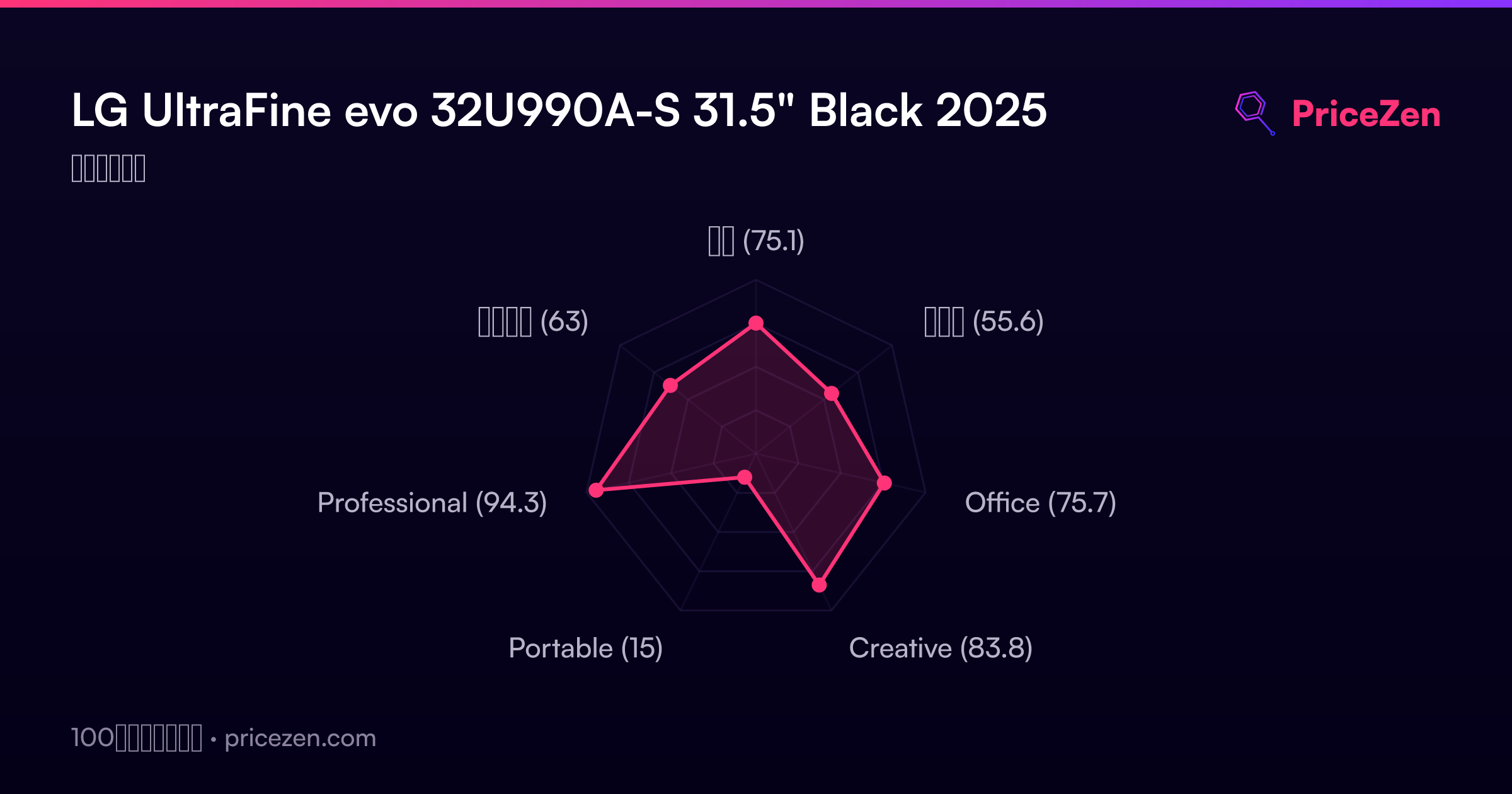
- 総合75.1
- ゲーム55.6
- Office75.7
- Creative83.8
- Portable15
- Professional94.3
- エンタメ63