Z-Edge X27 27"

QD-OLED: 自発光の画素に量子ドットの色彩 11月28日に確認済み
72/100 総合スコア 4.4 オーナー評価1,173件の平均
これまで1日分の価格しか確認しておらず、通常価格を判断するには足りません。
- Screen
- 27"
- Resolution
- 2560 x 1440
- Panel
- QD-OLED
- Refresh
- 240 Hz
- Response time
- 0.03 ms
- Adaptive sync
- FreeSync
1店舗の価格を比較
安い順。新品・整備済み品・バンドルのオファーは分けて表示するので、同じ条件どうしで比較できます。
| 店舗 | 販売元 | カラーと状態 | 価格 | 最安との差 | 最終確認 | リンク |
|---|---|---|---|---|---|---|
| 新品1件の価格単品 | ||||||
| Amazon | マーケットプレイス出品者 | 記載なし | ¥61,429 | 最安値 | 3 日前 | 店舗へ |
 出典: PriceZen, 2026年11月25日に確認
過去7日以内に確認した価格を「現在の価格」としています。 「マーケットプレイス出品者」とは、その店舗自身ではなく、店舗上の第三者の出品者を指します。








概要
The 30-Second Version
A 27" QD-OLED at 240Hz and 0.03ms for $300 is the headline, and our performance ranking puts it in the 98th percentile. Owners love the picture and the price, though the stand wobbles and HDMI can be finicky. Worth buying if you want cheap OLED speed.
Pros & Cons
長所
- 240Hz and 0.03ms GTG put it in the top tier for gaming performance. 98th
- QD-OLED true blacks and 1500000:1 contrast make dark scenes look genuinely deep. 91st
- Stand adjusts 120mm in height, swivels, pivots and takes a VESA 100x100 mount. 77th
- Owners consistently call out picture quality and value at this price. 75th
短所
- Owners report a wobbly stand connection despite the generous adjustments.
- A few buyers had HDMI cables that kept dropping the signal.
- Color coverage ranks about average, so it's not a pro color work panel.
- On-screen settings are limited according to several owners.
オーナーの声
The Word on the Street
- Picture quality dominates the feedback, with multiple owners calling out vivid color, sharp detail and genuinely deep blacks.
- Value comes up almost as often, and several buyers say the panel punches well above what they paid, with setup described as quick and painless.
- Build quality splits opinion: the stand connection wobbles for some owners, a few had HDMI cables that kept disconnecting, and others found the on-screen menu options thin.
購入者の評価が時間とともにどう変化したか
独自顧客が実際にレビューを書いた時期に基づいています。発売当初の高評価が続いたかどうかがわかります。
書かれたレビュー 12件、2021/08~2026/04:満足 11件、不満 1件
ストア評価全1,173件:4.4★。 多くの購入者はレビューを書かずに評価だけを付けています。 グラフは書かれたレビュー12件を数えています。
各点は書かれたレビュー1件で、書かれた月に置いています。満足 = 4〜5★、普通 = 3★、不満 = 1〜2★。
実証データ
Performance
On paper this thing is quick. 240Hz plus 0.03ms GTG and FreeSync is a competitive-gaming combo, and our ranking has it near the very top for performance. The QD-OLED panel does the heavy lifting on image quality: no backlight bleed, per-pixel lighting, and that absurd 1500000:1 contrast figure. Color is the softer spot. 120% sRGB and 1.07 billion colors sound big, but our color ranking puts it around the middle of the pack, so don't treat it as a grading reference display. Connectivity is solid with 2x HDMI and 2x DisplayPort, plus PIP/PBP if you want two sources on screen at once. The stand covers 120mm of height, tilt, ±25° swivel, pivot to portrait and VESA 100x100. At 6486g it's not going anywhere, and our portability score of 7.2/100 is exactly what you'd expect from a desktop panel.
Specifications
Full Specifications
Display
| Size | 27" |
| Resolution | 2560x1440 (QHD) |
| Panel Type | QD-OLED |
| Aspect Ratio | 16:9 |
| Curved | No |
| Screen Finish | matte |
Performance
| Refresh Rate | 240 Hz |
| Response Time | 0.03 |
| Adaptive Sync | FreeSync |
Color & HDR
| Color Gamut | 120% sRGB |
| Color Depth | 10-bit |
Connectivity
| HDMI Ports | 2 |
| DisplayPort | 2 |
| Speakers | No |
Ergonomics
| Height Adjustable | Yes |
| Tilt | Yes |
| Swivel | Yes |
| Pivot | Yes |
| VESA Mount | 100x100 |
Features
| PIP/PBP | Yes |
| Weight | 6.5 kg / 14.3 lbs |
vs Competition
Cross-shop the MSI MAG 271QPX QD-OLED E2 27" and the Samsung Odyssey G60SD 27" first, since they're the closest match on size and panel type. The ASUS ROG Strix XG27UCDMG 27" is worth a look if you want to compare against a bigger brand's take on a 27" OLED. If you'd rather go wide or large, the Alienware AW-Series AW3425DW 34" and LG UltraGear 32GX850A-B 32" are the ones to line up next to it. The X27's argument is simple: 240Hz, 0.03ms and a fully adjustable stand at $300, with performance and ergonomics ranked well above most monitors we track. What you give up is feature depth, where it lands below average.
| Spec | Z-Edge X27 27" | LG UltraGear 39" | BenQ PD3220U 32" | Samsung Odyssey Ark 2nd Gen 55" | Gigabyte M Series M32U 31.5" | Dell UltraSharp U4320Q 27" |
|---|---|---|---|---|---|---|
| Screen Size | 27 | 39 | 32 | 55 | 31.5 | 27 |
| Resolution | 2560 x 1440 | 3440 x 1440 | 3840 x 2160 | 3840 x 2160 | 3840 x 2160 | 3840 x 2160 |
| Panel Type | QD-OLED | OLED | IPS | Mini-LED | IPS | IPS |
| Refresh Rate | 240 | 240 | 60 | 165 | 144 | 60 |
| Response Time Ms | 0.03 | 0.03 | 5 | 1 | 1 | 5 |
| Adaptive Sync | FreeSync | FreeSync Premium Pro | - | FreeSync Premium Pro | FreeSync Premium Pro | - |
| Hdr | - | DisplayHDR True Black 400 | HDR10 | HDR10+ | HDR400 | HDR400 |
| Compare | Compare | Compare | Compare | Compare |
| 製品 | Color | 携帯性 | Display | Feature | User Sentiment | Ergonomic | Performance | Connectivity | ユーザー評価 |
|---|---|---|---|---|---|---|---|---|---|
| Z-Edge X27 27" | 57.4 | 12.7 | 73.4 | 43.1 | 76.6 | 90.8 | 97.9 | 73.8 | 74.8 |
| LG UltraGear 39" Compare | 63.3 | 49.3 | 84 | 96.3 | 0 | 66.9 | 97.9 | 81 | 0 |
| BenQ PD3220U 32" Compare | 88.6 | 81.3 | 95.1 | 85 | 0 | 90.8 | 22.3 | 96.9 | 0 |
| Samsung Odyssey Ark 2nd Gen 55" Compare | 98.4 | 20.7 | 91.5 | 96.3 | 10.4 | 30 | 77 | 81 | 74.8 |
| Gigabyte M Series M32U 31.5" Compare | 90 | 62.8 | 87 | 85 | 0 | 73.4 | 72.6 | 87.4 | 0 |
| Dell UltraSharp U4320Q 27" Compare | 91 | 82.7 | 87 | 85 | 0 | 90.8 | 22.3 | 96.9 | 0 |
価格
Value & Pricing
At USD 300 this is a lot of panel for the money, and value for money is the second most common theme in owner feedback. You're getting OLED contrast and a 240Hz refresh rate without the usual premium attached. We track its price over time and there's only one US listing in our data, so don't expect a bidding war between stores to save you more. If your budget tops out here, the trade-offs are the stand wobble and middling color scores, not the picture itself.
価格履歴
詳細情報
Overview
The Z-Edge X27 is a 27" QD-OLED gaming monitor running 2560x1440 at 240Hz with a claimed 0.03ms GTG response. It's $300 on Amazon right now, which is the kind of number that makes you double-check the spec sheet. Nope, it's real: true blacks, pixel-level lighting, 1500000:1 contrast, 10-bit color.
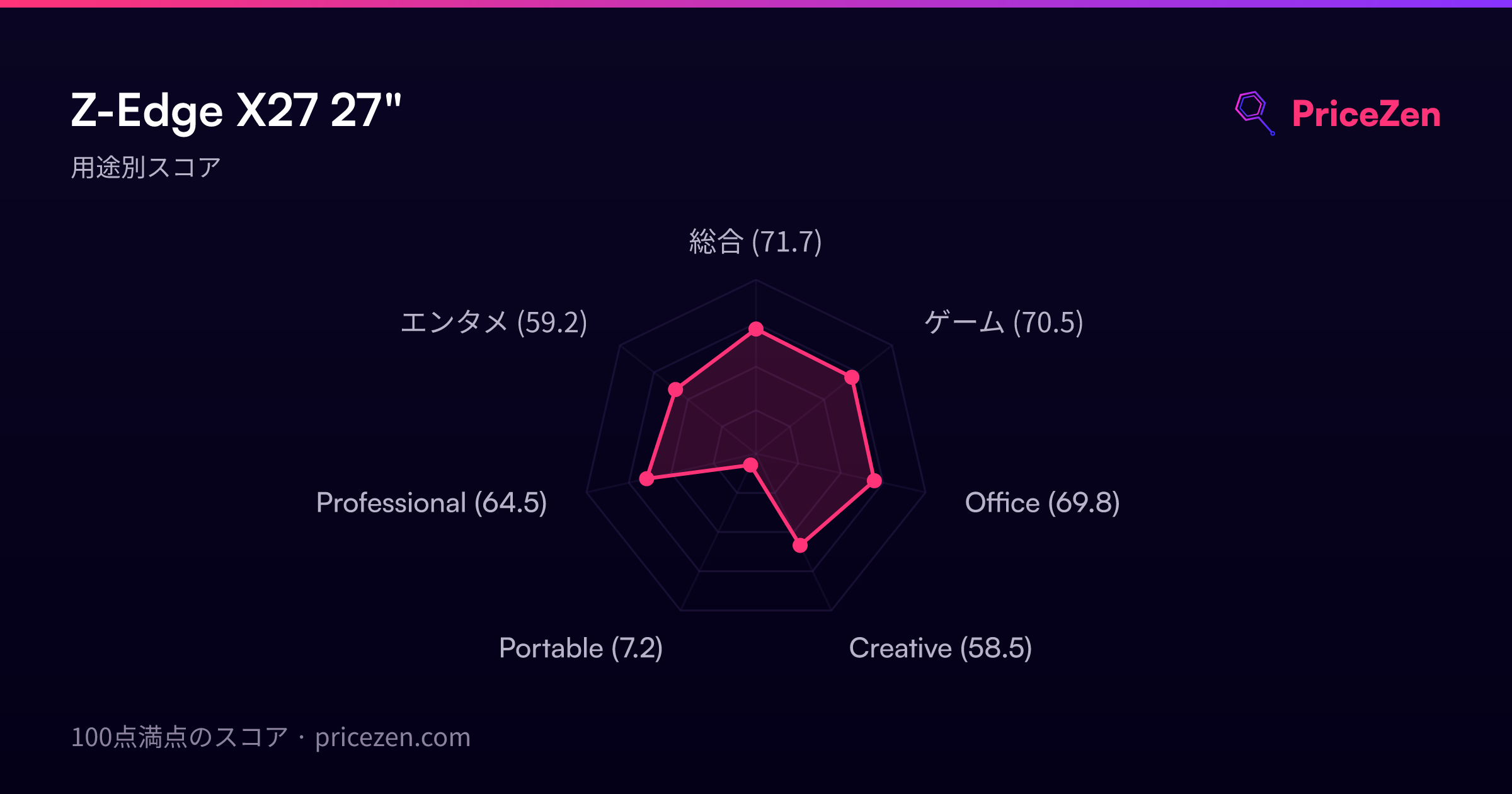
Our scoring model puts its performance in the 98th percentile against every monitor we track, and ergonomics land at 91. The overall score sits at 71.7/100 because the feature set and color coverage are merely okay. Owners seem happy anyway: 4.4/5 across 1173 reviews.
Common Questions
Q: Is 1440p sharp enough on a 27" screen?
A handful of owners felt it wasn't the crispest at this size, but 2560x1440 on 27" is the standard sweet spot for gaming. Our display ranking puts it above the middle of the pack.
Q: Can I mount it on a monitor arm?
Yes, it takes a VESA 100x100 mount, which is handy given owners report some wobble in the stock stand connection. The panel weighs 6486g, so pick an arm rated for that.
Q: Does it work for office use as well as gaming?
Our office score is 69.8/100 versus 70.5 for gaming, so it's nearly as capable either way. Height, tilt, swivel and pivot adjustment plus PIP/PBP help if you're juggling two machines.
Who Should Skip This
Skip it if you do color-critical work, because 120% sRGB lands mid-pack in our color ranking and the on-screen controls are limited. Skip it too if a rock-solid stand matters to you, since wobble is a recurring owner complaint. And if you need something you can carry around, the 7.2/100 portability score should end that conversation fast.
Verdict
Buy it if you want OLED contrast and high-refresh gaming without spending flagship money. Our gaming score of 70.5/100 and office score of 69.8/100 say it's a competent all-rounder, and owners back that up: lots of praise for sharpness, deep blacks and easy setup, with a few grumbles about the stand and HDMI cable. Sentiment sits at 85/100 in our distilled owner data, which is strong for a budget OLED. Tighten the stand mount, use a DisplayPort cable if HDMI acts up, and you'll probably be pleased.
Usage Scores
- 総合71.7
- ゲーム70.5
- Office69.8
- Creative58.5
- Portable7.2
- Professional64.5
- エンタメ59.2