KTC H34S18S 34"
The 34-inch VA panel with 1500R curvature delivers a 3440x1440 resolution at 180Hz with 1ms MPRT, ensuring smooth, tear-free gameplay via Adaptive-Sync. Its 123% sRGB and 98% DCI-P3 coverage, plus HDR10, brings vivid colors, while the anti-glare coating reduces eye strain during long sessions. Best for gamers and office workers who want a spacious ultrawide with full ergonomic adjustments and PIP/PBP for multitasking.

現在、販売店の最新価格はありません











概要
The 30-Second Version
A feature score in the 96th percentile for EUR 465 is the headline: 34 inches of 3440 x 1440 VA at 180Hz, with PIP/PBP, four video inputs and a stand that adjusts every which way. The panel itself is only mid-pack in our rankings, and HDMI tops out at 100Hz at 2560 x 1440. Owners seem happy anyway, at 4.4/5 across 2875 ratings.
Pros & Cons
長所
- Feature set at the top of the charts in our rankings: PIP/PBP, four video inputs, VESA 100x100 96th
- 180Hz with Adaptive-Sync, FreeSync and G-Sync compatibility, well above average for performance 91st
- Ergonomics among the best we track: 90mm height, -5 to 20 degree tilt, ±20 degree swivel, ±5 degree pivot 83rd
- Strong color for the price: 123% sRGB, 98% DCI-P3, 10-bit via 8-bit+FRC 82nd
- 4000:1 contrast on a 1500R VA panel, plus 4.4/5 from 2875 owner ratings
短所
- HDMI 2.0 ports cap out at 2560 x 1440 at 100Hz, so full resolution needs DisplayPort
- Panel quality only mid-pack in our display ranking despite the big spec numbers
- USB 2.0 is firmware-upgrade only, so no hub for your peripherals
- HDR10 support without any local dimming listed, so HDR is more checkbox than experience
- Dead last for portability in our data, a 34 inch curved screen isn't going anywhere
実証データ
Performance
Start with the refresh rate: 180Hz with Adaptive-Sync, FreeSync and G-Sync compatibility, plus a claimed 1ms MPRT response. That combination puts performance well above average in our rankings, and it's the sort of spec set that makes fast shooters and racers feel smooth on a 21:9 canvas. One wrinkle worth knowing before you plug in: the retailer listing says 180Hz, while KTC's own copy talks about 165Hz over DP 1.4. Either way, DisplayPort is the cable you want, because the two HDMI 2.0 ports are documented at 2560 x 1440 at 100Hz, not the panel's full 3440 x 1440.
The VA panel brings 4000:1 contrast and a 1500R curve, which is where the immersion comes from, and 178 degree viewing angles keep the edges from washing out. Color coverage of 123% sRGB and 98% DCI-P3 with 10.7 billion shades is genuinely strong for the money, though our color ranking calls it impressive rather than best-in-class. HDR10 is supported, but don't expect a mini-LED light show from a VA panel with no local dimming listed. And the anti-glare coating with low reflection is the quiet hero here if your desk sits near a window.
Specifications
Full Specifications
Display
| Size | 34" |
| Resolution | 3440x1440 |
| Panel Type | VA |
| Aspect Ratio | 21:9 |
| Curved | Yes |
| Curvature | 1500 |
| Screen Finish | matte |
Performance
| Refresh Rate | 180 Hz |
| Response Time | 1 |
| Adaptive Sync | Adaptive-Sync |
Color & HDR
| Color Gamut | 123% sRGB, 98% DCI-P3 |
| Color Depth | 10-bit |
| HDR | HDR10 |
Connectivity
| HDMI Ports | 2 |
| DisplayPort | 2 |
| Speakers | No |
| Headphone Jack | Yes |
Ergonomics
| Height Adjustable | Yes |
| Tilt | Yes |
| Swivel | Yes |
| Pivot | Yes |
| VESA Mount | 100x100 |
Features
| PIP/PBP | Yes |
vs Competition
Against the field we compare it to, the H34S18S wins on features (top of the charts) and ergonomics (a standout), while sitting mid-pack on display quality. If you're cross-shopping the Alienware AW3425DW 34", you're looking at the same ultrawide format, so the KTC's argument is its 96th percentile feature score and that four-input, PIP/PBP-equipped spec sheet at EUR 465. Tempted by the ASUS ROG Strix XG27UCDMG 27" or the MSI MAG 271QPX QD-OLED E2 27"? Those are different sizes and panel technologies, and the KTC's honest counter is width and value, not panel supremacy, since our display ranking puts it around the middle. The Samsung Odyssey G60SD 27" is the pick if you'd rather have a smaller, faster-feeling desk footprint, and the Dell UltraSharp U4025QW 39.7" goes bigger still for productivity. With office at 75.3/100 and gaming at 72.9/100, the KTC is the jack-of-most-trades option, not the specialist.
| Spec | KTC H34S18S 34" | LG UltraGear 45GX950A-B 45" | ASUS ROG Strix XG27UCDMG 27" | Dell UltraSharp U4025QW 39.7" | Alienware AW-Series AW3425DW 34" | MSI MAG 271QPX QD-OLED E2 27" |
|---|---|---|---|---|---|---|
| Screen Size | 34 | 45 | 27 | 39.70000076293945 | 34 | 27 |
| Resolution | 3440 x 1440 | 5120 x 2160 | 3840 x 2160 | 5120 x 2160 | 3440 x 1440 | 2560 x 1440 |
| Panel Type | VA | OLED | OLED | IPS | QD-OLED | QD-OLED |
| Refresh Rate | 180 | 330 | 240 | 120 | 240 | 240 |
| Response Time Ms | 1 | 0.029999999329447746 | 0.029999999329447746 | 5 | 0.029999999329447746 | 0.029999999329447746 |
| Adaptive Sync | Adaptive-Sync | FreeSync Premium Pro | FreeSync Premium Pro | Adaptive-Sync | FreeSync Premium Pro | FreeSync Premium Pro |
| Hdr | HDR10 | DisplayHDR True Black 400 | DisplayHDR True Black 400 | HDR600 | HDR400 | DisplayHDR True Black 400 |
| Compare | Compare | Compare | Compare | Compare |
| 製品 | Color | 携帯性 | Display | Feature | Performance | Connectivity | ユーザー評価 |
|---|---|---|---|---|---|---|---|
| KTC H34S18S 34" | 82.7 | 3.7 | 76.1 | 96.3 | 81.8 | 73.9 | 74.8 |
| LG UltraGear 45GX950A-B 45" Compare | 99.4 | 76.6 | 99.7 | 96.3 | 99.4 | 97 | 92 |
| ASUS ROG Strix XG27UCDMG 27" Compare | 96.5 | 57.4 | 97.7 | 85.1 | 97.9 | 81.1 | 98.9 |
| Dell UltraSharp U4025QW 39.7" Compare | 97.9 | 76.6 | 98.6 | 96.3 | 56.1 | 99.3 | 96.8 |
| Alienware AW-Series AW3425DW 34" Compare | 98.9 | 74 | 84.1 | 96.3 | 97.9 | 95.4 | 96.8 |
| MSI MAG 271QPX QD-OLED E2 27" Compare | 99.2 | 57.4 | 73.5 | 85.1 | 97.9 | 81.1 | 98.9 |
価格
Value & Pricing
EUR 465 at Amazon is the only store price we're tracking right now, and it's consistent across the Spanish, French and Italian listings we collect. For that you get 34 inches of 3440 x 1440, 180Hz, four video inputs, PIP/PBP and a fully adjustable stand with VESA mounting, which is a lot of boxes ticked in one purchase. Our feature ranking says you're getting near the top of the category on paper, and the 4.4/5 average across 2875 ratings suggests owners broadly agree they got what they paid for. The trade-off is the mid-pack panel score: you're buying breadth of features, not the finest image quality money can buy.
詳細情報
Overview
180Hz, 3440 x 1440 across 34 inches of curved VA, and a feature score in the 96th percentile. That's the KTC H34S18S in one breath: an ultrawide that piles on things you usually pay extra for, like PIP/PBP, a stand with height, tilt, swivel and pivot, VESA 100x100 mounting, and four video inputs (two HDMI, two DisplayPort). Our scoring model puts its features at the very top of the monitor category and its ergonomics among the best on the market.
The catch is that not everything is top-tier. The panel itself lands mid-pack in our display ranking, and the overall score comes out at 72.6/100, with office use at 75.3 and gaming at 72.9. Color is strong rather than class-leading: 123% sRGB, 98% DCI-P3, 10-bit output via 8-bit+FRC, HDR10 support and a 4000:1 contrast ratio that VA panels do well. At EUR 465 on Amazon, with 4.4/5 from 2875 owner ratings behind it, this is a spec-sheet bargain rather than a halo product.
Common Questions
Q: Can I get the full 180Hz over HDMI?
No. The two HDMI 2.0 ports are listed at 2560 x 1440 at 100Hz, so for the panel's native 3440 x 1440 you'll want one of the two DisplayPort 1.4 inputs. KTC's own documentation quotes 165Hz over DP while the retail listing says 180Hz, so treat DisplayPort as the only route to the high refresh rate either way.
Q: Is the color accuracy good enough for photo or video work?
It's strong for the price: 123% sRGB, 98% DCI-P3 and 10-bit output via 8-bit+FRC, which our color ranking rates as impressive rather than class-leading. The 4000:1 contrast helps with gradients and shadow detail. For casual editing it's plenty, but our display score sits mid-pack, so critical color work is where you'd want to look higher up the category.
Q: Will it work with both AMD and Nvidia graphics cards?
Yes, it supports Adaptive-Sync along with FreeSync and G-Sync compatibility, so tearing should be handled on either side. Pair that with 180Hz and a claimed 1ms MPRT and our performance ranking puts it well above average. Just remember the sync and high refresh combo lives on DisplayPort, not the 100Hz-limited HDMI inputs.
Who Should Skip This
Skip it if image quality is your whole reason for buying. Our display ranking puts this panel around the middle of the category, and HDR10 without listed local dimming won't scratch that itch. Competitive players who care more about raw speed than screen width should look at the 27 inch options in our comparison set instead. Console gamers take note too: HDMI 2.0 caps at 2560 x 1440 at 100Hz, so you won't get the full ultrawide experience there. And if you need a USB hub or a monitor you can move between rooms, the firmware-only USB 2.0 port and a portability score at the bottom of our data say this isn't it.
Verdict
We'd point most people toward this if they want an ultrawide that does a bit of everything without a premium price tag. The numbers back it up: features at the top of our rankings, ergonomics among the best, 180Hz with adaptive sync, 98% DCI-P3 coverage and a 4000:1 contrast ratio, all for EUR 465. A 72.6/100 overall score means it's good rather than exceptional, and the mid-pack display ranking is the reason why. But 2875 owners averaging 4.4/5 is a lot of people saying the compromise works. Just use DisplayPort, skip the HDMI ports for your main PC, and treat HDR10 as a bonus rather than the reason to buy.
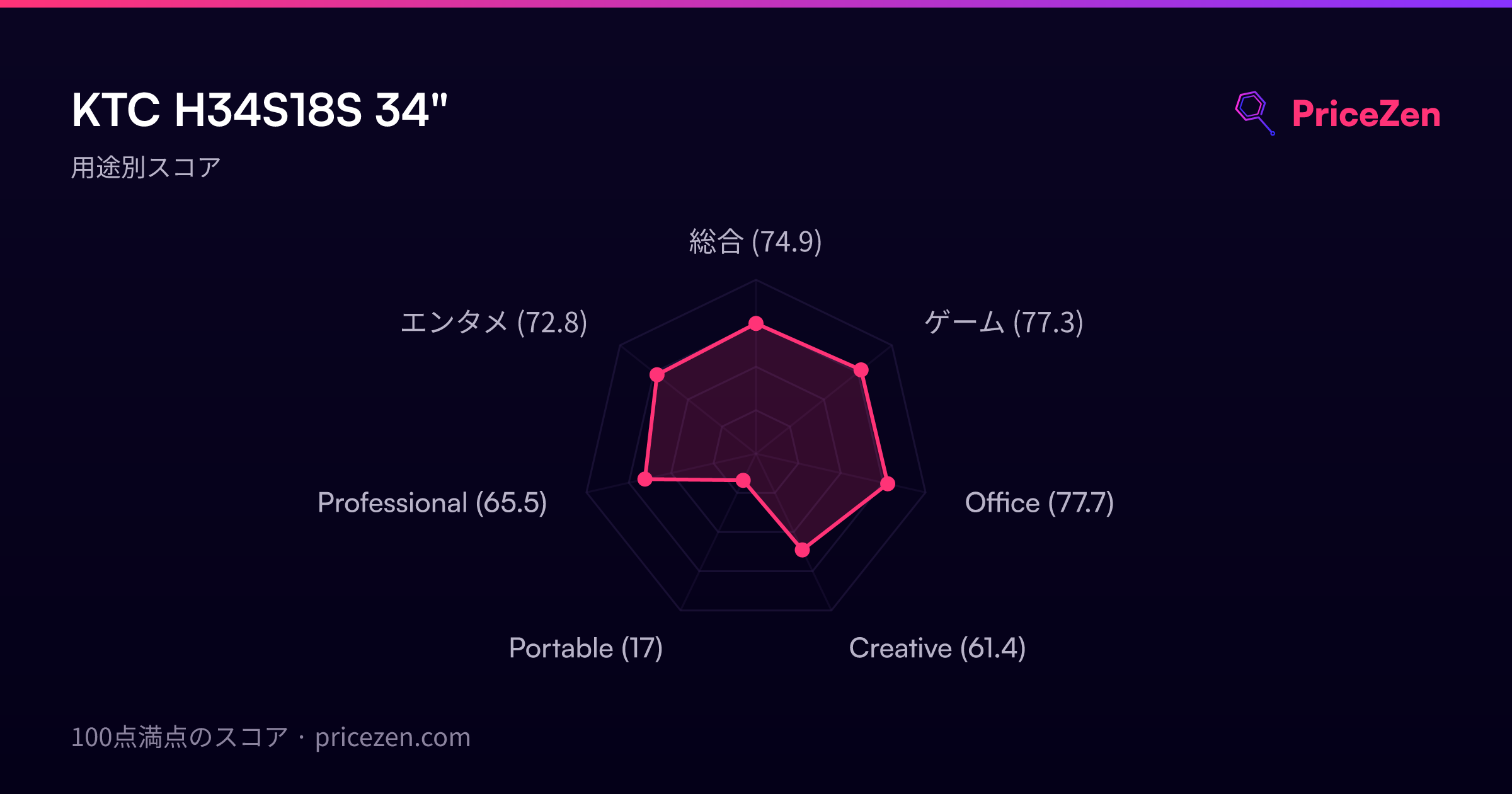
Usage Scores
- 総合75
- ゲーム77.4
- Office77.8
- Creative61.4
- Portable17
- Professional65.5
- エンタメ72.2