MSI Curved Gaming G2422C 24" Metallic Black 2023

四隅まで見渡しやすいカーブ 11月28日に確認済み
34/100 総合スコア
- Screen
- 24"
- Resolution
- 1920 x 1080
- Panel
- VA
- Refresh
- 180 Hz
- Response time
- 1 ms
- Adaptive sync
- Adaptive-Sync
1店舗の価格を比較
安い順。新品・整備済み品・バンドルのオファーは分けて表示するので、同じ条件どうしで比較できます。
| 店舗 | 販売元 | カラーと状態 | 価格 | 最安との差 | 最終確認 | リンク |
|---|---|---|---|---|---|---|
| 新品1件の価格単品 | ||||||
| 最後の確認時に在庫なし | ||||||
| Amazon | 不明 | 記載なし | 価格なし | 在庫切れ | 11月7日 | 店舗へ |
 出典: PriceZen, 2026年11月7日に確認
過去7日以内に確認した価格を「現在の価格」としています。 「マーケットプレイス出品者」とは、その店舗自身ではなく、店舗上の第三者の出品者を指します。
価格履歴
この期間にこの種類のオファーはありません。
その日に確認その日は未確認、オファーは継続中
出典: PriceZen, checked 2026年8月13日










概要
The 30-Second Version
The MSI G2422C is a 24-inch curved gaming monitor with a 180Hz refresh rate and 1ms response time that delivers smooth, responsive gameplay at a budget price. Color coverage is solid and setup is easy, but the stand is flimsy and user sentiment is worryingly low. It's a great value for competitive gamers who can overlook the build quality issues.
Pros & Cons
長所
- 180Hz refresh rate and 1ms response time feel great in fast games 82nd
- VA panel delivers deep blacks and solid contrast
- Easy setup with HDMI and DisplayPort options
- Good color coverage for the price (108% sRGB, 81% DCI-P3)
- Curved 1500R design adds subtle immersion
短所
- Stand design is flimsy and offers only tilt adjustment
- 250 nits brightness is dim for bright rooms
- User sentiment is concerningly low (16th percentile)
- Long-term reliability questions from early failures
- No height adjustment or swivel
オーナーの声
The Word on the Street
- Buyers consistently praise the vibrant colors and smooth gaming performance, with many noting the curved design adds a nice touch of immersion.
- Setup is frequently described as quick and painless, with multiple owners mentioning the HDMI and DisplayPort options make it easy to get running.
- A recurring complaint centers on the stand, which several owners describe as flimsy and poorly designed, with one report of a unit failing within two months.
購入者の評価が時間とともにどう変化したか
独自顧客が実際にレビューを書いた時期に基づいています。発売当初の高評価が続いたかどうかがわかります。
書かれたレビュー 16件、2026/04~2026/05:満足 9件、不満 2件、星なし 5件
各点は書かれたレビュー1件で、書かれた月に置いています。満足 = 4〜5★、普通 = 3★、不満 = 1〜2★。
実証データ
Performance
The G2422C delivers where it matters most for gaming. With a 180Hz refresh rate and 1ms response time, motion clarity is excellent, and Adaptive-Sync keeps things smooth whether you're running an AMD or NVIDIA GPU. In practice, this means fast-paced games like Valorant, Apex Legends, or CS2 feel responsive and fluid, with minimal ghosting thanks to the VA panel's quick pixel response. Our performance score of 82nd percentile puts it well above average for gaming monitors, and that's the main reason to consider this display.
The VA panel gives you deep blacks and good contrast, which is a nice bonus for darker games or watching content. The 1500R curve adds a bit of immersion, though on a 24-inch screen it's more subtle than on larger ultrawides. One thing to keep in mind: 250 nits of brightness is on the dimmer side, so if you're in a bright room with lots of natural light, you might find yourself squinting. For a dark gaming cave, it's perfectly fine.
Specifications
Full Specifications
Display
| Size | 24" |
| Resolution | 1920x1080 (Full HD) |
| Panel Type | VA |
| Aspect Ratio | 16:9 |
| Curved | Yes |
| Curvature | 1500 |
| Screen Finish | matte |
Performance
| Refresh Rate | 180 Hz |
| Response Time | 1 |
| Adaptive Sync | Adaptive-Sync |
Color & HDR
| Brightness | 250 nits |
| Color Gamut | 85% Adobe RGB / 81% DCI-P3 / 108% sRGB |
| Color Depth | 8-bit |
Connectivity
| HDMI Ports | 2 |
| DisplayPort | 1 |
| USB-C | 0 |
| Headphone Jack | Yes |
Ergonomics
| Height Adjustable | No |
| Tilt | Yes |
| Swivel | No |
| Pivot | No |
| VESA Mount | 75x75 |
Features
| Power | 36 |
| Weight | 2.6 kg / 5.8 lbs |
vs Competition
Stacked against the competition, the G2422C holds its own in raw gaming performance but falls behind in overall polish. The LG UltraGear 27G810A-B is a 27-inch flat panel with similar refresh rates but better build quality and a more reputable track record, though it costs more. The ASUS TUF Gaming VG34VQL1B is a 34-inch ultrawide that's in a completely different price class, so it's not a fair fight, but if you want immersion, that's the upgrade path. The BenQ MA Series MA270U and Dell S2725QC are both 27-inch 4K monitors aimed more at productivity than gaming, so they're not direct competitors for someone chasing high refresh rates at 1080p.
The Acer Nitro XV272U W2bmiiprx is probably the closest rival in spirit, offering 1440p resolution at a similar price point, though you'll sacrifice the curve and some refresh rate headroom. If you're deciding between the MSI and the Acer, it comes down to whether you prioritize the curved VA panel and 180Hz or the sharper 1440p image. For pure competitive gaming, the MSI's higher refresh rate wins. For everything else, the Acer's resolution bump is more versatile.
| Spec | MSI Curved Gaming G2422C 24" | LG UltraGear 45GX950A-B 45" | ASUS ROG Strix XG27UCDMG 27" | Dell UltraSharp U4025QW 39.7" | Alienware AW-Series AW3425DW 34" | Samsung Odyssey G60SD 27" |
|---|---|---|---|---|---|---|
| Screen Size | 24 | 45 | 27 | 39.7 | 34 | 27 |
| Resolution | 1920 x 1080 | 5120 x 2160 | 3840 x 2160 | 5120 x 2160 | 3440 x 1440 | 2560 x 1440 |
| Panel Type | VA | OLED | QD-OLED | IPS | QD-OLED | OLED |
| Refresh Rate | 180 | 330 | 240 | 120 | 240 | 360 |
| Response Time Ms | 1 | 0.03 | 0.03 | 5 | 0.03 | 0.03 |
| Adaptive Sync | Adaptive-Sync | FreeSync Premium Pro | FreeSync Premium Pro | Adaptive-Sync | FreeSync Premium Pro | FreeSync Premium Pro |
| Hdr | - | DisplayHDR True Black 400 | DisplayHDR True Black 400 | HDR600 | HDR400 | HDR10+ |
| Compare | Compare | Compare | Compare | Compare |
| 製品 | Color | 携帯性 | Display | Feature | User Sentiment | Ergonomic | Performance | Connectivity | ユーザー評価 |
|---|---|---|---|---|---|---|---|---|---|
| MSI Curved Gaming G2422C 24" | 47.9 | 57.3 | 31.2 | 47.4 | 16.1 | 47.1 | 81.7 | 53 | 11 |
| LG UltraGear 45GX950A-B 45" Compare | 99.4 | 76.5 | 99.7 | 96.3 | 76.6 | 90.8 | 99.4 | 96.9 | 91.9 |
| ASUS ROG Strix XG27UCDMG 27" Compare | 96.5 | 57.3 | 97.7 | 85 | 99.3 | 90.8 | 97.9 | 81 | 98.9 |
| Dell UltraSharp U4025QW 39.7" Compare | 97.9 | 76.5 | 98.6 | 96.3 | 85.4 | 90.8 | 56.1 | 99.3 | 96.8 |
| Alienware AW-Series AW3425DW 34" Compare | 98.9 | 73.9 | 84 | 96.3 | 95.7 | 90.8 | 97.9 | 95.4 | 96.8 |
| Samsung Odyssey G60SD 27" Compare | 90.7 | 39.3 | 73.4 | 70 | 95.7 | 90.8 | 99.5 | 87.4 | 91.9 |
価格
Value & Pricing
Pricing on the G2422C varies a bit depending on where you shop. In the US, it's listed at $221, while Canadian buyers can find it between CAD 160 and CAD 180 across two listings. Memory Express has the better deal at CAD 160, so if you're north of the border, that's the one to grab. For a 180Hz curved gaming monitor, that's competitive pricing, especially when you consider that many 144Hz flat panels cost about the same. The value proposition is strong on paper, but the reliability concerns and mediocre stand mean you're getting what you pay for in some areas. If you're willing to accept those trade-offs, the price is right.
詳細情報
Overview
The MSI G2422C is a 24-inch curved gaming monitor that sits in the budget 1080p high-refresh space. It's a VA panel with a 1500R curve, 180Hz refresh rate, and 1ms response time, which on paper is exactly what you'd want for fast-paced shooters without spending a fortune. Our database puts it at 82nd percentile for performance, which is genuinely impressive for a monitor in this price bracket. The display itself is a bit of a mixed bag though, landing at 32nd percentile, mostly because 250 nits of brightness and a 1080p resolution on a 24-inch panel aren't going to blow anyone away in 2025.
If you're searching for a budget curved gaming monitor that can actually keep up with competitive titles, this one checks a lot of boxes. The 180Hz refresh rate and Adaptive-Sync support mean you'll get smooth gameplay without screen tearing, assuming your GPU can push those frames. Color coverage is decent too, with 108% sRGB and 81% DCI-P3, so games will look vibrant even if the panel isn't the brightest thing on your desk. Setup is straightforward, with two HDMI ports and a DisplayPort, plus a headphone jack for convenience.
But here's the thing: user sentiment on this monitor is rough. It sits at 16th percentile in our database, which is one of the lowest scores we've seen for a product with otherwise solid specs. The recurring complaints are about the stand and long-term reliability, and those are the kinds of issues that can sour an otherwise good experience. We'll dig into that more below.
Common Questions
Q: Is the MSI G2422C good for gaming?
Yes, the MSI G2422C is excellent for gaming thanks to its 180Hz refresh rate, 1ms response time, and Adaptive-Sync support, which together deliver smooth, tear-free gameplay in fast-paced titles.
Q: Does the MSI G2422C have built-in speakers?
No, the MSI G2422C does not have built-in speakers. It does include a headphone jack, so you can connect headphones or external speakers directly to the monitor.
Q: Is the MSI G2422C VESA mount compatible?
Yes, the MSI G2422C supports VESA 75x75 mounting, which is handy since the included stand only offers tilt adjustment and many users find it flimsy.
Q: How bright is the MSI G2422C?
The MSI G2422C has a peak brightness of 250 nits, which is adequate for darker rooms but may feel dim in brightly lit spaces or near large windows.
Who Should Skip This
Skip the G2422C if you need a monitor for productivity or office work. The 1080p resolution on a 24-inch panel is fine for gaming but feels cramped for spreadsheets or multitasking, and the 250 nits brightness won't do you any favors in a well-lit office. If you're a content creator who needs accurate color for photo or video work, the 81% DCI-P3 coverage is decent but not professional grade, so you'd be better off with something like the BenQ MA270U or Dell S2725QC. And if you're the type who gets annoyed by wobbly stands or wants height adjustment out of the box, this monitor will frustrate you. Budget for a VESA mount or look elsewhere.
Verdict
Should you buy the MSI G2422C? If you're a competitive gamer on a budget who wants high refresh rates and a curved panel without spending a fortune, yes, with some caveats. The 180Hz refresh rate and 1ms response time are the real deal, and the color coverage is better than you'd expect at this price. The curve is a nice touch for immersion, even if it's subtle on a 24-inch screen.
But the stand is genuinely bad, and the user sentiment score of 16th percentile is a red flag we can't ignore. One reviewer reported a unit failing within two months, and while that's a small sample size, it's worth considering if you're planning to keep this monitor for years. If you can live with the flimsy stand and are willing to roll the dice on reliability, the G2422C delivers excellent gaming performance for the money. If you'd rather have peace of mind, the LG UltraGear or Acer Nitro are safer bets.
Usage Scores
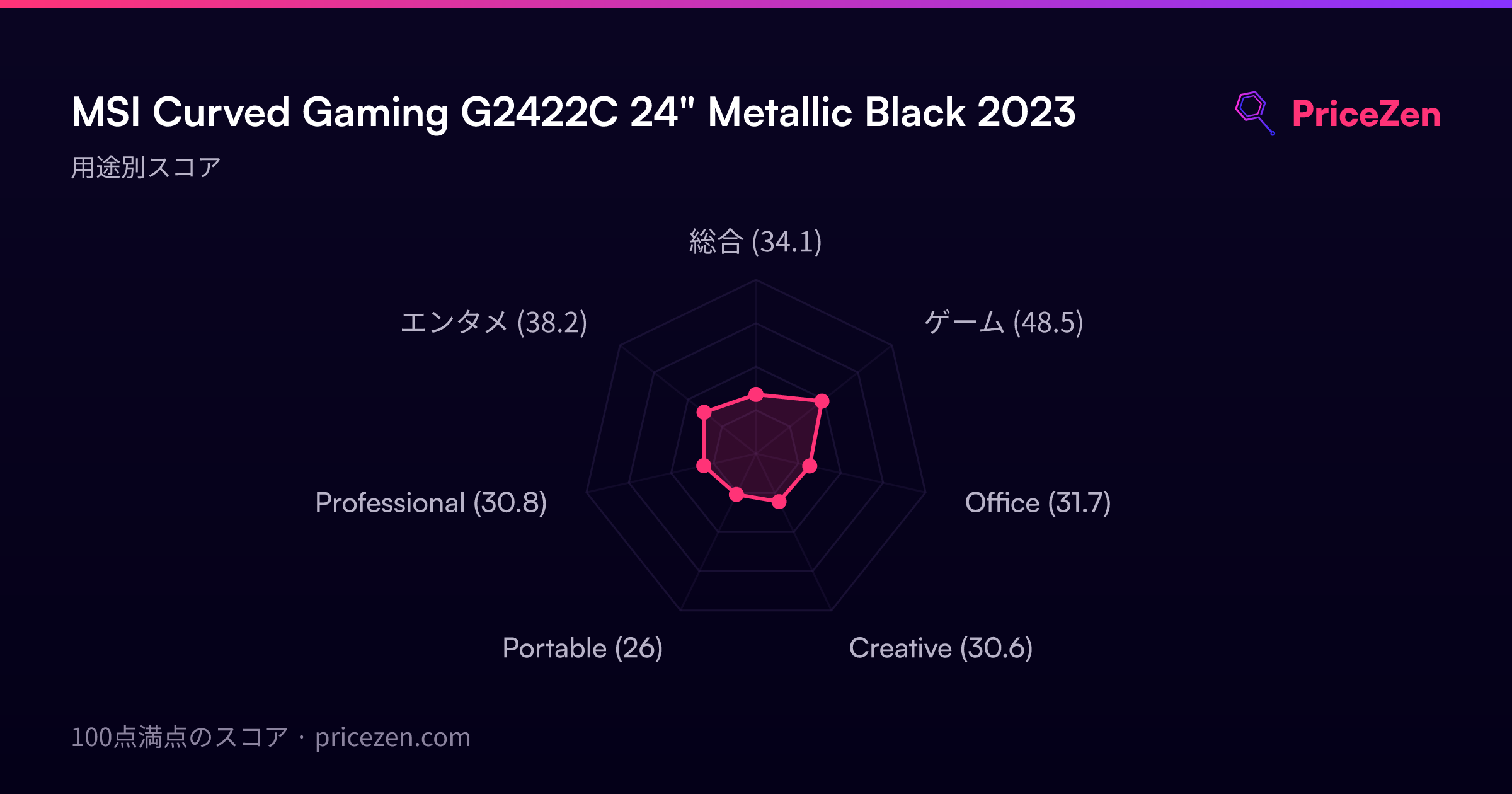
- 総合34.1
- ゲーム48.5
- Office31.7
- Creative30.6
- Portable26
- Professional30.8
- エンタメ38.2