ASUS BE24ECSBT 23.8" Black 2024

タッチ対応モニター: タップもスワイプも手描きも 11月29日に確認済み
54/100 総合スコア 4.0 オーナー評価1件の平均
- Screen
- 23.8"
- Resolution
- 1920 x 1080
- Panel
- IPS
- Refresh
- 75 Hz
- Response time
- 5 ms
- Adaptive sync
- Adaptive-Sync
1店舗の価格を比較
安い順。新品・整備済み品・バンドルのオファーは分けて表示するので、同じ条件どうしで比較できます。
| 店舗 | 販売元 | カラーと状態 | 価格 | 最安との差 | 最終確認 | リンク |
|---|---|---|---|---|---|---|
| 新品1件の価格単品 | ||||||
| 過去7日間は確認していないため、これらの価格は変わっている可能性があります | ||||||
| Amazon | マーケットプレイス出品者 | 記載なし | ¥65,167 | 11月3日 | 店舗へ | |
 出典: PriceZen, 2026年11月3日に確認
過去7日以内に確認した価格を「現在の価格」としています。 「マーケットプレイス出品者」とは、その店舗自身ではなく、店舗上の第三者の出品者を指します。
価格履歴
その日に確認その日は未確認、オファーは継続中
出典: PriceZen, checked 2026年11月3日











概要
The 30-Second Version
A niche touchscreen monitor with a best-in-class stand and killer USB-C docking. Skip it unless you absolutely need to poke your screen.
Pros & Cons
長所
- Outstanding ergonomic stand with full range of adjustments 91st
- USB-C with 80W power delivery is a clean one-cable docking solution 86th
- Responsive 10-point touchscreen is perfect for Windows 11 70th
- DisplayPort daisy-chaining for a clean multi-monitor setup
短所
- 1080p resolution on a 24" screen is just okay, not sharp
- 300 nits brightness can feel dim in a well-lit room
- 75Hz is better than 60Hz, but still not great for gaming
- Pricing is wildly inconsistent across different vendors
オーナーの声
The Word on the Street
- Owners love the flexible stand and the clean, one-cable USB-C setup for their laptops.
- A few people find the 1080p resolution a bit soft for a 24-inch screen when reading text all day.
- The biggest gripe is the inconsistent pricing, with some buyers feeling burned after seeing it much cheaper elsewhere.
購入者の評価が時間とともにどう変化したか
独自顧客が実際にレビューを書いた時期に基づいています。発売当初の高評価が続いたかどうかがわかります。
書かれたレビュー 3件、2024/08~2025/10:満足 1件、星なし 2件
ストア評価全1件:4.0★。 グラフは書かれたレビュー3件を数えています。
各点は書かれたレビュー1件で、書かれた月に置いています。満足 = 4〜5★、普通 = 3★、不満 = 1〜2★。
実証データ
Performance
The touchscreen is the star here, and it's a smooth, responsive 10-point panel that works great with Windows 11. What surprised us, though, was the stand. With a 92nd-percentile ergonomic score in our database, the height, tilt, swivel, and pivot adjustments are best-in-class. You can twist this thing into practically any position. The 75Hz refresh rate is a small but welcome step up from the standard 60Hz office monitor, making scrolling feel a little smoother, but the 5ms response time and 300-nit brightness are just middle-of-the-pack.
Specifications
Full Specifications
Display
| Size | 23.8" |
| Resolution | 1920x1080 (Full HD) |
| Panel Type | IPS |
| Aspect Ratio | 16:9 |
| Curved | No |
| Screen Finish | matte |
Performance
| Refresh Rate | 75 Hz |
| Response Time | 5 |
| Adaptive Sync | Adaptive-Sync |
Color & HDR
| Brightness | 300 nits |
| Color Gamut | 100% sRGB |
| Color Depth | 8-bit |
Connectivity
| HDMI Ports | 1 |
| DisplayPort | 1 |
| USB-C | 1 |
| Speakers | Yes |
| Headphone Jack | Yes |
Ergonomics
| Height Adjustable | Yes |
| Tilt | Yes |
| Swivel | Yes |
| Pivot | Yes |
| VESA Mount | 100x100 |
Features
| Webcam | No |
| Touchscreen | Yes |
| PIP/PBP | No |
| Power | 18 |
| Weight | 6.1 kg / 13.4 lbs |
vs Competition
You won't find many direct competitors with this exact feature set, which is why the BE24ECSBT exists. Most monitors in this price range, like the Dell P2422H, skip the touchscreen and USB-C power delivery for a sharper image or better color accuracy. On the flip side, portable touch monitors are cheaper but lack the ergonomic stand and daisy-chaining. If you don't need the touchscreen, a standard 24-inch IPS monitor like the Dell S2421HS will give you a better picture for less money. This ASUS is for a specific buyer who needs touch and ergonomics above all else.
| Spec | ASUS BE24ECSBT 23.8" | LG UltraGear 39" | BenQ PD3220U 32" | Samsung Odyssey Ark 2nd Gen 55" | Gigabyte M Series M32U 31.5" | Dell UltraSharp U4320Q 27" |
|---|---|---|---|---|---|---|
| Screen Size | 23.8 | 39 | 32 | 55 | 31.5 | 27 |
| Resolution | 1920 x 1080 | 3440 x 1440 | 3840 x 2160 | 3840 x 2160 | 3840 x 2160 | 3840 x 2160 |
| Panel Type | IPS | OLED | IPS | Mini-LED | IPS | IPS |
| Refresh Rate | 75 | 240 | 60 | 165 | 144 | 60 |
| Response Time Ms | 5 | 0.03 | 5 | 1 | 1 | 5 |
| Adaptive Sync | Adaptive-Sync | FreeSync Premium Pro | - | FreeSync Premium Pro | FreeSync Premium Pro | - |
| Hdr | - | DisplayHDR True Black 400 | HDR10 | HDR10+ | HDR400 | HDR400 |
| Compare | Compare | Compare | Compare | Compare |
| 製品 | Color | 携帯性 | Display | Feature | Ergonomic | Performance | Connectivity | ユーザー評価 |
|---|---|---|---|---|---|---|---|---|
| ASUS BE24ECSBT 23.8" | 58.5 | 86.2 | 21.4 | 55.4 | 90.7 | 44.2 | 70.1 | 6.9 |
| LG UltraGear 39" Compare | 63.3 | 49.3 | 84 | 96.3 | 66.8 | 97.9 | 81 | 0 |
| BenQ PD3220U 32" Compare | 88.5 | 81.3 | 95.1 | 85 | 90.7 | 22.3 | 96.9 | 0 |
| Samsung Odyssey Ark 2nd Gen 55" Compare | 98.4 | 20.7 | 91.5 | 96.3 | 30 | 77 | 81 | 75.1 |
| Gigabyte M Series M32U 31.5" Compare | 89.9 | 62.8 | 87 | 85 | 73.4 | 72.6 | 87.4 | 0 |
| Dell UltraSharp U4320Q 27" Compare | 91 | 82.7 | 87 | 85 | 90.7 | 22.3 | 96.9 | 0 |
価格
Value & Pricing
Pricing on this monitor is a rollercoaster, with a spread of over $7,400 between vendors. That's not a typo. You can find it for a reasonable $290, but some listings are absurdly high. At the low end, you're getting a solid deal on a specialized touch monitor with a fantastic stand and great connectivity. Just make sure you're buying from a vendor with a sane price tag. The best deal we're seeing is around the $290 mark.
詳細情報
Overview
The ASUS BE24ECSBT is a niche monitor that absolutely nails its specific mission: being a flexible, touch-friendly workhorse for an office or point-of-sale setup. If you need a 1080p screen you can poke, swivel into portrait mode, and use to charge your laptop with a single cable, this is it. But if you're just looking for a great general-purpose monitor for gaming or media, you're in the wrong aisle. The 75Hz refresh rate and 5ms response time are fine for spreadsheets, but the display quality itself is just average, and the price can be all over the place depending on where you shop.
Common Questions
Q: Can this monitor charge my laptop?
Yes, and it's one of the best reasons to buy it. The USB-C port pumps out up to 80W of power delivery, which is enough to keep most ultrabooks and even some smaller workstations topped up with a single cable.
Q: Is this good for gaming?
Not really. The 75Hz refresh rate is a tiny step up from a basic office screen, but the 5ms response time and lack of adaptive sync mean it's not built for fast-paced games. It's fine for Solitaire, but look elsewhere for anything more demanding.
Q: Does the touchscreen work with Macs?
It'll work as a basic pointing device, but macOS isn't built for touchscreens the way Windows is. You'll miss out on gestures and the experience is pretty clunky. This monitor is optimized for Windows 10 and 11.
Who Should Skip This
If you're looking for a vibrant display for photo editing or a high-refresh-rate screen for gaming, this isn't it. Go get a Dell S2722QC for a sharper 4K office panel or an MSI G274QPF-QD for a great 1440p gaming experience instead. This ASUS is strictly for people who need touch and a flexible stand first, and image quality second.
Verdict
The ASUS BE24ECSBT is a purpose-built tool, not a crowd-pleaser. For the right desk, it's a killer productivity hub. The combination of a great touchscreen, a super-flexible stand, and one-cable laptop docking is hard to beat. Just know what you're getting into: the image quality is nothing special, and you're paying a premium for the touch and ergonomic features. If those are on your must-have list, buy it from a vendor selling it near the $290 mark and don't look back.
Usage Scores
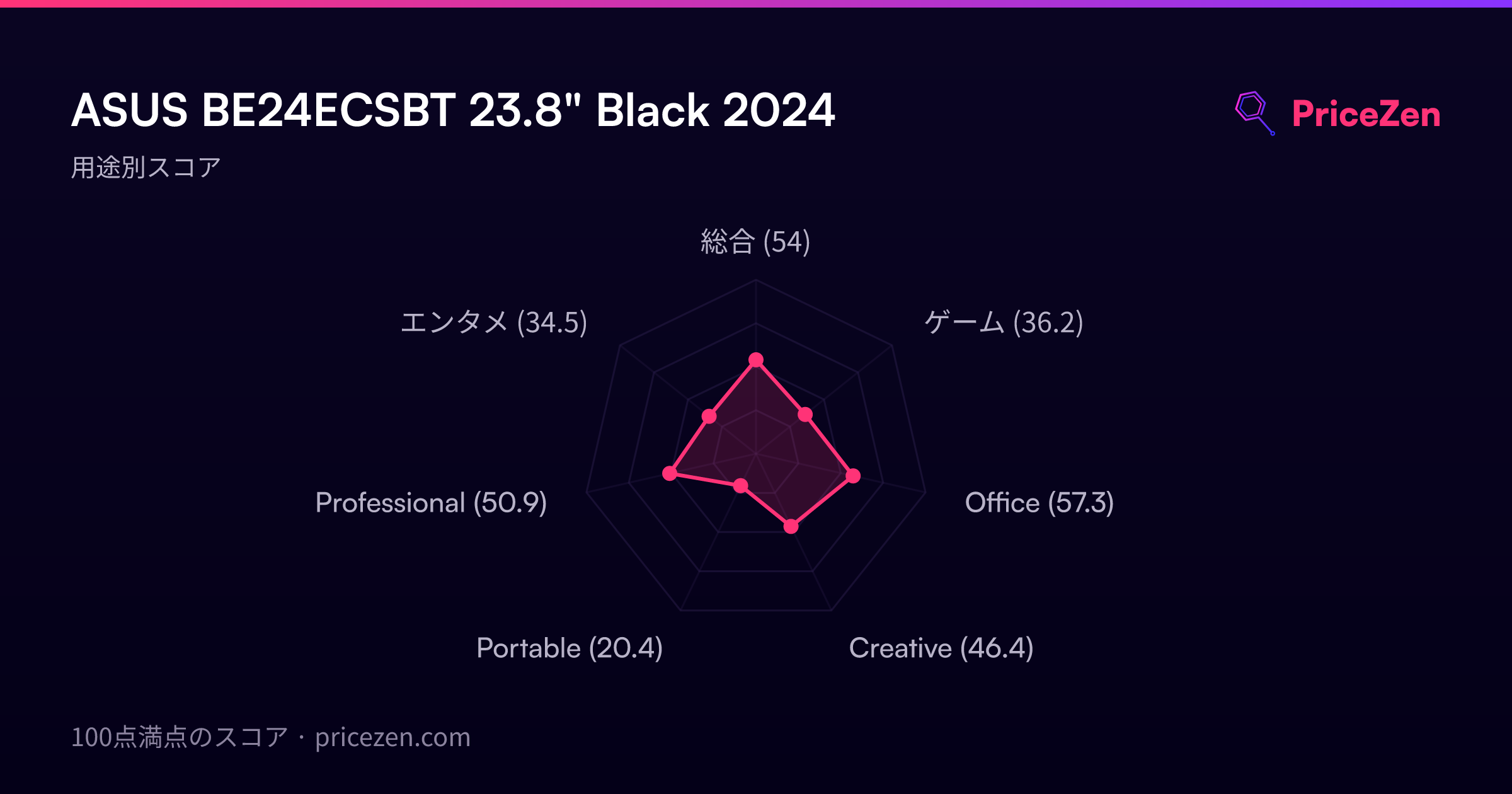
- 総合54
- ゲーム36.2
- Office57.3
- Creative46.4
- Portable20.4
- Professional50.9
- エンタメ34.5