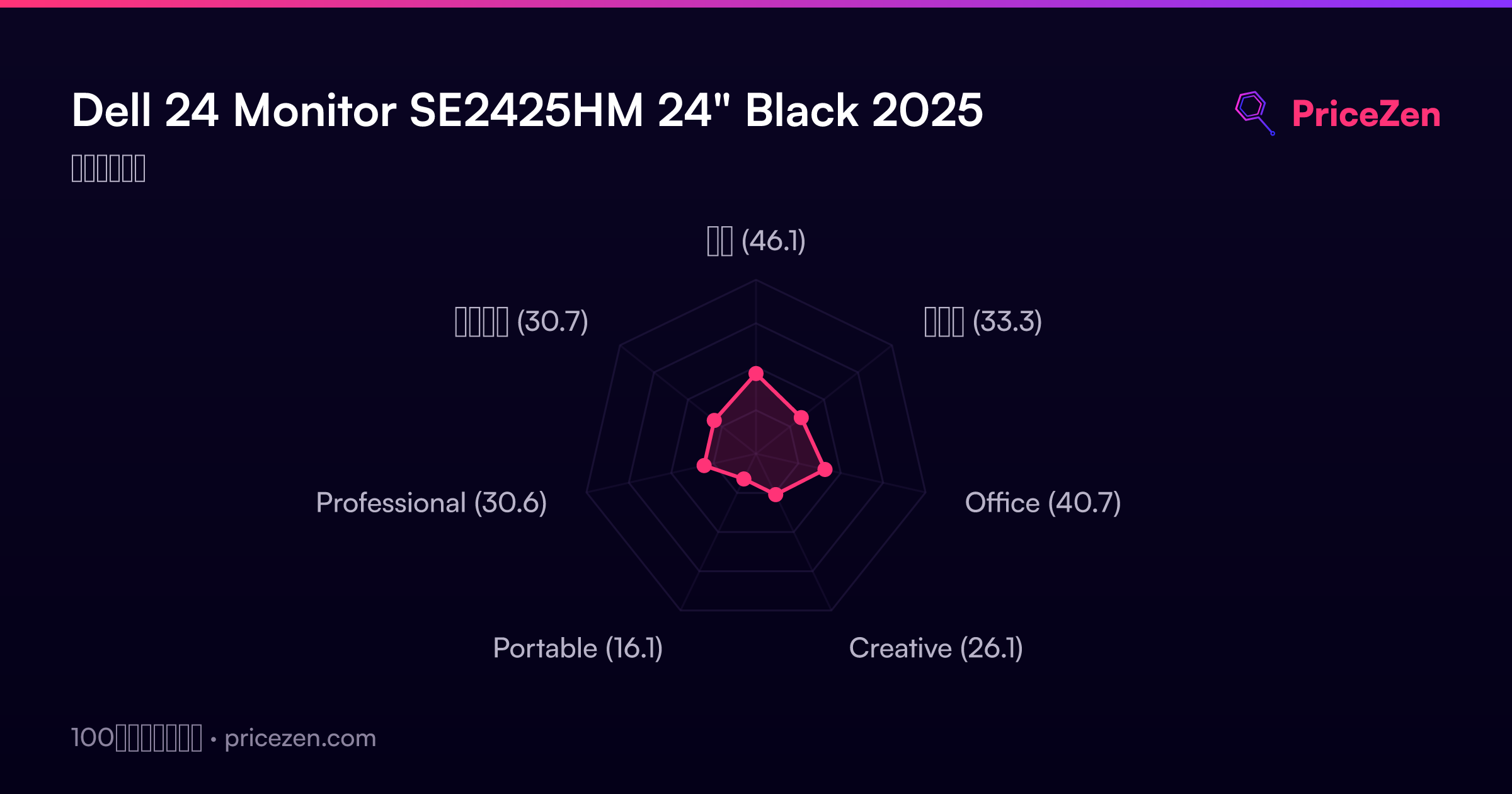
Dell 24 Monitor SE2425HM 24" Black 2025
The 100Hz refresh rate on this 24-inch IPS panel reduces flicker and makes scrolling smoother, with TÜV Rheinland 3-star certification and ComfortView Plus cutting blue light without dulling colors. Its small footprint, built-in power supply, cable holder, tilt and VESA 100x100 mount keep a desk tidy and flexible. Best for office workers who spend long hours on spreadsheets or documents and want a comfortable, low-glare display at a budget price.

現在、販売店の最新価格はありません











概要
The 30-Second Version
The Dell 24 Monitor SE2425HM is a budget-friendly 24-inch office monitor with a 100Hz IPS panel and ComfortView Plus eye comfort features. It's great for productivity and everyday use, with solid build quality and easy setup. Just don't buy it for gaming or color-critical work.
Pros & Cons
長所
- 100Hz refresh rate feels smoother than typical 60Hz office monitors 97th
- ComfortView Plus reduces blue light without wrecking color 89th
- IPS panel keeps colors consistent at wide viewing angles
- Sturdy build and easy tilt adjustment
- Competitive price for the feature set
短所
- Only one HDMI port, no DisplayPort or USB-C
- Color accuracy is mediocre out of the box
- No height adjustment on the stand
- Not suitable for gaming despite the 100Hz refresh rate
- VGA port feels dated in 2025
オーナーの声
The Word on the Street
購入者の評価が時間とともにどう変化したか
独自顧客が実際にレビューを書いた時期に基づいています。発売当初の高評価が続いたかどうかがわかります。
書かれたレビュー 19件、2025/09~2026/04:満足 19件
ストア評価全892件:4.7★。 多くの購入者はレビューを書かずに評価だけを付けています。 グラフは書かれたレビュー19件を数えています。
各点は書かれたレビュー1件で、書かれた月に置いています。満足 = 4〜5★、普通 = 3★、不満 = 1〜2★。
実証データ
Performance
The 100Hz refresh rate is the standout spec here. In our database, this monitor's overall performance lands at the 48th percentile, which is about average for its class. But that refresh rate is doing a lot of heavy lifting. Compared to a typical 60Hz office monitor, the SE2425HM feels smoother when you're scrolling through long documents or moving windows around. It's not going to blow anyone away, but it's a real quality-of-life improvement.
Color performance is where things get a little less exciting. The display sits at the 39th percentile for display quality and the 16th percentile for color, which means it's not a great choice for photo editing or any color-critical work. The 16.7 million colors spec is standard for a budget IPS panel, but the color accuracy out of the box isn't anything to write home about. A few users mention a slight pink or reddish tint that needs a quick calibration to fix. For office work, email, and web browsing, it's perfectly fine. Just don't expect it to compete with a color-calibrated professional display.
Specifications
Full Specifications
Display
| Size | 24" |
| Resolution | 1920x1080 (Full HD) |
| Panel Type | IPS |
| Aspect Ratio | 16:9 |
| Curved | No |
| Screen Finish | matte |
Performance
| Refresh Rate | 100 Hz |
Color & HDR
| Color Depth | 16.70 Million Colors |
Connectivity
| HDMI Ports | 1 |
| Speakers | No |
| Headphone Jack | No |
Ergonomics
| Height Adjustable | No |
| Tilt | Yes |
| Swivel | No |
| Pivot | No |
| VESA Mount | 100x100 |
Features
| Webcam | No |
| Touchscreen | No |
| PIP/PBP | No |
| Weight | 3.5 kg / 7.7 lbs |
vs Competition
Compared to the LG UltraGear 27G810A-B, the Dell is smaller, slower, and less feature-rich, but it's also significantly cheaper. The LG is a proper gaming monitor with a higher refresh rate and better color performance, while the Dell is a budget office display that happens to have a slightly elevated refresh rate. If you're gaming, the LG is the obvious choice. If you're just working, the Dell saves you money without sacrificing much.
The Acer Nitro XV272U W2bmiiprx and HP OMEN 27qs G2 are both 1440p displays with higher refresh rates and better gaming credentials. They also cost more. The MSI MAG 272QPW QD-OLED and ASUS ROG Strix XG27JCG are in a completely different league, with OLED panels and premium price tags. The Dell doesn't try to compete with any of them, and that's fine. It's a budget monitor for people who want a reliable screen for work, not a gaming battlestation.
| Spec | Dell 24 Monitor SE2425HM 24" | Acer Nitro UM.CX2AA.S01 34" | BenQ MOBIUZ EX381U 37.5" | Samsung Odyssey Ark 2nd Gen 55" | Gigabyte M Series M32U 31.5" | ASRock Phantom Gaming PGO27QFV 27" |
|---|---|---|---|---|---|---|
| Screen Size | 24 | 34 | 37.5 | 55 | 31.5 | 27 |
| Resolution | 1920 x 1080 | 3440 x 1440 | 3840 x 2160 | 3840 x 2160 | 3840 x 2160 | 2560 x 1440 |
| Panel Type | IPS | VA | IPS | Mini-LED | IPS | OLED |
| Refresh Rate | 100 | 165 | 144 | 165 | 144 | 360 |
| Response Time Ms | - | 1 | 1 | 1 | 1 | 0.029999999329447746 |
| Adaptive Sync | - | FreeSync Premium | FreeSync Premium Pro | FreeSync Premium Pro | FreeSync Premium Pro | FreeSync Premium Pro |
| Hdr | - | HDR400 | HDR10 | HDR10+ | HDR400 | DisplayHDR True Black 400 |
| Compare | Compare | Compare | Compare | Compare |
| 製品 | Color | 携帯性 | Display | Feature | User Sentiment | Ergonomic | Performance | Connectivity | ユーザー評価 |
|---|---|---|---|---|---|---|---|---|---|
| Dell 24 Monitor SE2425HM 24" | 15.5 | 27.8 | 37.6 | 21.3 | 89.2 | 47.3 | 47.9 | 20.7 | 96.8 |
| Acer Nitro UM.CX2AA.S01 34" Compare | 84.7 | 20.7 | 76.1 | 90.8 | 76.5 | 67 | 77.1 | 83.9 | 84 |
| BenQ MOBIUZ EX381U 37.5" Compare | 93.6 | 68 | 95.1 | 70.2 | 0 | 73.5 | 72.6 | 99.8 | 0 |
| Samsung Odyssey Ark 2nd Gen 55" Compare | 98.4 | 20.7 | 91.5 | 96.3 | 10.4 | 30.3 | 77.1 | 81.2 | 74.8 |
| Gigabyte M Series M32U 31.5" Compare | 90.1 | 63 | 87.1 | 85.1 | 0 | 73.5 | 72.6 | 87.6 | 0 |
| ASRock Phantom Gaming PGO27QFV 27" Compare | 80.1 | 57.5 | 73.5 | 70.2 | 0 | 73.5 | 99.5 | 81.2 | 7.9 |
価格
Value & Pricing
At $140 USD, the SE2425HM is a solid deal for an office monitor with a 100Hz IPS panel. You're getting a name-brand display with decent build quality and eye comfort features for less than many generic 60Hz panels. The Canadian price of $221 CAD is a bit steeper, and the Japanese price of ¥44,187 puts it in a different competitive bracket entirely. If you're in the US, this is an easy recommendation for office work. If you need better color accuracy or more connectivity, you'll want to spend a bit more on something like an LG UltraGear or an Acer Nitro, but for basic productivity, the Dell gets the job done without breaking the bank.
価格履歴
詳細情報
Overview
The Dell 24 Monitor SE2425HM is a 23.8-inch 1080p IPS display aimed squarely at office workers and anyone who wants a no-nonsense screen that's easy on the eyes. At around $140 USD, it sits in the budget-friendly end of the monitor market, but Dell packed in a few features you don't always see at this price. The headline is the 100Hz refresh rate, which is a nice step up from the standard 60Hz panels most budget monitors still ship with. It's not a gaming monitor, but that extra smoothness makes everyday scrolling and window dragging feel noticeably nicer.
Dell is leaning hard into eye comfort here. The SE2425HM has ComfortView Plus, which cuts down on blue light without making everything look like a sepia photograph. It also carries a TÜV Rheinland 3-star certification for eye comfort. If you spend eight hours a day staring at spreadsheets, that's a genuinely useful feature, not just marketing fluff. The IPS panel means colors stay consistent even when you're viewing the screen from an angle, which matters if you ever share your screen with a coworker or just slouch in your chair.
Connectivity is minimal. You get one HDMI port and one VGA port, which is a bit of a throwback. There's no DisplayPort, no USB hub, and no USB-C. For most office setups that's fine, but if you have a modern laptop that only outputs USB-C, you'll need an adapter. The built-in power supply and cable holder keep your desk tidy, and the stand tilts but doesn't adjust for height. You can always mount it on a VESA arm if you need more flexibility.
Common Questions
Q: Is the Dell SE2425HM good for gaming?
No, the Dell SE2425HM is not a good gaming monitor. While it has a 100Hz refresh rate, it lacks adaptive sync and has limited connectivity, making it better suited for office work and productivity.
Q: Does the Dell SE2425HM have built-in speakers?
No, the Dell SE2425HM does not have built-in speakers. You'll need external speakers or headphones connected to your computer for audio.
Q: Can I mount the Dell SE2425HM on a monitor arm?
Yes, the Dell SE2425HM supports VESA 100x100 mounting, so you can attach it to a compatible monitor arm or wall mount for more ergonomic flexibility.
Q: Does the Dell SE2425HM work with MacBooks?
The Dell SE2425HM has HDMI and VGA inputs, so you'll need a USB-C to HDMI adapter to connect a modern MacBook. Once connected, it works fine as an external display.
Who Should Skip This
Skip the Dell SE2425HM if you're a gamer looking for a high-refresh-rate display. The 100Hz panel might sound appealing, but without adaptive sync and with only HDMI and VGA inputs, it's not built for gaming. Photo editors and graphic designers should also look elsewhere, since the color accuracy is mediocre and the display sits in the 16th percentile for color performance in our database. If you need USB-C connectivity or a built-in USB hub, this monitor won't work for you either. For gaming, check out the LG UltraGear 27G810A-B or the Acer Nitro XV272U. For color work, you'll want something with better factory calibration, like a higher-end Dell UltraSharp or an ASUS ProArt display.
Verdict
Should you buy the Dell SE2425HM? If you need a dependable 24-inch monitor for office work, email, and general productivity, yes. The 100Hz refresh rate is a nice bonus, the IPS panel looks good from any angle, and ComfortView Plus genuinely helps with eye strain during long work sessions. The build quality is solid, setup is plug-and-play, and the price is right, especially in the US.
But if you're looking for a gaming monitor, keep looking. The 100Hz refresh rate might tempt you, but the lack of adaptive sync, the limited connectivity, and the mediocre color performance make this a poor fit for gaming. And if you do any kind of color-sensitive work, you'll want something with better out-of-the-box accuracy. For everyone else, this is a straightforward, reliable monitor that does exactly what it promises.
Usage Scores
- 総合46.1
- ゲーム33.3
- Office40.7
- Creative26.1
- Portable16.1
- Professional30.6
- エンタメ30.7