Deco Gear Curved Ultrawide EVOLUTION495K 49"

32:9のスーパーウルトラワイドで視界を包む 11月29日に確認済み
65/100 総合スコア 3.5 オーナー評価2件の平均
- Screen
- 49"
- Resolution
- 5120 x 1440
- Panel
- VA
- Refresh
- 165 Hz
- Response time
- 1 ms
- Adaptive sync
- Adaptive-Sync
- HDR
- HDR
1店舗の価格を比較
安い順。新品・整備済み品・バンドルのオファーは分けて表示するので、同じ条件どうしで比較できます。
| 店舗 | 販売元 | カラーと状態 | 価格 | 最安との差 | 最終確認 | リンク |
|---|---|---|---|---|---|---|
| 新品1件の価格単品 | ||||||
| 最後の確認時に在庫なし | ||||||
| Amazon | 不明 | 記載なし | 価格なし | 在庫切れ | 不明 | 店舗へ |
 出典: PriceZen
過去7日以内に確認した価格を「現在の価格」としています。 「マーケットプレイス出品者」とは、その店舗自身ではなく、店舗上の第三者の出品者を指します。











概要
The 30-Second Version
The Deco Gear 49" Curved Super Ultrawide delivers a massive 5120 x 1440 display with 165Hz, USB-C, and KVM for under $600, which is roughly half the price of comparable Samsung or LG options. The 300 nits brightness and VA panel are the main compromises, and the brand's lack of social proof means you're taking a bit of a gamble. But if you want to replace a dual monitor setup without breaking the bank, this is one of the best value propositions we've seen in the super ultrawide category.
Pros & Cons
長所
- Massive 49-inch 5120 x 1440 display replaces dual monitors for under $600 91st
- 165Hz refresh rate and 1ms response time are well above average for the price 87th
- USB-C with 65W power delivery plus built-in KVM is a hybrid work dream 83rd
- 93% DCI-P3 and 100% sRGB color coverage is a standout at this price 77th
- HDMI 2.1 and DisplayPort 1.4 give you future-proof connectivity options
短所
- 300 nits brightness is underwhelming, especially in bright rooms
- VA panel means some motion blur in fast-paced games compared to IPS or OLED
- Social proof is nearly nonexistent with only 2 reviews and a 17th percentile ranking
- HDR support is basically cosmetic at this brightness level
- At 8800g, this thing is heavy and needs a serious desk or monitor arm
オーナーの声
The Word on the Street
- The few owners who have reviewed it are impressed with the value, with one noting it works flawlessly at full 5120 resolution through a laptop dock using the included DisplayPort cable.
- A recurring complaint is that the brightness and clarity don't match up to similarly sized Samsung monitors, with one buyer saying it's noticeably dimmer and less sharp.
- There's a general sense that this is a budget-friendly ultrawide that delivers on the core specs, but the limited number of reviews makes it hard to gauge long-term reliability.
購入者の評価が時間とともにどう変化したか
独自顧客が実際にレビューを書いた時期に基づいています。発売当初の高評価が続いたかどうかがわかります。
書かれたレビュー 3件、2026/04~2026/06:満足 2件、不満 1件
ストア評価全2件:3.5★。 グラフは書かれたレビュー3件を数えています。
各点は書かれたレビュー1件で、書かれた月に置いています。満足 = 4〜5★、普通 = 3★、不満 = 1〜2★。
実証データ
Performance
Let's talk numbers. The 165Hz refresh rate paired with a 1ms response time puts this monitor in the 81st percentile for performance in our database. That's not top of the charts, but it's well above average and honestly more than enough for the vast majority of gamers. Unless you're a competitive esports player who needs 240Hz or 360Hz, you're not going to feel held back here. The Adaptive-Sync support means no screen tearing whether you're running an AMD or NVIDIA GPU, which is a nice touch at this price point.
The display itself ranks in the 87th percentile, which is a standout for the money. The 5120 x 1440 resolution gives you roughly 7.4 million pixels to work with, and the VA panel delivers the deep contrast ratios that VA is known for. The 93% DCI-P3 and 100% sRGB coverage means colors look vibrant without being cartoonishly oversaturated. The 300 nits brightness is where things get a little dicey. That's fine for a typical office or gaming room, but if you're in a bright room with lots of windows, you might find yourself squinting. HDR support is there, but at 300 nits it's more of a checkbox than a real HDR experience. Don't expect the eye-searing highlights you'd get from an OLED or a high-end mini-LED panel.
Specifications
Full Specifications
Display
| Size | 49" |
| Resolution | 5120x1440 |
| Panel Type | VA |
| Aspect Ratio | 32:9 |
| Curved | Yes |
Performance
| Refresh Rate | 165 Hz |
| Response Time | 1 |
| Adaptive Sync | Adaptive-Sync |
Color & HDR
| Brightness | 300 nits |
| Color Gamut | 93% DCI-P3, 100% sRGB |
| HDR | ✓ |
| HDR Support | HDR |
Connectivity
| HDMI Ports | 2 |
| DisplayPort | 1 |
| USB-C | 1 |
| Speakers | Yes |
| Headphone Jack | Yes |
Ergonomics
| Height Adjustable | Yes |
| Tilt | Yes |
Features
| Webcam | No |
| Touchscreen | No |
| Power | 150 |
| Weight | 8.8 kg / 19.4 lbs |
vs Competition
The most obvious comparison is the Samsung Odyssey G9 series. Samsung's 49-inch super ultrawides are the gold standard in this category, with better brightness, better HDR, and a more established reputation. But you're paying a serious premium for that. The G9 typically runs $1,200 to $1,500, which is more than double the Deco Gear's price. If you're a content creator or someone who needs the absolute best HDR performance, the Samsung is worth it. If you just want a huge screen for gaming and productivity without selling a kidney, the Deco Gear makes a strong case.
The LG UltraGear 45GX950A-B is another interesting alternative. It's a 45-inch OLED with a 21:9 aspect ratio rather than 32:9, so you're getting less horizontal space but significantly better contrast and true HDR. The OLED panel also means perfect blacks and faster response times. But again, you're looking at a much higher price tag. The ASUS ROG Strix XG27AQDMG and MSI MAG 271QPX are both 27-inch OLEDs that will absolutely crush the Deco Gear in terms of color accuracy and HDR, but they're tiny by comparison. If you want immersion and screen real estate, the Deco Gear wins. If you want image quality above all else, go OLED and accept the smaller screen.
| Spec | Deco Gear Curved Ultrawide EVOLUTION495K 49" | LG UltraGear 45GX950A-B 45" | ASUS ROG Strix XG27UCDMG 27" | Dell UltraSharp U4025QW 39.7" | Alienware AW-Series AW3425DW 34" | MSI MAG 271QPX QD-OLED E2 27" |
|---|---|---|---|---|---|---|
| Screen Size | 49 | 45 | 27 | 39.7 | 34 | 27 |
| Resolution | 5120 x 1440 | 5120 x 2160 | 3840 x 2160 | 5120 x 2160 | 3440 x 1440 | 2560 x 1440 |
| Panel Type | VA | OLED | QD-OLED | IPS | QD-OLED | QD-OLED |
| Refresh Rate | 165 | 330 | 240 | 120 | 240 | 240 |
| Response Time Ms | 1 | 0.03 | 0.03 | 5 | 0.03 | 0.03 |
| Adaptive Sync | Adaptive-Sync | FreeSync Premium Pro | FreeSync Premium Pro | Adaptive-Sync | FreeSync Premium Pro | FreeSync Premium Pro |
| Hdr | HDR | DisplayHDR True Black 400 | DisplayHDR True Black 400 | HDR600 | HDR400 | DisplayHDR True Black 400 |
| Compare | Compare | Compare | Compare | Compare |
| 製品 | Color | 携帯性 | Display | Feature | Ergonomic | Performance | Connectivity | ユーザー評価 |
|---|---|---|---|---|---|---|---|---|
| Deco Gear Curved Ultrawide EVOLUTION495K 49" | 70.2 | 62.8 | 83.1 | 90.8 | 59.9 | 77 | 87.4 | 4.2 |
| LG UltraGear 45GX950A-B 45" Compare | 99.4 | 76.5 | 99.7 | 96.3 | 90.7 | 99.4 | 96.9 | 92.2 |
| ASUS ROG Strix XG27UCDMG 27" Compare | 96.5 | 57.3 | 97.7 | 85 | 90.7 | 97.9 | 81 | 98.9 |
| Dell UltraSharp U4025QW 39.7" Compare | 97.9 | 76.5 | 98.6 | 96.3 | 90.7 | 56 | 99.3 | 92.2 |
| Alienware AW-Series AW3425DW 34" Compare | 98.9 | 73.9 | 84 | 96.3 | 90.7 | 97.9 | 95.3 | 96.9 |
| MSI MAG 271QPX QD-OLED E2 27" Compare | 99.1 | 57.3 | 73.3 | 85 | 90.7 | 97.9 | 81 | 98.9 |
価格
Value & Pricing
Here's where the Deco Gear gets really interesting. You're looking at $528 to $560 for a 49-inch super ultrawide with 165Hz, USB-C, and KVM. Compare that to something like the Samsung Odyssey G9 series, which starts well over $1,000 for similar specs. Even the LG UltraGear 45GX950A-B, which is a 45-inch OLED, runs significantly more. The Deco Gear is essentially offering 80 to 90 percent of the experience for roughly half the price.
The trade-off is that you're buying from a brand without the track record of Samsung, LG, or ASUS. The 17th percentile social proof ranking means there's not a lot of community feedback to lean on. If something goes wrong, you're relying on Best Buy's return policy and whatever warranty Deco Gear offers. But if you're willing to roll the dice on a lesser-known name, the raw specs per dollar here are hard to beat. This is the kind of value proposition that makes you wonder why the big brands charge so much more.
詳細情報
Overview
The Deco Gear 49" Curved Super Ultrawide is one of those monitors that makes you do a double take when you see the price. You're getting 5120 x 1440 pixels stretched across a 49-inch VA panel, which is basically two 27-inch 1440p monitors fused together without the bezel in the middle. For anyone who's been running a dual monitor setup and is tired of the gap, the cable mess, or the constant window dragging, this thing solves a real problem. And it does it for somewhere in the $528 to $560 range, which is frankly absurd for this much screen real estate.
The spec sheet reads like something from a monitor that costs twice as much. 165Hz refresh rate, 1ms response time, Adaptive-Sync, HDMI 2.1, DisplayPort 1.4, a USB-C port with 65W power delivery, and a built-in KVM switch. The KVM alone is a killer feature for hybrid workers. Plug your work laptop into the USB-C port, keep your desktop on DisplayPort, and switch between them with one keyboard and mouse. No more unplugging and replugging peripherals every time you move from work to play.
But here's the thing. Deco Gear isn't exactly a household name in the monitor world, and that shows in the social proof department. We're looking at a 17th percentile ranking there, which means very few people have actually bought and reviewed this thing. The two reviews that exist are split between glowing praise and a complaint about brightness. So you're taking a bit of a gamble on a lesser-known brand. The question is whether the specs and price make that gamble worth it. For a lot of people, the answer is probably yes.
Common Questions
Q: Can I connect my laptop through USB-C and does it charge it?
Yes. The USB-C port supports 65W power delivery, which means you can connect a compatible laptop with a single cable and it will charge while also sending video and data. That's enough juice for most ultrabooks and thin-and-light laptops, though beefier gaming laptops that draw 100W or more will still need their own power adapter.
Q: Is this monitor good for gaming?
For most gamers, absolutely. The 165Hz refresh rate and 1ms response time put it well above average in our performance rankings, and Adaptive-Sync eliminates screen tearing with both AMD and NVIDIA GPUs. The VA panel does have slightly slower pixel response than IPS or OLED, so hardcore competitive players might notice some ghosting in fast-paced shooters, but for the vast majority of games it's smooth and responsive.
Q: How does the KVM switch actually work?
The built-in KVM lets you connect two computers to the monitor, typically one via USB-C and one via DisplayPort or HDMI, and then plug your keyboard and mouse into the monitor's USB ports. You can then switch between the two computers with a button press, and your peripherals will follow. It's a huge convenience for anyone who splits time between a work laptop and a personal desktop.
Q: Will this monitor fit on my desk?
You'll need some serious desk space. The 49-inch panel is roughly 47 inches wide, and at 8800 grams (about 19.4 pounds) it's not something you want to put on a flimsy stand. The included stand supports height adjustment and tilt, but if you want to reclaim desk space, a sturdy monitor arm rated for at least 20 pounds is a good investment.
Who Should Skip This
If you're a competitive esports player who lives and dies by frame rates and response times, this isn't your monitor. The VA panel, while fast for everyday gaming, can't match the pixel response of a high-end IPS or OLED panel, and the 165Hz refresh rate, while solid, isn't in the 240Hz+ territory that serious competitive players demand. You'd be better off with something like the ASUS ROG Strix XG27AQDMG or the MSI MAG 271QPX, both of which are OLED panels with faster response times and higher refresh rates.
Content creators and anyone who works with color-critical video or photo editing should also look elsewhere. The 93% DCI-P3 coverage is good for gaming and general use, but it's not factory calibrated for professional work, and the 300 nits brightness means HDR content won't look anything like it does on a proper HDR display. If you need accurate color and real HDR, the LG UltraGear 45GX950A-B or a high-end Samsung Odyssey are better fits, though you'll pay significantly more.
Verdict
For the right person, this monitor is an absolute steal. If you're a hybrid worker who spends half the day in spreadsheets and the other half gaming, the combination of the 49-inch ultrawide, USB-C with 65W power delivery, and built-in KVM is basically tailor-made for you. The 165Hz refresh rate means your games will feel smooth, and the 5120 x 1440 resolution gives you enough desktop space to have three or four windows open side by side without feeling cramped. At under $600, it's hard to find a better productivity and gaming combo.
That said, this isn't the monitor for everyone. If you're a competitive esports player, you'll want something with a higher refresh rate and a faster panel type. If you're a content creator who needs accurate HDR and high brightness, look elsewhere. And if you're the type who wants the peace of mind that comes with a well-established brand and a robust warranty, the Deco Gear's lack of social proof might give you pause. But for the budget-conscious buyer who wants maximum screen real estate and solid gaming performance, this is one of the best deals on the market right now.
Usage Scores
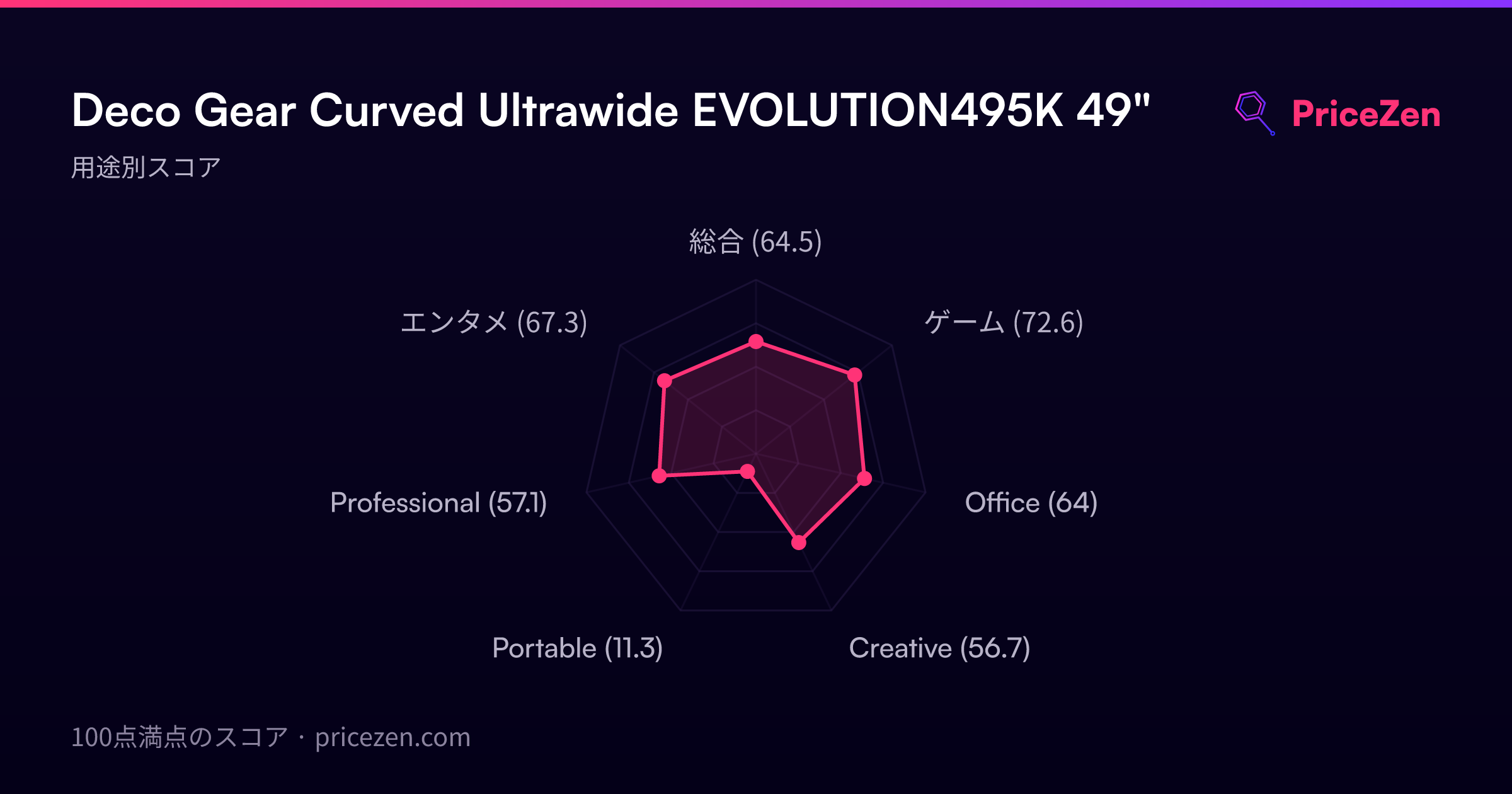
- 総合64.5
- ゲーム72.6
- Office64
- Creative56.7
- Portable11.3
- Professional57.1
- エンタメ67.3