Sony BRAVIA BZ30L
A 98-inch VA panel with 440 nits brightness and 5000:1 contrast delivers clear 4K HDR signage in controlled lighting, while 24/7 operation and Android OS support standalone playback. Four HDMI inputs with HDCP 2.3, plus IP and RS-232 control, let it integrate into larger AV networks, and the S-Center input doubles it as a center channel speaker. Best for AV integrators and facility managers deploying permanent digital signage or conference room displays that need remote management and multi-device connectivity.

現在、販売店の最新価格はありません


概要
The 30-Second Version
The Sony BZ30L is a 98-inch commercial display with excellent color and pro integration features, but its 60Hz panel and slow response time put performance near the bottom of our charts. It's built for boardrooms and signage, not gaming or home theater. At $7,980 USD, it's a solid investment for the right commercial buyer.
Pros & Cons
長所
- Massive 98-inch 4K panel with excellent color coverage 96th
- 24/7 duty cycle and IP/RS-232 control for commercial installs 81st
- Four HDMI inputs with HDCP 2.3 for flexible source switching 77th
- Android OS with AirPlay and Chromecast built in 70th
短所
- 60Hz refresh rate and 6.5ms response time are rough for motion
- 328W power draw will show up on the electric bill
- Ergonomics are limited to VESA mounting, no stand included
- Performance percentile is near the bottom of our database
実証データ
Performance
The BZ30L is a workhorse, not a racehorse. The 60Hz refresh rate and 6.5ms response time land it near the bottom of our performance charts, which makes sense when you remember this thing is meant to show spreadsheets and signage all day. Color is a different story. The 95% DCI-P3 coverage and 440 nits brightness put it in the 96th percentile for color, so presentations and video content will look rich and accurate. The 5000:1 static contrast ratio helps with depth in darker rooms. Just don't expect smooth motion or low input lag.
Specifications
Full Specifications
Display
| Resolution | 3840x2160 (4K UHD) |
| Panel Type | VA |
| Aspect Ratio | 16:9 |
Performance
| Refresh Rate | 60 Hz |
| Response Time | 6.5 |
Color & HDR
| Brightness | 440 nits |
| Color Gamut | 95% DCI-P3 |
| HDR | Dolby Vision |
| HDR Support | Dolby Vision |
Connectivity
| HDMI Ports | 4 |
| Speakers | Yes |
| Headphone Jack | Yes |
Ergonomics
| VESA Mount | 600x400 |
Features
| Webcam | No |
| Touchscreen | No |
| PIP/PBP | No |
| Power | 328 |
vs Competition
Stacked against the LG UltraGear 45GX950A-B or the ASUS ROG Strix XG27UCDMG, the BZ30L looks like it's from another planet. Those are high-refresh gaming monitors with OLED panels and response times measured in fractions of a millisecond. The BZ30L is a 60Hz VA panel built for static content and long hours. The Dell UltraSharp U4025QW is closer in spirit, a productivity-focused display, but even that has better ergonomics and a higher refresh rate. The Sony wins on sheer size and color accuracy for commercial use, but it's not competing in the same arena as the gaming displays.
| Spec | Sony BRAVIA BZ30L | LG UltraGear 45GX950A-B 45" | ASUS ROG Strix XG27UCDMG 27" | Dell UltraSharp U4025QW 39.7" | Alienware AW-Series AW3425DW 34" | MSI MAG 271QPX QD-OLED E2 27" |
|---|---|---|---|---|---|---|
| Screen Size | - | 45 | 27 | 39.70000076293945 | 34 | 27 |
| Resolution | 3840 x 2160 | 5120 x 2160 | 3840 x 2160 | 5120 x 2160 | 3440 x 1440 | 2560 x 1440 |
| Panel Type | VA | OLED | OLED | IPS | QD-OLED | QD-OLED |
| Refresh Rate | 60 | 330 | 240 | 120 | 240 | 240 |
| Response Time Ms | 6.5 | 0.029999999329447746 | 0.029999999329447746 | 5 | 0.029999999329447746 | 0.029999999329447746 |
| Adaptive Sync | - | FreeSync Premium Pro | FreeSync Premium Pro | Adaptive-Sync | FreeSync Premium Pro | FreeSync Premium Pro |
| Hdr | Dolby Vision | DisplayHDR True Black 400 | DisplayHDR True Black 400 | HDR600 | HDR400 | DisplayHDR True Black 400 |
| Compare | Compare | Compare | Compare | Compare |
| 製品 | Color | 携帯性 | Display | Feature | Ergonomic | Performance | Connectivity |
|---|---|---|---|---|---|---|---|
| Sony BRAVIA BZ30L | 96.1 | 43.4 | 80.9 | 70.2 | 30.3 | 9.4 | 77.3 |
| LG UltraGear 45GX950A-B 45" Compare | 99.4 | 76.6 | 99.7 | 96.3 | 90.8 | 99.4 | 96.9 |
| ASUS ROG Strix XG27UCDMG 27" Compare | 96.5 | 57.5 | 97.7 | 85.1 | 90.8 | 97.9 | 81.2 |
| Dell UltraSharp U4025QW 39.7" Compare | 97.9 | 76.6 | 98.6 | 96.3 | 90.8 | 56.1 | 99.3 |
| Alienware AW-Series AW3425DW 34" Compare | 98.9 | 74 | 84.1 | 96.3 | 90.8 | 97.9 | 95.4 |
| MSI MAG 271QPX QD-OLED E2 27" Compare | 99.2 | 57.5 | 73.5 | 85.1 | 90.8 | 97.9 | 81.2 |
価格
Value & Pricing
At $7,980 USD, this is not a casual purchase. But commercial displays in this size class rarely come cheap, and the BZ30L earns its keep through reliability and integration features rather than raw specs. The 24/7 duty cycle, IP control, and Android OS mean you can deploy it and forget it. If you need a giant screen for a conference room or digital signage, the price is defensible. If you want a big TV for movies and games, you're paying a premium for features you'll never use.
詳細情報
Overview
The Sony BRAVIA BZ30L is a 98-inch commercial display built for boardrooms, classrooms, and signage, not your living room. It runs Android OS, handles 24/7 operation, and plays nice with IP and RS-232 control systems. The VA panel gets bright enough for controlled lighting and covers 95% of DCI-P3, which is genuinely impressive for a display in this category.
But here's the thing. This is a 60Hz panel with a 6.5ms response time, and our database puts its performance in the 9th percentile. That's fine for a slide deck or a menu board. It's not fine for gaming or fast-moving content. Know what you're buying.
Common Questions
Q: Can I use this as a regular TV for movies and gaming?
You can, but you probably shouldn't. The 60Hz refresh rate and 6.5ms response time will make fast motion look rough, and you're paying for commercial features like 24/7 operation and IP control that won't matter in a living room.
Q: How bright is this display, and will it work in a bright room?
The BZ30L hits 440 nits, which is solid for controlled lighting like conference rooms and classrooms. It's not bright enough for direct sunlight or window-heavy spaces, so plan your install accordingly.
Q: Does this display come with a stand or wall mount?
No stand is included. The BZ30L uses a VESA 600x400 mount, so you'll need to budget for a wall mount or cart separately. That's typical for commercial displays in this size class.
Who Should Skip This
Skip the BZ30L if you want a big screen for gaming, movies, or sports. The 60Hz panel and 6.5ms response time will make motion look smeary, and the 328W power draw is overkill for casual use. If you need a 98-inch display for a bright living room, look for something with higher peak brightness and a faster panel instead.
Verdict
Buy the BZ30L if you're outfitting a conference room, classroom, or digital signage network and need a reliable 98-inch display with solid color and pro-level control options. The Android OS and 24/7 operation make it a set-it-and-forget-it solution. Skip it if you want a big screen for entertainment or gaming. The 60Hz panel and slow response time will frustrate anyone expecting smooth motion.
Usage Scores
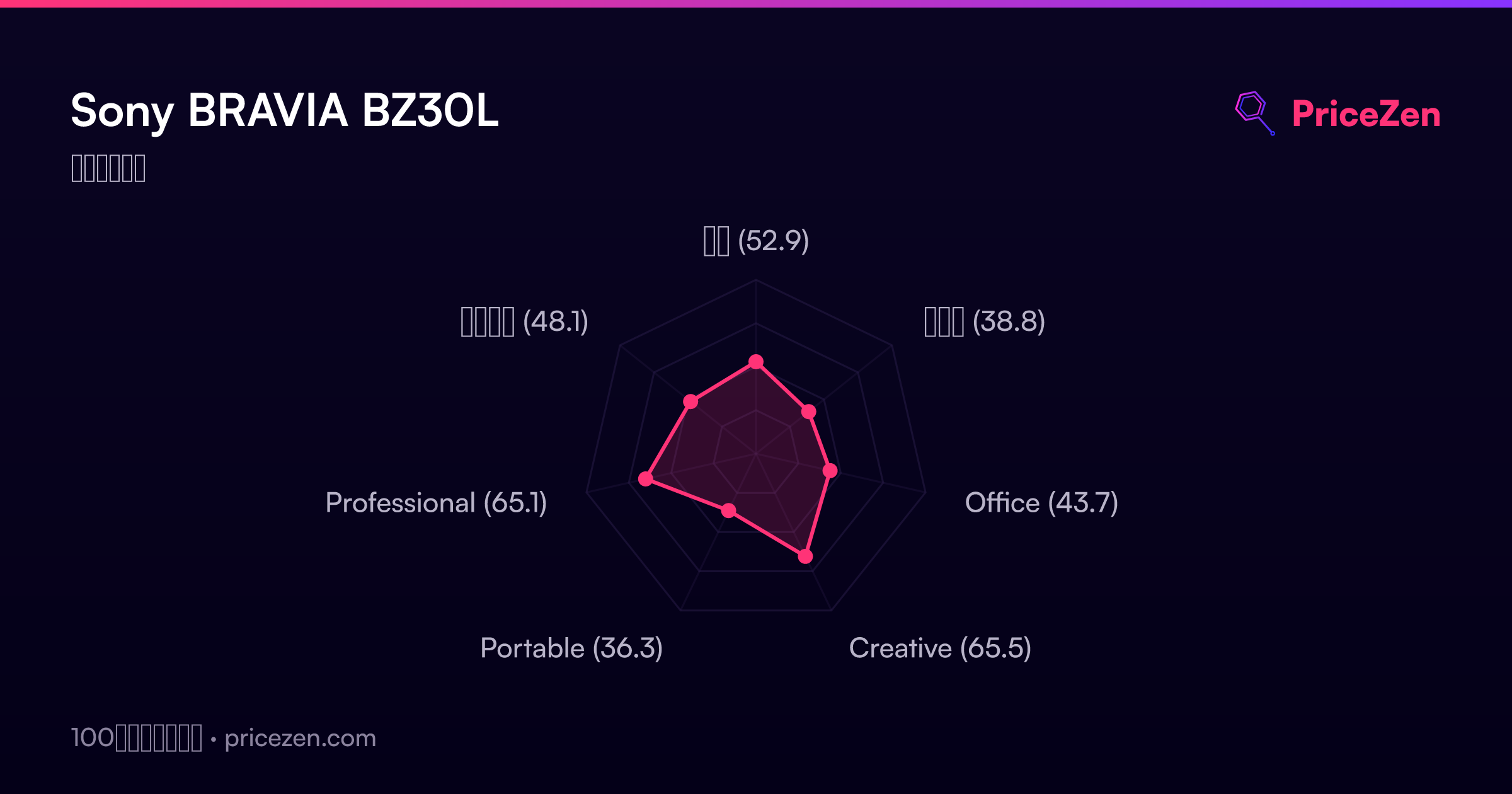
- 総合52.9
- ゲーム38.8
- Office43.7
- Creative65.5
- Portable36.3
- Professional65.1
- エンタメ48.1