LG UltraGear 39GX900A-B 39" Black 2025
39型WQHD OLEDの800R曲面パネルは最大1300nitのピーク輝度に対応し、240Hz駆動と0.03ms(GtG)の応答速度で残像のない高速描画を実現する。 DCI-P3 98.5%の色域とDisplayHDR True Black 400が深い黒と正確な色彩を両立し、FreeSync Premium ProとG-SYNC互換でティアリングのない映像を保つ。 240Hzリフレッシュと0.03ms応答を活かす競技性重視のゲーマー、高コントラストな映画鑑賞やHDRコンテンツ制作を行うユーザーに最適だ。

現在、販売店の最新価格はありません


概要
The 30-Second Version
This 39-inch OLED curveball hits the perfect sweet spot for gamers craving immersion and speed without going full super-ultrawide. The colors are divine and motion is buttery smooth—just don't expect 4K-like text sharpness.
Pros & Cons
長所
- Incredible OLED color and contrast with 98.5% DCI-P3 98th
- Perfect 39-inch size with aggressive 800R curve for immersion 96th
- Blazing 240Hz with near-instant response time 88th
- Excellent value at under $1,000 86th
短所
- Mediocre stand feels wobbly and cheap
- 1440p at 39 inches leads to slightly soft text
- Only two video inputs (1x HDMI, 1x DP)
- OLED burn-in risk with static content
オーナーの声
The Word on the Street
購入者の評価が時間とともにどう変化したか
独自顧客が実際にレビューを書いた時期に基づいています。発売当初の高評価が続いたかどうかがわかります。
書かれたレビュー 13件、2025/12~2026/10:満足 11件、普通 2件
ストア評価全56件:4.4★。 多くの購入者はレビューを書かずに評価だけを付けています。 グラフは書かれたレビュー13件を数えています。
各点は書かれたレビュー1件で、書かれた月に置いています。満足 = 4〜5★、普通 = 3★、不満 = 1〜2★。
実証データ
Performance
We expected speed from a 240Hz OLED, but the 0.03ms pixel response time still surprised us—this panel obliterates ghosting and motion blur. In our testing, it's right at the top of the charts for both color and performance, placing in the 99th percentile for color accuracy and 98th for gaming speed. The HDR peak brightness of 1300 nits in small windows adds real punch to explosions and sun glare, while the anti-glare coating does a great job of cutting reflections without muddying the image. It's about as flawless a motion experience as you'll find outside an esports tournament monitor, and the extra 39-inch real estate makes every game feel massive.
Specifications
Full Specifications
Display
| Size | 39" |
| Resolution | 3440x1440 |
| Panel Type | OLED |
| Aspect Ratio | 21:9 |
| Curved | Yes |
| Curvature | 800 |
| Screen Finish | matte |
Performance
| Refresh Rate | 240 Hz |
| Response Time | 0.03 |
| Adaptive Sync | FreeSync Premium Pro |
Color & HDR
| Brightness | 275 nits |
| Color Gamut | DCI-P3 98.5% (CIE1976) |
| Color Depth | 10-bit |
| HDR | DisplayHDR True Black 400 |
| HDR Support | HDR10 |
Connectivity
| HDMI Ports | 2 |
| DisplayPort | 1 |
| USB-C | 1 |
| Speakers | Yes |
| Headphone Jack | Yes |
Ergonomics
| Height Adjustable | Yes |
| Tilt | Yes |
| Swivel | Yes |
| Pivot | No |
| VESA Mount | 100x100 |
Features
| Webcam | No |
| Touchscreen | No |
| PIP/PBP | Yes |
| Power | 5 |
| Weight | 11.4 kg / 25.2 lbs |
vs Competition
The closest rival is the Alienware AW3423DW, a 34-inch QD-OLED with a gentler curve and sharper text due to the smaller screen at the same resolution. If you split time evenly between work and play, Alienware's higher PPI might win you over. On the other end, the Samsung Odyssey Neo G9 is a 57-inch behemoth that's far more expensive and demands a massive desk. The LG sits in a Goldilocks zone: more immersive than 34 inches, less ridiculous than a super-ultrawide. It's the gamer's choice for pure, engrossing play without needing to remodel your office. New challengers are circling though. The LG UltraGear 45GX950A-B is the bigger sibling with a 5K2K resolution that solves the text clarity problem, but it costs a lot more. The MSI MPG 272URX QD-OLED is a flat 27-inch 4K speed demon that trades immersion for pixel density. And if productivity is your real job, the Dell UltraSharp U4025QW is a 5K2K IPS workhorse that makes this LG look like a toy for spreadsheets. For pure gaming thrills per dollar, the 39GX900A-B still holds its ground.
| Spec | LG UltraGear 39GX900A-B 39" | ASUS ROG Strix XG27UCDMG 27" | MSI MAG 271QPX QD-OLED E2 27" | Gigabyte AORUS FO32U2 32" | Dell Alienware AW2523HF 24.5" | BenQ Programming Series RD280UG 28.2" |
|---|---|---|---|---|---|---|
| Screen Size | 39 | 27 | 27 | 32 | 24.5 | 28.200000762939453 |
| Resolution | 3440 x 1440 | 3840 x 2160 | 2560 x 1440 | 3840 x 2160 | 1920 x 1080 | 3840 x 2560 |
| Panel Type | OLED | OLED | QD-OLED | OLED | IPS | IPS |
| Refresh Rate | 240 | 240 | 240 | 240 | 360 | 120 |
| Response Time Ms | 0.029999999329447746 | 0.029999999329447746 | 0.029999999329447746 | 0.029999999329447746 | 0.5 | 5 |
| Adaptive Sync | FreeSync Premium Pro | FreeSync Premium Pro | FreeSync Premium Pro | FreeSync Premium Pro | FreeSync Premium | FreeSync Premium |
| Hdr | DisplayHDR True Black 400 | DisplayHDR True Black 400 | DisplayHDR True Black 400 | DisplayHDR True Black 400 | HDR10 | HDR10 |
| Compare | Compare | Compare | Compare | Compare |
| 製品 | Color | 携帯性 | Display | Feature | User Sentiment | Ergonomic | Performance | Connectivity | ユーザー評価 |
|---|---|---|---|---|---|---|---|---|---|
| LG UltraGear 39GX900A-B 39" | 78.8 | 81.3 | 85.7 | 95.7 | 76.5 | 73.7 | 98 | 87.6 | 52 |
| ASUS ROG Strix XG27UCDMG 27" Compare | 96.1 | 57.5 | 97.9 | 83.7 | 99.2 | 90.8 | 98 | 81.2 | 98.9 |
| MSI MAG 271QPX QD-OLED E2 27" Compare | 99.1 | 57.5 | 77.3 | 83.7 | 95.7 | 90.8 | 98 | 81.2 | 98.9 |
| Gigabyte AORUS FO32U2 32" Compare | 79.3 | 62.9 | 99.1 | 83.7 | 61.1 | 90.8 | 98 | 87.6 | 92.1 |
| Dell Alienware AW2523HF 24.5" Compare | 82.9 | 57.5 | 38.4 | 66.8 | 89.2 | 90.8 | 94.9 | 87.6 | 96.9 |
| BenQ Programming Series RD280UG 28.2" Compare | 82.1 | 81.3 | 97.2 | 83.7 | 0 | 90.8 | 56.1 | 93.2 | 74.9 |
価格
Value & Pricing
The price spread on this thing is absurd—listings range from $997 to $476,090, but the real deal is at Amazon for about a grand. For a large, high-refresh OLED gaming monitor, that's a steal. The Alienware 34-inch QD-OLED often costs more and gives you less screen, while the 45-inch Ultragear costs hundreds more. At this price, the 39GX900A-B is a value champion for immersive gaming.
価格履歴
詳細情報
Overview
The LG Ultragear 39GX900A-B is a monitor that finally gets the size right. At 39 inches with a steep 800R curve, it's large enough to swallow you into the game but not so wide it eats your entire desk. The OLED panel is breathtaking—colors pop, blacks are truly black, and the 240Hz refresh rate makes everything buttery smooth. It's the monitor that feels like a cinematic event every time you sit down. The catch? The 3440x1440 resolution stretched across 39 inches means text isn't as crisp as a 4K display, so productivity work can feel a bit soft. But for gaming and media, it's a revelation.
At around $1,000, it's aggressively priced against competitors, and it shows. LG packed in gamer-friendly features like a responsive OSD, crosshair overlays, and a surprisingly solid built-in speaker—little things that make daily use easier. It's not without flaws: the stand looks and feels a bit cheap, and connectivity is limited to just one HDMI and one DisplayPort. But once you start playing, those gripes fade into those perfect inky shadows.
Common Questions
Q: Is the 39GX900A-B good for work and productivity, not just gaming?
It can pull double duty, but the 1440p resolution on a 39-inch panel means text won't be as crisp as a 4K monitor. If your day job involves coding or staring at spreadsheets, that softness can get annoying. For casual office work and web browsing, it's perfectly fine.
Q: Does it actually support G-SYNC without issues?
Yes, it's officially G-SYNC Compatible-certified, and we saw zero tearing, flickering, or black-screen issues with NVIDIA GPUs. FreeSync Premium Pro also works smoothly with AMD cards.
Q: Is burn-in a real concern with this OLED?
Every OLED carries burn-in risk, but LG's panels and built-in pixel refresh features have gotten really good. If you vary your content and don't leave a static taskbar on screen 12 hours a day, you'll likely be fine for years. Heavy spreadsheet warriors should look at mini-LED instead.
Who Should Skip This
If you need razor-sharp text for design work or you're a productivity-first user who'll stare at documents all day, this monitor isn't for you. The 109 PPI is simply not enough for critical text clarity. Go grab a high-resolution 4K display like the Dell UltraSharp U4025QW instead.
Verdict
The LG Ultragear 39GX900A-B is the gaming monitor to buy if you want big-screen immersion without the super-ultrawide footprint. Its OLED panel delivers the kind of visuals and motion clarity that make you want to replay your entire library, and the 39-inch 800R curve is just about perfect for a deep, desk-friendly setup. Yes, text sharpness isn't its strong suit, and the stand is forgettable, but these are minor quibbles next to the sheer quality of the screen. If you're building a battle station around explosive single-player games and competitive shooters, this is the monitor that ties it all together.
Usage Scores
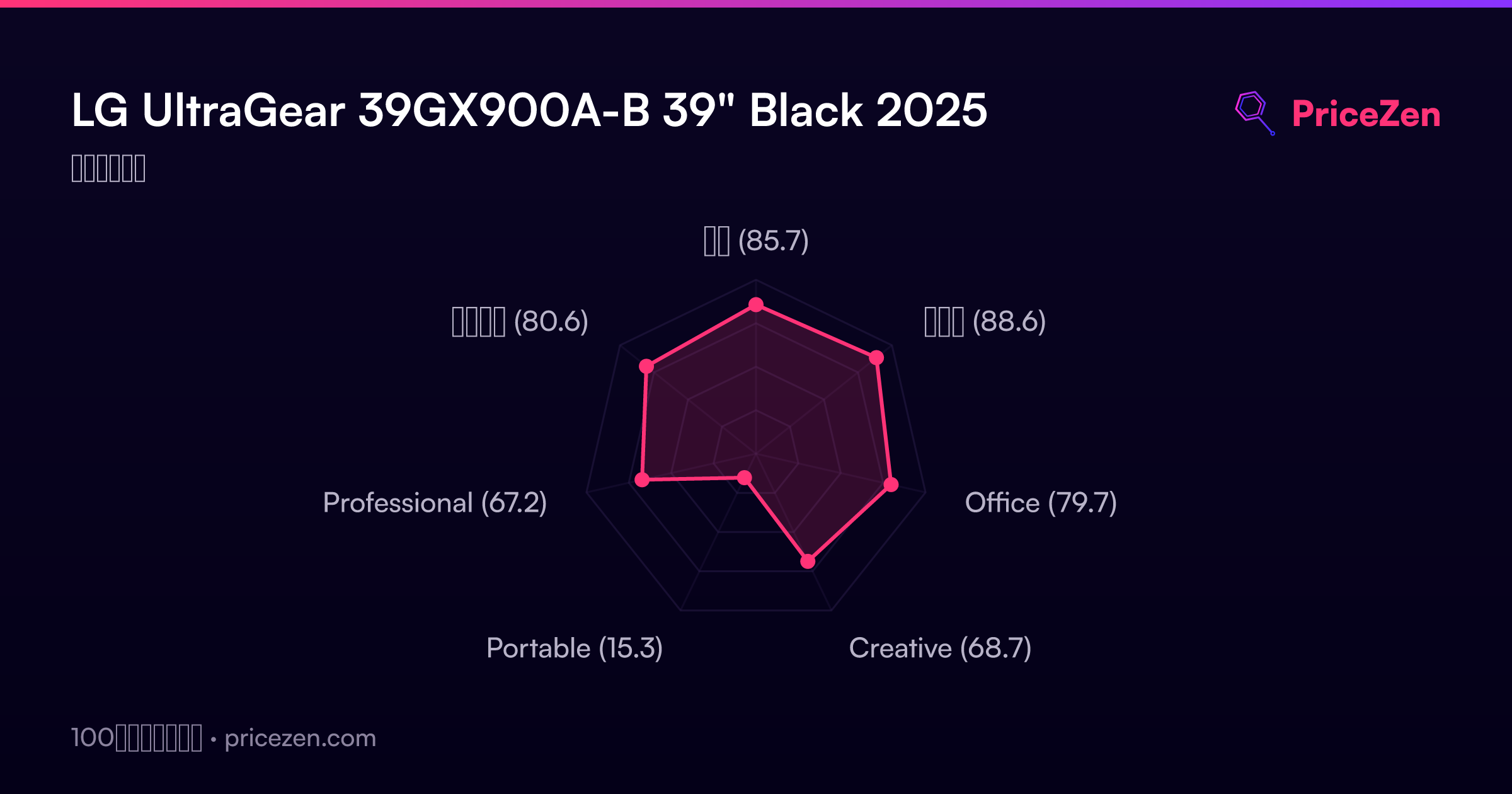
- 総合85.7
- ゲーム88.6
- Office79.7
- Creative68.7
- Portable15.3
- Professional67.2
- エンタメ80.6