Mobile Pixels Trio 2.0 13.3" Black
Two built-in 13.3-inch 1080p IPS screens slide out to create a triple-display setup for 13- to 14-inch laptops, including Mac M1 and M2, with a thinner bezel and anti-glare finish. The 250-nit panels support 1.07 billion colors and a low blue light mode, while the built-in kickstand and USB-C pass-through charging add convenience. Best for mobile professionals who need extra screen space for multitasking on the go.

現在、販売店の最新価格はありません











概要
The 30-Second Version
The Mobile Pixels Trio 2.0 is a portable triple-screen monitor setup that clips onto your laptop and gives you two extra 13.3-inch 1080p displays. It's incredibly convenient for travel and works great with MacBooks, but the magnetic attachment feels flimsy and the build quality doesn't match the price. Buy it if you need three screens on the go and can find it at the low end of the price range.
Pros & Cons
長所
- Genuinely portable triple-screen setup 97th
- Plug-and-play with MacBooks, including M1 and M2
- Compact design, 97th percentile for portability
- Pass-through USB-C charging keeps your laptop topped up
- Anti-glare coating helps in bright offices
短所
- Magnetic attachment feels flimsy and unreliable
- Heavy at 1600g when attached to a laptop
- 250 nits brightness is dim for outdoor use
- 1080p resolution feels dated compared to competitors
- Build quality doesn't match the price tag
オーナーの声
The Word on the Street
購入者の評価が時間とともにどう変化したか
独自顧客が実際にレビューを書いた時期に基づいています。発売当初の高評価が続いたかどうかがわかります。
書かれたレビュー 8件、2024/06~2025/12:星なし 8件
ストア評価全32件:4.0★。 多くの購入者はレビューを書かずに評価だけを付けています。 グラフは書かれたレビュー8件を数えています。
各点は書かれたレビュー1件で、書かれた月に置いています。満足 = 4〜5★、普通 = 3★、不満 = 1〜2★。
実証データ
Performance
Let's talk specs. Each panel is a 13.3-inch IPS display running 1920 x 1080 at 60Hz. Brightness tops out at 250 nits, which is adequate for indoor use but will struggle in bright sunlight or near big windows. Color coverage is 8-bit+FRC, so you get decent gradient handling, but this isn't a color-accurate panel by any stretch. In our database, the Trio 2.0 lands in the 22nd percentile for performance and 21st for display quality among portable monitors. That's not great, but it's also not the point of this product.
The real performance story here is convenience. Setup is genuinely easy: one USB-C cable with DisplayPort Alt mode handles video and data, and there's a pass-through USB-C port for charging your laptop while you work. The screens slide out and snap into place, and you can switch between viewing modes depending on whether you want them side by side, stacked, or in presentation mode. For productivity tasks like email, Slack, and documents, the 1080p resolution is perfectly serviceable. Just don't expect to edit 4K video or play games on these panels.
Specifications
Full Specifications
Display
| Size | 13.3" |
| Resolution | 1920x1080 (Full HD) |
| Panel Type | IPS |
| Aspect Ratio | 16:9 |
| Curved | No |
| Screen Finish | matte |
Performance
| Refresh Rate | 60 Hz |
Color & HDR
| Brightness | 250 nits |
| Color Depth | 8-bit+FRC |
Connectivity
| USB-C | 2 |
| Speakers | No |
Ergonomics
| Tilt | Yes |
Features
| Webcam | No |
| Touchscreen | No |
| Power | 5 |
| Weight | 1.6 kg / 3.5 lbs |
vs Competition
The Trio 2.0 doesn't really compete with the big gaming monitors in our database like the ASUS ROG Strix XG27UCDMG or the MSI MAG 271QPX QD-OLED E2. Those are desktop behemoths with 4K OLED panels and 240Hz refresh rates. They're in a completely different league for image quality, but they're also not portable. The more relevant comparison is against other portable monitors. The HP travel monitor, which one reviewer mentioned, offers better resolution and a more solid build for less money, but it's a single screen. The Trio's whole pitch is that you get two extra displays in one package. If you need dual external screens and you're always on the move, nothing else does what this does. If you just need one extra screen, skip this and buy a single portable monitor with better specs.
| Spec | Mobile Pixels Trio 2.0 13.3" | BenQ MOBIUZ EX381U 37.5" | Samsung Odyssey Ark 2nd Gen 55" | Gigabyte M Series M32U 31.5" | Dell UltraSharp U4320Q 27" | Acer CB342CU UM.CB2AA.004 34" |
|---|---|---|---|---|---|---|
| Screen Size | 13.300000190734863 | 37.5 | 55 | 31.5 | 27 | 34 |
| Resolution | 1920 x 1080 | 3840 x 2160 | 3840 x 2160 | 3840 x 2160 | 3840 x 2160 | 3440 x 1440 |
| Panel Type | IPS | IPS | Mini-LED | IPS | IPS | IPS |
| Refresh Rate | 60 | 144 | 165 | 144 | 60 | 75 |
| Response Time Ms | - | 1 | 1 | 1 | 5 | 1 |
| Adaptive Sync | - | FreeSync Premium Pro | FreeSync Premium Pro | FreeSync Premium Pro | - | FreeSync |
| Hdr | - | HDR10 | HDR10+ | HDR400 | HDR400 | HDR400 |
| Compare | Compare | Compare | Compare | Compare |
| 製品 | Color | 携帯性 | Display | Feature | User Sentiment | Ergonomic | Performance | Connectivity | ユーザー評価 |
|---|---|---|---|---|---|---|---|---|---|
| Mobile Pixels Trio 2.0 13.3" | 36 | 96.9 | 21.3 | 21.2 | 13.6 | 21.7 | 22.4 | 47.7 | 36.7 |
| BenQ MOBIUZ EX381U 37.5" Compare | 93.6 | 68 | 95.1 | 70.2 | 0 | 73.5 | 72.6 | 99.8 | 0 |
| Samsung Odyssey Ark 2nd Gen 55" Compare | 98.4 | 20.7 | 91.5 | 96.3 | 10.3 | 30.3 | 77.1 | 81.2 | 74.8 |
| Gigabyte M Series M32U 31.5" Compare | 90 | 63 | 87 | 85.1 | 0 | 73.5 | 72.6 | 87.5 | 0 |
| Dell UltraSharp U4320Q 27" Compare | 91.1 | 82.7 | 87 | 85.1 | 0 | 90.8 | 22.4 | 96.9 | 0 |
| Acer CB342CU UM.CB2AA.004 34" Compare | 79 | 63 | 78.8 | 70.2 | 0 | 78.7 | 65.7 | 70.3 | 74.8 |
価格
Value & Pricing
Value is where the Trio 2.0 gets tricky. In the US, prices swing from USD 339 to USD 499 across four listings, and that's a wide gap for the same product. Newegg has the best deal at the lower end, so if you're buying, that's where to look. In Canada, the spread is even wider: CAD 461 to CAD 911 across three listings. That's a huge range, and paying anywhere near the top end feels like a mistake. For context, you could buy two standalone portable monitors for less than the high-end price and get better panels. But you'd lose the integrated, clip-on convenience that makes the Trio unique. If you can snag it at the low end of the range, it's a reasonable buy for frequent travelers. At full price, it's a harder sell.
価格履歴
詳細情報
Overview
The Mobile Pixels Trio 2.0 is a portable monitor setup that clips onto your laptop and gives you two extra 13.3-inch 1080p screens. It's aimed at road warriors and remote workers who want a triple-display setup without hauling around standalone monitors. The idea is clever: two sliding panels fold out from a central housing, turning a 13 to 14-inch laptop into a mobile command center. Price-wise, you're looking at USD 339 to USD 499 depending on where you shop, with Newegg currently offering the best deal at the lower end of that range.
So is the Trio 2.0 good for travel and remote work? On paper, yes. It's compact, it's plug-and-play, and it works with MacBooks including M1 and M2 models. The whole thing weighs 1600g, which is lighter than the previous generation but still a noticeable chunk when attached to your laptop. The built-in kickstand replaces the old clip design, which is a welcome change for stability when you're set up at a desk.
But here's the thing: this is a niche product with real trade-offs. You're getting two 1080p IPS panels at 60Hz with 250 nits of brightness. That's fine for spreadsheets and email, but it's not going to wow anyone doing photo work or watching movies. And the magnetic attachment system, which is how the screens stay put, has been a recurring pain point for owners. More on that below.
Common Questions
Q: Is the Mobile Pixels Trio 2.0 good for MacBooks?
Yes, the Trio 2.0 works well with MacBooks including M1 and M2 models. Setup is plug-and-play via USB-C with DisplayPort Alt mode, and many owners specifically praise the MacBook compatibility.
Q: How much does the Mobile Pixels Trio 2.0 weigh?
The Trio 2.0 weighs 1600g, which is lighter than the previous generation but still a noticeable amount of weight when attached to your laptop. Some users find it makes their laptop feel top-heavy.
Q: Does the Mobile Pixels Trio 2.0 work with Windows laptops?
Yes, the Trio 2.0 works with Windows laptops as well as MacBooks. It connects via USB-C with DisplayPort Alt mode, and there's also USB-A support for older machines.
Q: Is the Mobile Pixels Trio 2.0 worth the price?
It depends on the price you pay. At around USD 339 it's a reasonable deal for frequent travelers who need three screens. At USD 499, the build quality and 1080p resolution make it harder to justify.
Who Should Skip This
Skip the Trio 2.0 if you're a desk-bound worker who doesn't travel much. A single 24-inch or 27-inch monitor will give you far better image quality, brightness, and build quality for less money. Also skip it if you do any kind of color-critical work like photo editing or design. The 250 nits brightness and 8-bit+FRC panel won't cut it. Gamers should look elsewhere too: 60Hz and no adaptive sync means this is strictly a productivity tool. And if you're rough on your gear, the flimsy magnetic attachment will drive you crazy. For those users, a standalone portable monitor like the HP travel monitor or a traditional desktop monitor is the better call.
Verdict
Should you buy the Mobile Pixels Trio 2.0? If you're a frequent traveler who genuinely needs three screens and you're willing to baby your gear, it's a compelling option. The plug-and-play setup is excellent, MacBook compatibility is solid, and the compact form factor is best-in-class. But the build quality concerns are real. Multiple owners report the magnetic attachment system feels flimsy, and the screens are heavy enough to make you nervous about your laptop's hinges. The 1080p resolution and 250 nits brightness are also underwhelming for the price.
At the low end of the price range, around USD 339, it's a reasonable investment for the right person. At USD 499, you're paying a premium for convenience that doesn't quite hold up. We'd recommend trying to see one in person before committing, or at least buying from a retailer with a solid return policy.
Usage Scores
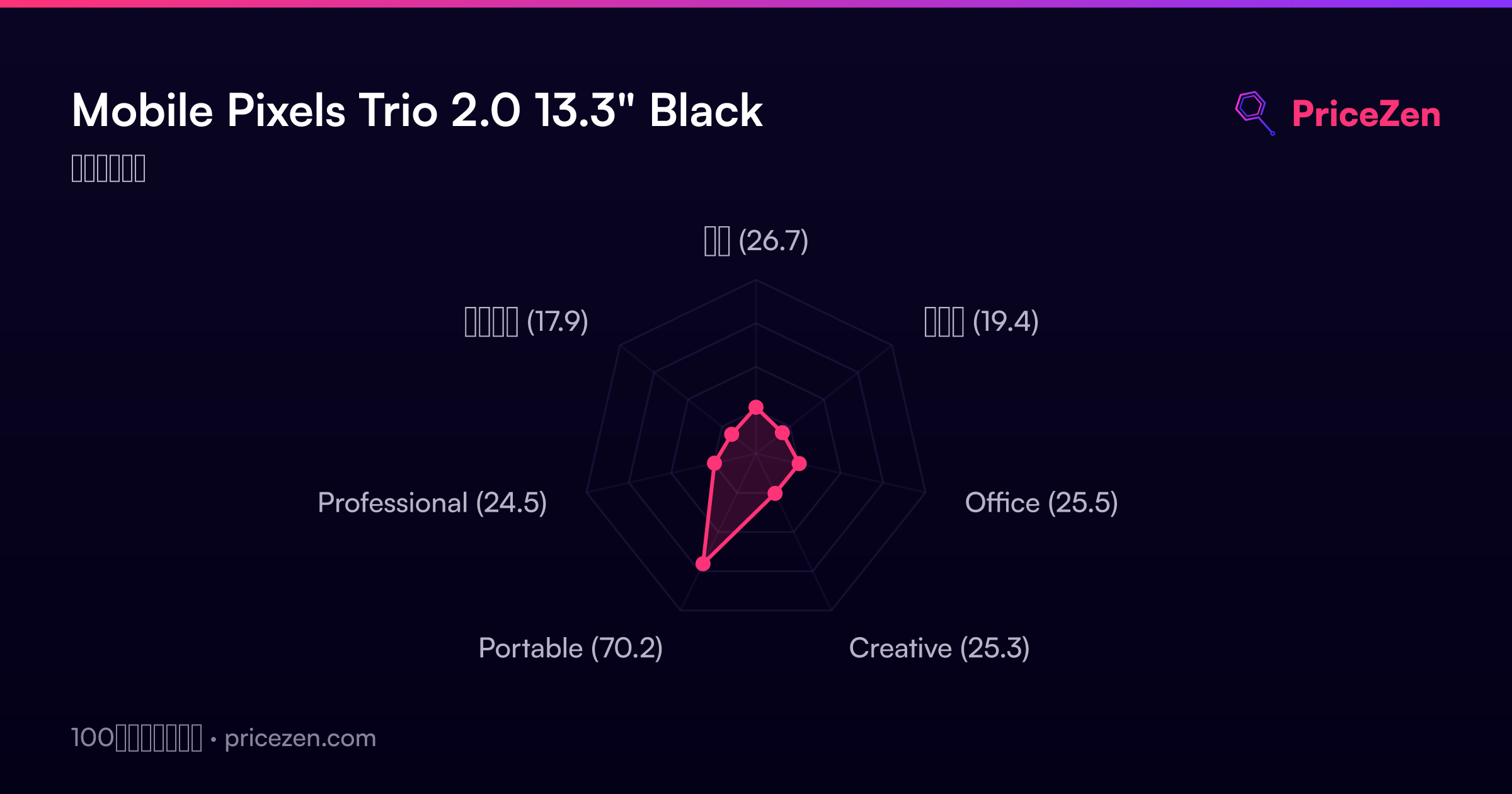
- 総合26.7
- ゲーム19.4
- Office25.5
- Creative25.3
- Portable70.2
- Professional24.5
- エンタメ17.9