Acer KB272 P6bi 27" Black 2025
The 144Hz refresh rate and 1ms response time deliver smooth, tear-free motion for fast-paced gaming, while AMD FreeSync keeps frames fluid. The 27-inch IPS panel covers 99% sRGB and 250 nits brightness, with a frameless bezel and VESA mount for flexible setups. Best for budget-conscious gamers and office users who want a dual-purpose monitor with low input lag and accurate colors.












概要
The 30-Second Version
A fast 144Hz panel wrapped in a budget body. Great for gamers on a tight budget, rough for anyone who needs ports or a decent stand.
Pros & Cons
長所
- 144Hz refresh rate makes games feel fluid 92nd
- IPS panel gives decent viewing angles 73rd
- FreeSync kills screen tearing
- VESA mount support if you hate the stand
短所
- Only one HDMI port, no DisplayPort
- 250 nits is dim for bright rooms
- Tilt-only stand, no height adjustment
- Color performance is below average
オーナーの声
The Word on the Street
購入者の評価が時間とともにどう変化したか
独自顧客が実際にレビューを書いた時期に基づいています。発売当初の高評価が続いたかどうかがわかります。
書かれたレビュー 13件、2024/06~2026/02:満足 13件
ストア評価全3,704件:4.6★。 多くの購入者はレビューを書かずに評価だけを付けています。 グラフは書かれたレビュー13件を数えています。
各点は書かれたレビュー1件で、書かれた月に置いています。満足 = 4〜5★、普通 = 3★、不満 = 1〜2★。
実証データ
Performance
The 144Hz refresh rate is the star here. Paired with FreeSync, motion stays smooth and tear-free in fast games, and the 1ms VRB response time keeps ghosting to a minimum. Brightness at 250 nits is fine for a dim room but struggles near windows. Color accuracy lands at 99% sRGB, which sounds impressive until you realize the panel sits in the bottom half for color performance in our database. It's a fast monitor, not a pretty one.
Specifications
Full Specifications
Display
| Size | 27" |
| Resolution | 1920x1080 (Full HD) |
| Panel Type | LCD |
| Aspect Ratio | 16:9 |
| Curved | No |
| Screen Finish | matte |
Performance
| Refresh Rate | 144 Hz |
| Response Time | 1 |
| Adaptive Sync | FreeSync |
Color & HDR
| Brightness | 250 nits |
| Color Gamut | 99% sRGB |
Connectivity
| HDMI Ports | 1 |
Ergonomics
| Height Adjustable | No |
| Tilt | Yes |
| VESA Mount | 100x100 |
Features
| Weight | 5.7 kg / 12.6 lbs |
vs Competition
The ASUS TUF Gaming VG34VQL1B and HP OMEN 27qs G2 both outclass this Acer in color, connectivity, and ergonomics, but they cost significantly more. The Dell S2725QC adds 4K and USB-C, which makes the KB272 look ancient for office work. If you want a cheap 144Hz panel and don't care about ports or stand quality, the Acer wins on price alone. If you can stretch your budget, the HP OMEN 27qs G2 is the smarter long-term buy.
| Spec | Acer KB272 P6bi 27" | BenQ PD3220U 32" | MSI MAG 274URFW 27" | LG UltraGear 32GQ750-B 32" | Samsung Odyssey Ark 2nd Gen 55" | Gigabyte M Series M32U 31.5" |
|---|---|---|---|---|---|---|
| Screen Size | 27 | 32 | 27 | 32 | 55 | 31.5 |
| Resolution | 1920 x 1080 | 3840 x 2160 | 3840 x 2160 | 3840 x 2160 | 3840 x 2160 | 3840 x 2160 |
| Panel Type | LCD | IPS | IPS | VA | Mini-LED | IPS |
| Refresh Rate | 144 | 60 | 160 | 144 | 165 | 144 |
| Response Time Ms | 1 | 5 | 0.5 | 1 | 1 | 1 |
| Adaptive Sync | FreeSync | - | FreeSync Premium | FreeSync Premium | FreeSync Premium Pro | FreeSync Premium Pro |
| Hdr | - | HDR10 | HDR | HDR10 | HDR10+ | HDR400 |
| Compare | Compare | Compare | Compare | Compare |
| 製品 | Color | 携帯性 | Display | Feature | Ergonomic | Performance | Connectivity | ユーザー評価 |
|---|---|---|---|---|---|---|---|---|
| Acer KB272 P6bi 27" | 35.9 | 12.7 | 43.6 | 21.2 | 47.2 | 72.6 | 20.6 | 92 |
| BenQ PD3220U 32" Compare | 88.6 | 81.3 | 95.1 | 85 | 90.7 | 22.4 | 96.9 | 0 |
| MSI MAG 274URFW 27" Compare | 91.9 | 57.4 | 87 | 85 | 90.7 | 90.8 | 81.1 | 51.3 |
| LG UltraGear 32GQ750-B 32" Compare | 88 | 20.8 | 91.5 | 70.1 | 78.6 | 72.6 | 62.3 | 57.6 |
| Samsung Odyssey Ark 2nd Gen 55" Compare | 98.4 | 20.8 | 91.5 | 96.3 | 30.1 | 77.1 | 81.1 | 74.8 |
| Gigabyte M Series M32U 31.5" Compare | 90 | 62.9 | 87 | 85 | 73.4 | 72.6 | 87.5 | 0 |
価格
Value & Pricing
At USD 104 to USD 143 depending on the vendor, this monitor is a steal if you grab it at the low end. Best Buy's refurbished listing sits at the bottom of that range, and that's the one to get. Paying over USD 120 for a single-HDMI, tilt-only panel starts to feel less clever when better-equipped 24-inch 144Hz monitors hover nearby.
価格履歴
詳細情報
Overview
The Acer KB272 P6bi is a budget 27-inch gaming monitor that nails the basics and skips everything else. You get a 144Hz IPS panel with a 1ms response time and FreeSync, which is honestly more than most people need for casual gaming and daily work. The catch? A single HDMI port, no height adjustment, and a 250-nit brightness ceiling that feels dim next to modern panels.
Common Questions
Q: Does this monitor work with PS5 or Xbox Series X?
Yes, via HDMI. You'll get 1080p at 120Hz on consoles, but no 1440p or 4K upscaling. It's fine for competitive shooters, not for cinematic single-player games.
Q: Can I mount this on a monitor arm?
Yep, it has a 100x100 VESA mount. Honestly, that's the move, because the included stand only tilts and feels flimsy.
Q: Is 250 nits bright enough?
For a dark or moderately lit room, sure. In a sunny office or near a big window, you'll be squinting. If brightness matters, look for 350 nits or higher.
Who Should Skip This
If you need USB-C, multiple inputs, or a height-adjustable stand, this isn't your monitor. Go grab the Dell S2725QC for office work or the HP OMEN 27qs G2 for a better all-around gaming panel.
Verdict
Buy the Acer KB272 P6bi if you need a cheap, fast 27-inch monitor for gaming and don't mind a basic stand and limited ports. It's a solid budget pick at the right price. Just don't expect it to impress anyone with brightness or color depth.
Usage Scores
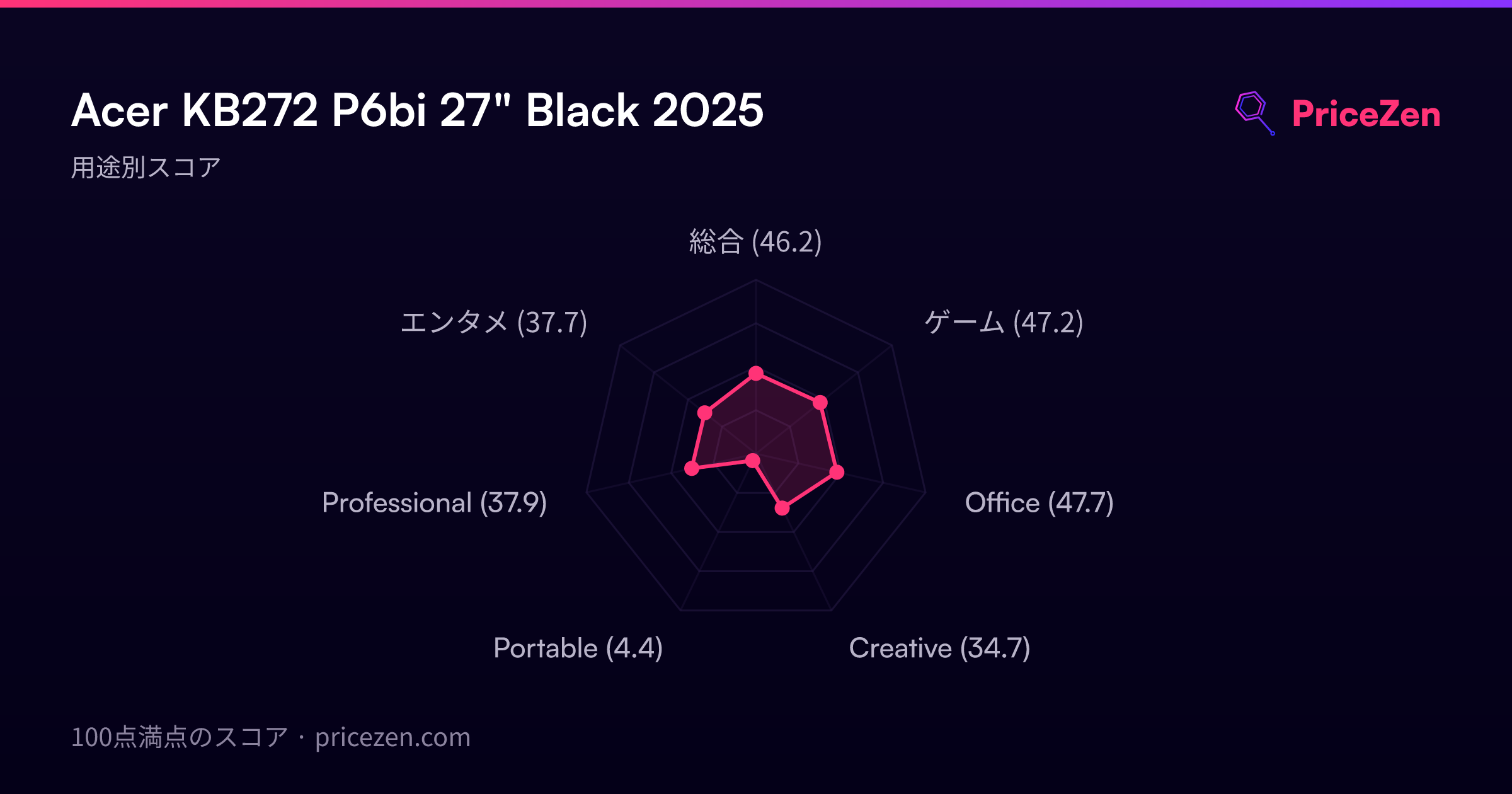
- 総合46.2
- ゲーム47.2
- Office47.7
- Creative34.7
- Portable4.4
- Professional37.9
- エンタメ37.7