Acer SH322QK 31.5" Black 2024
The 31.5-inch 4K VA panel delivers a 3000:1 static contrast ratio and deep blacks, paired with FreeSync for smooth 60Hz performance. A USB-C port with 40W power delivery and a height-adjustable ZeroFrame stand reduce desktop clutter while offering ergonomic flexibility. It best serves office productivity workers and multitaskers needing a large, sharp workspace for documents and spreadsheets, not color-critical creative tasks.












概要
The 30-Second Version
The Acer SH322QK is a 31.5-inch 4K monitor that nails the basics for office work: sharp text, a height-adjustable stand, and USB-C connectivity. It's not bright enough for HDR to matter much, and the built-in speakers are weak. Prices have climbed to $250-$350 USD, so shop carefully and aim for the low end, because at the high end this monitor is no longer the bargain it once was.
Pros & Cons
長所
- Sharp 4K picture on a big 31.5-inch screen 82nd
- Height-adjustable stand with tilt 75th
- USB-C connectivity is genuinely useful 71st
- Deep blacks thanks to the VA panel's 3000:1 contrast 70th
- Easy assembly, most people are up and running in minutes
短所
- Built-in speakers are weak, plan on external audio
- Only one HDMI port
- 250 nits brightness is underwhelming in bright rooms
- No VESA mount adapter included in the box
- Stand stability concerns from some owners
オーナーの声
The Word on the Street
購入者の評価が時間とともにどう変化したか
独自顧客が実際にレビューを書いた時期に基づいています。発売当初の高評価が続いたかどうかがわかります。
書かれたレビュー 16件、2024/01~2026/04:満足 14件、不満 1件、星なし 1件
ストア評価全776件:4.4★。 多くの購入者はレビューを書かずに評価だけを付けています。 グラフは書かれたレビュー16件を数えています。
各点は書かれたレビュー1件で、書かれた月に置いています。満足 = 4〜5★、普通 = 3★、不満 = 1〜2★。
実証データ
Performance
The display itself is a VA panel with a 3000:1 static contrast ratio, which means blacks look deeper than what you'd get from a typical IPS panel at this price. That's a real strength for watching videos or working in darker rooms. Brightness tops out at 250 nits, which is fine for indoor office use but nothing special. If you're in a bright room with lots of windows, you might find yourself wishing for more.
Color coverage is 72% NTSC with 8-bit depth and HDR10 support. In our database, color performance lands right around the middle of the pack, so don't expect this to replace a proper photo editing monitor. The HDR10 badge is more of a checkbox than a feature at 250 nits. You'll get slightly better highlight handling in supported content, but this isn't the kind of HDR that makes you squint. The 4ms response time is adequate for everyday use, and FreeSync helps smooth things out if you do some light gaming on the side.
Specifications
Full Specifications
Display
| Size | 31.5" |
| Resolution | 3840x2160 (4K UHD) |
| Panel Type | VA |
| Aspect Ratio | 16:9 |
| Curved | No |
| Screen Finish | matte |
Performance
| Refresh Rate | 60 Hz |
| Response Time | 4 |
| Adaptive Sync | FreeSync |
Color & HDR
| Brightness | 250 nits |
| Color Gamut | 72% NTSC |
| Color Depth | 8-bit |
| HDR | HDR10 |
| HDR Support | HDR10 |
Connectivity
| HDMI Ports | 1 |
| DisplayPort | 1 |
| USB-C | 1 |
| Speakers | Yes |
| Headphone Jack | Yes |
Ergonomics
| Height Adjustable | Yes |
| Tilt | Yes |
| Swivel | No |
| Pivot | No |
| VESA Mount | 75x75 |
Features
| Webcam | No |
| Touchscreen | No |
| PIP/PBP | No |
| Power | 40 |
| Weight | 7.5 kg / 16.5 lbs |
vs Competition
Stacked against the current competition, the Acer SH322QK occupies an odd spot. The ASUS ROG Strix XG27UCDMG is a 27-inch OLED gaming monitor that beats this Acer in color, contrast, and refresh rate, but it costs significantly more and is built for a different job. The Alienware AW3425DW takes a different approach with a 34-inch ultrawide format, giving you horizontal space instead of the Acer's taller 16:9 canvas. The LG UltraGear 32GX850A-B matches the Acer's size class at 32 inches but targets gamers with a faster panel and better picture quality, again at a higher price.
Where the Acer wins is price. A 31.5-inch 4K panel at the lower end of its current range is still hard to find, and for office work, the extra screen real estate matters more than a high refresh rate. How does the Acer SH322QK compare to the LG UltraGear 32GX850A-B? They share a similar footprint, but the LG is built for gaming while the Acer is built for desks full of spreadsheets. If you want a big 4K screen for documents and don't care about gaming, the Acer makes sense at the right price. If you want a monitor that does everything well, you'll need to spend more.
| Spec | Acer SH322QK 31.5" | Lenovo Legion R27qc-30 27" | LG UltraGear 39" | BenQ PD3220U 32" | Samsung Odyssey Ark 2nd Gen 55" | Gigabyte M Series M32U 31.5" |
|---|---|---|---|---|---|---|
| Screen Size | 31.5 | 27 | 39 | 32 | 55 | 31.5 |
| Resolution | 3840 x 2160 | 2560 x 1440 | 3440 x 1440 | 3840 x 2160 | 3840 x 2160 | 3840 x 2160 |
| Panel Type | VA | VA | OLED | IPS | Mini-LED | IPS |
| Refresh Rate | 60 | 180 | 240 | 60 | 165 | 144 |
| Response Time Ms | 4 | 0.5 | 0.03 | 5 | 1 | 1 |
| Adaptive Sync | FreeSync | FreeSync | FreeSync Premium Pro | - | FreeSync Premium Pro | FreeSync Premium Pro |
| Hdr | HDR10 | HDR10 | DisplayHDR True Black 400 | HDR10 | HDR10+ | HDR400 |
| Compare | Compare | Compare | Compare | Compare |
| 製品 | Color | 携帯性 | Display | Feature | User Sentiment | Ergonomic | Performance | Connectivity | ユーザー評価 |
|---|---|---|---|---|---|---|---|---|---|
| Acer SH322QK 31.5" | 41.8 | 71.2 | 82.2 | 70.1 | 48.2 | 66.9 | 44.2 | 70.2 | 74.7 |
| Lenovo Legion R27qc-30 27" Compare | 82.6 | 62.9 | 61.9 | 90.8 | 76.6 | 90.8 | 91.8 | 91 | 41.4 |
| LG UltraGear 39" Compare | 63.4 | 49.4 | 84.1 | 96.3 | 0 | 66.9 | 97.9 | 81.1 | 0 |
| BenQ PD3220U 32" Compare | 88.6 | 81.3 | 95.1 | 85 | 0 | 90.8 | 22.4 | 96.9 | 0 |
| Samsung Odyssey Ark 2nd Gen 55" Compare | 98.4 | 20.7 | 91.5 | 96.3 | 10.3 | 30.1 | 77.1 | 81.1 | 74.7 |
| Gigabyte M Series M32U 31.5" Compare | 90 | 62.9 | 87 | 85 | 0 | 73.4 | 72.6 | 87.5 | 0 |
価格
Value & Pricing
At $250 to $350 USD, the Acer SH322QK is harder to recommend than it used to be. The price has crept up, and that changes the math on a 31.5-inch 4K monitor with USB-C. At the bottom of that range it's still a fair deal for the size and connectivity you get. At the top, you're overpaying for a 60Hz VA panel with modest brightness.
The price story gets messier in other currencies. In Canada, we've seen it listed anywhere from CAD 345 to CAD 600 across three listings, and in Europe the spread is even wider at EUR 418 to EUR 794. If you're shopping in those regions, it pays to compare vendors before you buy, because the gap between the cheapest and most expensive listing is enormous. We track prices over time, partly through our community browser extension, and the pattern here is clear: patience and comparison shopping save you real money on this one.
価格履歴
詳細情報
Overview
The Acer SH322QK is a 31.5-inch 4K VA monitor aimed at people who want a big, sharp screen for office work and everyday use without spending a fortune. It sits in the budget-to-midrange bracket for 4K displays, and on paper it covers the basics: 3840 x 2160 resolution, 60Hz refresh, FreeSync support, and a height-adjustable stand. You get HDMI 2.0, DisplayPort 1.2, and USB-C, which is a nice trio for a monitor in this price range.
Is the Acer SH322QK good for productivity? For spreadsheets, documents, and general multitasking, yes. The 31.5-inch size gives you a lot of screen real estate, and the 4K resolution means text looks crisp. But this isn't a gaming monitor, and it's not trying to be. The 60Hz refresh and 4ms response time are fine for casual use, but competitive gamers should look elsewhere.
We track its price across stores, and right now we're seeing listings from $250 to $350 USD, with even wider variation in other currencies. That spread matters more than ever because at the low end it's still a reasonable buy, but at the high end you're paying well past what this panel deserves.
Common Questions
Q: Is the Acer SH322QK good for gaming?
It's fine for casual gaming thanks to FreeSync and a 4ms response time, but the 60Hz refresh rate means competitive players will want something faster.
Q: Does the Acer SH322QK have built-in speakers?
Yes, it has integrated speakers, but they're consistently described as weak. You'll probably want external speakers or headphones for anything beyond basic system sounds.
Q: Can I mount the Acer SH322QK on a monitor arm?
The monitor supports VESA 75x75 mounting, but several owners note that the VESA adapter isn't included in the box, so you may need to source one separately.
Q: Does the Acer SH322QK work with MacBooks via USB-C?
Yes, the USB-C port can carry video and connect to laptops, which makes it convenient for MacBook users who want a single-cable setup.
Who Should Skip This
Skip the Acer SH322QK if you're a gamer who wants high refresh rates, a designer who needs accurate color, or anyone working in a bright room where 250 nits won't cut it. The 60Hz panel and middle-of-the-road color coverage mean it's not built for fast-paced gaming or color-critical work. If you need better color, look at an IPS panel in the same size range. If you want gaming performance, the ASUS ROG Strix XG27UCDMG or LG UltraGear 32GX850A-B are much better fits, just be ready to pay more.
Verdict
Should you buy the Acer SH322QK? If you want a large 4K monitor for office work, coding, or general productivity, and you can find it near the $250 USD mark, it's still a reasonable pick. The picture is sharp, the VA panel gives you nice contrast, and the USB-C port makes it easy to connect a laptop with a single cable. The height-adjustable stand is a genuine plus at this price.
But there are compromises, and the rising price makes them sting more. The speakers are bad, the brightness is modest, and the stand has some stability quirks that a few owners have flagged. At $350 USD, those weaknesses are harder to forgive. If you need accurate color for design work or you want a monitor that can double as a gaming display, this isn't it. For pure office duty at the low end of its price range, though, it gets the job done.
Usage Scores
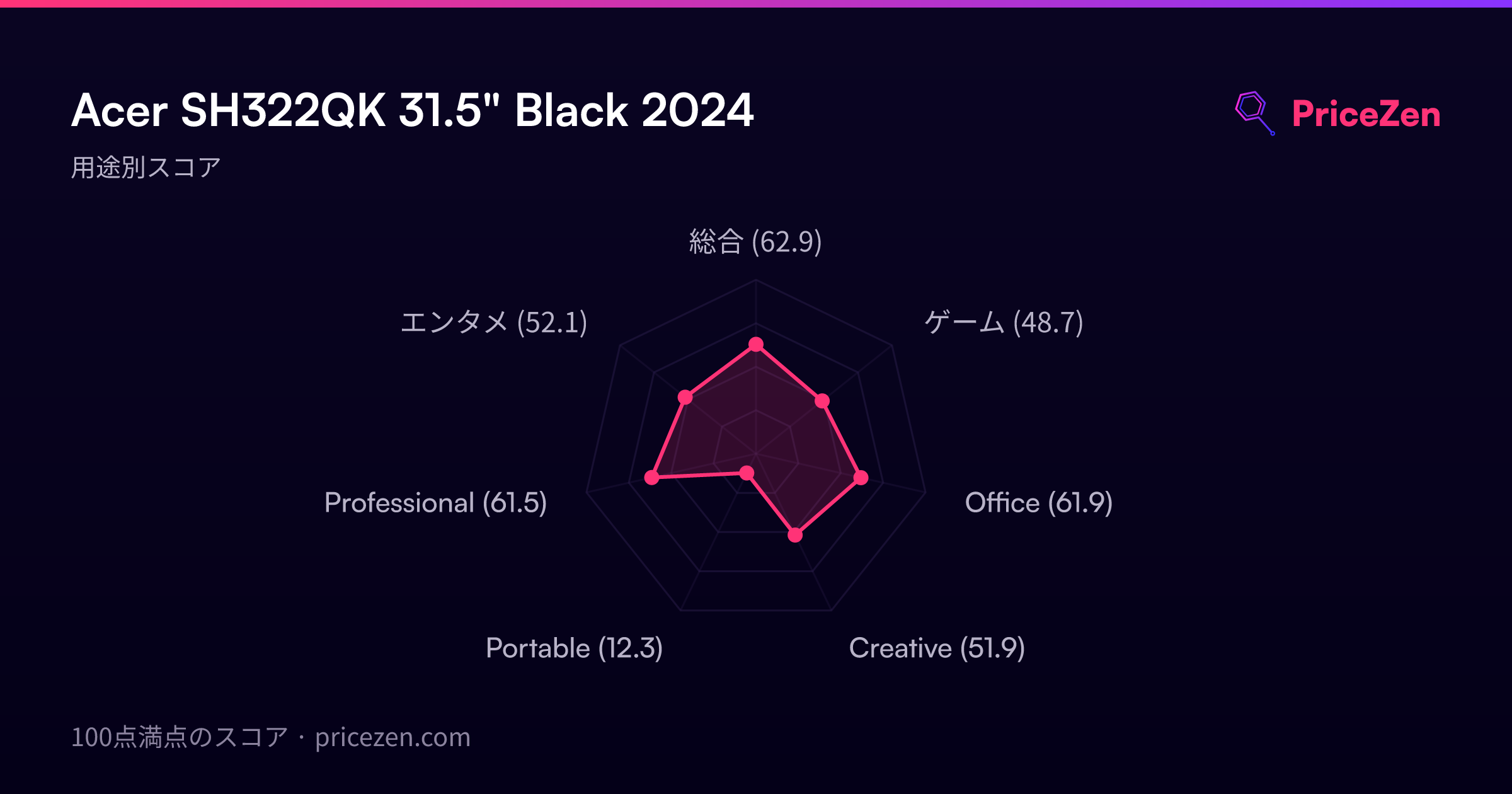
- 総合62.9
- ゲーム48.7
- Office61.9
- Creative51.9
- Portable12.3
- Professional61.5
- エンタメ52.1