LG 52T L1752T 17" Black
The 17-inch IPS panel delivers 1,400:1 contrast and 300 nits brightness, making it a solid choice for color-critical work despite its 4:3 aspect ratio. Its 8ms response time and 60Hz refresh rate are modest, but the VESA 100x100 mount adds flexibility for desk setups. Best for professionals needing a compact, reliable secondary display for spreadsheets or document editing, not for entertainment.

現在、販売店の最新価格はありません
概要
The 30-Second Version
The LG L1752T is a 17-inch 4:3 IPS monitor from a bygone era, selling used for around $125. Its compact size is its only real strength, landing in the 86th percentile for that category. Performance and display quality sit near the bottom at the 6th percentile, with an 8ms response time and 60Hz refresh rate. Only worth considering if you specifically need a 4:3 display for legacy hardware or tight spaces.
Pros & Cons
長所
- Compact 17-inch 4:3 form factor is great for tight spaces 86th
- IPS panel offers better viewing angles than TN alternatives from its era
- VESA 100x100 mount support for easy wall or arm mounting
- Low 30W power draw keeps energy costs minimal
- Cheap at around $125 for a functional used display
短所
- 8ms response time causes visible ghosting in motion
- 60Hz refresh rate is limiting for any modern use case
- 1280 x 1024 resolution feels cramped by today's standards
- Connectivity is nearly non-existent, 7th percentile ranking
- Entertainment score of 7.2 out of 100 is abysmal
実証データ
Performance
Let's talk about that 8ms response time. In 2006, that was acceptable. In 2024, it's a ghosting festival. Our database puts this monitor in the 6th percentile for performance, which means it's near the bottom of the barrel compared to modern displays. The 60Hz refresh rate is standard for office work but useless for any kind of fast-paced gaming. You'll see smearing and blur in anything that moves quickly.
The 300 nits brightness is actually not terrible for a panel this old, but the 16.2 million colors claim is a bit misleading. That number usually means it's using dithering to simulate colors rather than a true 8-bit panel. Color accuracy lands in the 42nd percentile, which is mediocre at best. Don't expect to do any photo editing or color-critical work on this thing. The 1,400:1 contrast ratio sounds impressive on paper, but in practice, this is still an old LCD with limited dynamic range.
Specifications
Full Specifications
Display
| Size | 17" |
| Resolution | 1280x1024 |
| Panel Type | IPS |
| Aspect Ratio | 4:3 |
| Curved | No |
Performance
| Refresh Rate | 60 Hz |
| Response Time | 8 |
Color & HDR
| Brightness | 300 nits |
| Color Gamut | 16.2 Million |
| Color Depth | 16.2 Million |
Connectivity
| HDMI Ports | 0 |
| DisplayPort | 0 |
| USB-C | 0 |
| Speakers | No |
| Headphone Jack | No |
Ergonomics
| Height Adjustable | No |
| Tilt | No |
| Swivel | No |
| Pivot | No |
| VESA Mount | 100x100 |
Features
| Webcam | No |
| Touchscreen | No |
| PIP/PBP | No |
| Power | 30 |
vs Competition
Stacked against modern competitors like the ASUS ROG Strix XG27JCG or the Dell Alienware AW2523HF, this LG looks like it's from another planet. Those monitors offer 240Hz refresh rates, 1ms response times, and resolutions that make the L1752T's 1280 x 1024 look like a thumbnail. But they also cost three to five times as much and are massive 27-inch panels. It's not a fair fight.
A more realistic comparison is against other used budget monitors in the $100 to $150 range. A used Dell UltraSharp from the same era would likely offer better color accuracy and build quality. A used 22-inch 1080p TN panel would give you more screen real estate and a modern aspect ratio, though with worse viewing angles. The L1752T's only real advantage is that 4:3 aspect ratio and its compact size. If you don't need those specific things, almost anything else is a better buy.
| Spec | LG 52T L1752T 17" | ASUS ROG Strix XG27UCDMG 27" | Dell UltraSharp U4025QW 39.7" | MSI MAG 271QPX QD-OLED E2 27" | Alienware AW-Series AW3425DW 34" | Samsung Odyssey G60SD 27" |
|---|---|---|---|---|---|---|
| Screen Size | 17 | 27 | 39.70000076293945 | 27 | 34 | 27 |
| Resolution | 1280 x 1024 | 3840 x 2160 | 5120 x 2160 | 2560 x 1440 | 3440 x 1440 | 2560 x 1440 |
| Panel Type | IPS | OLED | IPS | QD-OLED | QD-OLED | OLED |
| Refresh Rate | 60 | 240 | 120 | 240 | 240 | 360 |
| Response Time Ms | 8 | 0.029999999329447746 | 5 | 0.029999999329447746 | 0.029999999329447746 | 0.029999999329447746 |
| Adaptive Sync | - | FreeSync Premium Pro | Adaptive-Sync | FreeSync Premium Pro | FreeSync Premium Pro | FreeSync Premium Pro |
| Hdr | - | DisplayHDR True Black 400 | DisplayHDR 600 | DisplayHDR True Black 400 | DisplayHDR 400 True Black | HDR10+ |
| Compare | Compare | Compare | Compare | Compare |
| 製品 | Color | 携帯性 | Display | Feature | Ergonomic | Performance | Connectivity | ユーザー評価 |
|---|---|---|---|---|---|---|---|---|
| LG 52T L1752T 17" | 42.1 | 86.3 | 6 | 19.4 | 30.8 | 6.2 | 6.8 | 16.5 |
| ASUS ROG Strix XG27UCDMG 27" Compare | 96.1 | 57.6 | 97.9 | 83.8 | 90.8 | 98 | 81.2 | 99.3 |
| Dell UltraSharp U4025QW 39.7" Compare | 98.2 | 76.6 | 98.7 | 95.7 | 90.8 | 56.1 | 99.3 | 97.9 |
| MSI MAG 271QPX QD-OLED E2 27" Compare | 99.1 | 57.6 | 77.3 | 83.8 | 90.8 | 98 | 81.2 | 99.3 |
| Alienware AW-Series AW3425DW 34" Compare | 99 | 74 | 85.7 | 89.8 | 90.8 | 98 | 95.4 | 97.9 |
| Samsung Odyssey G60SD 27" Compare | 90.3 | 39.7 | 77.3 | 67.1 | 90.8 | 99.5 | 87.6 | 94.7 |
価格
Value & Pricing
At $125 used, the value proposition is tricky. You're paying for a working monitor, not a good one. For that same money, you can often find a used 22 or 24-inch 1080p panel that will run circles around this thing in every category except physical size. The compact footprint is really the only reason to consider this over a newer budget option.
That said, if you specifically need a 4:3 display for legacy software or hardware compatibility, your options are limited. New 4:3 monitors basically don't exist anymore, so the used market is your only choice. In that context, $125 for a working IPS panel with VESA mounting isn't outrageous. Just know you're paying a premium for the aspect ratio, not the performance.
詳細情報
Overview
The LG L1752T is a relic from a time when 4:3 was the standard and 17 inches felt like a big screen. It's a used monitor floating around on Newegg for about $125, and honestly, that price is doing a lot of heavy lifting for what you're getting. This is not a monitor for most people in 2024. But if you're running legacy hardware, need a cheap secondary display, or just want that square aspect ratio for older games and software, it might scratch a very specific itch.
Who is this actually for? Think point-of-sale systems, server racks, retro gaming setups, or someone who just needs a basic screen to check email and doesn't care about modern niceties. The 1280 x 1024 resolution is fine for text and basic productivity, and the IPS panel means viewing angles are better than the TN panels that dominated budget monitors back then. But that's about where the praise ends.
The interesting thing here is the contrast between its compact size ranking and everything else. It lands in the 86th percentile for compactness, which makes sense for a 17-inch 4:3 panel. But it's in the 6th percentile for both performance and display quality. That's a massive gap. You're getting a small footprint and not much else.
Common Questions
Q: Is this monitor good for gaming?
Not for modern gaming. The 60Hz refresh rate and 8ms response time put it in the 6th percentile for performance in our database. You'll experience noticeable ghosting and motion blur in fast-paced games. It might work for retro games that run at lower frame rates and don't require quick response times, but anything modern will feel sluggish and smeary.
Q: Can I use this as a second monitor for my modern PC?
Technically yes, but you'll need to check your GPU's outputs. This monitor uses older connection types, and its connectivity ranking is in the 7th percentile, meaning it has very limited input options. You'll likely need an adapter to connect it to a modern graphics card. The 1280 x 1024 resolution will also look noticeably low-res next to a modern 1080p or 1440p display.
Q: Is the IPS panel worth it on a monitor this old?
The IPS panel is actually one of the few bright spots here. It provides better viewing angles than the TN panels that were common in budget monitors of this era. If you're using it in a situation where you'll be viewing the screen from different angles, like a point-of-sale terminal or a shared workspace, the IPS panel helps. Just don't expect modern IPS quality in terms of color accuracy or brightness.
Q: Why would anyone buy a 4:3 monitor in 2024?
The main reasons are legacy software compatibility and physical space constraints. Some older industrial, medical, or point-of-sale software was designed for 4:3 displays and looks stretched or broken on widescreen monitors. The compact size also makes it useful for server racks, kiosks, or any setup where a widescreen monitor simply won't fit. If you don't have those specific needs, a modern widescreen monitor is a better choice.
Who Should Skip This
Skip this if you want to watch movies, play games, or do any kind of creative work. The entertainment score of 7.2 out of 100 is one of the worst we've seen, and the color accuracy won't cut it for photo or video editing. The 1280 x 1024 resolution feels cramped for web browsing and productivity compared to even a budget 1080p panel.
Also skip it if you need modern connectivity. With a 7th percentile ranking for connectivity, you'll be dealing with adapters and dongles just to plug it into a current computer. Instead, look for a used 22 or 24-inch 1080p IPS monitor in the same price range. You'll get better performance, more screen real estate, and modern inputs without spending much more.
Verdict
For the retro enthusiast or legacy system admin, the L1752T is a functional, compact display that gets the job done. The IPS panel means text stays readable from off angles, and the VESA mount gives you flexibility in how you set it up. If you're running old point-of-sale software, a vintage gaming rig, or just need a small screen for a server closet, this will work fine.
For everyone else, this monitor is a hard pass. The entertainment score of 7.2 out of 100 tells you everything you need to know. Movies will look washed out, games will smear, and the low resolution will frustrate anyone used to modern displays. Spend your $125 on a used 1080p monitor instead. You'll get a better experience in every way except physical footprint.
Usage Scores
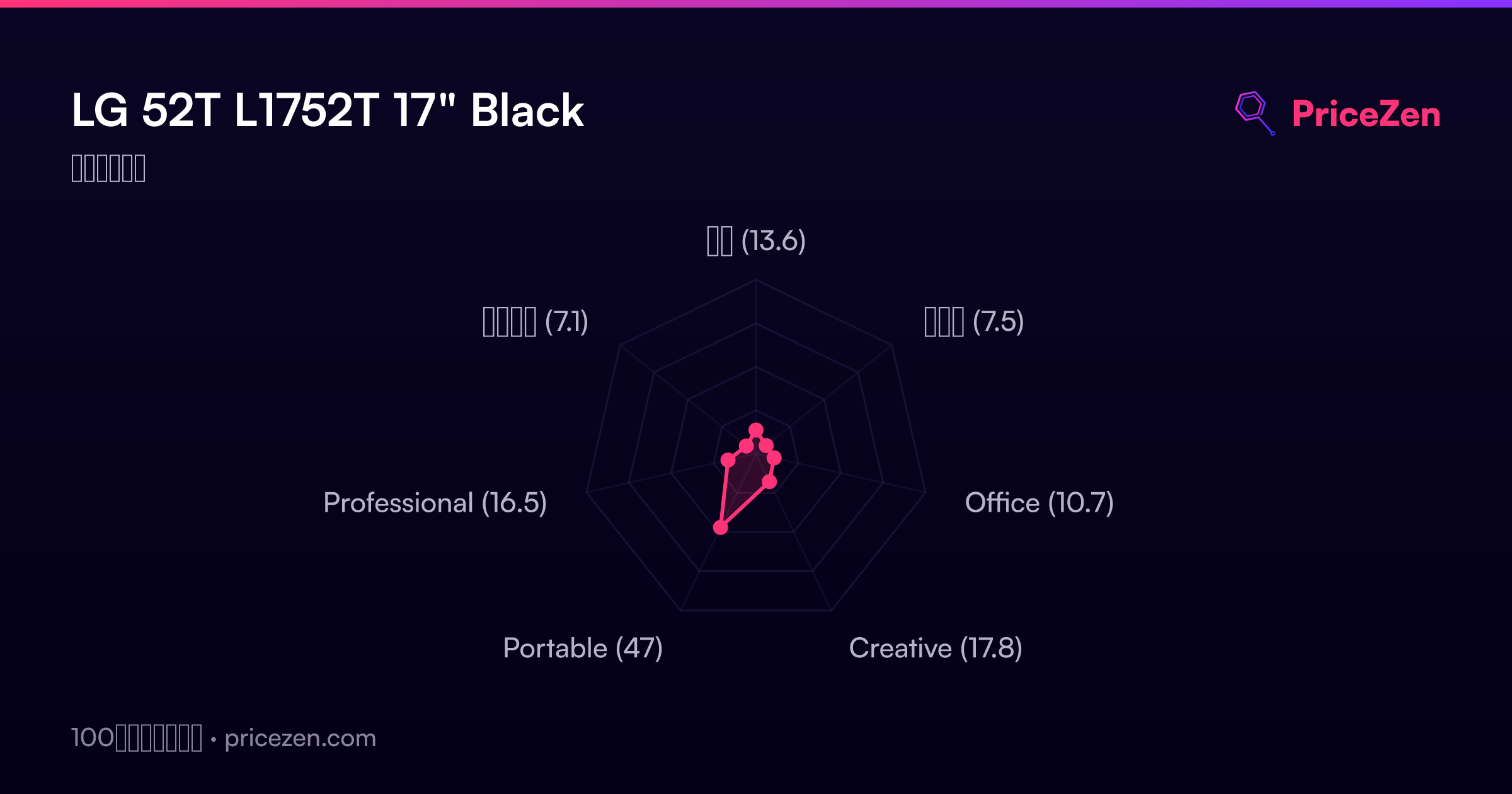
- 総合13.6
- ゲーム7.5
- Office10.7
- Creative17.8
- Portable47
- Professional16.5
- エンタメ7.1