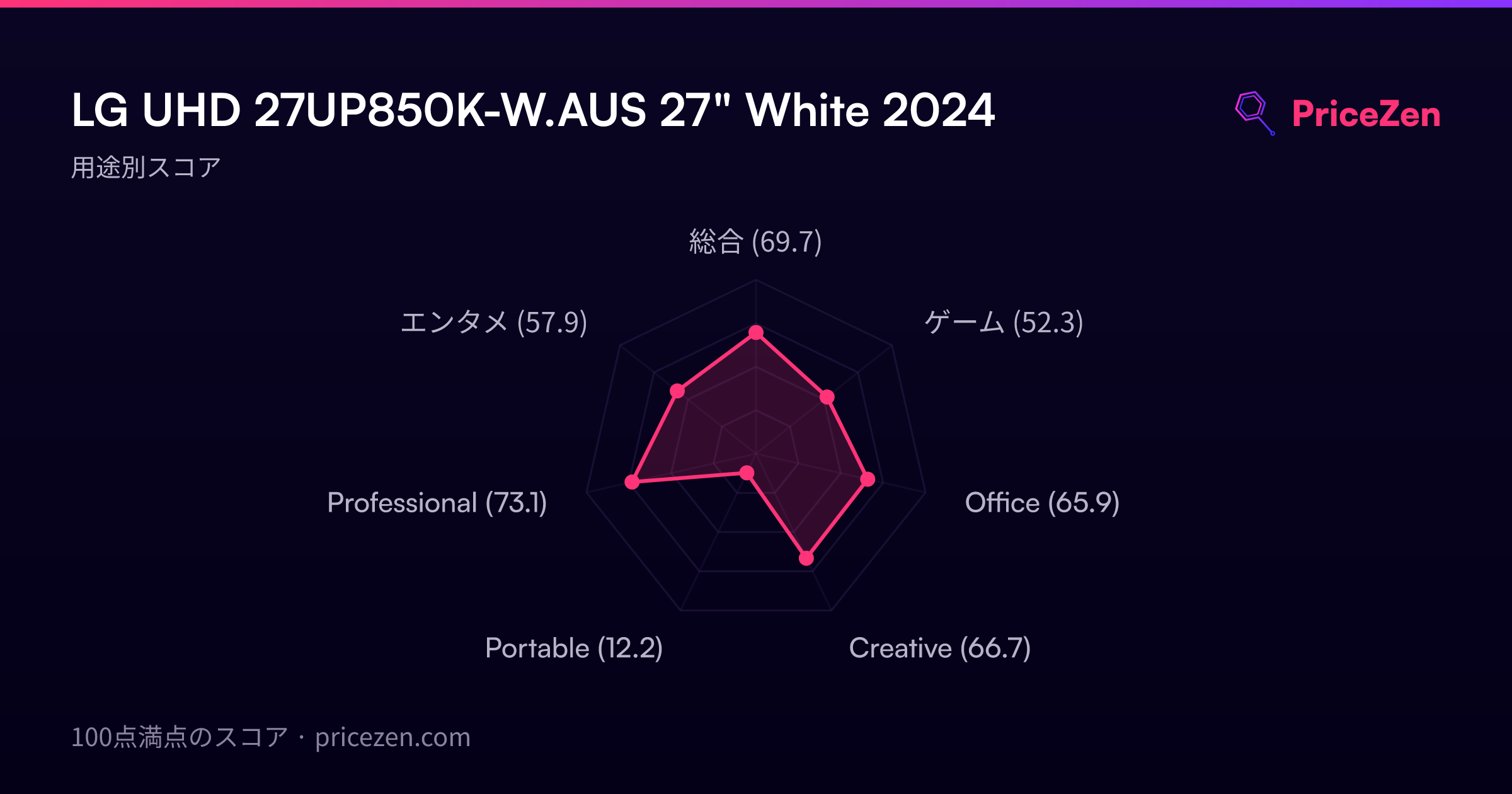
LG UHD 27UP850K-W.AUS 27" White 2024
A single USB-C cable delivers 4K video, data transfer, and 90W laptop charging, simplifying desk setups alongside a color-accurate 27-inch IPS panel with 95% DCI-P3 coverage and DisplayHDR 400. Hardware calibration readiness and a height-adjustable stand with pivot cater to precise workflow ergonomics, while FreeSync and built-in speakers support light gaming and media without extra peripherals. This monitor is best for photographers and graphic designers seeking a clutter-free, single-cable docking solution with reliable color accuracy and the flexibility to game occasionally.












概要
The 30-Second Version
The LG 27UP850K-W.AUS is a 27-inch 4K IPS monitor built for color-accurate work, not gaming. Its 95% DCI-P3 coverage and hardware calibration support make it a strong choice for photographers and designers, and the USB-C port with 90W power delivery is a genuine convenience for laptop users. The 60Hz refresh rate and 5ms response time hold it back for gaming, and the 400 nits brightness is just okay for HDR. If you need accurate color and a clean desk setup, this is a great pick. If you need speed, look elsewhere.
Pros & Cons
長所
- 95% DCI-P3 color coverage with hardware calibration support 92nd
- USB-C with 90W power delivery for single-cable laptop setups 87th
- 4K resolution on 27 inches gives sharp, detailed images 86th
- Ergonomic stand with height, tilt, and pivot adjustment 77th
- Display quality ranks in the 90th percentile in our database
短所
- 60Hz refresh rate limits gaming and smooth scrolling
- Connectivity options are thin beyond the USB-C port
- 400 nits brightness is mediocre for HDR content
- Built-in speakers are weak, as expected
- Performance percentile sits at just 37th overall
オーナーの声
The Word on the Street
購入者の評価が時間とともにどう変化したか
独自顧客が実際にレビューを書いた時期に基づいています。発売当初の高評価が続いたかどうかがわかります。
書かれたレビュー 6件、2023/07~2025/09:満足 6件
ストア評価全1,247件:4.6★。 多くの購入者はレビューを書かずに評価だけを付けています。 グラフは書かれたレビュー6件を数えています。
各点は書かれたレビュー1件で、書かれた月に置いています。満足 = 4〜5★、普通 = 3★、不満 = 1〜2★。
実証データ
Performance
Let's talk about what the numbers actually mean. The 3840 x 2160 resolution on a 27-inch panel gives you a pixel density of about 163 pixels per inch. That's sharp enough that text looks crisp and you can edit 4K photos without constantly zooming in to check focus. The 60Hz refresh rate is standard for a productivity monitor, and for most non-gaming work, it's completely fine. You won't notice it in Excel or Lightroom.
The 5ms response time is listed, but that's likely a gray-to-gray measurement with overdrive enabled. In practice, you might see a little ghosting in fast-moving content, but it's not a dealbreaker for the intended use case. The FreeSync support helps smooth out frame pacing if you do some light gaming, but it's limited by the 60Hz ceiling. If you're coming from a 144Hz panel, you'll feel the difference immediately. The HDR 400 certification is the entry-level HDR tier, which means it can accept an HDR signal and display it, but the 400 nits peak brightness and lack of local dimming mean it won't blow you away. Think of it as a slight improvement over SDR, not a true HDR experience.
Specifications
Full Specifications
Display
| Size | 27" |
| Resolution | 3840x2160 (4K UHD) |
| Panel Type | IPS |
| Aspect Ratio | 16:9 |
| Screen Finish | matte |
Performance
| Refresh Rate | 60 Hz |
| Response Time | 5 |
| Adaptive Sync | FreeSync |
Color & HDR
| Brightness | 400 nits |
| Color Gamut | 95% DCI-P3 |
| HDR | HDR400 |
| HDR Support | HDR400 |
Connectivity
| USB-C | 1 |
| Speakers | Yes |
Ergonomics
| Height Adjustable | Yes |
| Tilt | Yes |
| Pivot | Yes |
Features
| Weight | 5.9 kg / 13.0 lbs |
vs Competition
The competitive landscape here is interesting because most of the monitors in our database that compete with this LG are gaming-focused OLED panels. The ASUS ROG Strix XG27UCDMG, MSI MAG 271QPX QD-OLED E2, and Samsung Odyssey OLED G6 G60SF all offer dramatically better refresh rates and response times, but they're aimed at a completely different buyer. If you're a gamer, those are the obvious choice. The LG isn't trying to compete with them on speed.
Where the LG makes sense is against productivity and creative monitors like the Dell S2725QC. The Dell is a strong alternative with similar 4K resolution and USB-C connectivity, and it often comes in at a competitive price. The Gigabyte AORUS FO32U2 is a larger 32-inch OLED that offers better HDR and contrast, but it's also likely more expensive and overkill for someone who just needs accurate color for design work. The LG's sweet spot is the intersection of color accuracy, USB-C convenience, and a reasonable price. If you need all three, it's a compelling package. If you can sacrifice one of those, there are better options elsewhere.
| Spec | LG UHD 27UP850K-W.AUS 27" | BenQ PD3220U 32" | Gigabyte M Series M32U 31.5" | Samsung Odyssey G9 LC49G97TSSNXDC 49" | Acer CB342CU 34" | MSI MAG 273QP QD-OLED X24 26.5" |
|---|---|---|---|---|---|---|
| Screen Size | 27 | 32 | 31.5 | 49 | 34 | 26.5 |
| Resolution | 3840 x 2160 | 3840 x 2160 | 3840 x 2160 | 5120 x 1440 | 3440 x 1440 | 2560 x 1440 |
| Panel Type | IPS | IPS | IPS | QD-OLED | IPS | QD-OLED |
| Refresh Rate | 60 | 60 | 144 | 240 | 75 | 240 |
| Response Time Ms | 5 | 5 | 1 | 1 | 1 | 0.03 |
| Adaptive Sync | FreeSync | - | FreeSync Premium Pro | FreeSync | FreeSync | Adaptive-Sync |
| Hdr | HDR400 | HDR10 | HDR400 | HDR1000 | HDR400 | DisplayHDR True Black 400 |
| Compare | Compare | Compare | Compare | Compare |
| 製品 | Color | 携帯性 | Display | Feature | User Sentiment | Ergonomic | Performance | Connectivity | ユーザー評価 |
|---|---|---|---|---|---|---|---|---|---|
| LG UHD 27UP850K-W.AUS 27" | 86.4 | 71.2 | 87 | 70.1 | 76.6 | 70 | 35.7 | 29.6 | 92 |
| BenQ PD3220U 32" Compare | 88.6 | 81.3 | 95.1 | 85 | 0 | 90.7 | 22.4 | 96.9 | 0 |
| Gigabyte M Series M32U 31.5" Compare | 90 | 62.8 | 87 | 85 | 0 | 73.4 | 72.6 | 87.4 | 0 |
| Samsung Odyssey G9 LC49G97TSSNXDC 49" Compare | 98.8 | 3.7 | 98.3 | 90.8 | 0 | 73.4 | 87.2 | 33.8 | 11 |
| Acer CB342CU 34" Compare | 78.9 | 62.8 | 78.8 | 70.1 | 0 | 78.6 | 65.8 | 70.1 | 74.8 |
| MSI MAG 273QP QD-OLED X24 26.5" Compare | 74.4 | 12.7 | 72.5 | 70.1 | 0 | 90.7 | 97.9 | 53 | 0 |
価格
Value & Pricing
Pricing is clearer now. We're tracking a main listing at USD 430, which puts this in the mid-range for a 4K monitor built around color accuracy rather than speed. That's a sensible number for what you're getting: a sharp 27-inch panel with 95% DCI-P3 coverage, hardware calibration support through LG Calibration Studio, and a USB-C port that can feed your laptop 90W while carrying the picture. You're paying for the panel quality and the single-cable desk setup, not for gaming features or high refresh rates.
Compared to something like the Dell S2725QC, which sits in the same 4K USB-C productivity space, the LG holds its own on color accuracy and calibration features. The Dell may be the better buy depending on what it costs where you shop, but the LG's wide color coverage and hardware calibration are genuine differentiators for creative work. If you don't need those, a cheaper 4K panel will get you most of the way there, and you can put the savings toward a decent pair of desktop speakers.
価格履歴
詳細情報
Overview
The LG 27UP850K-W.AUS is a 27-inch 4K IPS monitor aimed squarely at people who need accurate color and a clean desk setup more than they need high refresh rates. It's not trying to be a gaming monitor, despite the FreeSync badge. It's a workhorse for photo editing, design, and general productivity, with a USB-C port that can push 90W of power to your laptop. That single cable setup is the kind of thing that sounds boring until you've lived with it, then you can't go back.
Our database puts the display quality in the 90th percentile and color performance in the 89th. That's the story here. The 95% DCI-P3 coverage and hardware calibration support through LG Calibration Studio mean this panel can be dialed in for serious color work. The 400 nits of brightness and DisplayHDR 400 certification are fine for SDR work and casual HDR content, but don't expect the eye-searing highlights you'd get from a proper HDR panel.
Where this monitor falls short is raw performance. The 60Hz refresh rate and 5ms response time land it in the 37th percentile for performance. That's fine for spreadsheets and Photoshop, but if you're playing fast shooters, you'll feel the difference immediately. The connectivity score is also weak at the 25th percentile, which is surprising given the USB-C port. The catch is that beyond that one great port, the rest of the I/O is pretty basic.
Who is this for? Photographers, graphic designers, and anyone who plugs a laptop in and out of a desk setup daily. The ergonomic stand with height, tilt, and pivot adjustment is a nice touch, and the built-in speakers are there if you need them. Just don't expect them to replace a decent pair of headphones or desktop speakers.
Common Questions
Q: Can this monitor charge my laptop over USB-C?
Yes. The USB-C port supports up to 90W of power delivery, which is enough to charge most ultrabooks and many mid-range laptops while also carrying the 4K video signal and data. That means one cable can handle display, peripherals, and charging. Just keep in mind that some high-performance gaming laptops draw more than 90W under load, so you might still need the original charger for those.
Q: Is this monitor good for gaming?
It's okay for casual gaming. The 60Hz refresh rate and 5ms response time are fine for slower-paced games, strategy titles, and RPGs, especially with FreeSync smoothing things out. But if you play competitive shooters or fast action games, you'll notice the lack of a high refresh rate. For serious gaming, you'd be better off with a 144Hz or higher panel, even if it means sacrificing some color accuracy.
Q: How accurate is the color out of the box?
The panel covers 95% of the DCI-P3 color space, which is strong for a monitor in this class. However, out-of-the-box accuracy can vary from unit to unit. The good news is that this monitor supports hardware calibration through LG Calibration Studio, which lets you dial in the color to match your specific workflow. If you're doing professional color work, you'll want to calibrate it regardless.
Q: Does the built-in speaker sound any good?
Not really. The built-in speakers are there for convenience, like hearing a notification or watching a quick video, but they're not going to fill a room or give you any meaningful bass. If you care about audio quality, you'll want to budget for a pair of desktop speakers or a good set of headphones. The speakers are a nice-to-have, not a selling point.
Who Should Skip This
If you're a gamer, especially someone who plays competitive titles, skip this monitor. The 60Hz refresh rate and 5ms response time will feel sluggish compared to even budget gaming monitors with 144Hz panels. You'd be much happier with something like the ASUS ROG Strix XG27UCDMG or the Samsung Odyssey OLED G6, both of which offer dramatically better motion handling. The color accuracy on those OLED panels is also excellent, so you're not sacrificing as much as you might think.
If you need a monitor for HDR content creation or consumption, this isn't the one. The 400 nits peak brightness and lack of local dimming mean HDR content won't look dramatically different from SDR. For real HDR work, you'd want something with at least 600 nits and preferably local dimming or an OLED panel. The Gigabyte AORUS FO32U2 is a better fit for that use case, though it comes at a higher price.
Verdict
For photographers and designers who need accurate color and don't want to spend a fortune, the LG 27UP850K-W.AUS is a solid pick. The 95% DCI-P3 coverage and hardware calibration support mean you can trust what you're seeing on screen, and the 4K resolution gives you plenty of detail for editing. The USB-C port with 90W power delivery is the kind of quality-of-life feature that makes a real difference if you're docking a laptop every day.
For gamers, this is not the monitor you want. The 60Hz refresh rate and 5ms response time are fine for casual play, but if you're into competitive shooters or fast-paced action, you'll be much happier with something like the ASUS ROG Strix XG27UCDMG or the Samsung Odyssey OLED G6. Those panels sacrifice some color accuracy for speed, but that's the trade-off that makes sense for gaming. If you're a hybrid user who does creative work during the day and games at night, you might want to look at a high-refresh 4K panel that can do both, even if it costs a bit more.
Usage Scores
- 総合69.7
- ゲーム52.3
- Office65.9
- Creative66.7
- Portable12.2
- Professional73.1
- エンタメ57.9