Dell S2421HGF S2421HS 24" Black 2020
A 24-inch 1080p panel with a 144Hz refresh rate and 1ms response time, paired with AMD FreeSync Premium for smooth gaming. The LED edgelight system keeps the monitor slim at 65.6mm depth, and the 3357g weight makes it easy to mount on a VESA arm. Best for budget-conscious gamers who want a fast, responsive display for competitive titles without spending on higher resolutions.












概要
The 30-Second Version
The Dell S2421HGF delivers smooth 144Hz gaming at a budget price, with a height-adjustable stand and FreeSync Premium. Color accuracy is weak thanks to the TN panel, and some units have electronic noise. Worth buying for budget gamers, not for color-critical work.
Pros & Cons
長所
- 144Hz refresh and 1ms response make gameplay feel snappy 97th
- Height-adjustable stand is a nice surprise at this price 73rd
- Sleek all-black design that doesn't scream gamer
- Great value for budget-conscious buyers
短所
- TN panel means washed-out colors at off angles
- Some units emit electronic noise while powered on
- No DisplayPort cable in the box
- Color banding reported on a few panels
オーナーの声
The Word on the Street
購入者の評価が時間とともにどう変化したか
独自顧客が実際にレビューを書いた時期に基づいています。発売当初の高評価が続いたかどうかがわかります。
書かれたレビュー 9件、2020/12~2023/11:満足 9件
ストア評価全3,539件:4.7★。 多くの購入者はレビューを書かずに評価だけを付けています。 グラフは書かれたレビュー9件を数えています。
各点は書かれたレビュー1件で、書かれた月に置いています。満足 = 4〜5★、普通 = 3★、不満 = 1〜2★。
実証データ
Performance
The 144Hz refresh rate and 1ms response time are the stars here. In our database, this monitor's performance sits well above average, and that tracks with what owners say: gameplay feels smooth and responsive, especially for fast-paced shooters. FreeSync Premium helps keep tearing at bay if you're on an AMD card. The weak spot is the TN panel itself. Colors wash out at sharp angles and brightness fades when you're not sitting dead center. Fine for gaming, less fine for anything color-critical.
Specifications
Full Specifications
Display
| Size | 24" |
| Resolution | 1920x1080 (Full HD) |
| Aspect Ratio | 16:9 |
| Screen Finish | glossy |
Performance
| Refresh Rate | 144 Hz |
| Response Time | 1 |
| Adaptive Sync | FreeSync Premium |
Ergonomics
| VESA Mount | VESA |
Features
| Weight | 3.4 kg / 7.4 lbs |
vs Competition
Stacked against the ASUS ROG Strix XG27UCDMG, LG UltraGear 27GX790A-B, or MSI MPG 271QR QD-OLED, this Dell is in a completely different league. Those are 27-inch OLED and QD-OLED panels with 4K or 1440p resolution and HDR that'll melt your eyeballs. They also cost several times more. The Dell's real competition is other budget 1080p 144Hz monitors, and there it holds its own. The Samsung Odyssey OLED G6 and Gigabyte AORUS FO32U2 are fantastic, but if you're cross-shopping those with a $314 monitor, you're either confused or very rich.
| Spec | Dell S2421HGF S2421HS 24" | Lenovo Legion R27qc-30 27" | BenQ PD3220U 32" | LG UltraGear 32GQ750-B 32" | Samsung Odyssey Ark 2nd Gen 55" | Gigabyte M Series M32U 31.5" |
|---|---|---|---|---|---|---|
| Screen Size | 24 | 27 | 32 | 32 | 55 | 31.5 |
| Resolution | 1920 x 1080 | 2560 x 1440 | 3840 x 2160 | 3840 x 2160 | 3840 x 2160 | 3840 x 2160 |
| Panel Type | - | VA | IPS | VA | Mini-LED | IPS |
| Refresh Rate | 144 | 180 | 60 | 144 | 165 | 144 |
| Response Time Ms | 1 | 0.5 | 5 | 1 | 1 | 1 |
| Adaptive Sync | FreeSync Premium | FreeSync | - | FreeSync Premium | FreeSync Premium Pro | FreeSync Premium Pro |
| Hdr | - | HDR10 | HDR10 | HDR10 | HDR10+ | HDR400 |
| Compare | Compare | Compare | Compare | Compare |
| 製品 | Color | 携帯性 | Display | Feature | User Sentiment | Ergonomic | Performance | Connectivity | ユーザー評価 |
|---|---|---|---|---|---|---|---|---|---|
| Dell S2421HGF S2421HS 24" | 15.5 | 27.8 | 31.2 | 21.2 | 61.3 | 30.1 | 72.6 | 6.5 | 96.8 |
| Lenovo Legion R27qc-30 27" Compare | 82.6 | 62.9 | 61.9 | 90.8 | 76.5 | 90.7 | 91.8 | 91 | 41.5 |
| BenQ PD3220U 32" Compare | 88.6 | 81.3 | 95.1 | 85 | 0 | 90.7 | 22.4 | 96.9 | 0 |
| LG UltraGear 32GQ750-B 32" Compare | 88 | 20.8 | 91.5 | 70.1 | 0 | 78.6 | 72.6 | 62.3 | 57.6 |
| Samsung Odyssey Ark 2nd Gen 55" Compare | 98.4 | 20.8 | 91.5 | 96.3 | 10.2 | 30.1 | 77.1 | 81.1 | 74.8 |
| Gigabyte M Series M32U 31.5" Compare | 90 | 62.9 | 87 | 85 | 0 | 73.4 | 72.6 | 87.5 | 0 |
価格
Value & Pricing
At $314 USD, this monitor is a solid deal if you're buying it for gaming. You get 144Hz, FreeSync Premium, and a stand that actually adjusts. That's more than many competitors offer at this price. But the value proposition crumbles if you need accurate colors or plan to do photo or video work. For pure gaming on a budget, it's hard to beat. For anything else, keep looking.
価格履歴
詳細情報
Overview
The Dell S2421HGF is a 24-inch 1080p gaming monitor that nails the basics: 144Hz refresh, 1ms response, and FreeSync Premium. It's not trying to be a 4K OLED showpiece. It's a budget-friendly TN panel built for people who want smooth gameplay without selling a kidney.
Dell keeps the design simple and all-black, with a height-adjustable stand that's more flexible than most monitors at this price. The panel is flat, which some folks prefer over curved. Just don't expect color accuracy that'll impress your photographer friends.
Common Questions
Q: Does this monitor come with a DisplayPort cable?
No, the box only includes an HDMI cable. You'll need to buy a DisplayPort cable separately if you want to use that connection.
Q: Is this monitor good for photo editing or color work?
Not really. The TN panel has limited color accuracy and viewing angles, so colors shift when you're not looking straight on. It's built for gaming, not color-critical tasks.
Q: Can I mount this on a monitor arm?
Yes, it has VESA mounting support. The panel alone weighs about 3.4 kg, so most standard monitor arms should handle it fine.
Who Should Skip This
Skip this if you need accurate colors for photo editing, video work, or design. The TN panel just can't deliver there. Also skip it if you're sensitive to electronic noise, since multiple owners report a whine or buzz from the unit. And if you want HDR or higher resolution, this isn't the monitor for you. Look at an IPS or OLED panel instead.
Verdict
Buy this if you're a gamer on a budget who wants smooth 144Hz gameplay and doesn't care about color accuracy. The height-adjustable stand and FreeSync Premium are genuinely useful features at this price. Skip it if you do any color-sensitive work or if you're bothered by electronic noise. It's a gaming monitor first, and it makes no apologies for that.
Usage Scores
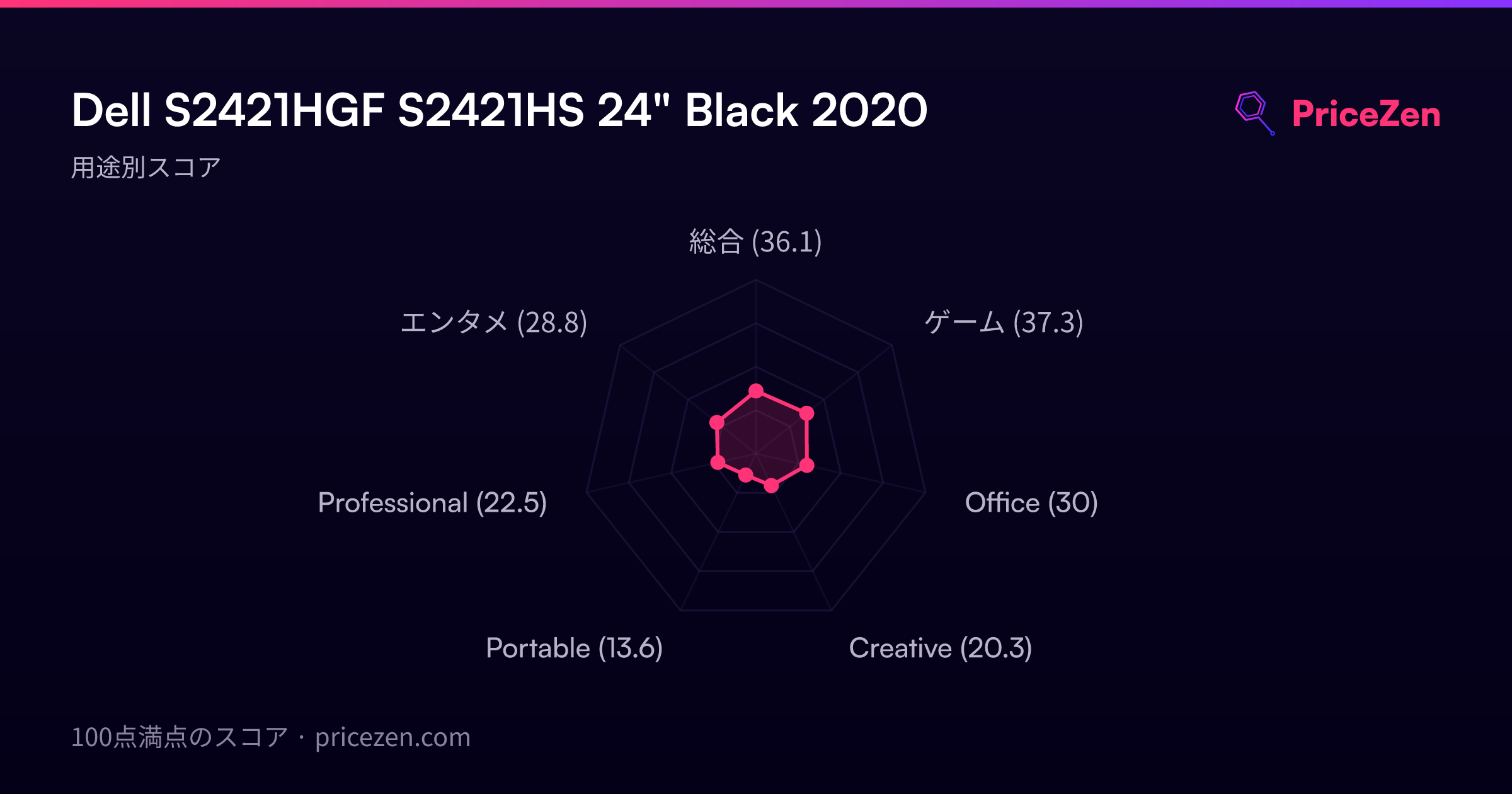
- 総合36.1
- ゲーム37.3
- Office30
- Creative20.3
- Portable13.6
- Professional22.5
- エンタメ28.8