ASUS VA279HAE 27" BLACK 2022
The 3000:1 contrast ratio of its 27-inch VA panel delivers deep blacks and bright whites for lifelike visuals, while the 178° viewing angle minimizes color shift from any direction. Its flicker-free and low blue light certifications, combined with an anti-glare coating, make it a practical choice for extended daily use. This monitor is best for office workers and students who need a comfortable, VESA-mountable 1080p display for documents and spreadsheets.

現在、販売店の最新価格はありません


概要
The 30-Second Version
A comfortable, contrast-rich budget monitor for office drones who value their eyeballs. Just don't expect color accuracy or modern connectivity.
Pros & Cons
長所
- Excellent contrast for the price, blacks actually look black 84th
- Flicker-free and low blue light tech genuinely helps with eye strain
- Easy setup, includes an HDMI cable in the box
- Stable stand with tilt adjustment, no wobble
短所
- Only one HDMI port plus D-Sub and VGA, connectivity is stuck in 2012
- Color accuracy is weak, 17th percentile is hard to ignore
- Built-in speakers are basically a formality
- On-screen controls are fiddly and annoying to navigate
オーナーの声
The Word on the Street
購入者の評価が時間とともにどう変化したか
独自顧客が実際にレビューを書いた時期に基づいています。発売当初の高評価が続いたかどうかがわかります。
書かれたレビュー 12件、2023/01~2023/08:満足 11件、不満 1件
ストア評価全202件:4.5★。 多くの購入者はレビューを書かずに評価だけを付けています。 グラフは書かれたレビュー12件を数えています。
各点は書かれたレビュー1件で、書かれた月に置いています。満足 = 4〜5★、普通 = 3★、不満 = 1〜2★。
実証データ
Performance
The VA panel here is a mixed bag. That 3,000:1 contrast ratio is the star of the show, giving you noticeably richer blacks than most IPS panels at this price. But the color performance lands in the 17th percentile, which is rough. Colors look a bit washed compared to what you'd get from a decent IPS panel, and the 1080p resolution stretched across 27 inches means text isn't as crisp as it would be on a 24-inch or a 1440p display. For documents and web browsing, it's fine. For anything color-sensitive, it's a letdown.
Specifications
Full Specifications
Display
| Size | 27" |
| Resolution | 1920x1080 (Full HD) |
| Panel Type | VA |
| Aspect Ratio | 16:9 |
| Screen Finish | glossy |
Connectivity
| HDMI Ports | 1 |
Ergonomics
| VESA Mount | 100x100 |
Features
| Weight | 5.4 kg / 12.0 lbs |
vs Competition
Against the Dell S2725QC, the ASUS loses on connectivity and resolution, the Dell brings 4K and USB-C to the table. The LG UltraGear 27G810A-B is a different animal entirely, built for gaming with higher refresh rates and better response times. The BenQ MA270U targets creative work with far superior color accuracy. Where the ASUS wins is pure price and eye comfort. If you just need a second monitor for documents and email, it's hard to beat at the US price. But any of those competitors will serve you better if you want more than the bare minimum.
| Spec | ASUS VA279HAE 27" | LG UltraGear 45GX950A-B 45" | Dell UltraSharp U4025QW 39.7" | MSI MAG 271QPX QD-OLED E2 27" | Alienware AW-Series AW3425DW 34" | Samsung Odyssey G60SD 27" |
|---|---|---|---|---|---|---|
| Screen Size | 27 | 45 | 39.70000076293945 | 27 | 34 | 27 |
| Resolution | 1920 x 1080 | 5120 x 2160 | 5120 x 2160 | 2560 x 1440 | 3440 x 1440 | 2560 x 1440 |
| Panel Type | VA | OLED | IPS | QD-OLED | QD-OLED | OLED |
| Refresh Rate | - | 330 | 120 | 240 | 240 | 360 |
| Response Time Ms | - | 0.029999999329447746 | 5 | 0.029999999329447746 | 0.029999999329447746 | 0.029999999329447746 |
| Adaptive Sync | - | FreeSync Premium Pro | Adaptive-Sync | FreeSync Premium Pro | FreeSync Premium Pro | FreeSync Premium Pro |
| Hdr | - | DisplayHDR True Black 400 | DisplayHDR 600 | DisplayHDR True Black 400 | DisplayHDR 400 True Black | HDR10+ |
| Compare | Compare | Compare | Compare | Compare |
| 製品 | Color | 携帯性 | Display | Feature | User Sentiment | Ergonomic | Performance | Connectivity | ユーザー評価 |
|---|---|---|---|---|---|---|---|---|---|
| ASUS VA279HAE 27" | 15.7 | 12.9 | 44.8 | 19.2 | 54.3 | 30.6 | 22.4 | 21 | 84.1 |
| LG UltraGear 45GX950A-B 45" Compare | 99.4 | 76.5 | 99.7 | 95.7 | 76.4 | 90.8 | 99.4 | 97 | 92.1 |
| Dell UltraSharp U4025QW 39.7" Compare | 98.2 | 76.5 | 98.7 | 95.7 | 85.7 | 90.8 | 56.1 | 99.3 | 96.9 |
| MSI MAG 271QPX QD-OLED E2 27" Compare | 99.1 | 57.5 | 77.3 | 83.7 | 95.7 | 90.8 | 98 | 81.3 | 98.9 |
| Alienware AW-Series AW3425DW 34" Compare | 99 | 73.9 | 85.7 | 89.7 | 95.7 | 90.8 | 98 | 95.5 | 96.9 |
| Samsung Odyssey G60SD 27" Compare | 90.3 | 39.6 | 77.3 | 66.9 | 95.7 | 90.8 | 99.5 | 87.6 | 92.1 |
価格
Value & Pricing
At USD 149 in the US, this is a solid deal for a basic office monitor. But the EUR pricing is all over the place, ranging from EUR 312 to EUR 433 across three listings. That's a EUR 121 spread for the exact same panel, which is absurd. If you're in Europe, shop around hard and don't pay more than the low end of that range. At the higher EUR prices, you're getting into territory where better monitors with more ports and better color exist.
詳細情報
Overview
The ASUS VA279HAE is a budget 27-inch workhorse that nails the basics and skips everything else. It's a 1080p VA panel with a 3,000:1 contrast ratio and 300 nits of brightness, which means deep blacks and decent punch for an office setup. The one thing to know? This is an eye-comfort monitor first, a performance display second. If you're staring at spreadsheets for eight hours, it's a genuinely smart buy. If you're editing photos or gaming, keep scrolling.
Common Questions
Q: Is this monitor good for gaming?
Not really. It's a 60Hz VA panel with no adaptive sync and response times that won't impress anyone. Casual games will look fine thanks to the contrast, but if you play anything fast-paced, get a proper gaming monitor like the LG UltraGear instead.
Q: Can I mount this on a monitor arm?
Yes, it has a standard VESA 100x100 mount. The included stand is stable enough, but if you want to free up desk space, any standard VESA arm will work.
Q: Is 1080p on a 27-inch screen too blurry?
It's noticeable if you sit close. Text isn't as sharp as it would be on a 24-inch 1080p or a 27-inch 1440p display. For most office work it's acceptable, but if you're picky about text clarity, consider a smaller screen or higher resolution.
Who Should Skip This
If you need accurate colors for photo editing, design work, or anything creative, this isn't your monitor. The color performance is near the bottom of the barrel. Go grab a BenQ MA270U or a Dell S2725QC instead. And if you want to game, the LG UltraGear 27G810A-B is the obvious pick. This ASUS is for spreadsheets and email, nothing more.
Verdict
Buy it if you need a cheap, comfortable monitor for office work and don't care about color accuracy or modern ports. The eye-care features are legit, the contrast is better than expected, and the US price is right. But don't overpay in Europe, and don't buy this expecting anything beyond basic productivity. It's a one-trick pony, but it does that trick well.
Usage Scores
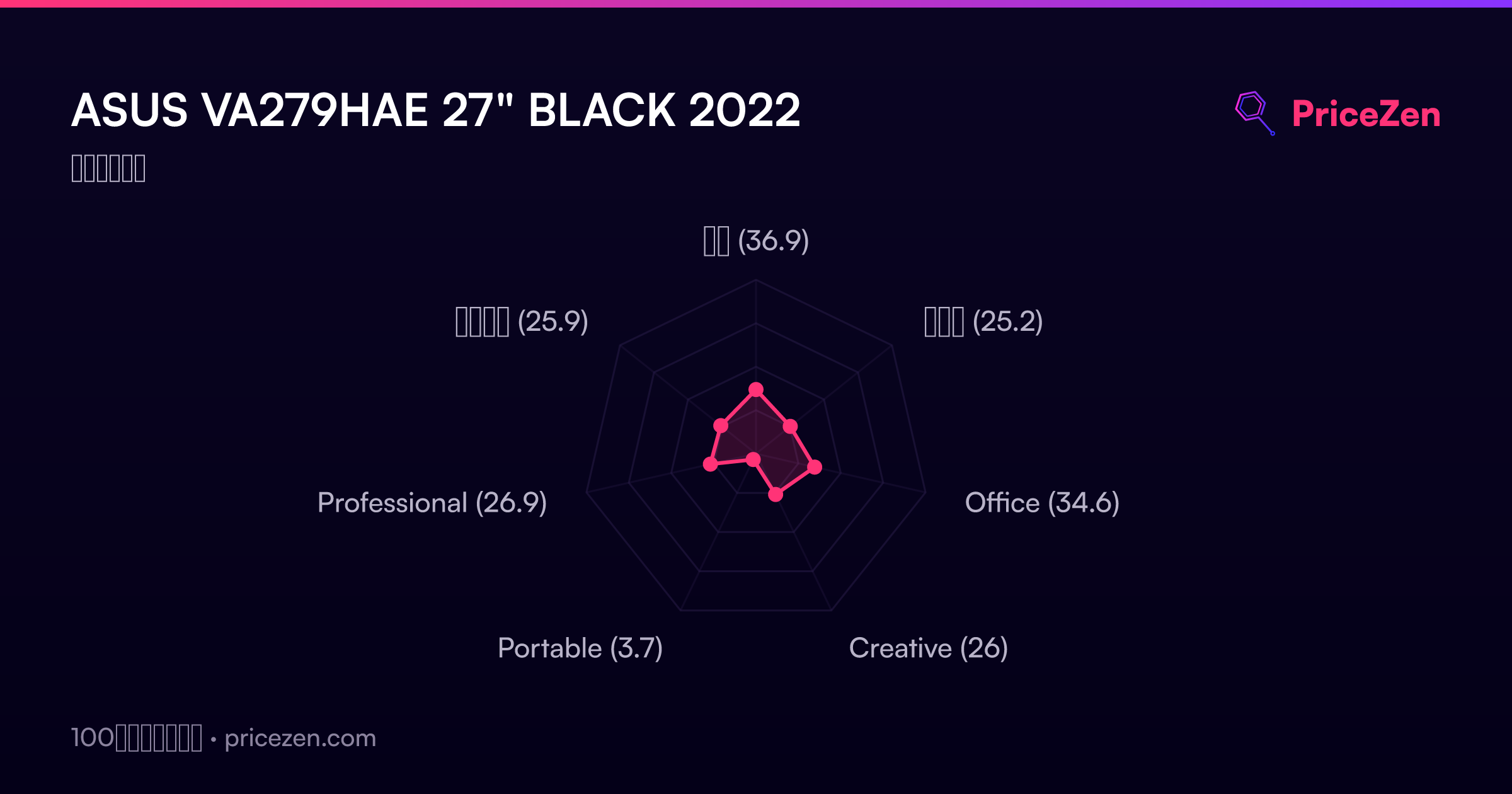
- 総合36.9
- ゲーム25.2
- Office34.6
- Creative26
- Portable3.7
- Professional26.9
- エンタメ25.9