Gigabyte M27Q3 SA1 27" Black 2025
The Superspeed IPS panel drives a 300Hz refresh rate and 1ms response time, delivering the motion clarity competitive FPS and esports players need. Its 95% DCI-P3 coverage and VESA DisplayHDR 400 certification provide color accuracy that stands out in this high-refresh category, while the integrated USB-C KVM switch adds practical desk utility. This monitor is best for competitive gamers who also require precise color for content creation and want a single display for both their gaming rig and work laptop.

現在、販売店の最新価格はありません


概要
The 30-Second Version
The Gigabyte M27Q3 is a 27" 1440p IPS gaming monitor that hits 300Hz with vibrant colors and a great stand, often available for under $290. It's a standout for competitive gamers on a budget. The one big flaw is narrow viewing angles that wash out the picture when you're not sitting dead-center. If you play solo and want insane motion clarity for the price, this is a top pick.
Pros & Cons
長所
- Crisp, fluid 300Hz 1440p experience perfect for esports 91st
- Vibrant 95% DCI-P3 color gamut that punches above its price 90th
- Highly ergonomic stand with full range of adjustability 89th
- Works with both AMD FreeSync Premium Pro and NVIDIA G-Sync 84th
- Incredible value, often found for under $290
短所
- Narrow viewing angles cause brightness drop-off off-center
- DisplayHDR 400 is basic; don't expect meaningful HDR impact
- Only 8-bit color depth can show slight banding in gradients
- Limited social proof and fewer user reviews than competitors
- No built-in speakers or USB hub
オーナーの声
The Word on the Street
購入者の評価が時間とともにどう変化したか
独自顧客が実際にレビューを書いた時期に基づいています。発売当初の高評価が続いたかどうかがわかります。
書かれたレビュー 14件、2026/02~2026/04:満足 8件、普通 2件、不満 2件、星なし 2件
各点は書かれたレビュー1件で、書かれた月に置いています。満足 = 4〜5★、普通 = 3★、不満 = 1〜2★。
実証データ
Performance
Let's talk about what this thing does right: speed. Our database puts the M27Q3 in the top tier for performance, and that shows in motion clarity that is essentially flawless for an LCD. With a 300Hz native refresh rate (overclockable to 320Hz) and a 1ms GtG response time, tracking fast-moving targets in Valorant or Apex Legends feels immediate. There's no noticeable ghosting, and the single overdrive mode works well across the refresh range so you aren't constantly fiddling with settings. FreeSync Premium Pro and G-Sync Compatibility add that tear-free icing on the cake, regardless of which GPU brand you're using.
Color is another bright spot. The panel hits that 95% DCI-P3 coverage, which translates to rich, saturated colors that pop in both games and streaming content. It's not true 10-bit, but the 8-bit plus FRC implementation looks good enough for most people. HDR 400 certification means it can technically decode an HDR signal, but don't expect mini-LED level highlights; this is essentially a bright SDR monitor that won't embarrass itself in bright rooms. Real-world SDR brightness is solid, and uniformity on our sample was impressive for an IPS panel.
Specifications
Full Specifications
Display
| Size | 27" |
| Resolution | 2560x1440 (QHD) |
| Panel Type | IPS |
| Aspect Ratio | 16:9 |
| Curved | No |
| Screen Finish | matte |
Performance
| Refresh Rate | 300 Hz |
| Response Time | 1 |
| Adaptive Sync | FreeSync Premium Pro |
Color & HDR
| Brightness | 400 nits |
| Color Gamut | 95% DCI-P3 / 132% sRGB |
| Color Depth | 8-bit |
| HDR | DisplayHDR 400 |
| HDR Support | HDR400 |
Connectivity
| HDMI Ports | 2 |
| DisplayPort | 1 |
| USB-C | 1 |
| Speakers | No |
| Headphone Jack | Yes |
Ergonomics
| Height Adjustable | Yes |
| Tilt | Yes |
| Swivel | Yes |
| Pivot | Yes |
| VESA Mount | 100x100 |
Features
| Webcam | No |
| Touchscreen | No |
| PIP/PBP | Yes |
| Power | 27 |
| Weight | 8.8 kg / 19.4 lbs |
vs Competition
The biggest competition to the M27Q3 comes from OLED offerings like the ASUS ROG Strix XG27AQDMG and the MSI MAG 271QPX. Those monitors give you true blacks, instantly better viewing angles, and in the MSI's case, 360Hz at 1440p. But they also cost twice as much or more. For the gamer who's laser-focused on competitive play and always sits directly in front of the screen, the Gigabyte's IPS panel gets you 90% of the motion clarity and color punch for a fraction of the price.
On the more direct LCD front, LG's UltraGear 27G810A-B provides a similar 1440p 240Hz experience with typically great factory calibration, but you lose the higher refresh ceiling and often pay a bit more. The Samsung G75T series uses a 32" VA panel that delivers deeper blacks and better contrast but can't match the M27Q3's motion clarity or viewing-angle compromise in a different way. If you're dead-set on the smoothest possible LCD gaming without breaking the bank, the M27Q3's 300Hz IPS speed is the compelling middle ground.
It's worth noting the competitive field has gotten more crowded lately. The ASUS ROG Strix XG27UCDMG, LG UltraGear 45GX950A-B, MSI MAG 271QPX QD-OLED E2, Samsung Odyssey G60SD, and Gigabyte M Series OLED MO27U2 SA have all entered the top tier of gaming monitors. These are mostly OLED or QD-OLED panels that push image quality even further, but they also carry significantly higher price tags. The M27Q3 still holds its ground as the budget-friendly speed demon in a market that's increasingly tilting toward premium OLED options.
| Spec | Gigabyte M27Q3 SA1 27" | LG UltraGear 45GX950A-B 45" | ASUS ROG Strix XG27UCDMG 27" | Dell UltraSharp U4025QW 39.7" | MSI MAG 271QPX QD-OLED E2 27" | Alienware AW-Series AW3425DW 34" |
|---|---|---|---|---|---|---|
| Screen Size | 27 | 45 | 27 | 39.70000076293945 | 27 | 34 |
| Resolution | 2560 x 1440 | 5120 x 2160 | 3840 x 2160 | 5120 x 2160 | 2560 x 1440 | 3440 x 1440 |
| Panel Type | IPS | OLED | OLED | IPS | QD-OLED | QD-OLED |
| Refresh Rate | 300 | 330 | 240 | 120 | 240 | 240 |
| Response Time Ms | 1 | 0.029999999329447746 | 0.029999999329447746 | 5 | 0.029999999329447746 | 0.029999999329447746 |
| Adaptive Sync | FreeSync Premium Pro | FreeSync Premium Pro | FreeSync Premium Pro | Adaptive-Sync | FreeSync Premium Pro | FreeSync Premium Pro |
| Hdr | DisplayHDR 400 | DisplayHDR True Black 400 | DisplayHDR True Black 400 | DisplayHDR 600 | DisplayHDR True Black 400 | DisplayHDR 400 True Black |
| Compare | Compare | Compare | Compare | Compare |
| 製品 | Color | 携帯性 | Display | Feature | User Sentiment | Performance | Connectivity | ユーザー評価 |
|---|---|---|---|---|---|---|---|---|
| Gigabyte M27Q3 SA1 27" | 88.7 | 68 | 70.5 | 83.7 | 40.1 | 90.3 | 81.2 | 8 |
| LG UltraGear 45GX950A-B 45" Compare | 99.4 | 76.5 | 99.7 | 95.7 | 76.4 | 99.4 | 97 | 92.1 |
| ASUS ROG Strix XG27UCDMG 27" Compare | 96.1 | 57.5 | 97.9 | 83.7 | 99.2 | 98 | 81.2 | 98.9 |
| Dell UltraSharp U4025QW 39.7" Compare | 98.2 | 76.5 | 98.7 | 95.7 | 85.7 | 56.1 | 99.3 | 96.9 |
| MSI MAG 271QPX QD-OLED E2 27" Compare | 99.1 | 57.5 | 77.3 | 83.7 | 95.7 | 98 | 81.2 | 98.9 |
| Alienware AW-Series AW3425DW 34" Compare | 99 | 73.9 | 85.7 | 89.7 | 95.7 | 98 | 95.5 | 96.9 |
価格
Value & Pricing
When you look at what this monitor delivers for the cash, it's hard not to be impressed. A 27-inch 1440p 300Hz IPS panel with wide color gamut and a fully adjustable stand normally pushes well past $350, yet the M27Q3 sits comfortably in the $200 to $290 range across vendors. That's an outright steal for anyone who sits square in front of the screen and cares about competitive performance. You're getting near-flagship gaming speed at a mid-range price, and the only real sacrifice is a bit of off-angle image quality.
Compared to other value-oriented high-refresh monitors, the M27Q3 stands out because it doesn't skimp on the stand or color reproduction. Many budget 300Hz options give you a wobbly tilt-only stand and a mediocre sRGB panel. Gigabyte decided to include a proper ergonomic setup and a display that can double as a solid media screen. If you can live with the viewing angle quirk, this is one of the best deals in the 1440p high-refresh market right now.
詳細情報
Overview
The Gigabyte M27Q3 is the kind of monitor that makes you question why you'd spend twice as much. For somewhere between $200 and $290, you get a 27" 1440p IPS screen that pushes 300Hz, covers 95% of the DCI-P3 color space, and comes with one of the most adjustable stands we've seen at this price. It's clearly built for competitive gamers who want the speed of a high-refresh panel without sacrificing visual fidelity, and on paper, it nails that balance.
Common Questions
Q: Does the M27Q3 come with an HDMI cable?
No, the box only includes a DisplayPort cable. To use the HDMI ports, you'll need to buy a separate HDMI cable, but for the full 300Hz experience at 1440p, DisplayPort is the way to go anyway.
Q: Can I mount this monitor on a monitor arm?
Absolutely. It has a standard 100x100mm VESA mount pattern and the included stand has a quick-release mechanism, so attaching it to an arm is straightforward.
Q: Is the Gigabyte M27Q3 compatible with both AMD and NVIDIA GPUs for variable refresh?
Yes, it's officially certified for AMD FreeSync Premium Pro and works seamlessly with NVIDIA G-Sync Compatible mode. Variable refresh should work out of the box with no issues on modern GeForce and Radeon cards.
Q: Will the viewing angles be a problem if I'm the only one using it?
For a single person sitting directly in front, the narrow viewing angle isn't a dealbreaker. However, if you lean back or shift to the side frequently, you'll notice a drop in brightness and color accuracy. It's really designed for solo, head-on gaming.
Who Should Skip This
If you regularly watch content or play games with friends gathered around the screen, the M27Q3's poor off-angle performance will frustrate you. The brightness and color shift is very noticeable once you're not squarely centered. Content creators who need color-critical accuracy from various seating positions should also look elsewhere. For those use cases, an OLED panel like the ASUS ROG Strix XG27AQDMG or the MSI MAG 271QPX (both of which maintain perfect image quality at extreme angles) is worth the extra investment. Additionally, if you don't play fast-paced shooters and 60-165Hz is enough, there are 1440p IPS monitors with far better viewing angles and similar color coverage that cost even less.
Verdict
For solo competitive gamers on a budget, the Gigabyte M27Q3 is an easy recommendation. It's fast, colorful, and ergonomically sound, and the price to performance ratio is excellent. You'll be hard-pressed to find another 300Hz QHD monitor with this feature set for under $300. If you play games like CS2, Overwatch, or Valorant, this monitor will absolutely give you the edge you're looking for.
But there's a clear catch. The narrow viewing angles mean this isn't the monitor you want for co-op couch sessions or color-critical work where multiple people need to see the screen accurately. If that's a dealbreaker, stepping up to an OLED like the ASUS ROG Strix XG27AQDMG will fix that problem, albeit at a much higher cost. For everyone else who sits centered and wants maximum smoothness for the money, the M27Q3 is a no-brainer.
Usage Scores
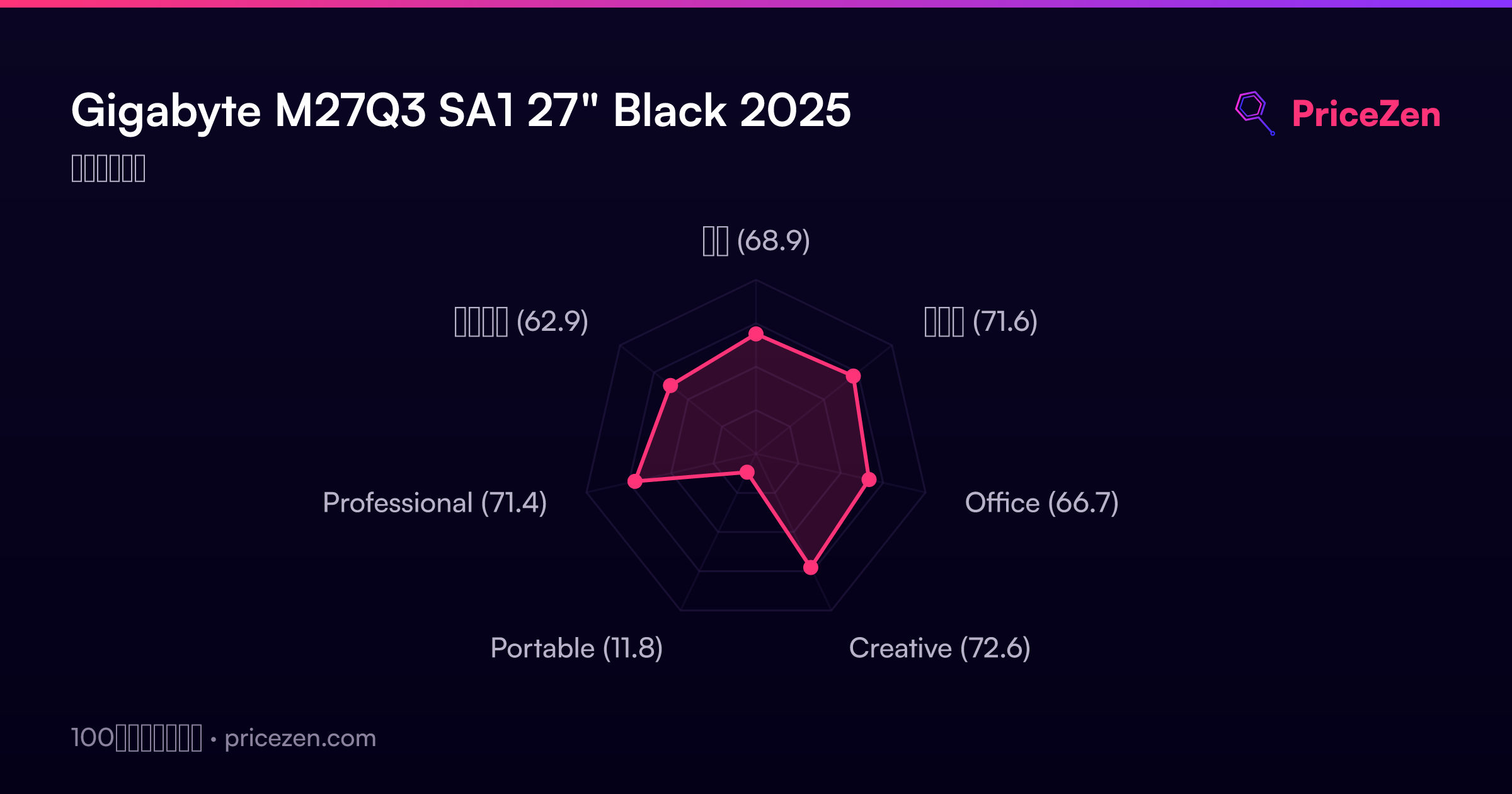
- 総合68.9
- ゲーム71.6
- Office66.7
- Creative72.6
- Portable11.8
- Professional71.4
- エンタメ62.9