ASUS ProArt PA279CDV 26.5" Black/Silver 2026
The 26.5-inch QD-OLED panel delivers 4K resolution, a 120Hz refresh rate, and a 0.1ms response time, with 1000 nits peak brightness and DisplayHDR True Black 400 for deep blacks and vivid colors. Calman Verified with Delta E < 1.5, it covers 99% DCI-P3 and includes USB-C with 96W Power Delivery, Auto KVM, and a built-in USB hub. Best for professional colorists and video editors who need accurate HDR grading and multi-device workflows.

現在、販売店の最新価格はありません


概要
The 30-Second Version
The ASUS ProArt PA279CDV is a 26.5-inch 4K QD-OLED professional monitor with 120Hz, factory calibration to Delta E < 1.5, Thunderbolt and 96W USB-C charging for USD 699. It scores 88.4/100 for professional work in our ranking, making it a strong pick for creators who also want a fast panel.
Pros & Cons
長所
- 4K QD-OLED with true blacks and 1000-nit HDR peaks 99th
- Factory calibrated, Calman Verified, Delta E < 1.5 97th
- 120Hz and 0.1ms GTG, so it doubles as a gaming screen 96th
- Thunderbolt, dual USB-C with 96W PD, daisy-chain DisplayPort, Auto KVM 91st
- Full height, tilt, swivel and pivot adjustment plus VESA 100x100
短所
- 250-nit typical brightness struggles in bright rooms
- Only one HDMI input
- 26.5 inches is small next to the ultrawides it competes with
- OLED burn-in risk with static toolbars and timelines all day
- Canadian pricing swings by CAD 100 between listings
実証データ
Performance
On paper this thing is quick. The 120Hz refresh rate and 0.1ms GTG response put it in the top few percent of monitors we track for performance, which means motion stays clean whether you're scrubbing 4K footage or playing something fast. Adaptive-Sync handles tearing. Contrast is the other headline: QD-OLED with DisplayHDR True Black 400 and a 1000-nit peak means blacks are actually black, not dark grey with a backlight glow behind them. Sustained brightness is listed at 250 nits, so this is a monitor for a controlled room, not a sun-drenched desk by a window.
Color is where the ProArt badge earns its keep. True 10-bit, 100% sRGB, 99% DCI-P3 and BT.2020 coverage, factory calibrated to Delta E < 1.5 and Calman Verified. In practice that means you can trust what you're grading without immediately reaching for a colorimeter. There's also an M Model-P3 mode tuned to match MacBook panels, which matters if your laptop screen and your desk monitor keep disagreeing about skin tones. Connectivity ranks at the 99th percentile in our data: two USB-C ports, Thunderbolt, 96W Power Delivery, HDMI, two DisplayPorts with daisy-chaining, a USB hub, speakers and a headphone jack. Auto KVM lets one keyboard and mouse follow you between two machines.
Specifications
Full Specifications
Display
| Size | 26.5" |
| Resolution | 3840x2160 (4K UHD) |
| Panel Type | QD-OLED |
| Aspect Ratio | 16:9 |
| Curved | No |
| Screen Finish | matte |
Performance
| Refresh Rate | 120 Hz |
| Response Time | 0.1 |
| Adaptive Sync | Adaptive-Sync |
Color & HDR
| Brightness | 250 nits |
| Color Gamut | 100% sRGB / 99% DCI-P3 |
| Color Depth | 10-bit |
| HDR | DisplayHDR True Black 400 |
| HDR Support | HDR10 |
Connectivity
| HDMI Ports | 1 |
| DisplayPort | 2 |
| USB-C | 2 |
| Thunderbolt | USB-C 96W PD |
| Speakers | Yes |
| Headphone Jack | Yes |
Ergonomics
| Height Adjustable | Yes |
| Tilt | Yes |
| Swivel | Yes |
| Pivot | Yes |
| VESA Mount | 100x100 |
Features
| Webcam | No |
| Touchscreen | No |
| PIP/PBP | Yes |
| Power | 27 |
| Weight | 5.6 kg / 12.4 lbs |
vs Competition
The obvious cross-shop is the MSI MAG 271QPX QD-OLED E2, another 27-inch QD-OLED aimed squarely at gamers, and the Samsung Odyssey G60SD at the same size. If your day is mostly shooters and your evening is more of the same, those are the ones to look at. The PA279CDV's argument against them is everything wrapped around the panel: Delta E < 1.5 calibration, 99% DCI-P3, Thunderbolt with 96W Power Delivery, Auto KVM and a Mac-matched color mode. Gaming monitors rarely bother with any of that.
If you want acreage instead, the LG UltraGear 45GX950A-B at 45 inches, the Alienware AW3425DW at 34 inches and the Dell UltraSharp U4025QW at 39.7 inches all give you far more horizontal room for timelines and spreadsheets. This ASUS gives you sharper pixels per inch and better contrast in a footprint that fits a normal desk. Our ranking has it well above average on compactness and features, and near the top on ergonomics, so it's the pick if you want one screen that does color work, laptop docking and gaming without eating your entire wall.
| Spec | ASUS ProArt PA279CDV 26.5" | LG UltraGear 45GX950A-B 45" | Dell UltraSharp U4025QW 39.7" | MSI MAG 271QPX QD-OLED E2 27" | Alienware AW-Series AW3425DW 34" | Samsung Odyssey G60SD 27" |
|---|---|---|---|---|---|---|
| Screen Size | 26.5 | 45 | 39.70000076293945 | 27 | 34 | 27 |
| Resolution | 3840 x 2160 | 5120 x 2160 | 5120 x 2160 | 2560 x 1440 | 3440 x 1440 | 2560 x 1440 |
| Panel Type | QD-OLED | OLED | IPS | QD-OLED | QD-OLED | OLED |
| Refresh Rate | 120 | 330 | 120 | 240 | 240 | 360 |
| Response Time Ms | 0.10000000149011612 | 0.029999999329447746 | 5 | 0.029999999329447746 | 0.029999999329447746 | 0.029999999329447746 |
| Adaptive Sync | Adaptive-Sync | FreeSync Premium Pro | Adaptive-Sync | FreeSync Premium Pro | FreeSync Premium Pro | FreeSync Premium Pro |
| Hdr | DisplayHDR True Black 400 | DisplayHDR True Black 400 | DisplayHDR 600 | DisplayHDR True Black 400 | DisplayHDR 400 True Black | HDR10+ |
| Compare | Compare | Compare | Compare | Compare |
| 製品 | Color | 携帯性 | Display | Feature | Performance | Connectivity |
|---|---|---|---|---|---|---|
| ASUS ProArt PA279CDV 26.5" | 79.4 | 83.8 | 97.3 | 83.7 | 95.7 | 99.2 |
| LG UltraGear 45GX950A-B 45" Compare | 99.4 | 76.5 | 99.7 | 95.7 | 99.4 | 97 |
| Dell UltraSharp U4025QW 39.7" Compare | 98.2 | 76.5 | 98.7 | 95.7 | 56.1 | 99.3 |
| MSI MAG 271QPX QD-OLED E2 27" Compare | 99.1 | 57.5 | 77.3 | 83.7 | 98 | 81.3 |
| Alienware AW-Series AW3425DW 34" Compare | 99 | 73.9 | 85.7 | 89.7 | 98 | 95.5 |
| Samsung Odyssey G60SD 27" Compare | 90.3 | 39.6 | 77.3 | 66.9 | 99.5 | 87.6 |
価格
Value & Pricing
At USD 699 it's currently listed at Amazon, and honestly that's a lot of monitor for the money: calibrated QD-OLED, Thunderbolt, 96W charging and a KVM in one box usually costs more than this. Canadian buyers should shop around, because we're seeing CAD 899 to CAD 999 across three listings, and CAD 100 is a decent chunk of a keyboard-and-mouse budget. We track its price over time, partly through our community browser extension, so if the CAD listings drift toward the top of that range, wait. Nobody pays us to say any of this, which makes it easy to just tell you the number.
詳細情報
Overview
The ASUS ProArt PA279CDV is a 26.5-inch 4K QD-OLED professional monitor, and it sits at USD 699 right now (CAD 899 to CAD 999 if you're shopping in Canada). That's the bracket where most people are still buying IPS panels for color work, so an OLED with factory calibration and Thunderbolt showing up here is worth a second look.
The pitch is simple: 3840 x 2160 on a QD-OLED panel, true 10-bit color, 100% sRGB and 99% DCI-P3 coverage, Calman Verified with Delta E under 1.5 out of the box. Add 120Hz, a 0.1ms GTG response time and Adaptive-Sync, and you've got a creator display that doesn't feel sluggish when you scroll a timeline or, yes, fire up a game after hours.
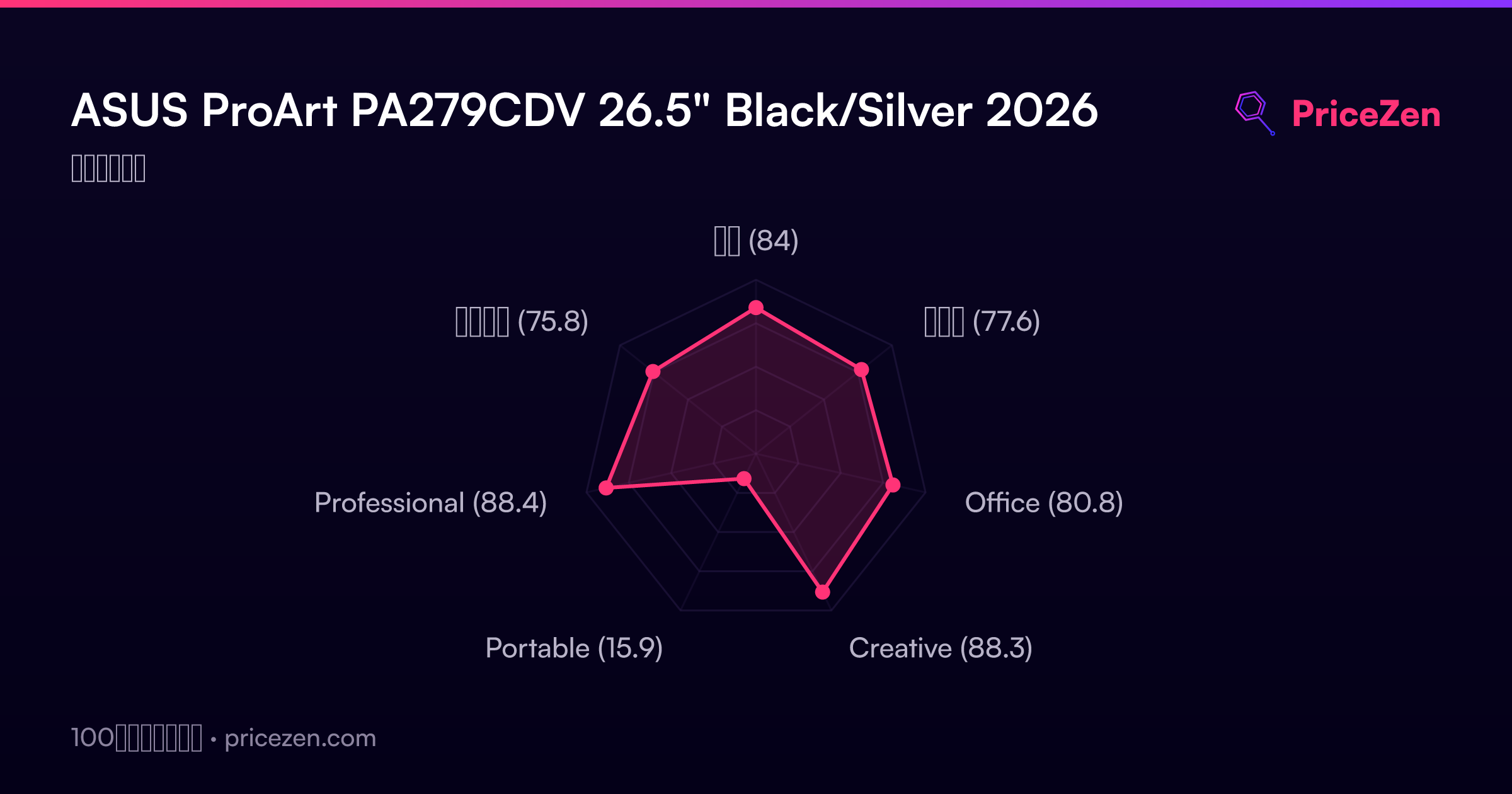
We collect specs, prices and owner ratings from a pile of stores with our own automated system, then score every monitor against the rest of its category. Our model puts this one at 84/100 overall, with 88.4 for professional work and 88.3 for creative use. Those are the two lanes it was built for, and the numbers agree.
Common Questions
Q: Is the ASUS ProArt PA279CDV good for gaming?
Yes, better than most creator monitors. The 120Hz refresh rate, 0.1ms GTG response and Adaptive-Sync put it near the top of our performance rankings, and QD-OLED contrast makes dark scenes look great.
Q: Does the PA279CDV work well with a MacBook?
It's built for it. There's an M Model-P3 color mode matched to MacBook panels, plus USB-C and Thunderbolt with up to 96W Power Delivery, so one cable carries video, data and charging.
Q: Is 250 nits bright enough for photo editing?
For a normally lit or dim room, yes, and the 1000-nit HDR peak plus DisplayHDR True Black 400 handles highlights. In a very bright office with windows behind you, this monitor will feel dim.
Q: Can I connect two computers to the PA279CDV at once?
Yes. Auto KVM switches a single keyboard and mouse between two connected machines, and PIP/PBP lets you show both inputs on screen together.
Who Should Skip This
If you work in a bright room with big windows, the 250-nit typical brightness will fight you all day, and a high-brightness IPS panel is the safer call. If your workflow is a 40-track timeline or six spreadsheet columns wide, look at the Dell UltraSharp U4025QW or the Alienware AW3425DW instead, because 26.5 inches gets cramped fast. Pure competitive gamers should check the MSI MAG 271QPX QD-OLED E2 or Samsung Odyssey G60SD before committing. And anyone who leaves the same static app open from morning to night should think hard about OLED burn-in. Our model scores it just 15.9 for portability, so it's not a travel screen either.
Verdict
Buy it if you edit photos, grade video or design for a living and you'd like your monitor to also be genuinely fun after work. The combination of calibrated QD-OLED, 120Hz, Thunderbolt and 96W charging at USD 699 is hard to argue with, and our scoring model agrees: 88.4 for professional use is a strong result.
Skip it if your room is bright, you need a huge canvas, or you leave the same static interface on screen for ten hours a day. Otherwise this is one of the easier recommendations we've made in this price bracket.
Usage Scores
- 総合84
- ゲーム77.6
- Office80.8
- Creative88.3
- Portable15.9
- Professional88.4
- エンタメ75.8