Samsung Odyssey G50F 27" Black 2025

1440pで180Hz、ゲームにちょうどいい組み合わせ 11月29日に確認済み
73/100 総合スコア 4.7 オーナー評価393件の平均
- Screen
- 27"
- Resolution
- 2560 x 1440
- Panel
- IPS
- Refresh
- 180 Hz
- Response time
- 1 ms
- Adaptive sync
- G-Sync Compatible
- HDR
- HDR10
1店舗の価格を比較
安い順。新品・整備済み品・バンドルのオファーは分けて表示するので、同じ条件どうしで比較できます。
| 店舗 | 販売元 | カラーと状態 | 価格 | 最安との差 | 最終確認 | リンク |
|---|---|---|---|---|---|---|
| 新品1件の価格単品 | ||||||
| 過去7日間は確認していないため、これらの価格は変わっている可能性があります | ||||||
| Amazon | マーケットプレイス出品者 | 記載なし | ¥34,262 | 11月3日 | 店舗へ | |
 出典: PriceZen, 2026年11月3日に確認
過去7日以内に確認した価格を「現在の価格」としています。 「マーケットプレイス出品者」とは、その店舗自身ではなく、店舗上の第三者の出品者を指します。
価格履歴
その日に確認その日は未確認、オファーは継続中
出典: PriceZen, checked 2026年11月3日











概要
The 30-Second Version
The G50F hits the 84th percentile for performance with a 180Hz QHD IPS panel and 1ms response time, all for USD 200 to USD 280. Ergonomics are best-in-class at the 92nd percentile, and 306 buyers rate it 4.6 out of 5. Connectivity is the weak link at the 46th percentile, but for the price, this is one of the best gaming monitor deals we have seen.
Pros & Cons
長所
- 180Hz refresh rate and 1ms response time put it in the 84th percentile for performance 97th
- 95th percentile social proof with a 4.6 out of 5 rating from 306 reviews 91st
- 92nd percentile ergonomics with height, tilt, swivel, and pivot adjustments 82nd
- G-Sync Compatible and FreeSync support cover both GPU camps 70th
- QHD 2560 x 1440 resolution on a 27-inch IPS panel looks sharp at 109 PPI
短所
- Connectivity sits at the 46th percentile with only one HDMI 2.0 and one DisplayPort 1.2
- 300 nits brightness limits HDR10 to a spec sheet bullet point
- 15th percentile compact score means a big footprint on your desk
- 48W power draw is on the higher side for a 27-inch panel
- Quality control complaints about stuck pixels in customer reviews
オーナーの声
The Word on the Street
- Long-term owners report the monitor holds up well after months of use with no degradation in performance or reliability.
- Several buyers who compared it directly to the similar G50D model found the G50F screen quality noticeably better at the same price.
- A recurring complaint involves quality control issues, with multiple reports of stuck green pixels on brand new units and frustrating exchange processes.
購入者の評価が時間とともにどう変化したか
独自顧客が実際にレビューを書いた時期に基づいています。発売当初の高評価が続いたかどうかがわかります。
書かれたレビュー 22件、2026/01~2026/11:満足 19件、普通 1件、不満 1件、星なし 1件
ストア評価全393件:4.7★。 多くの購入者はレビューを書かずに評価だけを付けています。 グラフは書かれたレビュー22件を数えています。
各点は書かれたレビュー1件で、書かれた月に置いています。満足 = 4〜5★、普通 = 3★、不満 = 1〜2★。
実証データ
Performance
The 180Hz refresh rate paired with a 1ms response time puts this panel in the 84th percentile for performance, which translates to one of the better non-OLED gaming experiences you can get without spending OLED money. The 2560 x 1440 resolution on a 27-inch IPS panel gives you roughly 109 pixels per inch, sharp enough that text stays crisp and games look detailed without demanding a flagship GPU to push frames.
G-Sync Compatible and FreeSync support mean tear-free gaming on both NVIDIA and AMD cards, and that is a bigger deal than it sounds at this price. The 300 nits brightness is fine for a dim room but will struggle next to a window, and HDR10 on a 300-nit IPS panel is more of a checkbox than a feature. You will not get real HDR pop here, but you will get smooth, responsive gameplay, and that is what this monitor is actually for.
Specifications
Full Specifications
Display
| Size | 27" |
| Resolution | 2560x1440 (QHD) |
| Panel Type | IPS |
| Aspect Ratio | 16:9 |
| Curved | No |
| Screen Finish | matte |
Performance
| Refresh Rate | 180 Hz |
| Response Time | 1 |
| Adaptive Sync | G-Sync Compatible |
Color & HDR
| Brightness | 300 nits |
| Color Gamut | 99% sRGB |
| Color Depth | 8-bit |
| HDR | HDR10 |
| HDR Support | HDR10 |
Connectivity
| HDMI Ports | 1 |
| DisplayPort | 1 |
| USB-C | 0 |
| Speakers | No |
| Headphone Jack | Yes |
Ergonomics
| Height Adjustable | Yes |
| Tilt | Yes |
| Swivel | Yes |
| Pivot | Yes |
| VESA Mount | 100x100 |
Features
| Webcam | No |
| Touchscreen | No |
| PIP/PBP | No |
| Power | 48 |
| Weight | 4.1 kg / 9.0 lbs |
vs Competition
Against the ASUS ROG Strix XG27AQDMG and MSI MAG 271QPX QD-OLED E2, the G50F gives up OLED contrast and true HDR performance, but it costs a fraction of the price. The LG UltraGear 27GX790A-B and Alienware AW2725D both push higher refresh rates and better color coverage, but again, you pay for it. The Dell S2725QC is the closest in spirit, but it leans more toward productivity than gaming. The G50F's 84th percentile performance score means it hangs with monitors that cost significantly more, even if the 46th percentile connectivity reminds you where corners were cut.
| Spec | Samsung Odyssey G50F 27" | Acer Nitro UM.CX2AA.S01 34" | LG UltraGear 39" | BenQ PD3220U 32" | MSI MAG 274URFW 27" | Gigabyte M Series M32U 31.5" |
|---|---|---|---|---|---|---|
| Screen Size | 27 | 34 | 39 | 32 | 27 | 31.5 |
| Resolution | 2560 x 1440 | 3440 x 1440 | 3440 x 1440 | 3840 x 2160 | 3840 x 2160 | 3840 x 2160 |
| Panel Type | IPS | VA | OLED | IPS | IPS | IPS |
| Refresh Rate | 180 | 165 | 240 | 60 | 160 | 144 |
| Response Time Ms | 1 | 1 | 0.03 | 5 | 0.5 | 1 |
| Adaptive Sync | G-Sync Compatible | FreeSync Premium | FreeSync Premium Pro | - | FreeSync Premium | FreeSync Premium Pro |
| Hdr | HDR10 | HDR400 | DisplayHDR True Black 400 | HDR10 | HDR | HDR400 |
| Compare | Compare | Compare | Compare | Compare |
| 製品 | Color | 携帯性 | Display | Feature | Ergonomic | Performance | Connectivity | ユーザー評価 |
|---|---|---|---|---|---|---|---|---|
| Samsung Odyssey G50F 27" | 67.6 | 12.7 | 66.9 | 70.1 | 90.7 | 81.7 | 33.7 | 96.9 |
| Acer Nitro UM.CX2AA.S01 34" Compare | 84.6 | 20.7 | 76 | 90.7 | 66.8 | 77.1 | 83.8 | 84.3 |
| LG UltraGear 39" Compare | 63.3 | 49.3 | 84.1 | 96.3 | 66.8 | 97.9 | 81 | 0 |
| BenQ PD3220U 32" Compare | 88.5 | 81.3 | 95.1 | 85 | 90.7 | 22.3 | 96.9 | 0 |
| MSI MAG 274URFW 27" Compare | 94.5 | 57.3 | 87 | 85 | 90.7 | 90.8 | 81 | 51.5 |
| Gigabyte M Series M32U 31.5" Compare | 89.9 | 62.8 | 87 | 85 | 73.4 | 72.6 | 87.4 | 0 |
価格
Value & Pricing
US pricing runs from USD 200 to USD 280 across four listings, and that USD 80 spread is worth paying attention to. At the low end, this monitor is an absolute steal for a 180Hz QHD IPS panel with this level of ergonomic adjustability. At the high end, you are creeping toward territory where faster panels and better connectivity start to appear. The Best Buy listing mentions a price match guarantee, so if you find it cheaper elsewhere, use that. The ergonomic score in the 92nd percentile means you are getting a stand that would cost extra on many competitors, and that adds real value to the package.
詳細情報
Overview
The Samsung Odyssey G5 G50F posts a 74.7 out of 100 overall score in our database, which lands it in solid territory for a 27-inch QHD gaming panel. The headline numbers are the 180Hz refresh rate, 1ms response time, and a 95th percentile social proof score backed by a 4.6 out of 5 rating across 306 reviews. People are buying this thing and mostly not returning it, which says something in the monitor lottery world.
But the scorecard has some sharp edges. Performance sits at the 84th percentile, which is genuinely strong, while connectivity drops to the 46th percentile thanks to a single HDMI 2.0 and one DisplayPort 1.2. The display and color scores hover around the 70th percentile, and the compact score is a rough 15th percentile. This is not a small monitor and it does not pretend to be.
Common Questions
Q: Does the G50F work with both NVIDIA and AMD graphics cards?
Yes. It supports both G-Sync Compatible and FreeSync, so you get adaptive sync with either GPU brand. The 180Hz refresh rate and 1ms response time are available regardless of which card you use.
Q: Is the HDR on this monitor any good?
Not really. It supports HDR10, but with only 300 nits of brightness on an IPS panel, the HDR experience is limited. You will get a slight color and contrast boost in supported games, but this is not a true HDR display. The 69th percentile color score reflects that.
Q: Can I mount this monitor on a monitor arm?
Yes, it has a standard VESA 100x100 mount. The included stand also offers height, tilt, swivel, and pivot adjustments, which puts it in the 92nd percentile for ergonomics, but if you want to free up desk space, a monitor arm works fine.
Who Should Skip This
Skip this if you need multiple inputs or plan to use it as a productivity hub. The single HDMI 2.0 and single DisplayPort 1.2 put connectivity at the 46th percentile, which means no USB hub, no USB-C, and no second HDMI for a console alongside your PC. The 15th percentile compact score also means this monitor takes up real desk space, so small setups should look elsewhere. And if you are sensitive to quality control roulette, the stuck pixel reports from multiple buyers are worth weighing before you commit.
Verdict
The Samsung Odyssey G5 G50F is a data-backed winner for gamers who want high refresh rate QHD without spending OLED money. The 180Hz panel, 1ms response time, and 92nd percentile ergonomics make it a practical daily driver, and the 95th percentile social proof suggests most buyers are happy with their purchase. The weak connectivity and mediocre HDR are real trade-offs, but at USD 200 to USD 280, this monitor delivers more performance per dollar than almost anything else in our database.
Usage Scores
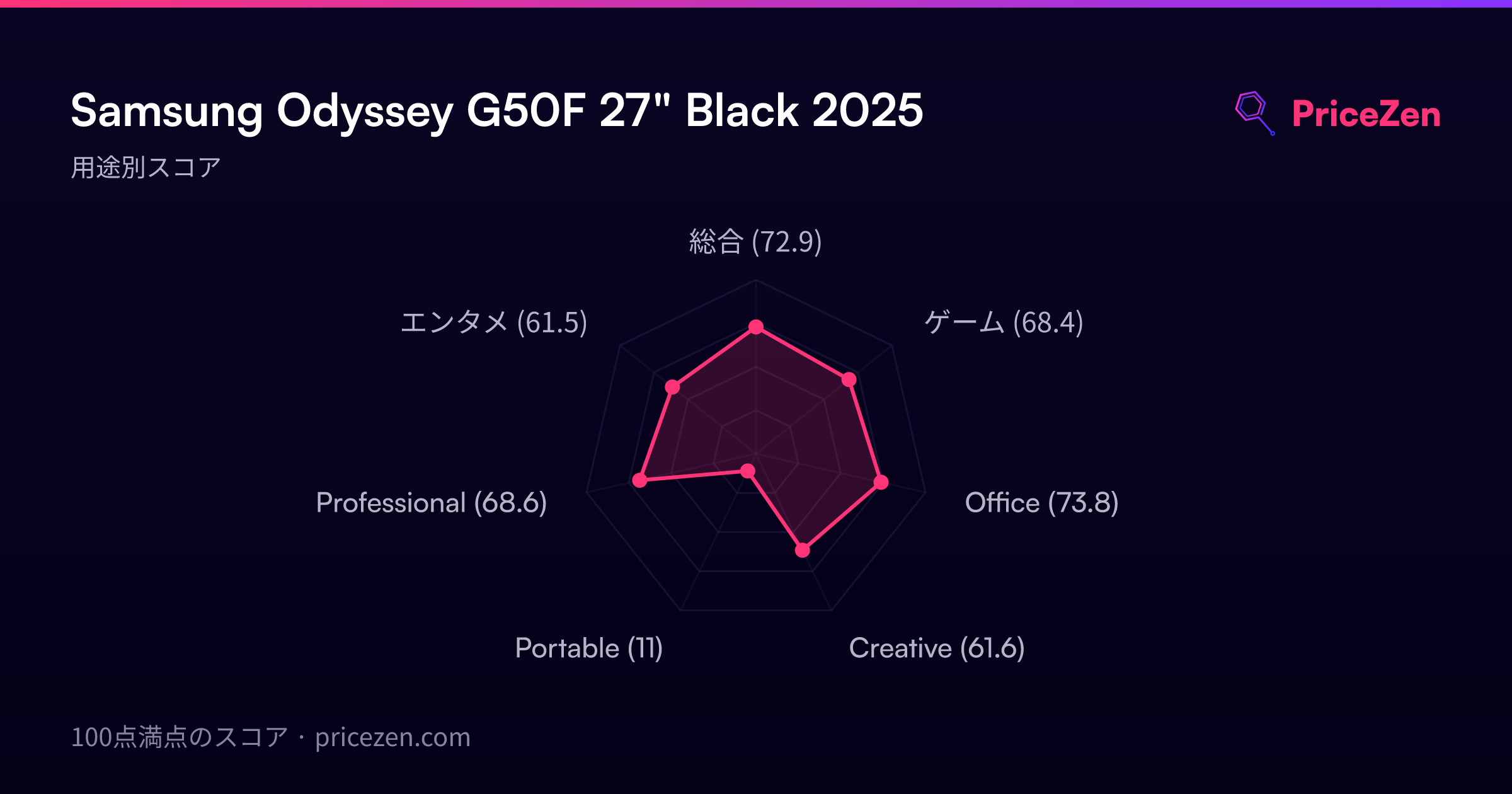
- 総合73.2
- ゲーム68.9
- Office73.7
- Creative62.1
- Portable11
- Professional68.5
- エンタメ62.5