ASUS BE279QFK 27" Black 2025
An integrated Full HD webcam, mic array, and speakers make this a complete conferencing solution, while the 100Hz IPS panel ensures smooth, tear-free video with Adaptive-Sync. Its ergonomic stand offers full tilt, swivel, pivot, and 150mm height adjustment, paired with a frameless design and 99% sRGB coverage for a clean, color-accurate workspace. This monitor is best for office professionals and remote workers who need a simplified, all-in-one video conferencing setup without external peripherals.

現在、販売店の最新価格はありません











概要
The 30-Second Version
A video conferencing monitor that actually gets the conferencing part right, but the display itself is just okay. Great for Zoom calls, mediocre for everything else.
Pros & Cons
長所
- Built-in webcam, mic, and speakers actually work well together 94th
- 100Hz refresh rate is a genuine upgrade over typical 60Hz office monitors 91st
- Ergonomics are excellent, height adjust, tilt, swivel, and pivot all included
- VESA mount support and frameless design make it flexible for any setup
短所
- 250 nits brightness is dim for bright rooms
- 1080p on a 27-inch panel looks noticeably soft next to a MacBook
- HDMI 1.4 and DisplayPort 1.2 are dated connections
- Customer rating of 3.5 stars suggests quality control inconsistencies
オーナーの声
The Word on the Street
購入者の評価が時間とともにどう変化したか
独自顧客が実際にレビューを書いた時期に基づいています。発売当初の高評価が続いたかどうかがわかります。
書かれたレビュー 12件、2025/05~2026/06:満足 3件、普通 2件、不満 7件
ストア評価全25件:3.3★。 多くの購入者はレビューを書かずに評価だけを付けています。 グラフは書かれたレビュー12件を数えています。
各点は書かれたレビュー1件で、書かれた月に置いています。満足 = 4〜5★、普通 = 3★、不満 = 1〜2★。
実証データ
Performance
The 100Hz refresh rate on a 1080p IPS panel is a nice surprise for an office monitor. Most business displays are stuck at 60Hz, so scrolling through spreadsheets and documents feels noticeably smoother here. The 5ms response time is fine, not going to blow anyone away, but perfectly adequate for productivity work. The 250 nits brightness is the weak spot. In a bright office with windows behind you, you'll be squinting. The 99% sRGB coverage is solid for a monitor in this class, colors look accurate enough for video calls and document work. The built-in webcam is 2MP Full HD, which is honestly better than most laptop webcams, and the dual mic array does a decent job picking up your voice without sounding like you're in a tin can.
Specifications
Full Specifications
Display
| Size | 27" |
| Resolution | 1920x1080 (Full HD) |
| Panel Type | IPS |
| Aspect Ratio | 16:9 |
| Curved | No |
| Screen Finish | matte |
Performance
| Refresh Rate | 100 Hz |
| Response Time | 5 |
| Adaptive Sync | Adaptive-Sync |
Color & HDR
| Brightness | 250 nits |
| Color Gamut | 99% sRGB |
| Color Depth | 8-bit |
| HDR | HDR10 |
Connectivity
| HDMI Ports | 1 |
| DisplayPort | 1 |
| USB-C | 0 |
| Speakers | Yes |
| Headphone Jack | Yes |
Ergonomics
| Height Adjustable | Yes |
| Tilt | Yes |
| Swivel | Yes |
| Pivot | Yes |
| VESA Mount | 100x100 |
Features
| Webcam | Yes |
| Touchscreen | No |
| PIP/PBP | No |
| Power | 11 |
| Weight | 5.2 kg / 11.5 lbs |
vs Competition
The Dell S2725QC is the most direct competitor here, another 27-inch office-focused monitor with USB-C connectivity and a cleaner design, though it lacks the built-in webcam. If you're already using an external webcam or your laptop's camera, the Dell is probably the better buy. The LG UltraGear 27G810A-B and MSI MAG 271QPX are gaming monitors that will absolutely destroy this thing in image quality and refresh rate, but they cost more and don't have the conferencing features. The HP OMEN 27qs G2 sits in a similar boat, better panel, no webcam. If you need the all-in-one conferencing package, the ASUS is unique. If you don't need the webcam, you have better display options at this price.
| Spec | ASUS BE279QFK 27" | BenQ MOBIUZ EX381U 37.5" | Samsung Odyssey Ark 2nd Gen 55" | Gigabyte M Series M32U 31.5" | Dell UltraSharp U4320Q 27" | Acer CB342CU UM.CB2AA.004 34" |
|---|---|---|---|---|---|---|
| Screen Size | 27 | 37.5 | 55 | 31.5 | 27 | 34 |
| Resolution | 1920 x 1080 | 3840 x 2160 | 3840 x 2160 | 3840 x 2160 | 3840 x 2160 | 3440 x 1440 |
| Panel Type | IPS | IPS | Mini-LED | IPS | IPS | IPS |
| Refresh Rate | 100 | 144 | 165 | 144 | 60 | 75 |
| Response Time Ms | 5 | 1 | 1 | 1 | 5 | 1 |
| Adaptive Sync | Adaptive-Sync | FreeSync Premium Pro | FreeSync Premium Pro | FreeSync Premium Pro | - | FreeSync |
| Hdr | HDR10 | HDR10 | HDR10+ | HDR400 | HDR400 | HDR400 |
| Compare | Compare | Compare | Compare | Compare |
| 製品 | Color | 携帯性 | Display | Feature | Ergonomic | Performance | Connectivity | ユーザー評価 |
|---|---|---|---|---|---|---|---|---|
| ASUS BE279QFK 27" | 53.7 | 54.4 | 50.7 | 94.4 | 90.8 | 52.6 | 43.3 | 8.1 |
| BenQ MOBIUZ EX381U 37.5" Compare | 93.6 | 68 | 95.1 | 70.2 | 73.5 | 72.6 | 99.8 | 0 |
| Samsung Odyssey Ark 2nd Gen 55" Compare | 98.4 | 20.7 | 91.5 | 96.3 | 30.3 | 77.1 | 81.2 | 74.8 |
| Gigabyte M Series M32U 31.5" Compare | 90.1 | 63 | 87.1 | 85.1 | 73.5 | 72.6 | 87.6 | 0 |
| Dell UltraSharp U4320Q 27" Compare | 91.1 | 82.7 | 87.1 | 85.1 | 90.8 | 22.3 | 96.9 | 0 |
| Acer CB342CU UM.CB2AA.004 34" Compare | 79 | 63 | 78.9 | 70.2 | 78.7 | 65.7 | 70.3 | 74.8 |
価格
Value & Pricing
Pricing is all over the place. In the US you'll see this anywhere from USD 160 to USD 299 depending on the vendor, and that's a massive spread for the same monitor. At USD 160 this is a steal for a video conferencing setup. At USD 299 you're paying too much and should look elsewhere. The CAD spread is even worse, CAD 220 to CAD 405. If you're in Canada, shop around hard before pulling the trigger. The 3-year warranty helps soften the blow, but the value proposition really depends on which listing you land on.
価格履歴
詳細情報
Overview
The ASUS BE279QFK is a video conferencing monitor that actually nails the whole point of a video conferencing monitor. Built-in webcam, mic array, speakers, and a 100Hz IPS panel in one package. It's not trying to be a gaming monitor or a color-critical display, it's trying to be the thing you plug in and immediately look decent on a Teams call with. And for that, it mostly works. The 95th percentile feature ranking tells you everything, this thing is loaded for office use. But the 3.5 star customer rating and 250 nits brightness tell you it's not without compromises.
Common Questions
Q: Is the built-in webcam good enough for daily video calls?
Yes, the 2MP Full HD webcam is better than most laptop cameras and perfectly fine for Teams, Zoom, and Meet. You won't look like a broadcast professional, but you'll look clear and well-lit in normal office lighting.
Q: Can I use this as a gaming monitor?
Sort of. The 100Hz refresh rate and Adaptive-Sync are nice, but the 5ms response time and 1080p resolution on a 27-inch panel won't impress anyone used to a proper gaming display. It's fine for casual gaming, but this is an office monitor first.
Q: Does the monitor work with MacBooks?
It works, but you'll need an adapter since it only has HDMI and DisplayPort inputs, no USB-C. And the 1080p resolution will look noticeably less sharp than your MacBook's built-in display, which is a common complaint from Mac users.
Who Should Skip This
If you're looking for a high-quality display for photo editing, gaming, or anything where image quality matters, this isn't it. The 250 nits brightness and 1080p resolution on a 27-inch panel will frustrate you. Go get the Dell S2725QC or step up to a proper 1440p panel instead. This monitor is for people who need the webcam and conferencing features, not for people who need a great screen.
Verdict
The ASUS BE279QFK is a niche product that nails its niche. If you're setting up a dedicated video conferencing station or a home office where you want one cable to handle everything, this is a genuinely good choice at the right price. The built-in webcam and mic array are better than most laptop setups, and the 100Hz panel is a nice bonus. But the dim 250 nits brightness and 1080p resolution on a 27-inch screen are real compromises. Buy it for the conferencing features, not the display quality. And only buy it if you can find it under USD 200.
Usage Scores
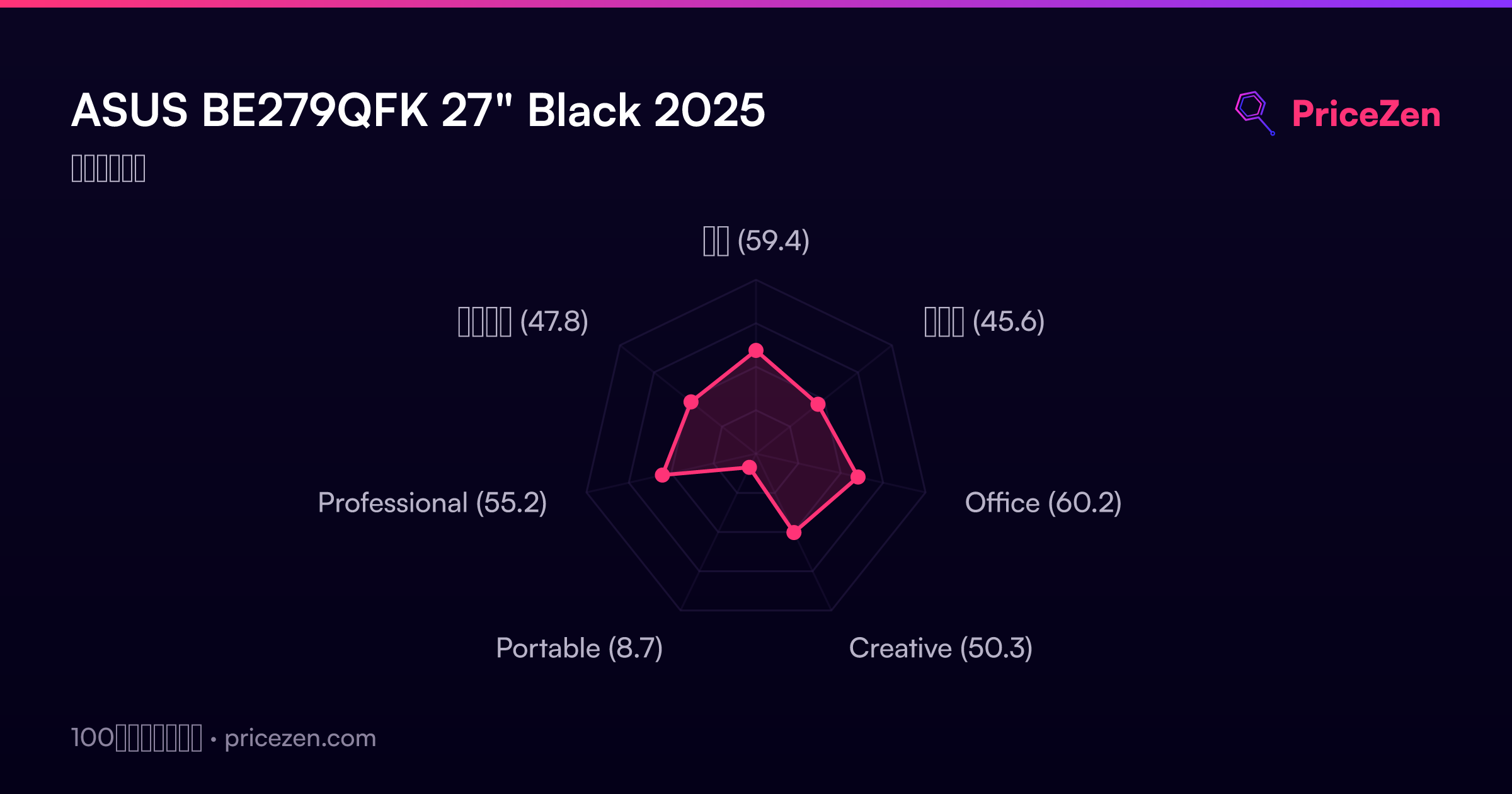
- 総合59.4
- ゲーム45.6
- Office60.2
- Creative50.3
- Portable8.7
- Professional55.2
- エンタメ47.8