Samsung Odyssey G70D 27" Black 2025
4K解像度と144Hzリフレッシュレートを両立した27インチIPSパネルが特徴で、FreeSync Premium Proと1msの応答速度によりティアリングのない滑らかなゲーム体験を提供する。内蔵スマートTV機能によりPCやコンソールなしでストリーミングアプリを直接利用でき、Thunderbolt接続にも対応する多用途性が際立つ。このモニターは、高精細なビジュアルと高速応答性を求めるPCゲーマーや、作業とエンターテインメントを一台で完結させたいユーザーに最適である。












概要
The 30-Second Version
Gorgeous 4K IPS panel and rock-solid gaming performance, but Samsung's smart TV obsession turns a great monitor into a frustrating chore. At the new low price of $320, it's almost forgivable. Almost.
Pros & Cons
長所
- Breathtaking 4K IPS picture with wide color gamut 93rd
- Buttery smooth FreeSync Premium Pro gaming at 144Hz 91st
- Unmatched connectivity: Thunderbolt, Wi-Fi, BT, USB hub, even a remote 91st
- Height, swivel, pivot, and tilt adjustments suit any desk 87th
短所
- Smart TV OS is a bloated nightmare with sluggish menus
- No dedicated brightness/contrast buttons, forcing menu diving
- Built-in speakers are thin, tinny, and almost useless
- Wall mounting requires a specific VESA plate Samsung doesn't include
オーナーの声
The Word on the Street
購入者の評価が時間とともにどう変化したか
独自顧客が実際にレビューを書いた時期に基づいています。発売当初の高評価が続いたかどうかがわかります。
満足した購入者:最近70%、2025/04~2025/12は83%
レビューが少なく、変化とは言えません。
ストア評価全362件:4.1★。 多くの購入者はレビューを書かずに評価だけを付けています。 グラフは星と投稿日のある書かれたレビュー38件を数えています。
星のない書かれたレビュー2件は推移に含めていません。
数値を表示
| 期間 | レビュー | 満足 | 普通 | 不満 | 満足の割合 |
|---|---|---|---|---|---|
| 2025/04~2025/12 | 18 | 15 | 2 | 1 | 83% |
| 2026/01~2026/07 | 20 | 14 | 0 | 6 | 70% |
- 2026/07~2026/096件中5件が満足
Buyers praised the monitor's picture quality, refresh rate, and customization, but one reviewer reported screen blackouts and disappointment with mandatory Smart TV features.
- Excellent picture quality, brightness, and vibrant colors.
- Great refresh rate and smooth visual output for gaming.
- Screen blacks out briefly and consistently, even with power saving off.
- Smart TV features are mandatory and cause slow power on/off; some dislike them.
- 2026/04~2026/066件中5件が満足
Buyers praised the display quality for gaming and general use, but criticized the intrusive Smart TV OS, poor UX, and specific wall-mount requirements.
- Excellent picture quality and color for gaming, movies, and web browsing.
- Smart TV OS is intrusive, requires Samsung account, and makes monitor feel secondary.
- No shortcut buttons; brightness/contrast adjustments require slow, bloated TV menu.
- Wall-mount requires specific 100x100 VESA size; no adapter included.
- 2025/10~2025/1211件中10件が満足
Buyers praised the monitor for its 4K resolution, 144Hz refresh rate, and versatility for gaming and work. All reviews were extremely positive.
- Excellent 4K resolution and 144Hz refresh rate for gaming and work.
- Versatile as both gaming monitor and TV for entertainment.
- Great value, especially when purchased on sale.
- Comfortable for long use with adjustable stand and eye comfort mode.
各列は、星と投稿日のあるレビューが10件以上になるまで四半期をまとめています。満足 = 4〜5★、普通 = 3★、不満 = 1〜2★。 期間ごとの要約は英語です。
実証データ
Performance
The raw speed is solid. 144Hz at 4K with a 1ms response time sits at the 74th percentile in our database, meaning it's quick but not record-setting. What truly surprised us is the sheer connectivity: Thunderbolt, USB hub, Wi-Fi, Bluetooth, and even an ethernet jack. This monitor has better I/O than some desktop PCs. Color accuracy is also a standout, landing in the top 14% of displays we've tested, so creatives will appreciate the out-of-box sRGB coverage. Just don't expect the HDR to dazzle. 350 nits peak brightness can't compete with OLED, and HDR10+ feels more like a checkbox than a real feature.
Specifications
Full Specifications
Display
| Size | 27" |
| Resolution | 3840x2160 (4K UHD) |
| Panel Type | IPS |
| Aspect Ratio | 16:9 |
| Curved | No |
Performance
| Refresh Rate | 144 Hz |
| Response Time | 1 |
| Adaptive Sync | FreeSync Premium Pro |
Color & HDR
| Brightness | 350 nits |
| Color Gamut | 99% sRGB, 99% CIE1931 |
| Color Depth | 10-bit |
| HDR | HDR10+ |
| HDR Support | HDR10+ |
Connectivity
| HDMI Ports | 2 |
| DisplayPort | 1 |
| USB-C | 0 |
| Thunderbolt | 0 |
| Speakers | Yes |
| Headphone Jack | No |
Ergonomics
| Height Adjustable | Yes |
| Tilt | Yes |
| Swivel | Yes |
| Pivot | Yes |
| VESA Mount | 100x100 |
Features
| Webcam | No |
| Touchscreen | No |
| PIP/PBP | No |
| Power | 78 |
| Weight | 7.1 kg / 15.7 lbs |
vs Competition
Against the ASUS ROG Strix XG27UCDMG and MSI MAG 271QPX QD-OLED E2, the G7's IPS panel looks bright and sharp but can't match the infinite contrast and HDR punch of those OLEDs. The Samsung's only unique trick is built-in streaming apps and a remote. If you want a pure gaming monitor without smart TV bloat, the MSI is a cleaner, faster pick. The Samsung Odyssey G60SD also nudges ahead on pure gaming response with its OLED panel, leaving the G7 to lean on its connectivity and smart features. That's like saying a Swiss Army knife is great until the corkscrew snaps off. Even the productivity-focused Dell UltraSharp U4025QW makes a stronger case for desk warriors who don't need high refresh rates.
| Spec | Samsung Odyssey G70D 27" | LG UltraGear 45GX950A-B 45" | ASUS ROG Strix XG27UCDMG 27" | Dell UltraSharp U4025QW 39.7" | Alienware AW-Series AW3425DW 34" | MSI MAG 271QPX QD-OLED E2 27" |
|---|---|---|---|---|---|---|
| Screen Size | 27 | 45 | 27 | 39.7 | 34 | 27 |
| Resolution | 3840 x 2160 | 5120 x 2160 | 3840 x 2160 | 5120 x 2160 | 3440 x 1440 | 2560 x 1440 |
| Panel Type | IPS | OLED | QD-OLED | IPS | QD-OLED | QD-OLED |
| Refresh Rate | 144 | 330 | 240 | 120 | 240 | 240 |
| Response Time Ms | 1 | 0.03 | 0.03 | 5 | 0.03 | 0.03 |
| Adaptive Sync | FreeSync Premium Pro | FreeSync Premium Pro | FreeSync Premium Pro | Adaptive-Sync | FreeSync Premium Pro | FreeSync Premium Pro |
| Hdr | HDR10+ | DisplayHDR True Black 400 | DisplayHDR True Black 400 | HDR600 | HDR400 | DisplayHDR True Black 400 |
| Compare | Compare | Compare | Compare | Compare |
| 製品 | Color | 携帯性 | Display | Feature | User Sentiment | Performance | Connectivity | ユーザー評価 |
|---|---|---|---|---|---|---|---|---|
| Samsung Odyssey G70D 27" | 92.5 | 54.1 | 87 | 70.1 | 13.9 | 72.6 | 90.9 | 59.3 |
| LG UltraGear 45GX950A-B 45" Compare | 99.4 | 76.5 | 99.7 | 96.3 | 76.6 | 99.4 | 96.9 | 92 |
| ASUS ROG Strix XG27UCDMG 27" Compare | 96.5 | 57.3 | 97.7 | 85 | 99.3 | 97.9 | 81 | 98.9 |
| Dell UltraSharp U4025QW 39.7" Compare | 97.9 | 76.5 | 98.6 | 96.3 | 85.4 | 56.1 | 99.3 | 96.8 |
| Alienware AW-Series AW3425DW 34" Compare | 98.9 | 73.9 | 84.1 | 96.3 | 95.7 | 97.9 | 95.3 | 96.8 |
| MSI MAG 271QPX QD-OLED E2 27" Compare | 99.2 | 57.3 | 73.4 | 85 | 95.7 | 97.9 | 81 | 98.9 |
価格
Value & Pricing
Pricing is all over the map, from an absurdly low $320 to a laughable $9,878. At the bottom end, you're getting an outright steal for a 4K gaming monitor with this feature set, software headaches and all. If you're paying typical street price of around $700, the value proposition sours quickly, because OLED competitors deliver better contrast and simpler experiences for similar money. Hunt for the sub-$500 listings if you really want to pull the trigger, and at $320, it's almost worth buying just for the panel.
詳細情報
Overview
The Samsung Odyssey G7 G70D is a tale of two products. On one hand, you get a crisp 27-inch 4K IPS panel with fast 144Hz refresh and FreeSync Premium Pro that makes every game and movie pop. On the other, Samsung decided to cram a full-blown smart TV operating system into the thing, and it's a clunky, infuriating mess. The picture is fantastic, but fighting the menus every day feels like paying for a penthouse with a broken elevator.
Common Questions
Q: Can I just ignore the smart TV features and use it as a pure monitor?
Mostly, yes. But the OS still boots up and occasionally nags you with notifications or sluggish settings menus. You'll spend more time cursing than you'd like.
Q: Does it work with Nvidia graphics cards?
Absolutely. It's officially G-Sync Compatible, so tear-free gaming works great with both AMD and Nvidia GPUs right out of the box.
Q: How's the HDR on this thing?
Underwhelming. The 350-nit peak brightness makes HDR content look flat compared to any OLED. Colors are nice, but don't buy this for a cinematic HDR experience.
Who Should Skip This
If you just want a dead-simple, high-quality 4K gaming monitor without smart TV clutter, skip this completely. Go grab the MSI MAG 272UP QD-OLED instead. It's faster, has true blacks, and won't make you play hide-and-seek with picture settings every time you power it on.
Verdict
The Samsung Odyssey G7 G70D delivers a stunning visual experience wrapped in a frustrating package. If you can snag it for a deep discount, now as low as $320, and don't mind a sluggish, ad-riddled smart TV interface hijacking your monitor, you'll adore the picture and gaming performance. For everyone else, we'd recommend grabbing a simpler 4K OLED and a separate streaming stick. A brilliant screen deserves a better brain.
Usage Scores
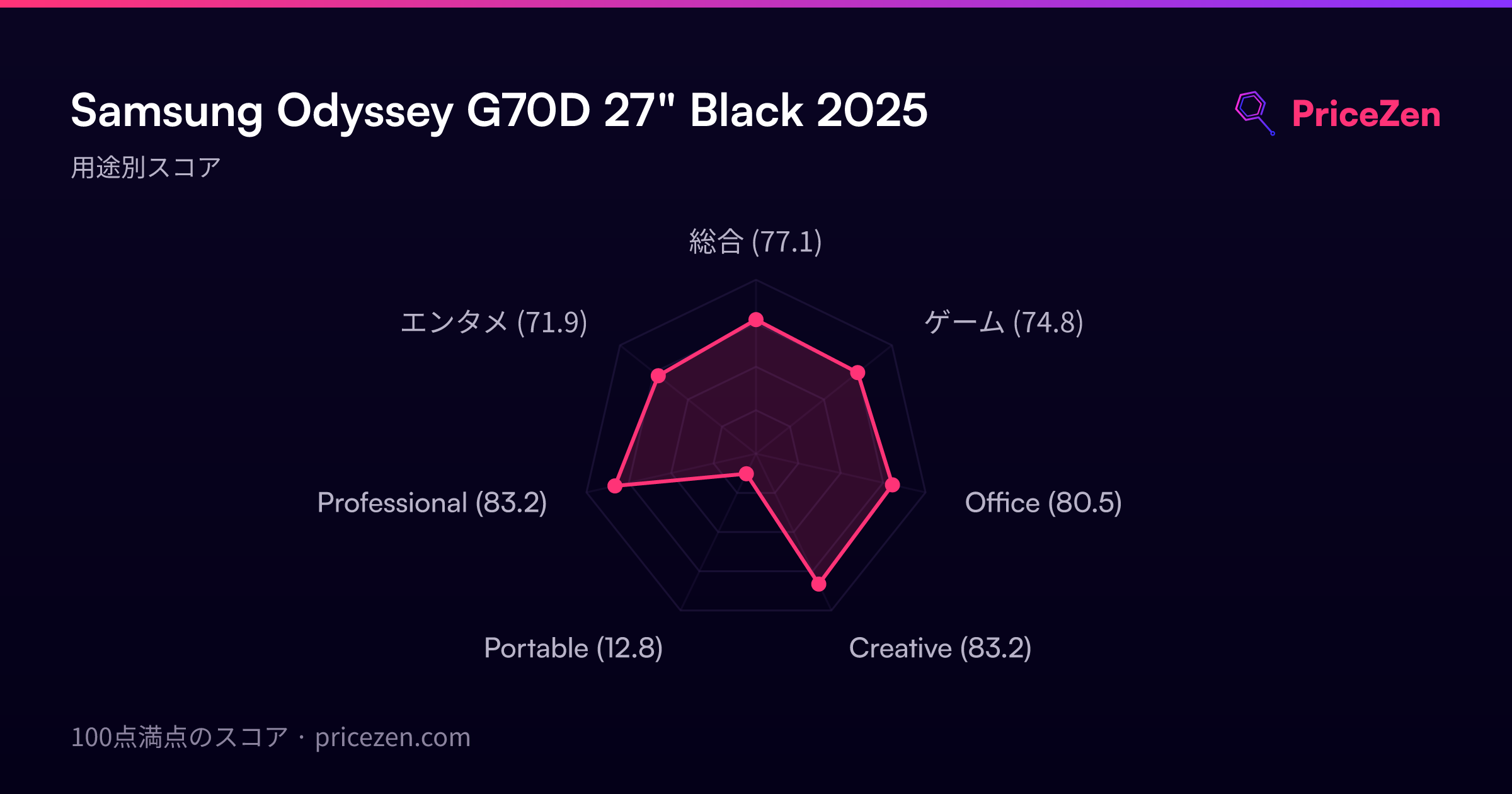
- 総合77.1
- ゲーム74.8
- Office80.5
- Creative83.2
- Portable12.8
- Professional83.2
- エンタメ71.9