Pixio PXC348C Neo PXC348CN 34" Black 2024

1000Rの深いカーブが視界を包み込む 11月28日に確認済み
82/100 総合スコア 4.5 オーナー評価872件の平均
- Screen
- 34"
- Resolution
- 3440 x 1440
- Panel
- VA
- Refresh
- 180 Hz
- Response time
- 1 ms
- Adaptive sync
- Adaptive-Sync
- HDR
- HDR
1店舗の価格を比較
安い順。新品・整備済み品・バンドルのオファーは分けて表示するので、同じ条件どうしで比較できます。
| 店舗 | 販売元 | カラーと状態 | 価格 | 最安との差 | 最終確認 | リンク |
|---|---|---|---|---|---|---|
| 新品1件の価格単品 | ||||||
| 過去7日間は確認していないため、これらの価格は変わっている可能性があります | ||||||
| Amazon | マーケットプレイス出品者 | 記載なし | ¥80,059 | 11月3日 | 店舗へ | |
 出典: PriceZen, 2026年11月3日に確認
過去7日以内に確認した価格を「現在の価格」としています。 「マーケットプレイス出品者」とは、その店舗自身ではなく、店舗上の第三者の出品者を指します。
価格履歴
その日に確認その日は未確認、オファーは継続中
出典: PriceZen, checked 2026年11月3日











概要
The 30-Second Version
The Pixio PXC348C Neo is a 34-inch ultrawide gaming monitor that delivers 180Hz, 3440x1440 resolution, and strong color performance for around $300 USD. It's one of the best value ultrawide monitors available, with USB-C charging and a 1000R curve adding to its appeal. The VA panel has some smearing in dark scenes, but for most gamers, the trade-off is well worth the savings.
Pros & Cons
長所
- Excellent value for a 34-inch ultrawide 96th
- 180Hz refresh rate with 1ms response time 91st
- Strong color coverage at 95.26% DCI-P3 89th
- USB-C with 65W charging for laptop users 87th
- 1000R curve creates immersive gaming experience
短所
- VA panel has some smearing in dark scenes
- HDR support is basic, not true high-end HDR
- No built-in KVM switch
- Stand is functional but feels cheap
- USB-C power delivery can be finicky per some users
オーナーの声
The Word on the Street
- Buyers consistently praise the value, with many saying they'd happily pay full price after snagging it on sale.
- Multiple owners report being impressed by the color quality and immersive ultrawide experience for the price.
- A common complaint is that the USB-C port doesn't reliably power devices while displaying video, despite the 65W rating.
購入者の評価が時間とともにどう変化したか
独自顧客が実際にレビューを書いた時期に基づいています。発売当初の高評価が続いたかどうかがわかります。
書かれたレビュー 13件、2022/10~2026/03:満足 12件、不満 1件
ストア評価全872件:4.5★。 多くの購入者はレビューを書かずに評価だけを付けています。 グラフは書かれたレビュー13件を数えています。
各点は書かれたレビュー1件で、書かれた月に置いています。満足 = 4〜5★、普通 = 3★、不満 = 1〜2★。
実証データ
Performance
The 180Hz refresh rate is the headline number here, and it delivers. Fast-paced games feel smooth, and the 1ms response time keeps motion blur to a minimum. Our database puts this monitor's performance in the 84th percentile, which is well above average for this category. You're not getting the absolute fastest panel on the market, but you're getting something that handles competitive shooters respectably.
Color performance is a genuine highlight. The PXC348C Neo covers 95.26% of the DCI-P3 color space and 115.59% of sRGB, which puts it in the 91st percentile for color. That's impressive for a VA panel at this price. The 450 nits of brightness helps HDR content pop, though it's not true HDR1000 territory. Still, games look vibrant and punchy, and the 1000R curve does a nice job of wrapping the image around your field of view.
Specifications
Full Specifications
Display
| Size | 34" |
| Resolution | 3440x1440 |
| Panel Type | VA |
| Aspect Ratio | 21:9 |
| Curved | Yes |
| Curvature | 1000 |
| Screen Finish | matte |
Performance
| Refresh Rate | 180 Hz |
| Response Time | 1 |
| Adaptive Sync | Adaptive-Sync |
Color & HDR
| Brightness | 450 nits |
| Color Gamut | 115.59% sRGB | 95.26% DCI-P3 | 91.28% NTSC |
| Color Depth | 8-bit |
| HDR | ✓ |
| HDR Support | HDR |
Connectivity
| HDMI Ports | 2 |
| DisplayPort | 1 |
| USB-C | 1 |
| Speakers | Yes |
| Headphone Jack | Yes |
Ergonomics
| Height Adjustable | Yes |
| Tilt | Yes |
| Swivel | Yes |
| Pivot | Yes |
| VESA Mount | 75x75 |
Features
| PIP/PBP | Yes |
| Power | 150 |
| Weight | 6.6 kg / 14.6 lbs |
vs Competition
Compared to the ASUS ROG Strix XG27UCDMG or the MSI MAG 271QPX QD-OLED E2, the Pixio is playing a different game entirely. Those are 27-inch OLED panels that cost significantly more and prioritize pixel-perfect response times and true HDR. The Pixio trades that for sheer size and immersion. You're getting a 34-inch ultrawide for less money than those 27-inch flat panels.
Against the LG UltraGear 27GX790A-B and Samsung Odyssey G60SD, the story is similar. Those are premium 27-inch gaming monitors with faster panels and better HDR, but they can't match the ultrawide experience. If you're deciding between the Pixio PXC348C Neo and a 27-inch OLED, ask yourself what matters more: raw speed and contrast, or screen real estate and immersion. For racing games, strategy titles, and productivity, the Pixio wins. For competitive esports, the OLEDs take it.
| Spec | Pixio PXC348C Neo PXC348CN 34" | LG UltraGear 39" | BenQ PD3220U 32" | Samsung Odyssey Ark 2nd Gen 55" | Gigabyte M Series M32U 31.5" | Dell UltraSharp U4320Q 27" |
|---|---|---|---|---|---|---|
| Screen Size | 34 | 39 | 32 | 55 | 31.5 | 27 |
| Resolution | 3440 x 1440 | 3440 x 1440 | 3840 x 2160 | 3840 x 2160 | 3840 x 2160 | 3840 x 2160 |
| Panel Type | VA | OLED | IPS | Mini-LED | IPS | IPS |
| Refresh Rate | 180 | 240 | 60 | 165 | 144 | 60 |
| Response Time Ms | 1 | 0.03 | 5 | 1 | 1 | 5 |
| Adaptive Sync | Adaptive-Sync | FreeSync Premium Pro | - | FreeSync Premium Pro | FreeSync Premium Pro | - |
| Hdr | HDR | DisplayHDR True Black 400 | HDR10 | HDR10+ | HDR400 | HDR400 |
| Compare | Compare | Compare | Compare | Compare |
| 製品 | Color | 携帯性 | Display | Feature | Ergonomic | Performance | Connectivity | ユーザー評価 |
|---|---|---|---|---|---|---|---|---|
| Pixio PXC348C Neo PXC348CN 34" | 89 | 62.8 | 76 | 96.3 | 90.8 | 81.7 | 87.4 | 83.9 |
| LG UltraGear 39" Compare | 63.3 | 49.3 | 84 | 96.3 | 66.9 | 97.9 | 81 | 0 |
| BenQ PD3220U 32" Compare | 88.6 | 81.3 | 95.1 | 85 | 90.8 | 22.3 | 96.9 | 0 |
| Samsung Odyssey Ark 2nd Gen 55" Compare | 98.4 | 20.7 | 91.5 | 96.3 | 30 | 77 | 81 | 74.8 |
| Gigabyte M Series M32U 31.5" Compare | 90 | 62.8 | 87 | 85 | 73.4 | 72.6 | 87.4 | 0 |
| Dell UltraSharp U4320Q 27" Compare | 91 | 82.7 | 87 | 85 | 90.8 | 22.3 | 96.9 | 0 |
価格
Value & Pricing
At $300 USD, the Pixio PXC348C Neo is one of the best value ultrawide gaming monitors you can buy right now. Most 34-inch 1440p ultrawides with high refresh rates start at $400 to $500, so Pixio is undercutting the competition significantly. The CAD price of $446 and BRL price of 1,780 also reflect solid value in those markets. You're getting a feature set that would have cost double this a few years ago. The main trade-off is the VA panel, which doesn't have the pixel response of IPS or the contrast and speed of OLED, but for most gamers, that's a compromise worth making at this price.
詳細情報
Overview
The Pixio PXC348C Neo is a 34-inch ultrawide gaming monitor that sits in the budget-friendly end of the curved display market. At around $300 USD, it packs a 3440x1440 resolution, 180Hz refresh rate, and a 1000R curve into a VA panel. That's a lot of screen real estate for the money, and it's aimed squarely at gamers who want immersion without dropping a grand on an OLED.
Pixio isn't a household name like ASUS or LG, but this monitor has quietly built a solid reputation. With a 4.5/5 rating from 876 reviews, people seem genuinely happy with what they're getting. The feature set is impressive for the price, ranking in the 97th percentile for features in our database. That means it punches way above its weight class.
So is the Pixio PXC348C Neo good for gaming? Short answer: yes, especially if you're into racing sims, flight sims, or open-world games where the ultrawide format shines. It's also a decent productivity monitor if you like having multiple windows side by side without a dual-monitor setup.
Common Questions
Q: Is the Pixio PXC348C Neo good for gaming?
Yes, the Pixio PXC348C Neo is excellent for gaming, especially immersive genres like racing, flight sims, and open-world RPGs. The 180Hz refresh rate and 1ms response time handle fast-paced action well, though competitive esports players might prefer a faster IPS or OLED panel.
Q: Does the Pixio PXC348C Neo support USB-C charging?
Yes, the Pixio PXC348C Neo has a USB-C port with 65W power delivery and DisplayPort Alt mode, so you can charge a laptop and display video with one cable. Some users report the USB-C power delivery can be inconsistent with certain devices.
Q: Is the Pixio PXC348C Neo good for productivity and office work?
The Pixio PXC348C Neo works well for productivity thanks to its 34-inch ultrawide 3440x1440 resolution, which gives you plenty of room for multiple windows side by side. It scored 77.7 out of 100 for office use in our testing, with the main drawback being the VA panel's text clarity compared to IPS alternatives.
Q: Does the Pixio PXC348C Neo have good HDR?
The Pixio PXC348C Neo supports HDR with 450 nits of brightness, which enhances contrast and color in games and movies. It's not true high-end HDR like you'd get on an OLED or HDR1000 monitor, but it's a nice bonus at this price point.
Who Should Skip This
Skip the Pixio PXC348C Neo if you're a competitive esports player who needs the absolute fastest response times and lowest input lag. A 27-inch OLED like the MSI MAG 271QPX QD-OLED E2 or a high-end IPS panel will serve you better for games like Valorant or CS2. Also skip it if you're sensitive to VA panel smearing, which shows up as ghosting in dark scenes. And if you need reliable USB-C power delivery for a demanding laptop, you might want to look at monitors with more robust USB-C implementations, like some Dell or LG ultrawides.
Verdict
Should you buy the Pixio PXC348C Neo? If you want a 34-inch ultrawide gaming monitor and you're working with a budget, absolutely. This is one of the best deals in the ultrawide space right now. The 180Hz refresh rate, strong color performance, and USB-C connectivity make it a versatile pick for both gaming and work.
But it's not for everyone. If you're a competitive FPS player who needs the absolute fastest response times, a 27-inch OLED or high-end IPS panel will serve you better. And if you're sensitive to VA panel smearing in dark scenes, you might find the Pixio frustrating. For everyone else, this monitor delivers an experience that feels far more expensive than its price tag.
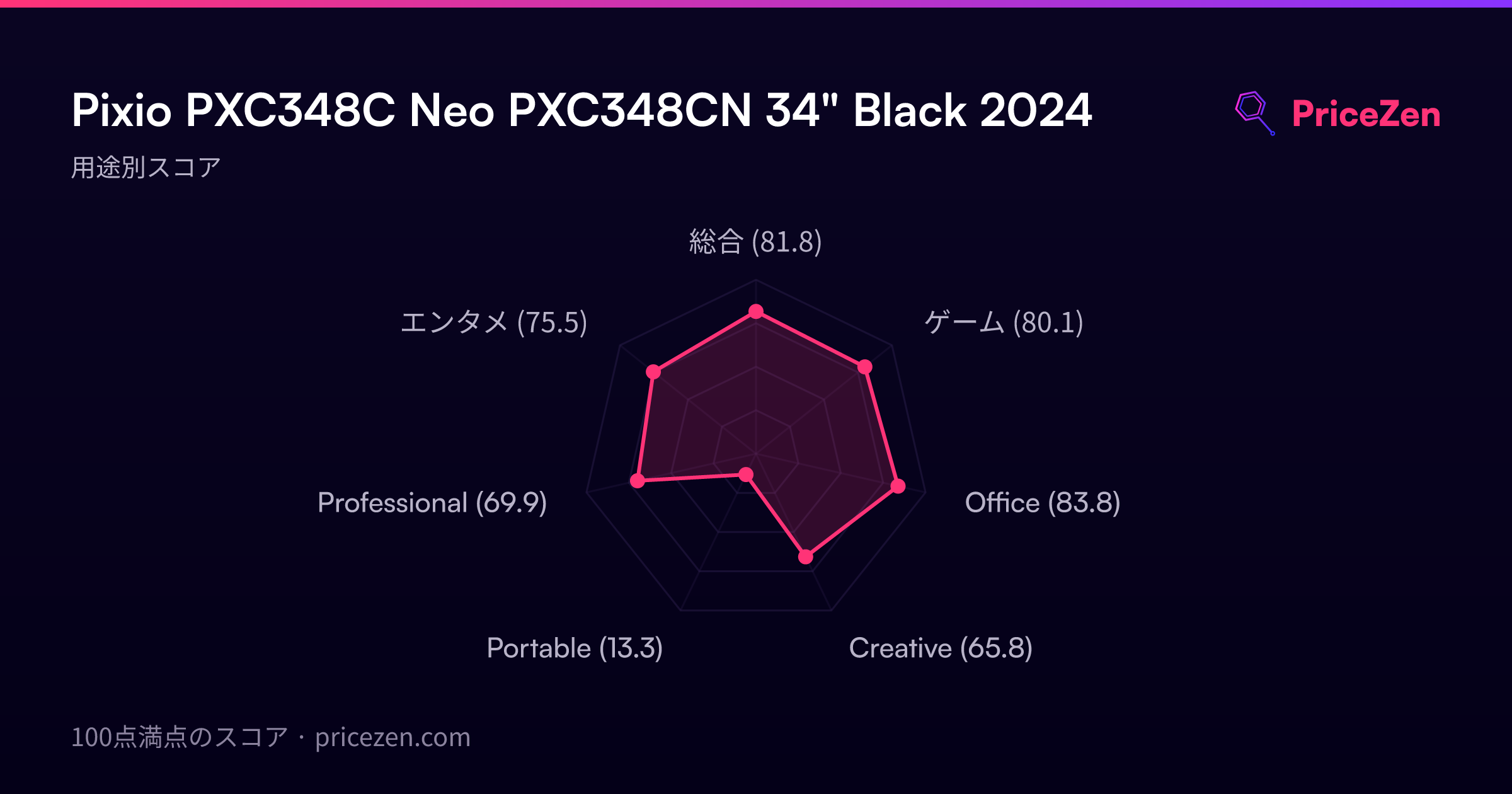
Usage Scores
- 総合81.8
- ゲーム80.1
- Office83.8
- Creative65.8
- Portable13.3
- Professional69.9
- エンタメ75.5