Dell P Series P2419H 24" Black 2018
The 24-inch IPS panel delivers 250 nits of brightness and 8-bit color, paired with a 60Hz refresh rate and 5ms response time for dependable office visuals. Its height-adjustable stand with tilt, swivel, and pivot, plus VESA 100x100 mounting, offers flexible ergonomics, while the 18W power draw keeps energy use low. Best suited for office workers and professionals handling spreadsheets, documents, and everyday multitasking, though its 22.6/100 entertainment score makes it a weak choice for media consumption.

現在、販売店の最新価格はありません






概要
The 30-Second Version
The Dell P2419H is a solid office monitor with a fantastic stand and easy setup. It's not fast or colorful, but at around $210 it's a great value for everyday work. If you need a reliable second screen, this is an easy yes.
Pros & Cons
長所
- Stand is fantastic with height, tilt, swivel, and pivot all included 92nd
- Easy setup and VESA mounting make it painless to get going 91st
- Good picture quality for everyday office tasks 70th
- Excellent value for the price 68th
短所
- Color and brightness are underwhelming compared to modern panels
- No built-in webcam and the thin bezel makes third-party cams tricky
- Daisy chaining is not supported despite some confusion
- A few users report a weird smell out of the box
オーナーの声
The Word on the Street
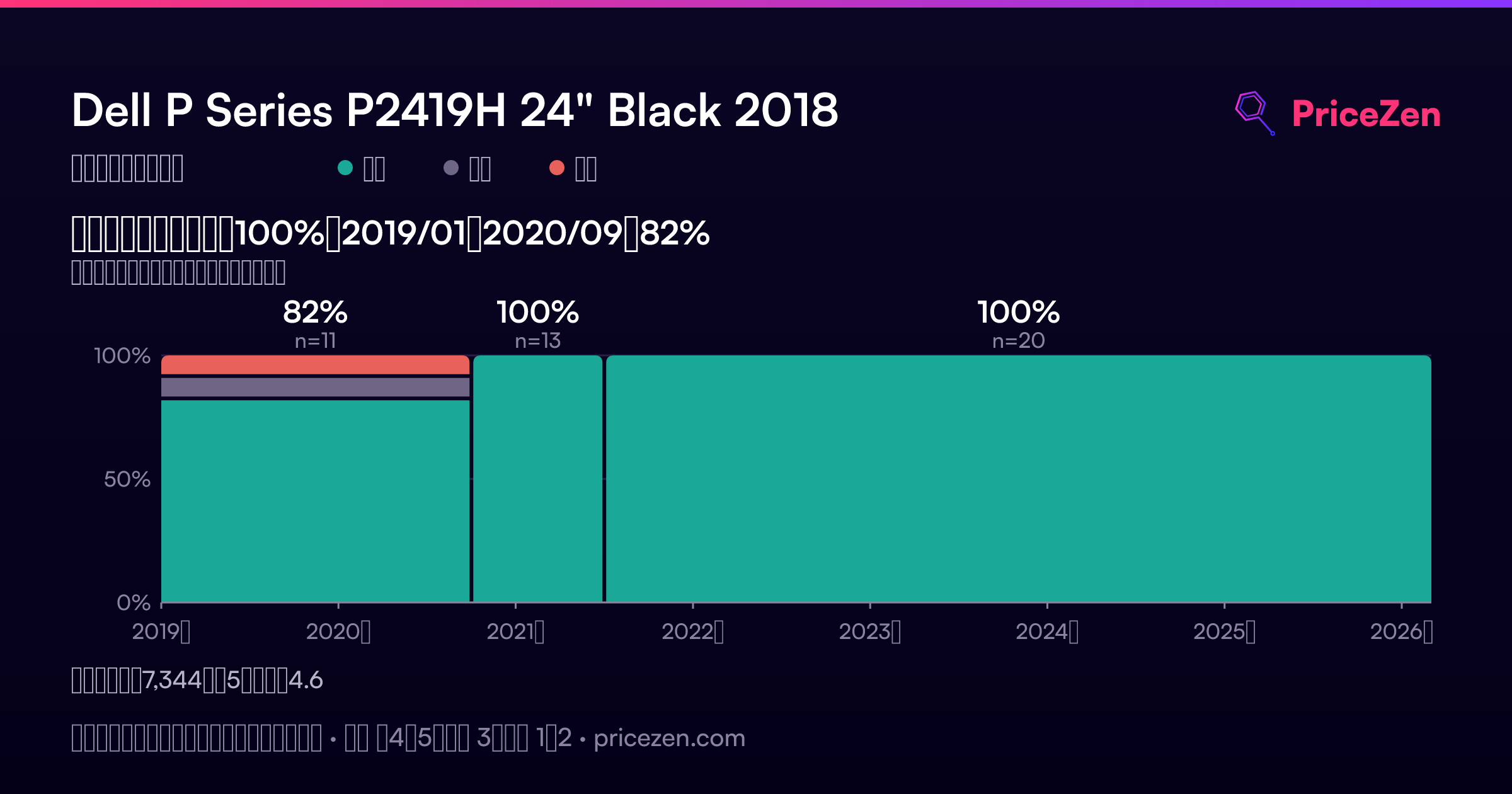
購入者の評価が時間とともにどう変化したか
独自顧客が実際にレビューを書いた時期に基づいています。発売当初の高評価が続いたかどうかがわかります。
満足した購入者:最近100%、2019/01~2020/09は82%
レビューが少なく、変化とは言えません。
ストア評価全7,344件:4.6★。 多くの購入者はレビューを書かずに評価だけを付けています。 グラフは星と投稿日のある書かれたレビュー44件を数えています。
数値を表示
| 期間 | レビュー | 満足 | 普通 | 不満 | 満足の割合 |
|---|---|---|---|---|---|
| 2019/01~2020/09 | 11 | 9 | 1 | 1 | 82% |
| 2020/10~2021/06 | 13 | 13 | 0 | 0 | 100% |
| 2021/07~2026/02 | 20 | 20 | 0 | 0 | 100% |
- 2021/10~2021/123件中3件が満足
Buyers in this period found the monitor reliable and a good value, praising its flexible stand and design. One noted a minor power input issue, while another mentioned resolution differences compared to a higher-end iMac.
- Reliable performance and satisfaction, with one long-term Dell customer praising durability.
- Flexible stand with height, tilt, and rotation adjustments, appreciated by users.
- Good value for the price, especially for Mac mini users.
- Minor power input problem reported by one buyer.
- 2021/04~2021/068件中8件が満足
All reviews are positive, praising easy setup, fast shipping, sharp picture, and good value. Adjustability and portrait mode are also highlighted.
- Easy setup and connections, with quick and well-packed delivery from B&H.
- Sharp picture quality, especially for 4K cameras, and good value for the price.
- Adjustable stand with tilt, height, and portrait mode rotation, appreciated for work use.
- Fast shipping, often faster than expected, and good overall shopping experience.
各列は、星と投稿日のあるレビューが10件以上になるまで四半期をまとめています。満足 = 4〜5★、普通 = 3★、不満 = 1〜2★。 期間ごとの要約は英語です。
実証データ
Performance
This monitor runs at 60Hz with a 5ms response time, which is fine for documents and web browsing but won't impress anyone trying to game. The 250-nit brightness and 8-bit color land in the bottom quarter of our database, so don't expect HDR pop or deep blacks. It's an IPS panel, so viewing angles are decent, but the color performance is a weak spot at the 16th percentile. For office work, it's perfectly serviceable. For anything creative or fast-paced, it falls behind.
Specifications
Full Specifications
Display
| Size | 24" |
| Resolution | 1920x1080 (Full HD) |
| Panel Type | IPS |
| Aspect Ratio | 16:9 |
| Curved | No |
| Screen Finish | matte |
Performance
| Refresh Rate | 60 Hz |
| Response Time | 8 |
Color & HDR
| Brightness | 250 nits |
| Color Gamut | 72% CIE1931 |
| Color Depth | 8-bit |
Connectivity
| HDMI Ports | 1 |
| DisplayPort | 1 |
| USB-C | 0 |
| Thunderbolt | N/A |
| Speakers | No |
| Headphone Jack | No |
Ergonomics
| Height Adjustable | Yes |
| Tilt | Yes |
| Swivel | Yes |
| Pivot | Yes |
| VESA Mount | 100x100 |
Features
| Webcam | No |
| Touchscreen | No |
| PIP/PBP | No |
| Power | 18 |
| Weight | 3.3 kg / 7.2 lbs |
vs Competition
Stacked against the LG UltraGear 27GX790A-B or the ASUS ROG Strix XG27AQDMG, the P2419H looks ancient. Those are high-refresh gaming panels with OLED or fast IPS tech, and they cost significantly more. The Samsung Odyssey G7 G75F and Alienware AW2725D are also in a different league for speed and color. But if you don't need 144Hz or 4K, those monitors are overkill. The P2419H wins on simplicity and price, not performance.
| Spec | Dell P Series P2419H 24" | LG UltraGear 45GX950A-B 45" | ASUS ROG Strix XG27UCDMG 27" | Alienware AW-Series AW3425DW 34" | MSI MAG 271QPX QD-OLED E2 27" | Samsung Odyssey G80SH 32" |
|---|---|---|---|---|---|---|
| Screen Size | 24 | 45 | 27 | 34 | 27 | 32 |
| Resolution | 1920 x 1080 | 5120 x 2160 | 3840 x 2160 | 3440 x 1440 | 2560 x 1440 | 3840 x 2160 |
| Panel Type | IPS | OLED | OLED | QD-OLED | QD-OLED | OLED |
| Refresh Rate | 60 | 330 | 240 | 240 | 240 | 240 |
| Response Time Ms | 8 | 0.029999999329447746 | 0.029999999329447746 | 0.029999999329447746 | 0.029999999329447746 | 0.029999999329447746 |
| Adaptive Sync | - | FreeSync Premium Pro | FreeSync Premium Pro | FreeSync Premium Pro | FreeSync Premium Pro | FreeSync Premium Pro |
| Hdr | - | DisplayHDR True Black 400 | DisplayHDR True Black 400 | HDR400 | DisplayHDR True Black 400 | HDR10+ |
| Compare | Compare | Compare | Compare | Compare |
| 製品 | Color | 携帯性 | Display | Feature | User Sentiment | Performance | Connectivity | ユーザー評価 |
|---|---|---|---|---|---|---|---|---|
| Dell P Series P2419H 24" | 15.5 | 68 | 37.6 | 21.2 | 48 | 6.3 | 70.3 | 92 |
| LG UltraGear 45GX950A-B 45" Compare | 99.4 | 76.6 | 99.7 | 96.3 | 76.4 | 99.4 | 97 | 92 |
| ASUS ROG Strix XG27UCDMG 27" Compare | 96.5 | 57.4 | 97.7 | 85.1 | 99.3 | 97.9 | 81.1 | 98.9 |
| Alienware AW-Series AW3425DW 34" Compare | 98.9 | 74 | 84.1 | 96.3 | 95.7 | 97.9 | 95.4 | 96.8 |
| MSI MAG 271QPX QD-OLED E2 27" Compare | 99.2 | 57.4 | 73.5 | 85.1 | 95.7 | 97.9 | 81.1 | 98.9 |
| Samsung Odyssey G80SH 32" Compare | 94.4 | 49.4 | 99 | 70.2 | 89.2 | 97.9 | 81.1 | 96.8 |
価格
Value & Pricing
At around $210 USD, this monitor is a bargain for what it does. You're getting a reliable IPS panel with a stand that most budget monitors would charge extra for. The lack of modern features like high refresh rates or better color keeps it from being a steal, but for a second screen or a basic office setup, it's hard to beat. If you find it on sale, even better.
詳細情報
Overview
The Dell P2419H is a 24-inch 1080p IPS monitor aimed squarely at office desks, and it nails the basics. You get a crisp enough picture, a stand that actually moves the way you want, and a price that doesn't make your finance team flinch. It's not flashy, but it's dependable.
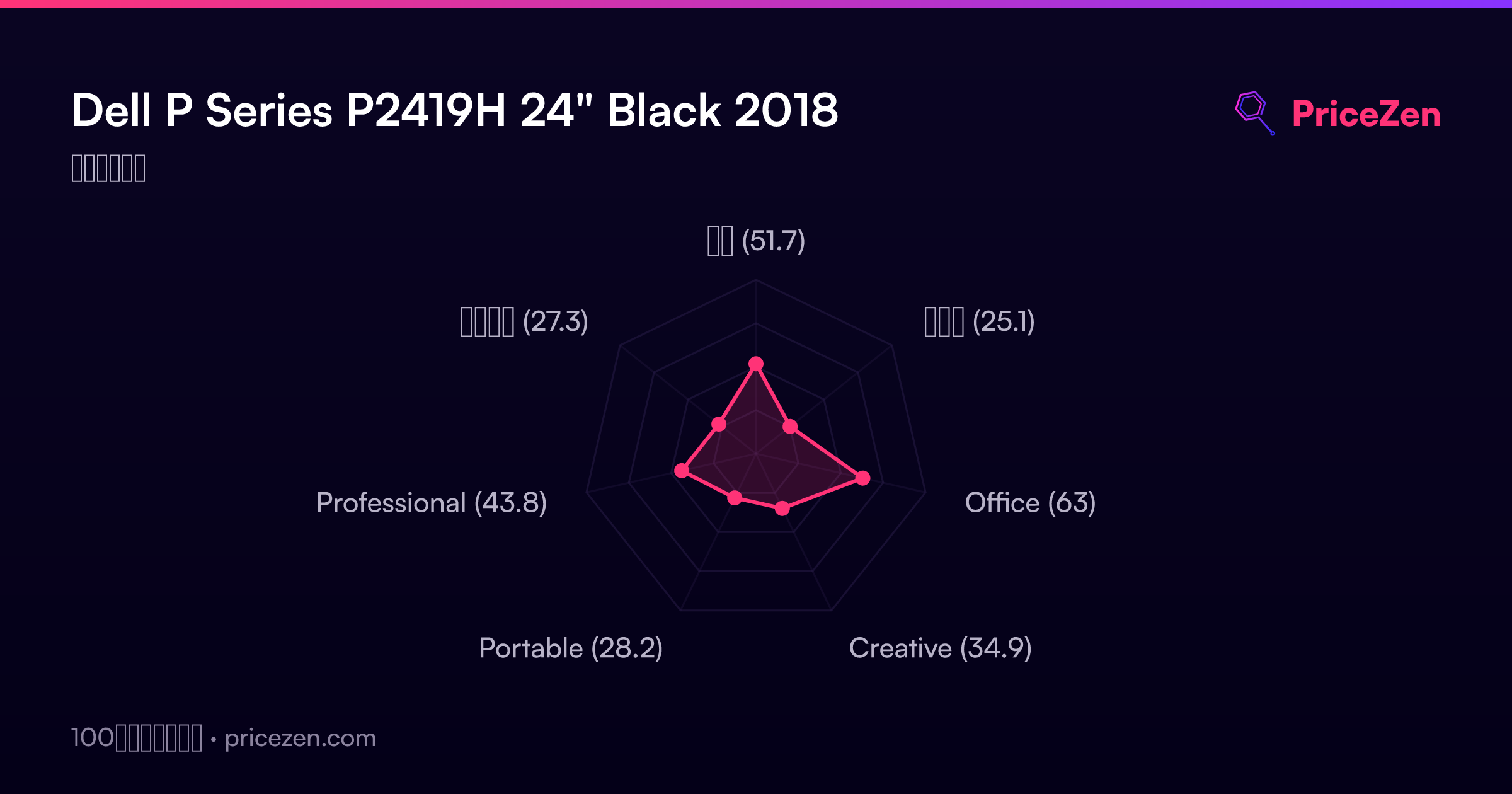
Our database puts it at 30.7 out of 100 overall, which sounds rough until you realize this thing is a workhorse, not a show pony. It's best for office use at 45.7, and the ergonomics are genuinely top-tier at the 91st percentile. If you need a second screen for spreadsheets and email, this is a solid pick.
Common Questions
Q: Can this monitor rotate to portrait mode without a wall mount?
Yes, the included stand supports full pivot rotation, so you can flip it vertical right out of the box.
Q: Does it come with an HDMI cable?
It depends on the seller, but most listings include at least one cable. Check the specific retailer before you buy.
Q: Is there a built-in webcam?
No, there's no webcam. The bezel is thin, so attaching a third-party one can be a bit fiddly.
Who Should Skip This
Skip this if you need high refresh rates for gaming, accurate color for photo or video work, or built-in extras like a webcam. The 60Hz panel and mediocre color performance will frustrate anyone doing more than basic tasks. If you want daisy chaining, look elsewhere because this monitor doesn't support it.
Verdict
Buy this if you need a dependable office monitor that won't break the bank. It's perfect for a second display, a home office upgrade, or anyone who values a good stand over flashy specs. The ergonomics alone make it worth considering, and the picture quality is fine for text and video calls. Just don't expect it to handle gaming or color-critical work.
Usage Scores
- 総合51.7
- ゲーム25.1
- Office63
- Creative34.9
- Portable28.2
- Professional43.8
- エンタメ27.3