Acer SB270 UM.HS0AA.002 27" Black 2024
The 120Hz refresh rate and 1ms response time with FreeSync compatibility deliver smooth, tear-free motion for fast-paced gaming on a budget. Its IPS panel provides consistent colors from wide angles within a zero-frame design, though the 250-nit brightness limits HDR impact. This monitor is best for entry-level gamers and home office users who need a responsive, frameless 27-inch display at an accessible price.

現在、販売店の最新価格はありません











概要
The 30-Second Version
A 120Hz budget monitor that's great for smooth gaming, but Acer forgot to mention it has no speakers and no VESA mount. Know what you're getting into before you buy.
Pros & Cons
長所
- 120Hz refresh rate at this price is a steal 70th
- FreeSync support makes gaming smooth without tearing 68th
- Crisp 1080p picture for basic tasks 67th
- Lightweight at 1361g, easy to move around
短所
- No speakers or audio port, and the listing doesn't make that clear
- No VESA mount without buying an adapter
- Stand only tilts, no height adjustment
- 250 nits brightness is rough in bright rooms
オーナーの声
The Word on the Street
購入者の評価が時間とともにどう変化したか
独自顧客が実際にレビューを書いた時期に基づいています。発売当初の高評価が続いたかどうかがわかります。
書かれたレビュー 10件、2025/02~2026/02:満足 8件、普通 1件、不満 1件
ストア評価全187件:4.3★。 多くの購入者はレビューを書かずに評価だけを付けています。 グラフは書かれたレビュー10件を数えています。
各点は書かれたレビュー1件で、書かれた月に置いています。満足 = 4〜5★、普通 = 3★、不満 = 1〜2★。
実証データ
Performance
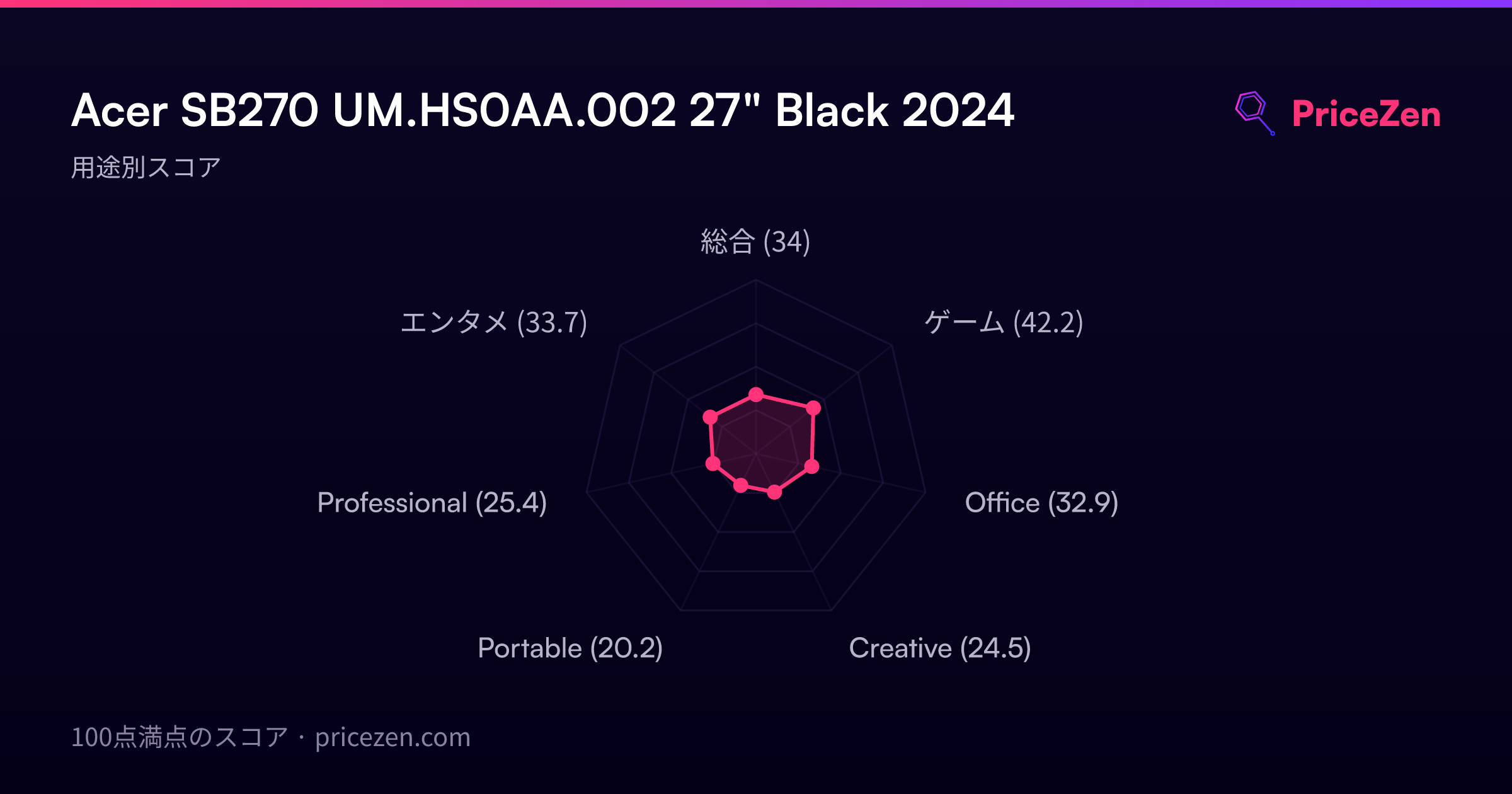
The 120Hz refresh rate is the star here, and it's legitimately smooth for a budget panel. The 1ms VRB response time helps keep motion from turning into a blurry mess during fast scenes. But the 250 nits brightness is a weak spot, landing in the bottom fifth of monitors we track. In a bright room, you'll be squinting. The IPS panel gives you decent viewing angles, but color performance sits near the bottom of the pack. For gaming, it's a solid 44 out of 100 in our database. For office work, it drops to 36.8. This is a monitor that does one thing well: smooth motion on a budget.
Specifications
Full Specifications
Display
| Size | 27" |
| Resolution | 1920x1080 (Full HD) |
| Panel Type | IPS |
| Aspect Ratio | 16:9 |
| Curved | No |
| Screen Finish | matte |
Performance
| Refresh Rate | 120 Hz |
| Response Time | 1 |
| Adaptive Sync | FreeSync |
Color & HDR
| Brightness | 250 nits |
Connectivity
| HDMI Ports | 1 |
Ergonomics
| Tilt | Yes |
Features
| Weight | 1.4 kg / 3.0 lbs |
vs Competition
The LG UltraGear 27G810A-B is the obvious step up if you want better color and build quality, but you'll pay more for it. The ASUS TUF Gaming VG34VQL1B is a different beast entirely, ultrawide and curved, but overkill if you just want a basic 27-inch screen. The BenQ MA Series MA270U and Dell S2725QC both offer 4K resolution, which makes text noticeably sharper for office work, but they cost significantly more and drop the high refresh rate. For pure budget gaming, the Acer holds its own. For everything else, those competitors are better rounded.
| Spec | Acer SB270 UM.HS0AA.002 27" | ASUS ROG Strix XG27UCDMG 27" | LG UltraGear 45GX950A-B 45" | Dell UltraSharp U4025QW 39.7" | Alienware AW-Series AW3425DW 34" | MSI MAG 271QPX QD-OLED E2 27" |
|---|---|---|---|---|---|---|
| Screen Size | 27 | 27 | 45 | 39.7 | 34 | 27 |
| Resolution | 1920 x 1080 | 3840 x 2160 | 5120 x 2160 | 5120 x 2160 | 3440 x 1440 | 2560 x 1440 |
| Panel Type | IPS | OLED | OLED | IPS | QD-OLED | QD-OLED |
| Refresh Rate | 120 | 240 | 330 | 120 | 240 | 240 |
| Response Time Ms | 1 | 0.03 | 0.03 | 5 | 0.03 | 0.03 |
| Adaptive Sync | FreeSync | FreeSync Premium Pro | FreeSync Premium Pro | Adaptive-Sync | FreeSync Premium Pro | FreeSync Premium Pro |
| Hdr | - | DisplayHDR True Black 400 | DisplayHDR True Black 400 | HDR600 | HDR400 | DisplayHDR True Black 400 |
| Compare | Compare | Compare | Compare | Compare |
| 製品 | Color | 携帯性 | Display | Feature | User Sentiment | Ergonomic | Performance | Connectivity | ユーザー評価 |
|---|---|---|---|---|---|---|---|---|---|
| Acer SB270 UM.HS0AA.002 27" | 15.5 | 67.9 | 50.6 | 21.2 | 29.2 | 21.6 | 69.9 | 20.6 | 67.1 |
| ASUS ROG Strix XG27UCDMG 27" Compare | 96.5 | 57.4 | 97.7 | 85 | 99.3 | 90.7 | 97.9 | 81.1 | 98.9 |
| LG UltraGear 45GX950A-B 45" Compare | 99.4 | 76.6 | 99.7 | 96.3 | 76.5 | 90.7 | 99.4 | 96.9 | 92 |
| Dell UltraSharp U4025QW 39.7" Compare | 97.9 | 76.6 | 98.6 | 96.3 | 85.5 | 90.7 | 56.1 | 99.3 | 96.8 |
| Alienware AW-Series AW3425DW 34" Compare | 98.9 | 73.9 | 84.1 | 96.3 | 95.7 | 90.7 | 97.9 | 95.4 | 96.8 |
| MSI MAG 271QPX QD-OLED E2 27" Compare | 99.2 | 57.4 | 73.5 | 85 | 95.7 | 90.7 | 97.9 | 81.1 | 98.9 |
価格
Value & Pricing
At $134 USD, this monitor is a solid deal if you know exactly what you're getting. The 120Hz panel alone makes it worth considering over cheaper 60Hz options. But the missing audio and VESA support mean you might spend extra on adapters or external speakers, which eats into the savings. If you can live without those features, the value is hard to beat. If you can't, you'll feel nickel-and-dimed.
詳細情報
Overview
The Acer SB270 is a budget 27-inch 1080p monitor that punches above its weight for the price. The headline feature is the 120Hz refresh rate with FreeSync support, which is genuinely rare at this price point. But the real story here is what Acer left out: no speakers, no audio port, and no VESA mount without buying an adapter. If you just need a big, smooth screen for basic work and light gaming, this thing delivers. If you expect any audio or mounting flexibility, you'll be annoyed within the first hour.
Common Questions
Q: Does this monitor have built-in speakers?
No, and that's the biggest complaint from buyers. There's no audio port either, so you'll need external speakers or headphones connected to your PC.
Q: Can I mount this on a monitor arm?
Not out of the box. It's not VESA compatible, so you'll need to buy a separate adapter if you want to mount it.
Q: Is 1080p on a 27-inch screen too blurry?
For gaming and video, it's fine. For text-heavy work, you'll notice the pixels more than on a 24-inch 1080p or a 27-inch 1440p. If you do a lot of reading, consider a higher resolution panel.
Who Should Skip This
If you need built-in audio or plan to mount your monitor on an arm, this isn't it. Go grab a monitor with VESA support and speakers instead. If you're doing color-critical work or spend all day reading text, the 1080p resolution and weak color performance will frustrate you. Look at a 1440p or 4K option like the Dell S2725QC.
Verdict
The Acer SB270 is a budget monitor with one great trick: 120Hz at a low price. If you're a casual gamer or just want a big, smooth screen for everyday use, it's a solid buy. But the missing audio and VESA support are real annoyances that Acer should have been upfront about. Buy it for the refresh rate, not for the overall experience.
Usage Scores
- 総合34
- ゲーム42.2
- Office32.7
- Creative24.5
- Portable20.2
- Professional25.5
- エンタメ33.4