Acer V6 Series V176L 17" Black 2019
The 17-inch TN panel runs at 75Hz with a 5ms response time and 250 nits brightness, making motion feel smooth for basic office tasks. Its 1280x1024 SXGA resolution and VGA input keep costs low, while VESA 100x100 mount support saves desk space. This monitor is best for budget-conscious office workers who need a compact secondary display for spreadsheets or email.

現在、販売店の最新価格はありません


概要
The 30-Second Version
The Acer V176L is a 17-inch 5:4 monitor built for legacy applications and compact secondary display setups. It offers a 75Hz refresh rate, 5ms response time, and VESA mounting, but it's VGA-only with a TN panel and weak color performance. Pricing runs $133-$140 in the US, with a wild CAD 178 to CAD 393 spread in Canada, so shop around. Buy it if you need the 5:4 form factor, skip it if you just want a cheap general-purpose monitor.
Pros & Cons
長所
- Perfect 5:4 size for legacy applications that break on widescreens 86th
- Compact footprint works great as a secondary display
- 75Hz refresh rate is a small upgrade over typical 60Hz office panels
- VESA mount compatible for clean desk setups
- Matte ComfyView screen reduces glare in bright rooms
短所
- VGA-only input, no HDMI or DisplayPort
- TN panel with weak color accuracy and narrow viewing angles
- 250 nits brightness struggles in well-lit spaces
- No built-in speakers
- Pricing feels high for technology this old
オーナーの声
The Word on the Street
購入者の評価が時間とともにどう変化したか
独自顧客が実際にレビューを書いた時期に基づいています。発売当初の高評価が続いたかどうかがわかります。
書かれたレビュー 11件、2014/06~2026/04:満足 9件、普通 2件
ストア評価全14件:4.3★。 グラフは書かれたレビュー11件を数えています。
各点は書かれたレビュー1件で、書かれた月に置いています。満足 = 4〜5★、普通 = 3★、不満 = 1〜2★。
実証データ
Performance
The specs here are modest but functional. You get a 75Hz refresh rate and a 5ms response time, which is actually a small step up from the 60Hz you'd expect on a budget office panel. That 75Hz won't blow anyone away, but it makes scrolling and window dragging feel a touch smoother than a basic 60Hz screen. The 5ms response time is fine for office work and web browsing, though you'll see some ghosting if you try to play fast-paced games on it.
The TN panel is the big trade-off. TN panels are known for fast response times and cheap manufacturing, but they also have narrow viewing angles and weaker color reproduction. Our database puts this display's color performance in the 16th percentile, which means it's near the bottom of the pack. The 250 nits of brightness is okay for a dim office but will struggle near bright windows. And the connectivity story is sparse: one VGA input, no HDMI, no DisplayPort. If your computer doesn't have VGA out, you'll need an adapter.
Specifications
Full Specifications
Display
| Size | 17" |
| Resolution | 1280x1024 |
| Panel Type | TN |
| Aspect Ratio | 5:4 |
| Curved | No |
| Screen Finish | matte |
Performance
| Refresh Rate | 75 Hz |
| Response Time | 5 |
Color & HDR
| Brightness | 250 nits |
| Color Gamut | 16.7 Million Colors |
| Color Depth | 16.7 Million Colors |
Connectivity
| HDMI Ports | 0 |
| DisplayPort | 0 |
| USB-C | 0 |
| Speakers | No |
| Headphone Jack | No |
Ergonomics
| Height Adjustable | No |
| Tilt | Yes |
| Swivel | No |
| Pivot | No |
| VESA Mount | 100x100 |
Features
| Webcam | No |
| Touchscreen | No |
| PIP/PBP | No |
| Power | 13 |
| Weight | 2.6 kg / 5.7 lbs |
vs Competition
Stacked against the competition in our database, the V176L is in a strange spot. The LG UltraGear 27G810A-B and ASUS TUF Gaming VG34VQL1B are gaming monitors with high refresh rates and modern panels, but they're also much bigger and much more expensive. The Dell S2725QC is a 27-inch 4K monitor aimed at productivity, with far better color and connectivity. The HP OMEN 27qs G2 and MSI MAG 271QPX QD-OLED are in a completely different league for gaming and media.
But none of those competitors offer a 5:4 aspect ratio, and that's the V176L's entire reason for existing. If you need a non-widescreen display, you're not cross-shopping this against a 27-inch gaming monitor. You're comparing it to other 17-inch 5:4 panels, and there just aren't many left. That scarcity is part of why the price holds up. The trade-off is clear: you give up modern connectivity, color accuracy, and brightness to get a form factor that's nearly extinct.
| Spec | Acer V6 Series V176L 17" | LG UltraGear 45GX950A-B 45" | ASUS ROG Strix XG27UCDMG 27" | Alienware AW-Series AW3425DW 34" | MSI MPG 271QR QD-OLED X50 27" | Gigabyte AORUS FO32U2 32" |
|---|---|---|---|---|---|---|
| Screen Size | 17 | 45 | 27 | 34 | 27 | 32 |
| Resolution | 1280 x 1024 | 5120 x 2160 | 3840 x 2160 | 3440 x 1440 | 2560 x 1440 | 3840 x 2160 |
| Panel Type | TN | OLED | OLED | QD-OLED | QD-OLED | OLED |
| Refresh Rate | 75 | 330 | 240 | 240 | 500 | 240 |
| Response Time Ms | 5 | 0.029999999329447746 | 0.029999999329447746 | 0.029999999329447746 | 0.029999999329447746 | 0.029999999329447746 |
| Adaptive Sync | - | FreeSync Premium Pro | FreeSync Premium Pro | FreeSync Premium Pro | G-Sync Compatible | FreeSync Premium Pro |
| Hdr | - | DisplayHDR True Black 400 | DisplayHDR True Black 400 | DisplayHDR 400 True Black | DisplayHDR True Black 500 | DisplayHDR True Black 400 |
| Compare | Compare | Compare | Compare | Compare |
| 製品 | Color | 携帯性 | Display | Feature | User Sentiment | Ergonomic | Performance | Connectivity | ユーザー評価 |
|---|---|---|---|---|---|---|---|---|---|
| Acer V6 Series V176L 17" | 15.7 | 86.3 | 2.2 | 19.2 | 61 | 47.6 | 39.9 | 6.7 | 21 |
| LG UltraGear 45GX950A-B 45" Compare | 99.4 | 76.5 | 99.7 | 95.7 | 76.4 | 90.8 | 99.4 | 97 | 92.1 |
| ASUS ROG Strix XG27UCDMG 27" Compare | 96.1 | 57.5 | 97.9 | 83.7 | 99.2 | 90.8 | 98 | 81.2 | 98.9 |
| Alienware AW-Series AW3425DW 34" Compare | 99 | 73.9 | 85.7 | 89.7 | 95.7 | 90.8 | 98 | 95.4 | 96.9 |
| MSI MPG 271QR QD-OLED X50 27" Compare | 99.1 | 57.5 | 77.3 | 83.7 | 95.7 | 90.8 | 99.9 | 62.5 | 98.9 |
| Gigabyte AORUS FO32U2 32" Compare | 79.4 | 62.9 | 99.1 | 83.7 | 61 | 90.8 | 98 | 87.6 | 92.1 |
価格
Value & Pricing
Here's where things get tricky. The US pricing sits between $133 and $140, which isn't terrible for a functional monitor, but you're paying for the form factor, not the specs. In Canada, the spread is wild: CAD 178 to CAD 393 across two listings. That's a CAD 215 gap for the exact same panel, which tells me some retailers are banking on buyers not shopping around. If you're in Canada, do yourself a favor and check both listings before you buy. The cheaper one is the obvious choice.
Compared to what else is out there, the value proposition is questionable. For similar money, you can often find a 22 or 24-inch widescreen IPS monitor with better colors, better connectivity, and a more modern feature set. But those don't have the 5:4 aspect ratio, and that's the whole point of this product. You're paying a premium for a niche form factor that's getting harder to find. If you need it, you need it, and the price is what it is.
価格履歴
詳細情報
Overview
The Acer V176L is a bit of a time capsule, and I mean that in the nicest possible way. It's a 17-inch monitor with a 5:4 aspect ratio and a 1280 x 1024 resolution. You don't see these every day anymore. Most of the industry moved to widescreen panels years ago, but Acer keeps this one around for a very specific crowd: people running legacy software, point-of-sale systems, or anyone who just wants a compact second screen that doesn't take over the desk.
Who is this actually for? If you're running old business applications that break on widescreen resolutions, this is a lifesaver. The 5:4 ratio means your software displays the way it was originally designed. It's also a solid pick for a secondary display next to a laptop, where you just need something small for email, chat, or reference docs. The VESA mount compatibility means you can stick it on an arm and keep your desk clean.
But let's be honest about what this isn't. This is not a gaming monitor, not a color-critical display, and definitely not an entertainment screen. Our database puts its entertainment score at 13.7 out of 100, which is rough. The TN panel, the VGA-only input, and the modest 250 nits of brightness all point to one thing: this is a utility monitor, not a showpiece.
Common Questions
Q: Does this monitor have a matte screen or a glossy one?
It has a matte screen. Acer calls it ComfyView, and it's designed to reduce glare and reflections. That makes it a solid choice for offices with overhead lighting or windows behind you, since you won't be fighting your own reflection all day.
Q: What are the physical dimensions of the screen?
The display is 17 inches measured diagonally, with a 5:4 aspect ratio. That means it's noticeably more square than a typical widescreen monitor. The 1280 x 1024 resolution gives you plenty of vertical space for documents and legacy applications, which is exactly why people seek out this form factor.
Q: Can I connect this to a modern laptop that only has HDMI or USB-C?
Not directly. The V176L only has a VGA input, no HDMI or DisplayPort. You'll need an HDMI-to-VGA or USB-C-to-VGA adapter, which are cheap and widely available. Just keep in mind that adapters can sometimes introduce slight signal quality issues, though for a 1280 x 1024 panel it's rarely noticeable.
Q: Does this monitor have built-in speakers?
No, there are no built-in speakers. If you need audio, you'll want to use external speakers or headphones connected to your computer directly. For a secondary display or office setup, this is usually a non-issue, but it's worth knowing before you buy.
Who Should Skip This
If you're looking for a primary monitor for gaming, media consumption, or any kind of color-sensitive work, this is not your monitor. The TN panel's color performance sits in the 16th percentile of our database, and the entertainment score of 13.7 out of 100 tells you everything you need to know. You'd be much happier with a 24-inch IPS panel, which you can often find for similar money.
Also skip this if you don't specifically need the 5:4 aspect ratio. The VGA-only input is a real limitation in 2025, and the 250 nits of brightness will feel dim if your workspace gets a lot of natural light. If you just want a cheap second monitor, look at 22 or 24-inch widescreen options instead. They'll give you better connectivity, better colors, and more screen real estate for roughly the same price.
Verdict
If you're running legacy software that requires a 5:4 display, buy this without hesitation. It's one of the few options left, it works, and the 75Hz refresh rate is a small bonus. The matte screen is genuinely nice for office environments, and the VESA mount makes it easy to position exactly where you need it. Just make sure your computer has VGA out or budget for an adapter.
For everyone else, think carefully. If you just want a small second monitor and don't specifically need the 5:4 ratio, you can probably find a 22-inch widescreen with better specs for similar money. The V176L is a specialty tool, not a general-purpose display. It does its job well, but that job is narrow.
Usage Scores
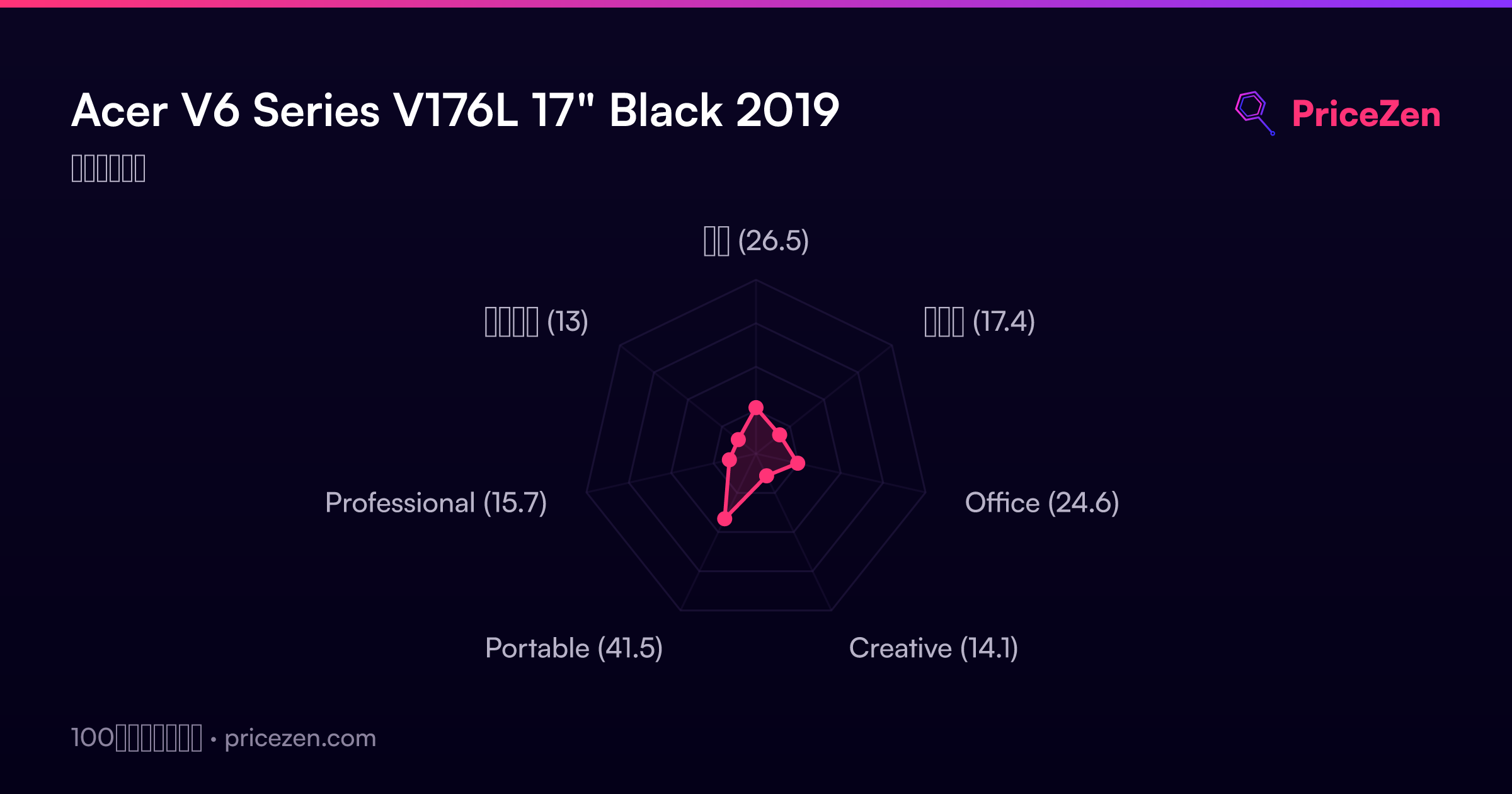
- 総合26.5
- ゲーム17.4
- Office24.6
- Creative14.1
- Portable41.5
- Professional15.7
- エンタメ13