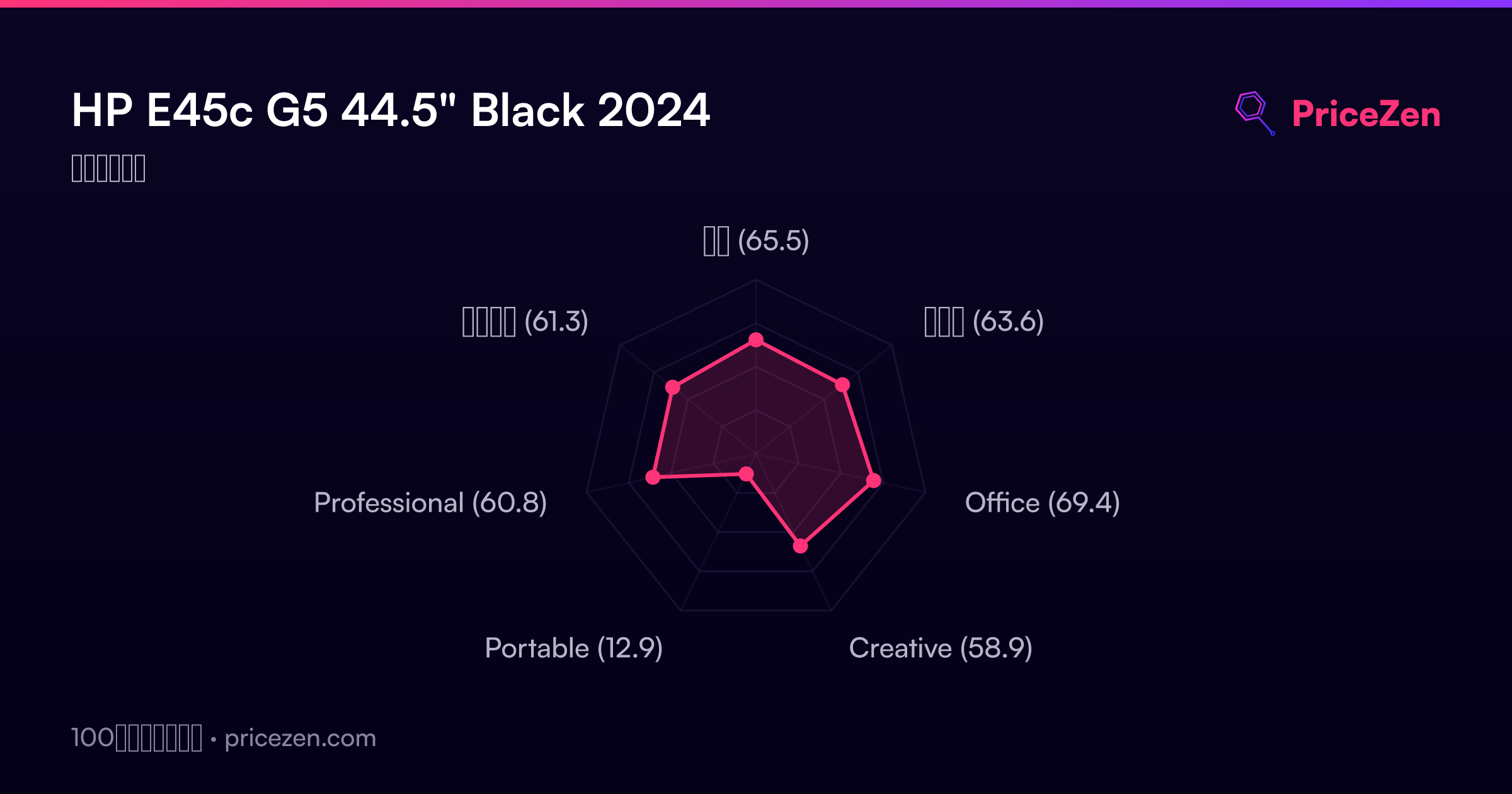
HP E45c G5 44.5" Black 2024
The 44.5-inch Double QHD VA panel with a 165Hz refresh rate and FreeSync Premium eliminates the need for dual monitors while keeping motion smooth. An integrated KVM switch and USB-C with 55W power delivery streamline a multi-device setup, though its 14.6 kg weight anchors it firmly to a desk. This display is best for financial analysts and multitasking office users who need to view massive spreadsheets or multiple sources simultaneously on a single seamless screen.

現在、販売店の最新価格はありません











概要
The 30-Second Version
This is the dual-monitor setup you actually want. Buy it for the seamless workflow and built-in KVM, and enjoy the shockingly good 165Hz refresh rate as a bonus.
Pros & Cons
長所
- A genuine dual 24" monitor replacement with zero bezel gap 98th
- Built-in KVM switch is a game-changer for multi-PC setups 83rd
- 165Hz refresh rate makes everything feel buttery smooth 77th
- Rock-solid connectivity with Thunderbolt, USB-C, and RJ45 74th
短所
- VA panel's vertical viewing angles are just okay
- Setup instructions are an absolute mess out of the box
- You'll almost certainly need to crank up font scaling to 150%
- The built-in 3W speakers are tinny and forgettable
オーナーの声
The Word on the Street
購入者の評価が時間とともにどう変化したか
独自顧客が実際にレビューを書いた時期に基づいています。発売当初の高評価が続いたかどうかがわかります。
書かれたレビュー 10件、2023/07~2025/10:満足 6件、普通 1件、星なし 3件
ストア評価全13件:4.4★。 グラフは書かれたレビュー10件を数えています。
各点は書かれたレビュー1件で、書かれた月に置いています。満足 = 4〜5★、普通 = 3★、不満 = 1〜2★。
実証データ
Performance
We were genuinely surprised by how well this VA panel handles motion. With a 165Hz refresh rate and FreeSync Premium, it's way smoother than any office monitor has a right to be. The 3ms response time keeps ghosting to a minimum, making it totally viable for some after-hours gaming, even if it's not going to dethrone a dedicated OLED gaming display. The real star, though, is the sheer desktop space. Having a document, a spreadsheet, and Slack all open at once without overlapping windows is a workflow revelation.
Specifications
Full Specifications
Display
| Size | 44.5" |
| Resolution | 5120x1440 |
| Panel Type | VA |
| Aspect Ratio | 32:9 |
| Curved | Yes |
| Curvature | 1500 |
| Screen Finish | matte |
Performance
| Refresh Rate | 165 Hz |
| Response Time | 3 |
| Adaptive Sync | FreeSync Premium |
Color & HDR
| Brightness | 400 nits |
| Color Gamut | 99% sRGB |
| Color Depth | 8-bit |
Connectivity
| HDMI Ports | 1 |
| DisplayPort | 1 |
| USB-C | 2 |
| Thunderbolt | N/A |
| Speakers | Yes |
Ergonomics
| Height Adjustable | Yes |
| Tilt | Yes |
| Swivel | Yes |
| Pivot | No |
| VESA Mount | 100x100 |
Features
| Webcam | No |
| Touchscreen | No |
| PIP/PBP | Yes |
| Power | 55 |
| Weight | 14.6 kg / 32.2 lbs |
vs Competition
The obvious competitor is the Samsung Odyssey Neo G9, which is wider at 49 inches and packs a more dramatic 1000R curve, but it's also significantly more expensive and leans harder into gaming. For pure productivity, the Dell UltraSharp U4025QW is a strong alternative with a sharper 5K2K resolution and an IPS panel for better color accuracy, but you sacrifice the high refresh rate and that ultrawide 32:9 aspect ratio. If you want one screen to rule them all for work and play, the HP is the smarter, more balanced pick. That said, the gaming monitor market just got a lot more interesting with the ASUS ROG Strix XG27UCDMG, MSI MAG 271QPX QD-OLED E2, and Samsung Odyssey G60SD all landing in the top 5. Those are 27-inch QD-OLED panels built for speed and contrast, not desk-spanning productivity, so they're not direct rivals. But if your split is 70 percent gaming and 30 percent work, one of those OLEDs will make the HP feel like a compromise.
| Spec | HP E45c G5 44.5" | LG UltraGear 45GX950A-B 45" | ASUS ROG Strix XG27UCDMG 27" | Dell UltraSharp U4025QW 39.7" | MSI MAG 271QPX QD-OLED E2 27" | Alienware AW-Series AW3425DW 34" |
|---|---|---|---|---|---|---|
| Screen Size | 44.5 | 45 | 27 | 39.70000076293945 | 27 | 34 |
| Resolution | 5120 x 1440 | 5120 x 2160 | 3840 x 2160 | 5120 x 2160 | 2560 x 1440 | 3440 x 1440 |
| Panel Type | VA | OLED | OLED | IPS | QD-OLED | QD-OLED |
| Refresh Rate | 165 | 330 | 240 | 120 | 240 | 240 |
| Response Time Ms | 3 | 0.029999999329447746 | 0.029999999329447746 | 5 | 0.029999999329447746 | 0.029999999329447746 |
| Adaptive Sync | FreeSync Premium | FreeSync Premium Pro | FreeSync Premium Pro | Adaptive-Sync | FreeSync Premium Pro | FreeSync Premium Pro |
| Hdr | - | DisplayHDR True Black 400 | DisplayHDR True Black 400 | HDR600 | DisplayHDR True Black 400 | HDR400 |
| Compare | Compare | Compare | Compare | Compare |
| 製品 | Color | 携帯性 | Display | Feature | User Sentiment | Ergonomic | Performance | Connectivity | ユーザー評価 |
|---|---|---|---|---|---|---|---|---|---|
| HP E45c G5 44.5" | 73.2 | 76.6 | 83.2 | 52.9 | 61.1 | 73.5 | 64.5 | 98.2 | 21.6 |
| LG UltraGear 45GX950A-B 45" Compare | 99.4 | 76.6 | 99.7 | 96.3 | 76.5 | 90.8 | 99.4 | 97 | 92 |
| ASUS ROG Strix XG27UCDMG 27" Compare | 96.5 | 57.5 | 97.7 | 85.1 | 99.2 | 90.8 | 97.9 | 81.2 | 98.9 |
| Dell UltraSharp U4025QW 39.7" Compare | 97.9 | 76.6 | 98.6 | 96.3 | 85.6 | 90.8 | 56.1 | 99.3 | 96.8 |
| MSI MAG 271QPX QD-OLED E2 27" Compare | 99.2 | 57.5 | 73.6 | 85.1 | 95.7 | 90.8 | 97.9 | 81.2 | 98.9 |
| Alienware AW-Series AW3425DW 34" Compare | 98.9 | 74 | 84.1 | 90.8 | 95.7 | 90.8 | 97.9 | 95.4 | 96.8 |
価格
Value & Pricing
Pricing on this thing is all over the map, with a wild spread from $999 to $2799 across vendors. At the low end, it's a steal for the screen real estate and KVM features you're getting. At the high end, you're getting fleeced. If you're paying more than $1100, you're doing it wrong. Newegg currently has the best deal we've seen, so start your hunt there.
詳細情報
Overview
The HP E45c G5 is basically the ultimate dual-monitor killer for your desk. It wraps a massive 44.5-inch, 5120x1440 canvas around your field of view, giving you the screen real estate of two 24-inch QHD monitors side-by-side without the annoying bezel in the middle. The one thing to know is that this is a productivity beast first, with a built-in KVM switch and tons of connectivity, that just happens to be surprisingly decent for gaming on the side.
Common Questions
Q: Can I connect two computers and use them at the same time?
Absolutely. That's the whole point of the built-in KVM and Picture-by-Picture mode. You can have your work laptop and gaming PC on screen simultaneously, controlling both with a single keyboard and mouse.
Q: Is this monitor good for gaming?
It's surprisingly solid. The 165Hz refresh rate and FreeSync Premium keep things smooth, and the 3ms response time is fast enough for anything but the most competitive esports. Just don't expect OLED-level contrast.
Q: Will text be too small to read at this resolution?
Out of the box, yes. You'll want to set Windows scaling to 150% to make text comfortable. It's a quick fix, but it's basically mandatory unless you have superhuman vision.
Who Should Skip This
If your heart is set on a single, immersive gaming display with deep blacks and a tight curve, this isn't it. The VA panel is good, but a QD-OLED like the MSI MAG 271QPX QD-OLED E2 or the ASUS ROG Strix XG27UCDMG will blow it away in HDR and response times. Go grab one of those instead.
Verdict
If you're drowning in a multi-monitor mess of cables and bezels, the HP E45c G5 is your lifeline. It's a top-tier productivity monitor that streamlines your entire setup with a brilliant KVM switch and a massive, smooth display. The poor instructions and need for font scaling are minor annoyances in an otherwise fantastic package. For anyone juggling two computers and a dozen windows, this is the monitor to get.
Usage Scores
- 総合65.5
- ゲーム63.6
- Office69.4
- Creative58.9
- Portable12.9
- Professional60.8
- エンタメ61.3