MSI Pro MP242 E14A 23.8" Black 2026

144Hzでゲームがなめらか 11月29日に確認済み
59/100 総合スコア
- Screen
- 23.8"
- Resolution
- 1920 x 1080
- Panel
- IPS
- Refresh
- 144 Hz
- Response time
- 1 ms
- Adaptive sync
- FreeSync
- HDR
- HDR
1店舗の価格を比較
安い順。新品・整備済み品・バンドルのオファーは分けて表示するので、同じ条件どうしで比較できます。
| 店舗 | 販売元 | カラーと状態 | 価格 | 最安との差 | 最終確認 | リンク |
|---|---|---|---|---|---|---|
| 新品1件の価格単品 | ||||||
| 最後の確認時に在庫なし | ||||||
| Amazon | 不明 | 記載なし | 価格なし | 在庫切れ | 不明 | 店舗へ |
 出典: PriceZen
過去7日以内に確認した価格を「現在の価格」としています。 「マーケットプレイス出品者」とは、その店舗自身ではなく、店舗上の第三者の出品者を指します。











概要
The 30-Second Version
The MSI Pro MP242 E14A is a budget 24-inch 1080p monitor with a 144Hz refresh rate and surprisingly good color coverage. It's not going to win any awards for brightness or resolution, but at under $135 it's a solid value. If you want smooth gaming on a tight budget, this is worth a look.
Pros & Cons
長所
- 144Hz refresh rate makes games feel genuinely smooth 81st
- Color coverage is well above average for a budget monitor 73rd
- Thin bezels look clean and work well for multi-monitor setups 70th
- VESA mount support means you can ditch the basic stand 70th
短所
- Only 1080p resolution on a 24-inch panel
- 300 nits brightness is mediocre for HDR content
- Stand only tilts, no height or swivel adjustment
- Built-in speakers are likely an afterthought
オーナーの声
The Word on the Street
- Several owners mention the color accuracy is better than expected for a budget monitor
- A few buyers note the stand is basic and lacks height adjustment
- Some users report the built-in speakers are weak and not worth using
実証データ
Performance
The 144Hz refresh rate and 1ms MPRT response time are the headline acts here, and they deliver for the price. Fast-paced games feel smooth, and Adaptive-Sync keeps tearing at bay whether you're on an AMD or NVIDIA card. The 4ms GtG response is more realistic than the 1ms marketing number, but it's still fine for a budget panel. Color performance is a pleasant surprise, with 121% sRGB and 91% DCI-P3 coverage putting it well above average for this class. Brightness tops out at 300 nits, which is fine for indoor use but won't make HDR content pop. The HDR label is mostly decorative here.
Specifications
Full Specifications
Display
| Size | 23.8" |
| Resolution | 1920x1080 (Full HD) |
| Panel Type | IPS |
| Aspect Ratio | 16:9 |
| Curved | No |
| Screen Finish | matte |
Performance
| Refresh Rate | 144 Hz |
| Response Time | 1 |
| Adaptive Sync | FreeSync |
Color & HDR
| Brightness | 300 nits |
| Color Gamut | 86% Adobe RGB / 91% DCI-P3 / 121% sRGB (CIE 1976) |
| Color Depth | 8-bit |
| HDR | ✓ |
| HDR Support | HDR |
Connectivity
| HDMI Ports | 1 |
| DisplayPort | 1 |
| USB-C | 0 |
| Thunderbolt | No |
| Speakers | Yes |
| Headphone Jack | Yes |
Ergonomics
| Height Adjustable | No |
| Tilt | Yes |
| Swivel | No |
| Pivot | No |
| VESA Mount | 100x100 |
Features
| Webcam | No |
| Touchscreen | No |
| Weight | 4.8 kg / 10.6 lbs |
vs Competition
Stacked against the ASUS TUF Gaming VG27AQL5A or the Acer Nitro XV272U, the MSI gives up resolution and screen size. Those competitors offer 1440p panels and more gaming-focused features, but they also cost significantly more. The Dell S2725QC brings 4K and USB-C, but it's a different class of monitor entirely. The HP OMEN 27qs G2 and Alienware AW3225DM are in another league for gaming performance and price. For under $135, the MSI competes on value more than raw specs, and it holds its own in that arena.
| Spec | MSI Pro MP242 E14A 23.8" | ASUS ROG Strix XG27UCDMG 27" | LG UltraGear 45GX950A-B 45" | Dell UltraSharp U4025QW 39.7" | Alienware AW-Series AW3425DW 34" | Samsung Odyssey G60SD 27" |
|---|---|---|---|---|---|---|
| Screen Size | 23.8 | 27 | 45 | 39.7 | 34 | 27 |
| Resolution | 1920 x 1080 | 3840 x 2160 | 5120 x 2160 | 5120 x 2160 | 3440 x 1440 | 2560 x 1440 |
| Panel Type | IPS | QD-OLED | OLED | IPS | QD-OLED | OLED |
| Refresh Rate | 144 | 240 | 330 | 120 | 240 | 360 |
| Response Time Ms | 1 | 0.03 | 0.03 | 5 | 0.03 | 0.03 |
| Adaptive Sync | FreeSync | FreeSync Premium Pro | FreeSync Premium Pro | Adaptive-Sync | FreeSync Premium Pro | FreeSync Premium Pro |
| Hdr | HDR | DisplayHDR True Black 400 | DisplayHDR True Black 400 | HDR600 | HDR400 | HDR10+ |
| Compare | Compare | Compare | Compare | Compare |
| 製品 | Color | 携帯性 | Display | Feature | Ergonomic | Performance | Connectivity |
|---|---|---|---|---|---|---|---|
| MSI Pro MP242 E14A 23.8" | 70.2 | 62.8 | 21.4 | 70 | 47.1 | 72.6 | 81 |
| ASUS ROG Strix XG27UCDMG 27" Compare | 96.5 | 57.3 | 97.7 | 85 | 90.7 | 97.9 | 81 |
| LG UltraGear 45GX950A-B 45" Compare | 99.4 | 76.5 | 99.7 | 96.3 | 90.7 | 99.4 | 96.9 |
| Dell UltraSharp U4025QW 39.7" Compare | 97.9 | 76.5 | 98.6 | 96.3 | 90.7 | 56 | 99.3 |
| Alienware AW-Series AW3425DW 34" Compare | 98.9 | 73.9 | 84 | 96.3 | 90.7 | 97.9 | 95.3 |
| Samsung Odyssey G60SD 27" Compare | 90.6 | 39.3 | 73.3 | 70 | 90.7 | 99.5 | 87.4 |
価格
Value & Pricing
At $94 to $135, this monitor is a solid deal if you know what you're getting. You're not paying for 4K, USB-C power delivery, or a fancy stand. You're paying for a fast, color-accurate 1080p panel that does the basics well. The connectivity score lands in the 85th percentile for this category, which is impressive at this price. If you need a cheap gaming monitor or a second screen for work, this is easy to recommend.
詳細情報
Overview
The MSI Pro MP242 E14A is a 24-inch 1080p IPS panel that tries to do a little bit of everything. You get a 144Hz refresh rate, 1ms MPRT response, and surprisingly solid color coverage for a budget monitor. At $94 to $135 depending on where you shop, it's aimed at people who want smooth gaming without spending real money.
It's not going to blow anyone away, but it doesn't really need to. The spec sheet reads like a sensible compromise: fast enough for casual gaming, accurate enough for light creative work, and cheap enough that you won't feel bad about it in six months.
Common Questions
Q: Is this monitor good for gaming?
Yes, for casual and mid-level gaming. The 144Hz refresh rate and Adaptive-Sync support keep things smooth, though competitive players may want a faster GtG response time.
Q: Can I mount this monitor on a monitor arm?
Yes, it has a standard VESA 100x100 mount pattern, so most monitor arms will work fine.
Q: Does the HDR actually make a difference?
Not really. At 300 nits peak brightness, HDR content won't look dramatically different from SDR. Think of it as a checkbox feature rather than a selling point.
Who Should Skip This
Skip this if you need 1440p or 4K resolution, since 1080p on a 24-inch panel feels cramped for detailed work. Also skip it if you need a height-adjustable stand out of the box, because the included one only tilts. And if you're a competitive esports player who demands the absolute fastest response times, look for a panel with a better GtG rating.
Verdict
This is a monitor for budget-conscious gamers and anyone who wants a fast, color-accurate 1080p display without spending over $150. It's not for professionals who need 4K resolution or precise color calibration, and it's not for competitive gamers who demand the absolute lowest input lag. But for everyday use, light gaming, and general productivity, it's a genuinely good pick.
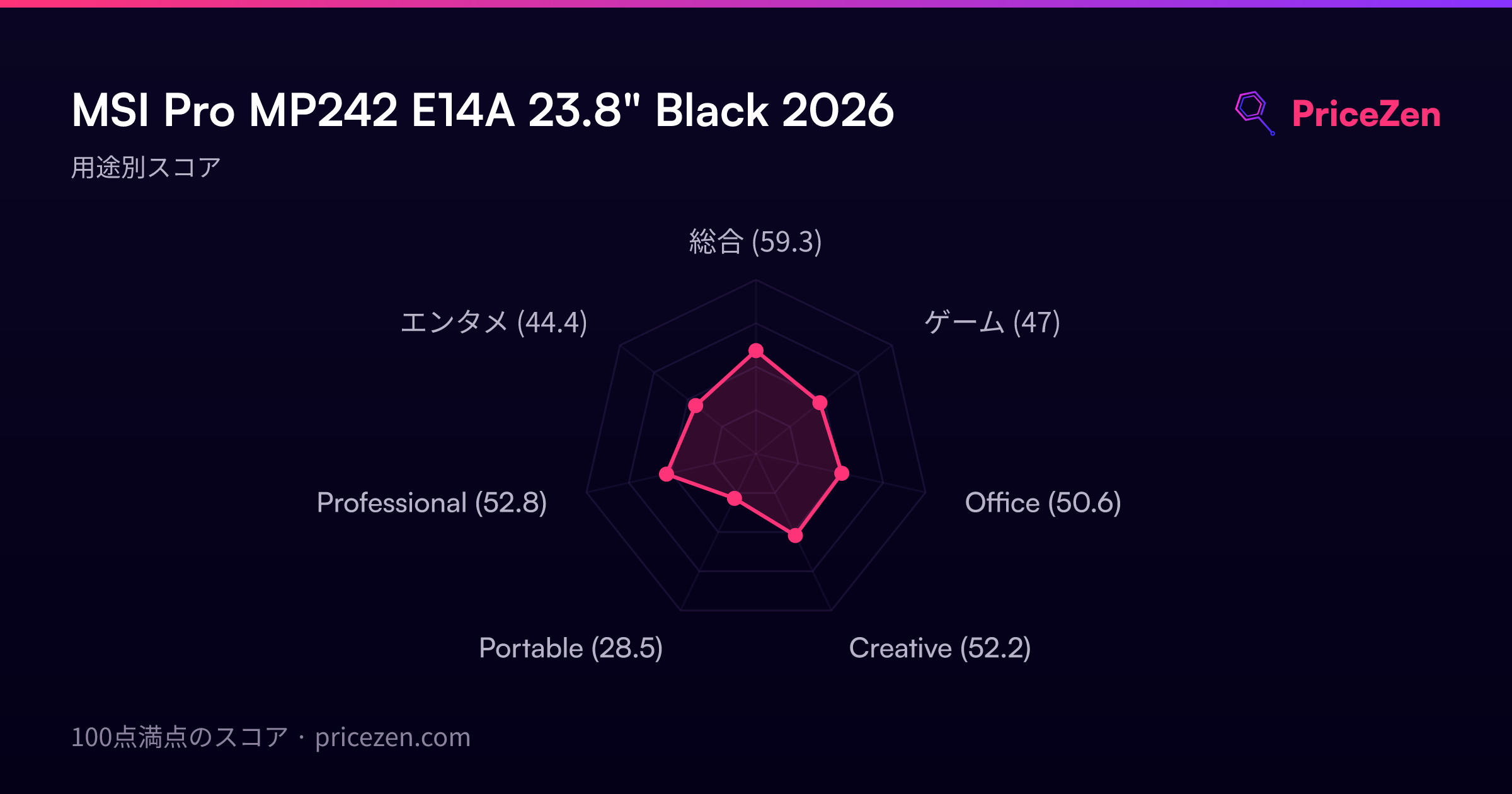
Usage Scores
- 総合59.3
- ゲーム47
- Office50.6
- Creative52.2
- Portable28.5
- Professional52.8
- エンタメ44.4