Lenovo 100e Chromebook 11.6" 83G80000US 2024, Intel N100, 4GB, 32GB eMMC, Graphite Gray
The 0.8 GHz Intel N100 quad-core and 4GB LPDDR5 RAM handle basic classroom tasks and web apps without lag. Its rugged build, 250-nit IPS touchscreen, and Wi-Fi 6 make it durable and practical for daily school use. Best for K-12 students who need a spill-resistant, drop-tolerant Chromebook for Google Classroom and web browsing.

現在、販売店の最新価格はありません











概要
The 30-Second Version
The Lenovo 100e Chromebook Gen 4 is a rugged, budget-friendly school machine built to survive drops, spills, and daily backpack abuse. The Intel N100 and 4GB of RAM handle ChromeOS basics fine, but the 32GB eMMC storage and dim 1366x768 display are real compromises. US pricing starts at USD 289 at Staples, which is a solid deal for a durable classroom device. If you need more power or storage, look elsewhere.
Pros & Cons
長所
- Rugged build with MIL-SPEC 810H testing and spill-resistant keyboard 99th
- Compact and light at 1.23kg, easy for kids to carry 86th
- Wi-Fi 6 and Bluetooth 5.1 keep connections stable in busy classrooms 82nd
- Touchscreen option adds flexibility for younger students
- ChromeOS means automatic updates and built-in virus protection
短所
- 4GB RAM limits multitasking and tab-heavy workflows
- 32GB eMMC storage is slow and fills up quickly
- 1366x768 display with 250 nits and 50% NTSC is dim and washed out
- CPU performance lands in the 16th percentile, fine but not fast
- No USB-C charging on both sides, just one USB-C port total
実証データ
Performance
The Intel N100 is a 4-core chip that boosts up to 3.4GHz, and for a Chromebook at this price, it's fine. Web browsing, Google Docs, YouTube, and basic Android apps run without much fuss. But our database puts this CPU in the 16th percentile for laptops overall, so we're talking about entry-level performance. It's not going to win any races, but ChromeOS is light enough that most students won't notice the ceiling unless they start piling on tabs.
The 4GB of LPDDR5 RAM is the bigger constraint. That lands in the 4th percentile, which is rough. ChromeOS handles memory better than Windows, but 4GB still means you'll feel the squeeze with more than a handful of tabs open. The 32GB eMMC storage is also near the bottom at the 3rd percentile. eMMC is slower than even budget SSDs, and 32GB fills up fast once you start downloading Android apps or offline content. For a cloud-first workflow, it's workable. For anything local, it's tight.
Specifications
Full Specifications
Processor
| CPU | Intel Processor N100 |
| Cores | 4 |
| Frequency | 700 MHz |
| L3 Cache | 6 MB |
Graphics
| GPU | Intel UHD Graphics |
| Type | Integrated |
| VRAM Type | Shared |
Memory & Storage
| RAM | 4 GB |
| RAM Generation | LPDDR5 |
| Storage | 32 GB |
| Storage Type | eMMC |
Display
| Size | 11.6" |
| Resolution | 1366x768 |
| Panel | IPS |
| Refresh Rate | 60 Hz |
| Brightness | 250 nits |
| Color Gamut | 50% NTSC |
Connectivity
| USB-C Ports | 1 |
| USB Ports | 2 |
| HDMI | HDMI 1.4 |
| Wi-Fi | Wi-Fi 6 |
| Bluetooth | Bluetooth 5.1 |
| Ethernet | No |
Physical
| Weight | 1.2 kg / 2.7 lbs |
| Battery | 47 Wh |
| OS | ChromeOS |
vs Competition
The obvious comparison in the Chromebook space is anything from Acer or ASUS in the same price band. The ASUS Vivobook TP3407SA-DS74T is a convertible with more flexibility, though it costs more and isn't built for the same abuse. The HP OmniBook X Flip 14-fm0013dx is another step up in screen size and performance, but again, you're paying for it. The Lenovo 100e Gen 4 wins on durability and price, not on raw specs.
If you're looking at the MacBook Pro MWP72LL/A or the Samsung Galaxy Book4 Edge NP960XMA-KB1US, you're in a completely different universe. Those are premium machines with high-res displays, fast processors, and real storage. They're not competitors in the traditional sense, but they show what you give up when you prioritize ruggedness and cost. The MSI Summit A1MTG-001US is closer in spirit as a business-focused machine, but it's still far more powerful and far more expensive. For a school district buying in bulk, the Lenovo is the pragmatic choice. For an individual who wants a do-everything laptop, it's not.
| Spec | Lenovo 100e Chromebook 11.6" 83G80000US | ASUS ROG Strix G16 Gaming Laptop | MSI Katana Thin 15 | Microsoft Surface Laptop 13.8" EP2-42030 | HP OMEN Transcend 14 | Dell Latitude 14" XPS 13 |
|---|---|---|---|---|---|---|
| CPU | Intel Processor N100 | AMD Ryzen 9 8940HX | Intel Core i9 14900HX | Qualcomm Snapdragon X Plus X1P-64-100 | Intel Core Ultra 9 285H | Intel Core Ultra 7 155U |
| RAM (GB) | 4 | 64 | 32 | 32 | 32 | 64 |
| Storage (GB) | 32 | 4096 | 2048 | 1024 | 1024 | 2048 |
| Screen | 11.6" 1366x768 | 16" 1920x1200 | 15.6" 2560x1600 | 13.8" 2304x1536 | 14" 2880x1800 | 14" 1920x1080 |
| GPU | Intel UHD Graphics | NVIDIA GeForce RTX 5070 Ti | NVIDIA GeForce RTX 5070 | Qualcomm Adreno | NVIDIA GeForce RTX 5070 | Intel Graphics |
| OS | ChromeOS | Windows 11 Pro | Windows 11 Home | Windows 11 Home | Windows 11 Home | Windows 11 Pro |
| Weight (kg) | 1.2 | 2.5 | 1.9 | 1.3 | 1.7 | 1.4 |
| Battery (Wh) | 47 | - | - | - | 71 | - |
| Compare | Compare | Compare | Compare | Compare |
| 製品 | CPU | GPU | RAM | ポート | 画面 | 携帯性 | ストレージ | 信頼性 | ユーザー評価 | Affordability |
|---|---|---|---|---|---|---|---|---|---|---|
| Lenovo 100e Chromebook 11.6" 83G80000US | 16.5 | 28.2 | 4.5 | 48.6 | 8.5 | 99 | 2.5 | 81.8 | 44 | 86 |
| ASUS ROG Strix G16 Gaming Laptop Compare | 95.1 | 96.7 | 97.6 | 83.5 | 76.2 | 12.1 | 98.4 | 60.5 | 87.3 | 5.7 |
| MSI Katana Thin 15 Compare | 93.2 | 93.5 | 79.5 | 74.9 | 86.7 | 43.6 | 93.9 | 60.5 | 59.4 | 14.6 |
| Microsoft Surface Laptop 13.8" EP2-42030 Compare | 72.3 | 13.3 | 79.5 | 58.5 | 84.4 | 89.5 | 65.3 | 81.8 | 97.5 | 22.3 |
| HP OMEN Transcend 14 Compare | 90.1 | 93.5 | 79.5 | 77.8 | 96 | 71.8 | 79.3 | 33.6 | 21.7 | 8.9 |
| Dell Latitude 14" XPS 13 Compare | 53.1 | 69.6 | 95.6 | 89.4 | 50.5 | 80.8 | 93.9 | 33.6 | 57.7 | 50 |
価格
Value & Pricing
Pricing is all over the place depending on where you look. In the US, we're seeing listings from USD 289 to USD 374 across four vendors. That's an USD 85 spread for the same machine, which is wild for a budget Chromebook. Staples has the best deal at the low end, so if you're buying for a school or a single student, that's where we'd point you first. In Europe, the gap is even bigger, with EUR prices ranging from EUR 528 to EUR 715 across Spain, France, and Italy. That EUR 187 difference means shopping around actually matters here.
For what you get, the US pricing feels fair. A rugged Chromebook with a touchscreen, Wi-Fi 6, and all-day battery for under USD 300 is a solid deal. The European pricing is harder to swallow, especially at the high end. At EUR 715, you're dangerously close to much more capable Windows laptops or better-equipped Chromebooks with more RAM and actual SSD storage.
価格履歴
詳細情報
Overview
The Lenovo 100e Chromebook Gen 4 is not trying to impress anyone at a coffee shop. It's a school machine, through and through. Built for classrooms, backpacks, and the occasional drop onto concrete, this 11.6-inch clamshell is all about surviving the chaos of K-12 life while keeping the price tag low enough for district budgets. The Intel N100 chip, 4GB of RAM, and 32GB of eMMC storage are modest, but ChromeOS doesn't need much to feel responsive for web-based work.
What makes this thing interesting is the durability story. Lenovo put it through MIL-SPEC 810H testing, which means it can handle a 76 cm drop onto concrete, 60 kg of force on the lid, and a 360 ml water spill across the keyboard. The anti-pry full-skirt keycaps are a nice touch too, since curious fingers love to pop keys off. For IT admins, the top-load keyboard is serviceable without tearing the whole machine apart.
This is a device for students and schools, not for anyone who wants to edit video or run heavy apps. The touchscreen option, Wi-Fi 6, and claimed 12-hour battery life make it a solid companion for Google Classroom, research, and light creative work. Just don't expect it to do much beyond that.
Common Questions
Q: Is 4GB of RAM enough for a Chromebook?
For basic tasks like Google Docs, web browsing, and video streaming, 4GB is workable on ChromeOS. But it fills up fast if you're a tab hoarder or run Android apps in the background. If you can stretch to an 8GB model, you'll have a much smoother experience, especially a year or two down the road.
Q: How durable is the Lenovo 100e Gen 4 really?
It's built to MIL-SPEC 810H standards, which means it's been tested for drops onto concrete from 76 cm, 60 kg of force on the lid, and 360 ml water spills on the keyboard. The anti-pry keycaps and reinforced ports add extra protection. For a school environment, this is about as tough as budget Chromebooks get.
Q: Can this run Android apps and Linux?
Yes, ChromeOS supports Android apps through the Google Play Store, and Linux can be enabled in developer settings. But with only 32GB of eMMC storage and 4GB of RAM, you'll run out of space and memory quickly if you install much. It's best to stick with web apps and a few lightweight Android apps.
Q: Is the screen good enough for reading and video?
The 11.6-inch 1366x768 IPS panel is fine for reading text and basic video, but it's dim at 250 nits and only covers 50% of the NTSC color gamut. In bright classrooms or near windows, you'll notice the lack of brightness. For a student device, it's acceptable. For media consumption, it's underwhelming.
Who Should Skip This
If you're a high school or college student who needs to run heavier applications, edit video, or keep dozens of tabs open, this machine will frustrate you. The 4GB of RAM and 32GB of eMMC storage are simply too tight for anything beyond light web work. Look for a Chromebook with 8GB of RAM and at least 64GB of SSD storage instead, or consider a budget Windows laptop if you need desktop apps.
Also skip this if you care about screen quality. The 1366x768 resolution and 250-nit brightness are fine for text but rough for anything visual. If you watch a lot of video or work with images, you'll want a Full HD panel with better color coverage. And if you need serious performance for gaming or creative work, this is the wrong tool entirely. The gaming score of 1.7 out of 100 tells you everything you need to know there.
Verdict
For schools and parents of younger kids, the Lenovo 100e Chromebook Gen 4 makes a lot of sense. It's built to survive drops, spills, and the general chaos of student life. The keyboard is spill-resistant up to 360 ml, the ports are reinforced, and the whole thing weighs just 1.23kg. ChromeOS keeps maintenance simple, and the claimed 12-hour battery life means it can get through a full school day without hunting for an outlet.
For anyone else, this is a harder sell. The 4GB of RAM and 32GB of eMMC storage are real limitations if you want to do anything beyond web browsing and Google Docs. The display is dim and low-res, which is fine for reading but rough for anything visual. If you're a student who needs to run heavier apps, edit photos, or keep dozens of tabs open, look for a Chromebook with 8GB of RAM and at least 64GB of storage. This machine is a specialist, and its specialty is surviving school.
Usage Scores
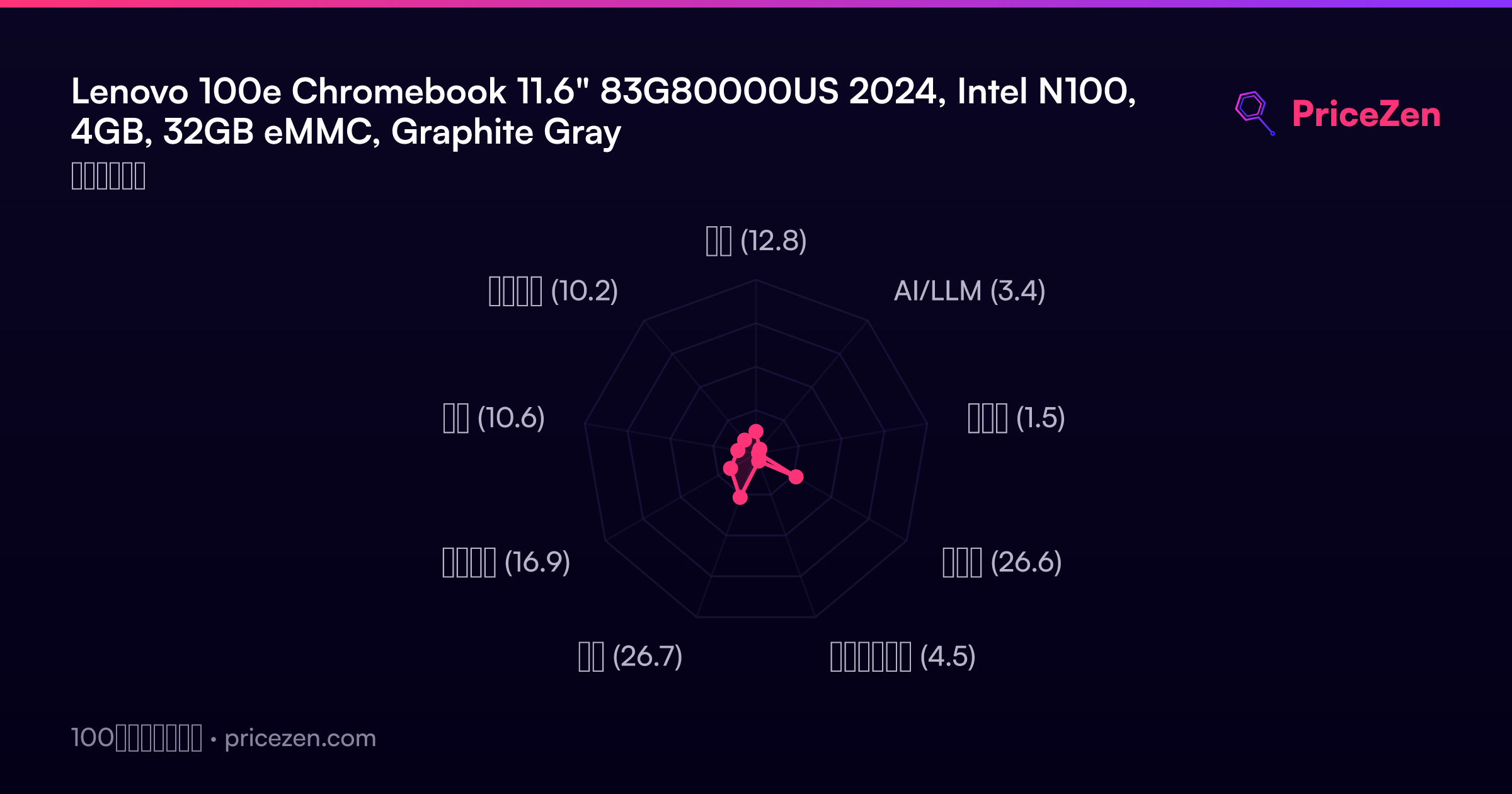
- 総合12.8
- AI/LLM3.4
- ゲーム1.5
- 携帯性26.6
- クリエイター4.5
- 学生26.7
- ビジネス16.9
- 開発10.6
- エンタメ10.2