Dell Inspiron 14" i5440-7783BLK-PUS 2023, Core 7 150U, 16GB, 1TB SSD, Carbon Black

メモリーカードリーダー内蔵 11月28日に確認済み
47/100 総合スコア 4.0 オーナー評価202件の平均
- CPU
- Intel Core 7 150U
- RAM
- 16 GB
- Storage
- 1 TB
- Screen
- 14" 1920x1200
- GPU
- Intel Graphics
- OS
- Windows 11 Home
- Weight
- 1.7 kg











概要
The 30-Second Version
The Dell Inspiron i5440 packs 16GB of RAM and a 1TB SSD into a 14-inch 16:10 laptop, which is a solid spec combo for productivity. But the user sentiment is deeply polarized, with owners reporting excessive fan noise, battery failures, and random crashes alongside praise for speed and value. The 250-nit screen is one of the weakest we've seen in this class. It's worth considering only if you find it on sale and can tolerate the reliability gamble.
Pros & Cons
長所
- 16GB DDR5 RAM handles multitasking well 79th
- 1TB NVMe SSD is generous for this price class 79th
- 16:10 FHD+ display gives extra vertical space 72nd
- Strong social proof with lots of buyer interest
- Good value when found on sale
短所
- User sentiment in the 21st percentile, very polarized
- Screen brightness of 250 nits is weak, 10th percentile
- Fan noise is a recurring complaint from owners
- Reliability score in the 33rd percentile
- Port selection is limited, 29th percentile
オーナーの声
The Word on the Street
- A recurring theme is that owners upgrading from older machines are impressed by the speed and responsiveness, with the 16GB of RAM and fast SSD making everyday tasks feel snappy.
- Fan noise is the most common complaint, with multiple owners describing the fan spinning up loudly for no apparent reason and finding it disruptive during normal use.
- Several verified buyers report hardware failures within the first year, including battery issues, USB ports that stop recognizing devices, and random blue screens even on Linux.
- Value for money is a split theme, with some owners feeling great about the price they paid on sale while others regret the purchase due to build quality and support issues.
購入者の評価が時間とともにどう変化したか
独自顧客が実際にレビューを書いた時期に基づいています。発売当初の高評価が続いたかどうかがわかります。
書かれたレビュー 13件、2024/09~2026/02:満足 9件、普通 1件、不満 3件
ストア評価全202件:4.0★。 多くの購入者はレビューを書かずに評価だけを付けています。 グラフは書かれたレビュー13件を数えています。
各点は書かれたレビュー1件で、書かれた月に置いています。満足 = 4〜5★、普通 = 3★、不満 = 1〜2★。
実証データ
Performance
The Core 7 150U is a 10-core chip with a 1.8GHz base clock. In our database, it lands right around the 51st percentile for CPUs, which is about average for this class of laptop. That means it'll handle everyday tasks like web browsing, document editing, video calls, and light photo work without breaking a sweat. The 16GB of DDR5 RAM helps a lot here, sitting in the 56th percentile, which is solid for multitasking. You can have a dozen browser tabs open, a spreadsheet, and a video call going without the machine grinding to a halt.
The integrated Intel Graphics is where things get limited. It's in the 47th percentile for GPUs, which is fine for basic display output but not much else. Don't expect to play anything beyond casual games or older titles at low settings. The gaming score of 14.5 out of 100 tells you everything you need to know. This is not a gaming laptop, and it's not pretending to be one. The 1TB NVMe SSD is a bright spot though, landing in the 79th percentile for storage. That's a lot of fast space for documents, photos, and apps, and startup times should be snappy.
Specifications
Full Specifications
Processor
| CPU | Intel Core 7 150U |
| Cores | 10 |
| Frequency | 1.8 GHz |
| L3 Cache | 12 MB |
Graphics
| GPU | Intel Graphics |
| Type | Integrated |
Memory & Storage
| RAM | 16 GB |
| RAM Generation | DDR5 |
| Storage | 1 TB |
| Storage Type | NVMe SSD |
Display
| Size | 14" |
| Resolution | 1920x1200 (Full HD) |
| Brightness | 250 nits |
Connectivity
| USB-C Ports | 1 |
| USB Ports | 2 |
| HDMI | HDMI 1.4 |
Physical
| Weight | 1.7 kg / 3.7 lbs |
| OS | Windows 11 Home |
vs Competition
The competitors listed here are mostly gaming and high-performance machines, which makes this comparison a bit odd. The Apple MacBook Pro M4 Max, ASUS ROG Zephyrus G14, and Lenovo Legion Pro 7i are all in a completely different class, both in price and performance. If you're cross-shopping those, the Inspiron isn't really in the same conversation. The MacBook Pro will crush it in display quality, build, and battery life, but you'll pay a lot more for that privilege.
A more realistic comparison would be against other mid-range 14-inch laptops like the HP Pavilion series or Lenovo IdeaPad line. Against those, the Inspiron holds its own on specs, with the 1TB SSD and 16GB RAM being genuine advantages. But the screen brightness of 250 nits is a real weakness. Many competitors in this price range offer 300 nits or brighter panels, which makes a noticeable difference in bright rooms or near windows. The port selection is also thin, with just one USB-C, two USB-A, and HDMI 1.4. If you need to connect multiple modern peripherals, you'll be reaching for a dongle.
| Spec | Dell Inspiron 14" i5440-7783BLK-PUS | Apple MacBook Pro 14.2" M4 Pro | ASUS ROG Zephyrus 14" GA403WW-G14.R95080 | Lenovo Legion Pro 7i Gen 10 16" | HP OMEN Transcend | Samsung Galaxy Book5 Pro 14" NP944XHA-KG3US |
|---|---|---|---|---|---|---|
| CPU | Intel Core 7 150U | Apple M4 Pro | AMD Ryzen AI 9 HX 370 | Intel Core Ultra 9 275HX | Intel Core Ultra 9 285H | Intel Core Ultra 7 258V |
| RAM (GB) | 16 | 48 | 32 | 32 | 32 | 32 |
| Storage (GB) | 1024 | 4096 | 2048 | 1024 | 1024 | 1024 |
| Screen | 14" 1920x1200 | 14.2" 3024x1964 | 14" 2880x1800 | 16" 2560x1600 | 14" 2880x1800 | 14" 2880x1800 |
| GPU | Intel Graphics | Apple (16-Core) | NVIDIA GeForce RTX 5080 | NVIDIA GeForce RTX 5070 Ti | NVIDIA GeForce RTX 5070 | Intel Arc Graphics 140V |
| OS | Windows 11 Home | macOS | Windows 11 Home | Windows 11 Home | Windows 11 Home | Windows 11 Pro |
| Weight (kg) | 1.7 | 1.6 | 1.6 | 2.7 | 1.6 | 1.2 |
| Battery (Wh) | - | 72 | - | 99 | 71 | 63 |
| Compare | Compare | Compare | Compare | Compare |
| 製品 | CPU | GPU | RAM | ポート | 画面 | 携帯性 | ストレージ | User Sentiment | 信頼性 | ユーザー評価 | Affordability |
|---|---|---|---|---|---|---|---|---|---|---|---|
| Dell Inspiron 14" i5440-7783BLK-PUS | 48.4 | 47.9 | 55.8 | 28.4 | 30.7 | 71.8 | 79.3 | 22 | 33.7 | 78.8 | 51.9 |
| Apple MacBook Pro 14.2" M4 Pro Compare | 92.4 | 78.9 | 90.6 | 73.8 | 99.1 | 68.9 | 98.4 | 90.9 | 98.2 | 99.7 | 4.6 |
| ASUS ROG Zephyrus 14" GA403WW-G14.R95080 Compare | 91.2 | 98.3 | 90.8 | 89.4 | 96 | 73.6 | 89.7 | 99.1 | 60.6 | 95.6 | 6.1 |
| Lenovo Legion Pro 7i Gen 10 16" Compare | 97.2 | 96.7 | 89 | 97.3 | 95 | 9.5 | 79.3 | 90.9 | 82 | 99.7 | 5.9 |
| HP OMEN Transcend Compare | 90.1 | 93.5 | 89.7 | 89.4 | 96 | 72.2 | 65.4 | 81.5 | 33.7 | 93.2 | 9 |
| Samsung Galaxy Book5 Pro 14" NP944XHA-KG3US Compare | 65.8 | 69.6 | 79.5 | 83.5 | 90.3 | 89.4 | 79.3 | 0 | 82 | 95.6 | 21.4 |
価格
Value & Pricing
Pricing is a bit tricky here since we don't have a single MSRP to anchor on. What we do see is CAD 1,362 in Canada and MXN 20,450 in Mexico. That's a mid-range price for a mid-range laptop, and the value proposition really depends on whether you catch it on sale. Several owners mention buying it at a discount and feeling great about the purchase. At full price, it's harder to justify given the reliability concerns.
The 1TB SSD and 16GB of RAM are the value highlights. You'd typically pay more for that storage capacity in this segment. But the weak screen and the reliability issues eat into that value. If you're comparing against other 14-inch productivity laptops, you can find options with brighter displays and better build quality for similar money. The affordability score sits at the 56th percentile, so it's not a screaming deal, just average.
詳細情報
Overview
The Dell Inspiron i5440 is one of those laptops that looks great on paper for the price. You get a 14-inch 16:10 FHD+ display, an Intel Core 7 150U with 10 cores, 16GB of DDR5 RAM, and a full terabyte of NVMe storage. That's a solid productivity package for students, office workers, or anyone replacing a machine from five or six years ago. And the social proof is strong here, sitting in the 91st percentile, which means a lot of people are buying and reviewing this thing.
But here's the catch. The user sentiment score lands in the 21st percentile, which is rough. That means real owners are having a very different experience than the spec sheet suggests. Some people love it, calling it fast and a great value when it's on sale. Others are dealing with fan noise that sounds like a jet engine, battery failures, and random blue screens. It's a real gamble, and that's the story of this laptop.
Dell positions this as a productivity machine with military-grade testing and a TPM for security. The 16:10 aspect ratio is genuinely nice for documents and spreadsheets, giving you more vertical space than a standard 16:9 panel. And the 1.67kg weight is reasonable for a 14-inch laptop, though some owners call it heavy. It's a mixed bag, and we'll dig into why below.
Common Questions
Q: Is the Dell Inspiron i5440 good for gaming?
No, not really. The integrated Intel Graphics puts this laptop in the 47th percentile for GPU performance, and the gaming score is just 14.5 out of 100. You can play casual games and older titles at low settings, but anything modern or demanding will struggle. If gaming matters, look at something with a dedicated GPU like the ASUS ROG Zephyrus G14 or Lenovo Legion Pro 7i.
Q: How is the battery life on this laptop?
Battery life is a concern based on owner reports. Several verified reviews mention battery failure after just a few months of use, which is a serious red flag. Dell doesn't publish an official battery life estimate for this model, but the combination of a 10-core processor and a 250-nit display suggests moderate battery life at best. If battery longevity is a priority, this may not be the safest choice.
Q: Is the display bright enough for outdoor use?
The 250-nit brightness is a weak point, landing in the 10th percentile for screens in this category. That's fine for indoor use in normal lighting, but it'll be hard to see in bright rooms or near windows, and outdoor use will be a struggle. If you need a brighter panel, look for laptops with 300 nits or higher, which are common in this price range.
Q: Does this laptop have enough ports for everyday use?
The port selection is limited, with just one USB-C, two USB-A, and HDMI 1.4. That puts it in the 29th percentile for connectivity. For basic use with a mouse and a flash drive, it's workable. But if you need to connect multiple modern peripherals, an external display, and charge at the same time, you'll likely need a USB-C hub or dongle.
Who Should Skip This
If you're sensitive to fan noise, this laptop is probably not for you. The fan complaints are consistent enough that it's clearly a design issue, not a one-off defect. Multiple owners describe the fan spinning up loudly during light tasks, which gets old fast in a quiet office or classroom. You should also skip this if you need a bright screen for working near windows or outdoors. The 250-nit panel is one of the dimmest in this class, and it'll frustrate you in bright environments.
Anyone who needs a reliable machine for work or school should think twice. The reliability score in the 33rd percentile and the reports of battery failures and blue screens suggest this laptop has quality control issues. If your income or grades depend on your laptop working every day, look at a Lenovo IdeaPad or HP Pavilion instead. They offer similar specs with better build quality and fewer reported hardware failures.
Verdict
If you're a student or office worker who needs a basic productivity machine and you can find this on sale, the Inspiron i5440 can work. The 16GB of RAM and 1TB SSD are genuinely useful, and the 16:10 display is nice for reading and writing. The Core 7 150U is capable enough for everyday tasks, and the backlit keyboard is a nice touch for late-night work sessions.
But if you're sensitive to fan noise, need a bright screen for outdoor use, or want a machine that'll last more than a couple of years without issues, look elsewhere. The reliability concerns are real, and the user sentiment score reflects that. This is a laptop that works great for some people and becomes a nightmare for others. That inconsistency is the core problem. For a safer bet, consider a Lenovo IdeaPad or an HP Pavilion with similar specs but better build quality and brighter displays.
Usage Scores
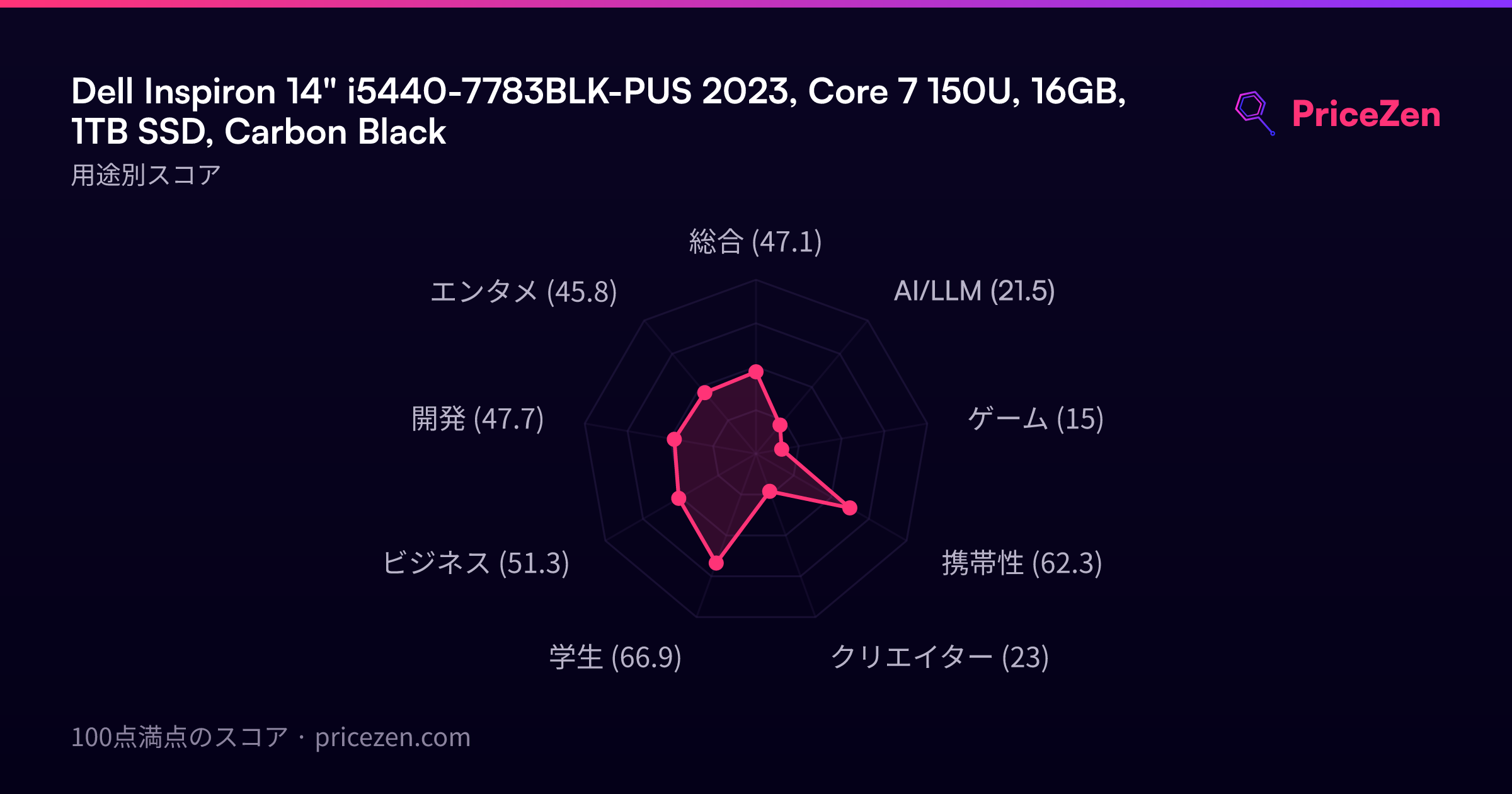
- 総合47.1
- AI/LLM21.5
- ゲーム15
- 携帯性62.3
- クリエイター23
- 学生66.8
- ビジネス51.3
- 開発47.7
- エンタメ45.8