ASUS Vivobook 14" X1404Z 2024, Core i3-1215U, 16GB, 512GB SSD, Quiet Blue
The Intel Core i3-1215U 6-core processor with 16GB DDR4 RAM and a 512GB NVMe SSD handles everyday multitasking and storage needs smoothly. Its 14-inch Full HD IPS display and 1.41kg weight make it a portable option for work or study, though the 42Wh battery is modest. Best for students and business users who need a reliable, budget-friendly Windows 11 Pro laptop for documents, browsing, and light productivity.

現在、販売店の最新価格はありません
概要
The 30-Second Version
The ASUS Vivobook X1404Z is a budget 14-inch laptop with 16GB of RAM and a 512GB SSD, which is more than you usually get at this price. It's great for everyday tasks like browsing, documents, and video calls, but the integrated graphics and lack of a backlit keyboard mean it's not for gamers or heavy users. If you need a solid, lightweight Windows 11 Pro machine without spending much, this is a good pick.
Pros & Cons
長所
- 16GB of RAM is generous for a budget laptop 80th
- 512GB NVMe SSD keeps things snappy
- Solid build quality for the price
- Windows 11 Pro included
- Lightweight at 1.41kg
短所
- No backlit keyboard
- Weak integrated graphics
- Only 42Wh battery, expect modest runtime
- Limited port selection
- Display is just average
オーナーの声
The Word on the Street
購入者の評価が時間とともにどう変化したか
独自顧客が実際にレビューを書いた時期に基づいています。発売当初の高評価が続いたかどうかがわかります。
書かれたレビュー 1件、2026年3月:満足 1件
各点は書かれたレビュー1件で、書かれた月に置いています。満足 = 4〜5★、普通 = 3★、不満 = 1〜2★。
実証データ
Performance
The Core i3-1215U is a low-power chip with 2 performance cores and 4 efficiency cores. In our database, it lands around the 30th percentile for CPUs, which means it's on the weaker side compared to the broader laptop market. But for the intended use case, that's okay. It turbos up to 4.4GHz on the performance cores, so short bursts of activity feel snappy. Don't expect to edit 4K video or run heavy virtual machines on this thing.
The Intel UHD integrated graphics sit at the 37th percentile for GPUs. That's not a gaming setup. You can play older titles, indie games, and maybe some light esports at low settings, but anything modern will struggle. The 16GB of RAM is a genuine highlight here. It's above average for this price range and means you can keep a bunch of browser tabs open without the system grinding to a halt. The 512GB NVMe SSD is about average for storage, but it's fast enough to keep boot times and app launches feeling quick.
Specifications
Full Specifications
Processor
| CPU | Intel Core i3 1215U |
| Cores | 6 |
| Frequency | 1.2 GHz |
| L3 Cache | 10 MB |
Graphics
| GPU | Intel UHD Graphics |
| Type | Integrated |
| VRAM Type | Shared |
Memory & Storage
| RAM | 16 GB |
| RAM Generation | DDR4 |
| Storage | 512 GB |
| Storage Type | NVMe SSD |
Display
| Size | 14" |
| Resolution | 1920x1080 (Full HD) |
| Panel | IPS |
| Refresh Rate | 60 Hz |
Connectivity
| USB-C Ports | 1 |
| USB Ports | 1 |
| HDMI | 1 x HDMI |
| Wi-Fi | Wi-Fi 6 |
| Bluetooth | Bluetooth 5.3 |
Physical
| Weight | 1.4 kg / 3.1 lbs |
| Battery | 42 Wh |
| OS | Windows 11 Home |
vs Competition
Compared to the Apple MacBook Pro M4 Max, this is a completely different universe. The MacBook Pro is a professional workstation with a price tag to match, while the Vivobook is a budget daily driver. The same goes for the Lenovo Legion Pro 7i and MSI Raider, which are gaming and creator machines with dedicated GPUs. The HP OMEN Transcend 14 is also a gaming laptop, so it's not a fair fight.
A more realistic comparison is the Microsoft Surface Laptop 7th Edition. The Surface has a much better display, longer battery life, and a more premium build, but it also costs significantly more. If you're deciding between the two, it comes down to budget. The Vivobook gets you 16GB of RAM and a 512GB SSD for less money, but you give up the nicer screen and backlit keyboard. For students and home users on a tight budget, the Vivobook makes a lot of sense.
| Spec | ASUS Vivobook 14" X1404Z | Apple MacBook Pro 14.2" M4 Max | Lenovo Legion Pro 7i Gen 10 16" | HP OMEN Transcend | Samsung Galaxy Book5 Pro 14" NP944XHA-KG3US | Dell Premium 14.5" LDA14250-7667SLV-PUS |
|---|---|---|---|---|---|---|
| CPU | Intel Core i3 1215U | Apple M4 Max | Intel Core Ultra 9 275HX | Intel Core Ultra 9 285H | Intel Core Ultra 7 258V | Intel Core Ultra 7 255H |
| RAM (GB) | 16 | 64 | 32 | 32 | 32 | 32 |
| Storage (GB) | 512 | 4096 | 1024 | 1024 | 1024 | 1024 |
| Screen | 14" 1920x1080 | 14.2" 3024x1964 | 16" 2560x1600 | 14" 2880x1800 | 14" 2880x1800 | 14.5" 3200x2000 |
| GPU | Intel UHD Graphics | Apple (40-Core) | NVIDIA GeForce RTX 5070 Ti | NVIDIA GeForce RTX 5070 | Intel Arc Graphics 140V | Intel Arc Graphics |
| OS | Windows 11 Home | macOS | Windows 11 Home | Windows 11 Home | Windows 11 Pro | Windows 11 Home |
| Weight (kg) | 1.4 | 1.6 | 2.7 | 1.6 | 1.2 | 1.7 |
| Battery (Wh) | 42 | 72 | 99 | 71 | 63 | 62 |
| Compare | Compare | Compare | Compare | Compare |
| 製品 | CPU | GPU | RAM | ポート | 画面 | 携帯性 | ストレージ | User Sentiment | 信頼性 | ユーザー評価 | Affordability |
|---|---|---|---|---|---|---|---|---|---|---|---|
| ASUS Vivobook 14" X1404Z | 35.7 | 28 | 62.5 | 27.5 | 38.7 | 79.6 | 50.8 | 51.2 | 60.7 | 37 | 0 |
| Apple MacBook Pro 14.2" M4 Max Compare | 93.7 | 91.6 | 95.7 | 73.1 | 99.3 | 68.8 | 98.4 | 99 | 98.3 | 73.3 | 1.7 |
| Lenovo Legion Pro 7i Gen 10 16" Compare | 97.2 | 96.6 | 89 | 97.2 | 95.6 | 9.6 | 79.2 | 90.8 | 82.1 | 99.7 | 5.6 |
| HP OMEN Transcend Compare | 90.1 | 93.5 | 89.7 | 89.2 | 96.5 | 72.3 | 65.1 | 81.2 | 33.6 | 94.2 | 8.5 |
| Samsung Galaxy Book5 Pro 14" NP944XHA-KG3US Compare | 65.7 | 69.6 | 79.4 | 83 | 91.6 | 89.5 | 79.2 | 0 | 82.1 | 96.5 | 20.6 |
| Dell Premium 14.5" LDA14250-7667SLV-PUS Compare | 87 | 69.6 | 89 | 65.8 | 97.2 | 61.2 | 65.1 | 90.8 | 33.6 | 96.5 | 14 |
価格
Value & Pricing
Pricing for this specific configuration isn't listed, but the ASUS Vivobook X1404Z typically sits in the budget to lower-mid range. The 16GB RAM and 512GB SSD combo is what makes this interesting. A lot of laptops in this class ship with 8GB of RAM and a 256GB drive, so getting double both is a real advantage. If you can find this around the $400 to $500 mark, it's a solid deal. If it creeps much higher, you might want to look at something with a better CPU or a backlit keyboard.
詳細情報
Overview
The ASUS Vivobook X1404Z is a 14-inch budget laptop aimed at students, home users, and anyone who needs a basic Windows 11 Pro machine without spending a fortune. It sits in the entry-level price bracket, and the specs reflect that. You get an Intel Core i3-1215U, 16GB of DDR4 RAM, and a 512GB NVMe SSD. That RAM and storage combo is actually more generous than you'd expect at this price, which is nice to see.
Is the ASUS Vivobook X1404Z good for everyday tasks? For web browsing, document editing, video calls, and streaming, yes. The 12th Gen i3 is a 6-core chip with 8 threads, and while it won't win any rendering contests, it handles the basics without feeling sluggish. The 14-inch 1920x1080 IPS display is a standard 60Hz panel. It's not going to blow you away with color accuracy or brightness, but it's perfectly fine for a budget laptop.
One thing to note right away: this specific configuration is professionally upgraded by MichaelElectronics2, so you're getting 16GB of RAM and Windows 11 Pro out of the box. That's a solid value add for a machine in this class. The Quiet Blue color is also a nice touch if you're tired of the usual silver and black slabs.
Common Questions
Q: Does the ASUS Vivobook X1404Z have a backlit keyboard?
No, the ASUS Vivobook X1404Z does not come with a backlit keyboard. If you often type in low light, you'll want to factor that in.
Q: Is the ASUS Vivobook X1404Z good for gaming?
Not really. The Intel UHD integrated graphics are fine for older or indie games, but modern titles will struggle. This is a productivity and everyday-use laptop, not a gaming machine.
Q: How much RAM does the ASUS Vivobook X1404Z have?
This configuration comes with 16GB of DDR4 RAM, which is 8GB onboard plus an 8GB SODIMM. That's plenty for multitasking and everyday use.
Q: Is the ASUS Vivobook X1404Z good for students?
Yes, it's a solid choice for students. It's lightweight, has a full HD display, and the 16GB of RAM handles research, writing, and video calls without breaking a sweat.
Who Should Skip This
Skip the ASUS Vivobook X1404Z if you need a backlit keyboard, plan to do any serious gaming, or want a laptop with long battery life. The 42Wh battery is on the smaller side, so you'll be reaching for the charger more often than you'd like. If you need more graphics power, look at something like the HP OMEN Transcend 14 or a Lenovo Legion. If you want a premium ultrabook experience with a better screen and battery, the Microsoft Surface Laptop 7th Edition is worth the extra money. And if you're a creative professional, the MacBook Pro M4 Max is in a completely different league, both in performance and price.
Verdict
Should you buy the ASUS Vivobook X1404Z? If you need a reliable, lightweight laptop for school, work-from-home tasks, or general everyday use, and you want 16GB of RAM without paying a premium, this is a solid choice. The build quality feels better than you'd expect at this price, and the keyboard is comfortable to type on. The lack of a backlit keyboard is a bummer if you work in dim lighting, but it's not a dealbreaker for everyone.
If you're hoping to game, edit video, or run demanding software, this isn't the laptop for you. The integrated graphics and modest CPU will hold you back. But for the basics, the Vivobook X1404Z does the job without any drama. It's a straightforward, no-nonsense budget laptop that gets the fundamentals right.
Usage Scores
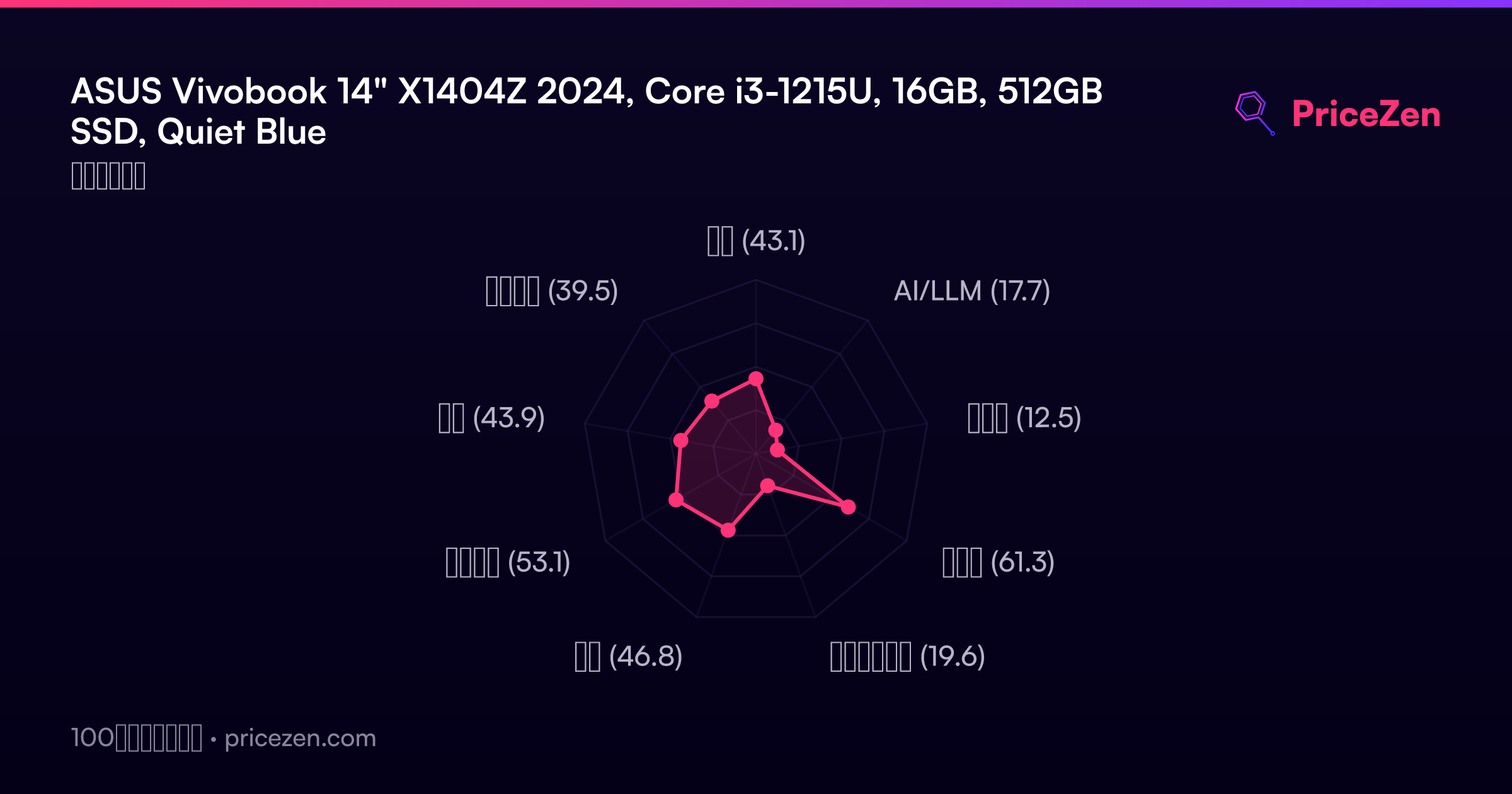
- 総合43.1
- AI/LLM17.7
- ゲーム12.5
- 携帯性61.3
- クリエイター19.6
- 学生46.8
- ビジネス53.1
- 開発43.9
- エンタメ39.5