HP ZBook 14" G1a 2025, Ryzen AI Max PRO 390, 32GB, 2TB SSD, Radeon 8050S

120HzのOLED、なめらかで漆黒 11月28日に確認済み
74/100 総合スコア 4.0 オーナー評価5件の平均
- CPU
- AMD Ryzen AI Max Pro 390
- RAM
- 32 GB
- Storage
- 2 TB
- Screen
- 14" 2880x1800
- GPU
- AMD Radeon 8050S Graphics
- OS
- Windows 11 Pro
- Weight
- 2.5 kg
- Battery
- 74 Wh


概要
The 30-Second Version
The HP ZBook G1a packs a 93rd-percentile CPU and a stunning 120Hz OLED into a compact magnesium body that owners genuinely love. At USD 3,313 it's expensive, and the AI/LLM performance (41.1/100) doesn't match the marketing hype. Buy it for creative work and portable power, skip it if local AI inference is your main goal.
Pros & Cons
長所
- 12-core Ryzen AI Max PRO 390 ranks in the 93rd percentile for CPU performance 95th
- 14" 2880x1800 120Hz OLED with 100% DCI-P3 is a top-tier display (95th percentile) 94th
- 2TB PCIe 4.0 NVMe SSD offers leading storage capacity and speed (94th percentile) 94th
- Owners praise the compact magnesium build and cooling for a machine this powerful 93rd
- Port selection includes Thunderbolt 4, HDMI 2.1, Ethernet, and Wi-Fi 7 (92nd percentile)
短所
- AI/LLM workload score of 41.1 is mediocre despite the AI-focused marketing
- Affordability ranks in the 6th percentile, making this one of the priciest options in its class
- Only 5 reviews exist, giving low confidence in long-term reliability data (34th percentile)
- 32GB RAM config limits local LLM work compared to higher-memory variants owners mention
- Windows/Linux compatibility limitations noted by owners compared to macOS alternatives
オーナーの声
The Word on the Street
- A recurring theme is that the raw performance in such a compact chassis genuinely surprises people, with multiple owners describing it as the most powerful small notebook they've used.
- Build quality gets consistent praise, with owners highlighting the magnesium construction and effective cooling as standout qualities that justify the workstation price tag.
- Some owners note that AI and GPU-dependent workloads don't perform as well as NVIDIA-equipped alternatives, and Windows/Linux compatibility can be limiting compared to macOS for certain workflows.
- Buyers who cross-shopped against MacBook Pro configurations tend to feel the ZBook offers competitive value, particularly for those who need Windows-native software support.
購入者の評価が時間とともにどう変化したか
独自顧客が実際にレビューを書いた時期に基づいています。発売当初の高評価が続いたかどうかがわかります。
書かれたレビュー 5件、2025/12~2026/02:星なし 5件
ストア評価全5件:4.0★。 グラフは書かれたレビュー5件を数えています。
各点は書かれたレビュー1件で、書かれた月に置いています。満足 = 4〜5★、普通 = 3★、不満 = 1〜2★。
実証データ
Performance
Let's talk numbers. The Ryzen AI Max PRO 390 lands in the 93rd percentile for CPU performance across all laptops we track, which puts it among the best mobile processors available right now. That 12-core, 3.2GHz chip paired with 32GB of LPDDR5X running at 8500MHz means heavy multitasking and sustained workloads aren't going to choke this thing. The 2TB PCIe 4.0 NVMe SSD ranks in the 94th percentile for storage, so you're getting both capacity and speed that sit near the top of the market. For video editors scrubbing 4K timelines or developers compiling large codebases, these are the specs that translate directly into shorter wait times.
The Radeon 8050S GPU scores in the 86th percentile, which is strong for integrated graphics but worth contextualizing. Owners report it handles creative workloads and even gaming respectably, and the 81.9 gaming score backs that up. But here's the trade-off: if your workflow depends on CUDA acceleration or you're trying to run large language models locally with maximum throughput, this AMD GPU falls behind NVIDIA-equipped alternatives. The 41.1 AI/LLM score tells that story plainly. The 14" 2880x1800 OLED panel at 120Hz with 100% DCI-P3 coverage is a standout though, ranking in the 95th percentile for display quality. Color-accurate, smooth, and bright enough at 400 nits for most indoor work. Just don't expect to use it comfortably in direct sunlight.
Specifications
Full Specifications
Processor
| CPU | AMD Ryzen AI Max Pro 390 |
| Cores | 12 |
| Frequency | 3.2 GHz |
| L3 Cache | 64 MB |
Graphics
| GPU | AMD Radeon 8050S Graphics |
| Type | Discrete |
Memory & Storage
| RAM | 32 GB |
| RAM Generation | LPDDR5X |
| Storage | 2 TB |
| Storage Type | NVMe SSD |
Display
| Size | 14" |
| Resolution | 2880x1800 |
| Panel | OLED |
| Refresh Rate | 120 Hz |
| Brightness | 400 nits |
| Color Gamut | 100% DCI-P3 |
Connectivity
| USB-C Ports | 3 |
| USB Ports | 1 |
| Thunderbolt | Thunderbolt 4 |
| HDMI | HDMI 2.1 |
| Wi-Fi | Wi-Fi 7 |
| Bluetooth | Bluetooth 5.4 |
| Ethernet | No |
Physical
| Weight | 2.5 kg / 5.6 lbs |
| Battery | 74 Wh |
| OS | Windows 11 Pro |
vs Competition
The Apple MacBook Pro 14.2" M4 Max is the obvious cross-shop here. Owners specifically mention comparing the ZBook against MacBook configurations and finding HP's pricing competitive. Where the ZBook wins on paper: the 120Hz OLED touchscreen, the port selection with full-size HDMI 2.1 and Ethernet, and Windows 11 Pro compatibility. Where it gives ground: the AI/LLM score suggests Apple's unified memory architecture may handle certain ML workloads more efficiently, and owners note macOS compatibility advantages for some workflows. If you're locked into Apple's software world, the MacBook is the safer bet. If you need Windows-native tools or want that OLED touch panel, the ZBook earns its spot.
Against the ASUS ROG Zephyrus 14" and Lenovo Legion Pro 7i Gen 10, the ZBook trades raw gaming GPU power for a better display and more professional build. The gaming score of 81.9 is strong, but those machines are purpose-built for GPU-heavy tasks with discrete NVIDIA hardware. The Samsung Galaxy Book5 Pro 14" and Dell Premium 14.5" compete more on portability and mainstream productivity, where the ZBook's workstation-class CPU and 2TB storage give it a clear edge for heavier workloads. Our ranking puts the ZBook's screen, storage, CPU, and ports all above the 90th percentile, which is a rare combination. The trade-off is weight at 2.54kg and that steep price. If you want the most well-rounded spec sheet in a 14" workstation and don't need CUDA, this thing is hard to beat.
| Spec | HP ZBook 14" G1a | Apple MacBook Pro 14.2" M4 Pro | ASUS ROG Zephyrus 14" GA403WW-G14.R95080 | Lenovo Legion Pro 7i Gen 10 16" | Samsung Galaxy Book5 Pro 14" NP944XHA-KG3US | Dell Premium 14.5" LDA14250-7667SLV-PUS |
|---|---|---|---|---|---|---|
| CPU | AMD Ryzen AI Max Pro 390 | Apple M4 Pro | AMD Ryzen AI 9 HX 370 | Intel Core Ultra 9 275HX | Intel Core Ultra 7 258V | Intel Core Ultra 7 255H |
| RAM (GB) | 32 | 48 | 32 | 32 | 32 | 32 |
| Storage (GB) | 2048 | 4096 | 2048 | 1024 | 1024 | 1024 |
| Screen | 14" 2880x1800 | 14.2" 3024x1964 | 14" 2880x1800 | 16" 2560x1600 | 14" 2880x1800 | 14.5" 3200x2000 |
| GPU | AMD Radeon 8050S Graphics | Apple (16-Core) | NVIDIA GeForce RTX 5080 | NVIDIA GeForce RTX 5070 Ti | Intel Arc Graphics 140V | Intel Arc Graphics |
| OS | Windows 11 Pro | macOS | Windows 11 Home | Windows 11 Home | Windows 11 Pro | Windows 11 Home |
| Weight (kg) | 2.5 | 1.6 | 1.6 | 2.7 | 1.2 | 1.7 |
| Battery (Wh) | 74 | 72 | - | 99 | 63 | 62 |
| Compare | Compare | Compare | Compare | Compare |
| 製品 | CPU | GPU | RAM | ポート | 画面 | 携帯性 | ストレージ | User Sentiment | 信頼性 | ユーザー評価 | Affordability |
|---|---|---|---|---|---|---|---|---|---|---|---|
| HP ZBook 14" G1a | 92.8 | 86.2 | 92 | 92.2 | 95.3 | 61.7 | 93.9 | 93.6 | 33.7 | 17.4 | 5.7 |
| Apple MacBook Pro 14.2" M4 Pro Compare | 92.4 | 78.9 | 90.6 | 73.8 | 99.1 | 68.9 | 98.4 | 90.9 | 98.2 | 99.7 | 4.7 |
| ASUS ROG Zephyrus 14" GA403WW-G14.R95080 Compare | 91.2 | 98.3 | 90.8 | 89.4 | 96 | 73.6 | 89.7 | 99.1 | 60.6 | 95.6 | 6.2 |
| Lenovo Legion Pro 7i Gen 10 16" Compare | 97.2 | 96.7 | 89 | 97.3 | 95 | 9.5 | 79.3 | 90.9 | 82 | 99.7 | 5.9 |
| Samsung Galaxy Book5 Pro 14" NP944XHA-KG3US Compare | 65.8 | 69.6 | 79.5 | 83.5 | 90.3 | 89.4 | 79.3 | 0 | 82 | 95.6 | 21.4 |
| Dell Premium 14.5" LDA14250-7667SLV-PUS Compare | 87 | 69.6 | 89 | 66.7 | 96.8 | 61.3 | 65.4 | 90.9 | 33.7 | 95.6 | 14.9 |
価格
Value & Pricing
At USD 3,313 from B&H Photo (the only US listing we currently track), this is not a budget play. The affordability ranking sits in the 6th percentile, meaning almost everything else in this category costs less. In Canada, it's listed at CAD 4,741. You're paying a premium for the combination of a top-tier OLED display, workstation-grade CPU, and a genuinely portable form factor. Owners who've cross-shopped it against MacBook Pro configurations report feeling it's competitively priced for what you get, particularly if you need Windows or Linux rather than macOS.
But here's the honest math: if AI/LLM work is your primary use case, you're spending over three thousand dollars on a machine that scores below average in exactly that area. The value proposition clicks when you're a creator or power user who wants the best display, fast storage, and serious CPU grunt in a 14" package. For that person, the price stings but the specs justify it. For someone chasing local AI inference, there are better places to put that money.
詳細情報
Overview
The HP ZBook G1a is one of those machines that makes you do a double take at the spec sheet. A 12-core Ryzen AI Max PRO 390, Radeon 8050S graphics, and a gorgeous 14" OLED touchscreen, all packed into a magnesium chassis that owners describe as remarkably compact for what it delivers. This is a mobile workstation aimed squarely at people who need serious compute on the go: creators rendering timelines, developers running local models, engineers juggling memory-hungry applications. And it does all of that without looking like it escaped from a server room.
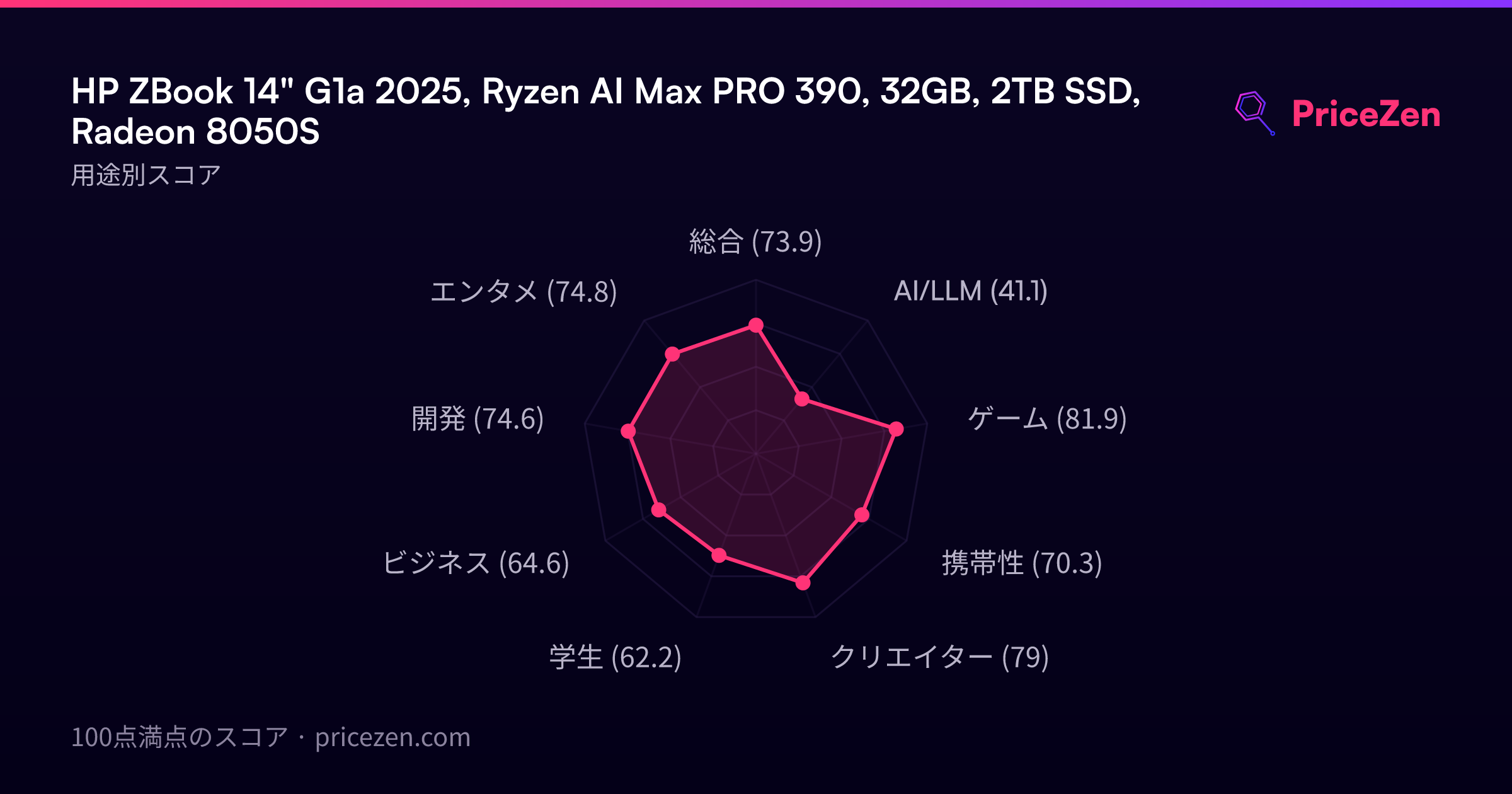
What makes this thing interesting is the tension between its marketing and its actual strengths. HP pitches it hard for AI workflows and local LLM work, but our scoring model puts its AI/LLM capability at just 41.1 out of 100, solidly middle of the pack. Meanwhile, gaming scores 81.9 and creator work hits 79.1, both well above average. So the real story here isn't the AI angle. It's that this is a genuinely powerful creative and general-purpose workstation that happens to have an AI-branded chip inside.
We collect specs, prices, ratings and owner feedback from multiple stores with our own automated system, and the picture that emerges is a machine with top-tier hardware let down slightly by a thin review base and some compatibility friction. Only 5 reviews exist so far, which gives us low confidence in the sentiment data, but the ones that are there are enthusiastic. The 90/100 sentiment score is one of the best we've seen, meaning owners who've bought it really like it. The question is whether the specific configuration at this price point matches what you actually need.
Common Questions
Q: Can this laptop actually run large language models locally?
It can run smaller models, but the 32GB LPDDR5X in this configuration and the Radeon 8050S GPU limit what you can fit and how fast inference runs. Our scoring puts AI/LLM capability at 41.1 out of 100, which is middle of the pack. Owners mention higher-memory variants performing better for this use case, so if local LLM work is your priority, look for a configuration with more unified memory or an NVIDIA GPU with dedicated VRAM.
Q: How does the OLED display hold up for professional color work?
The 14" 2880x1800 panel covers 100% DCI-P3 with a 100,000:1 contrast ratio and 120Hz refresh rate with VRR. It ranks in the 95th percentile for screen quality across all laptops we track. For video editing, photo work, and design, this is one of the best panels you can get in a 14" machine right now.
Q: Is 2.54kg too heavy for a 14" laptop?
It's on the heavier side for a 14" notebook, ranking in the 62nd percentile for compactness, which is about average. The magnesium chassis keeps it manageable, and owners describe it as surprisingly portable for the power inside. But if you're comparing it to ultrabooks under 1.5kg, you'll notice the difference in a backpack after a long commute.
Q: Is the price justified compared to a MacBook Pro?
Owners who've compared both feel the ZBook is competitively priced, especially given the 120Hz OLED touchscreen, Thunderbolt 4, HDMI 2.1, and Ethernet that you won't find on a MacBook without adapters. At USD 3,313 it's a premium purchase either way, but if you need Windows 11 Pro and that port selection, the ZBook makes a strong case for itself.
Who Should Skip This
If your primary workload is running large AI models locally or you depend on CUDA-accelerated pipelines, this isn't your machine. The Radeon 8050S simply can't match NVIDIA's ecosystem for those tasks, and the 41.1 AI/LLM score reflects that gap. Look at the ASUS ROG Zephyrus 14" or Lenovo Legion Pro 7i Gen 10 instead, where discrete NVIDIA GPUs will serve you better.
Also skip this if you're budget-conscious. The 6th-percentile affordability ranking means you're paying near the top of the market, and with only 5 reviews and a 34th-percentile reliability score, there's limited long-term owner data to validate that investment. If you just need a solid productivity laptop with a good screen, the Samsung Galaxy Book5 Pro 14" or Dell Premium 14.5" will cost less and cover everyday workloads without the workstation premium.
Verdict
If you're a video editor, 3D artist, or developer who needs a portable machine with a color-accurate display and doesn't want to sacrifice CPU power for size, the ZBook G1a is a compelling pick. The 95th-percentile OLED screen, 93rd-percentile CPU, and 94th-percentile storage make it a genuine creative powerhouse. Owners love the build quality and compact design, and the port selection means you won't be living the dongle life. For this use case, the high price buys you a machine that checks nearly every box.
But if you're buying this primarily for local AI model work because HP's marketing told you to, pump the brakes. The 41.1 AI/LLM score and owner reports of lower performance versus NVIDIA GPUs mean you'd be better served by a CUDA-equipped machine. And if budget matters, the 6th-percentile affordability ranking is a cold shower. This is a luxury workstation for people who know exactly why they need these specific specs. Buy it for the display, the CPU, and the build. Don't buy it for the AI sticker on the box.
Usage Scores
- 総合73.9
- AI/LLM41.1
- ゲーム81.9
- 携帯性70.3
- クリエイター79
- 学生62.2
- ビジネス64.6
- 開発74.6
- エンタメ74.8