Lenovo Yoga 7i 14" 83TC003XUS 2026, Core Ultra 7, 24GB, 512GB SSD, Luna Grey
The Intel Core Ultra 7 Series 3 8-core processor with a 40+ TOPS NPU powers this 14-inch 1920x1200 OLED touchscreen 2-in-1, delivering 400 nits brightness and 100% sRGB and P3 coverage for accurate visuals. Its 45Wh battery and Wi-Fi 7 support make it a portable choice, while the 360-degree hinge and backlit keyboard add flexibility for on-the-go use. Best for students and compact-laptop buyers who need a versatile touchscreen for note-taking, streaming, and everyday productivity, not for gaming.

現在、販売店の最新価格はありません
概要
The 30-Second Version
A gorgeous OLED 2-in-1 that's perfect for students and desk jockeys. Skip it if you want to game or need more than 512GB of storage.
Pros & Cons
長所
- Gorgeous OLED screen with full sRGB and P3 coverage 82nd
- 24GB RAM is generous for a thin-and-light 82nd
- Weighs just 1.40kg, easy to toss in a bag 82nd
- Wi-Fi 7 and Thunderbolt keep you future-proofed 79th
短所
- 512GB storage fills up fast
- Integrated graphics can't handle real gaming
- 45Wh battery is small for an OLED panel
- 60Hz refresh feels dated next to 120Hz rivals
オーナーの声
The Word on the Street
実証データ
Performance
The Core Ultra 7 Series 3 with 8 cores at 2.3GHz is a solid performer for productivity, landing well above average in our CPU rankings. What surprised us is how much RAM Lenovo crammed in here, 24GB of LPDDR5X is more than most thin-and-lights at this price, and it shows when you've got thirty browser tabs plus a video call going. The 512GB SSD is a bit stingy though, it sits in the bottom third for storage, so you'll be leaning on cloud storage sooner than you'd like.
Specifications
Full Specifications
Processor
| CPU | Intel Core Ultra 7 Series 3 |
| Cores | 8 |
| Frequency | 2.3 GHz |
| L3 Cache | 12 MB |
Graphics
| GPU | Intel Graphics |
| Type | Integrated |
Memory & Storage
| RAM | 24 GB |
| RAM Generation | LPDDR5X |
| Storage | 512 GB |
| Storage Type | SSD |
Display
| Size | 14" |
| Resolution | 1920x1200 (Full HD) |
| Panel | OLED |
| Refresh Rate | 60 Hz |
| Brightness | 400 nits |
| Color Gamut | 100% sRGB and P3 |
Connectivity
| USB-C Ports | 2 |
| USB Ports | 1 |
| Thunderbolt | Thunderbolt 4 |
| HDMI | HDMI 2.1 |
| Wi-Fi | Wi-Fi 7 |
Physical
| Weight | 1.4 kg / 3.1 lbs |
| Battery | 45 Wh |
| OS | Windows 11 Home |
vs Competition
Against the Apple MacBook Air M4, the Yoga wins on flexibility with its 360-degree hinge and touchscreen, but loses on battery life and raw graphics punch. The HP OmniBook X Flip 14 is the closest direct rival, another 2-in-1 with similar specs, but the Yoga's OLED screen gives it a visual edge. If you need actual GPU power, the ASUS ROG Flow Z13 or MSI Creator A13V are better picks, but they're heavier and pricier.
| Spec | Lenovo Yoga 7i 14" 83TC003XUS | Apple MacBook Pro 14.2" M4 Pro | ASUS ROG Zephyrus 14" GA403WW-G14.R95080 | HP OMEN Transcend | Samsung Galaxy Book5 Pro 14" NP944XHA-KG3US | Dell Premium 14.5" LDA14250-7667SLV-PUS |
|---|---|---|---|---|---|---|
| CPU | Intel Core Ultra 7 Series 3 | Apple M4 Pro | AMD Ryzen AI 9 HX 370 | Intel Core Ultra 9 285H | Intel Core Ultra 7 258V | Intel Core Ultra 7 255H |
| RAM (GB) | 24 | 48 | 32 | 32 | 32 | 32 |
| Storage (GB) | 512 | 4096 | 2048 | 1024 | 1024 | 1024 |
| Screen | 14" 1920x1200 | 14.2" 3024x1964 | 14" 2880x1800 | 14" 2880x1800 | 14" 2880x1800 | 14.5" 3200x2000 |
| GPU | Intel Graphics | Apple (16-Core) | NVIDIA GeForce RTX 5080 | NVIDIA GeForce RTX 5070 | Intel Arc Graphics 140V | Intel Arc Graphics |
| OS | Windows 11 Home | macOS | Windows 11 Home | Windows 11 Home | Windows 11 Pro | Windows 11 Home |
| Weight (kg) | 1.4 | 1.6 | 1.6 | 1.6 | 1.2 | 1.7 |
| Battery (Wh) | 45 | 72 | - | 71 | 63 | 62 |
| Compare | Compare | Compare | Compare | Compare |
| 製品 | CPU | GPU | RAM | ポート | 画面 | 携帯性 | ストレージ | 信頼性 | ユーザー評価 | Affordability |
|---|---|---|---|---|---|---|---|---|---|---|
| Lenovo Yoga 7i 14" 83TC003XUS | 71.4 | 54.8 | 82.1 | 64.4 | 78.9 | 81.5 | 35.6 | 82.1 | 75.9 | 23.7 |
| Apple MacBook Pro 14.2" M4 Pro Compare | 92.4 | 78.8 | 90.6 | 73.8 | 99.1 | 68.9 | 98.4 | 98.3 | 99.7 | 4.5 |
| ASUS ROG Zephyrus 14" GA403WW-G14.R95080 Compare | 91.2 | 98.3 | 90.8 | 89.4 | 96 | 73.7 | 89.7 | 60.7 | 96.6 | 6 |
| HP OMEN Transcend Compare | 90.1 | 93.5 | 89.6 | 89.4 | 96 | 72.3 | 65.1 | 33.7 | 94.2 | 8.9 |
| Samsung Galaxy Book5 Pro 14" NP944XHA-KG3US Compare | 65.7 | 69.5 | 79.4 | 83.4 | 90.3 | 89.5 | 79.2 | 82.1 | 96.6 | 21 |
| Dell Premium 14.5" LDA14250-7667SLV-PUS Compare | 87 | 69.5 | 89 | 66.7 | 96.8 | 61.2 | 65.1 | 33.7 | 96.6 | 14.5 |
価格
Value & Pricing
Pricing is all over the map right now, we're seeing USD 825 to USD 1,650 across four US listings. At the low end, this is a steal for an OLED 2-in-1 with 24GB of RAM. At the high end, you're paying MacBook Air money for a machine with half the storage and a smaller battery. Shop around and don't pay more than about USD 1,000 for this config.
詳細情報
Overview
The Lenovo Yoga 7i 83TC003XUS is a 2-in-1 that nails the basics for students and office types. The standout here is that 14-inch PureSight OLED panel, which covers 100% of both sRGB and P3, so colors pop whether you're sketching or streaming. It's a Copilot+ PC with an Intel Core Ultra 7 and 24GB of RAM, so it handles everyday multitasking without breaking a sweat. Just don't expect it to game, the integrated Intel Graphics put it near the bottom for that.
Common Questions
Q: Can this laptop play games?
Not really. The integrated Intel Graphics score in the bottom half for GPU performance, so you're fine with Minecraft or older titles at low settings, but anything modern will chug. Get a laptop with a dedicated GPU if gaming matters.
Q: How long does the battery actually last?
The 45Wh battery is on the small side, especially for an OLED screen. Expect around 6 to 8 hours of light use, less if you're streaming video or running AI features. Bring a charger if you're out all day.
Q: Is the touchscreen any good for drawing?
It's responsive and the OLED colors are accurate, but the 60Hz refresh rate means pen strokes won't feel as fluid as on a 120Hz panel. Fine for notes and casual sketching, not ideal for serious digital art.
Who Should Skip This
If you're looking for a gaming machine or need serious graphics horsepower, this isn't it. Go grab an ASUS ROG Flow Z13 or a laptop with a dedicated GPU instead. Also skip it if you store tons of files locally, 512GB will frustrate you within a year.
Verdict
For students and office workers who want a lightweight 2-in-1 with a stunning screen, the Yoga 7i is an easy recommendation, especially if you find it under USD 1,000. The OLED panel alone makes spreadsheets and Netflix look better than they have any right to. Just know that gaming is off the table and you'll want an external drive eventually.
Usage Scores
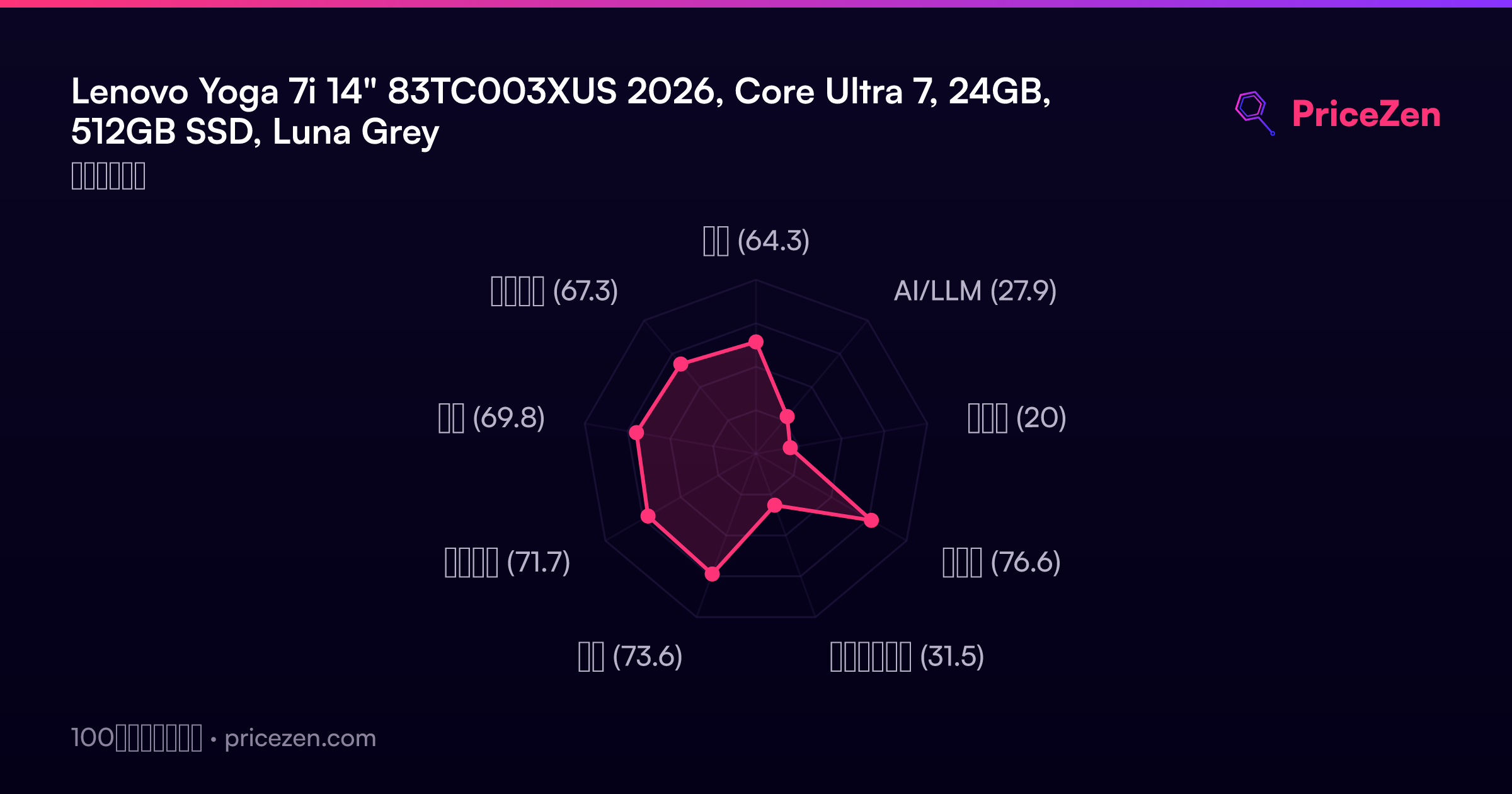
- 総合64.3
- AI/LLM27.9
- ゲーム20
- 携帯性76.6
- クリエイター31.5
- 学生73.6
- ビジネス71.7
- 開発69.8
- エンタメ67.3